mirror of
https://github.com/NginxProxyManager/nginx-proxy-manager.git
synced 2026-04-26 18:05:54 +03:00
[GH-ISSUE #722] Restrict access to Admin Panel from outside the lan #612
Labels
No labels
awaiting feedback
bug
cannot reproduce
dns provider request
duplicate
enhancement
enhancement
enhancement
good first issue
help wanted
invalid
need more info
no certbot plugin available
product-support
pull-request
question
stale
troll
upstream issue
v2
v2
v2
v3
wontfix
No milestone
No project
No assignees
1 participant

Notifications
Due date
No due date set.
Dependencies
No dependencies set.
Reference
starred/nginx-proxy-manager-NginxProxyManager#612
Loading…
Add table
Add a link
Reference in a new issue
No description provided.
Delete branch "%!s()"
Deleting a branch is permanent. Although the deleted branch may continue to exist for a short time before it actually gets removed, it CANNOT be undone in most cases. Continue?
Originally created by @rParslow on GitHub (Nov 15, 2020).
Original GitHub issue: https://github.com/NginxProxyManager/nginx-proxy-manager/issues/722
Hi
I've redirected ports 80/443 to the IP where nginx-proxy-manager is hosted
From the internet if I try to connect to my.public.ip:81 the admin panel is prompted
Same with a domain I've wildcardly redirected a domain to my IP and dummy.mydomaine.tld:81 prompt admin panel
Could it be an settings to allow only connecting to the admin panel from the lan ?
@Wadera commented on GitHub (Nov 16, 2020):
Disable port forwarding for port 81 ;)
Set new proxy, example:
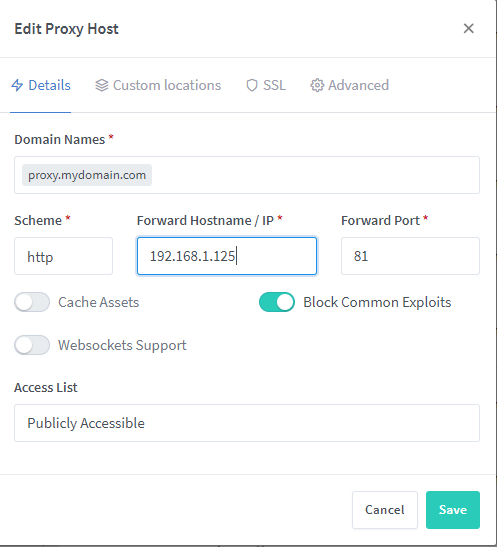
Restrict IP for your proxy server for your own and local, for example:
Where
192.168.0.1is your local network and1233.123.123.123is your own IP ;)@rParslow commented on GitHub (Nov 16, 2020):
Thanks @Wadera it works fine when I'm on my Lan
But when I'm from an external IP
As I've a wildcard domain pointing on my Ngnix Reverse proxy ponting on anysubdomain.maydomain.tld:81 or 42.42.42.42:81
prompt the login panel of the manager.
Where can I modify the host config of the pannel ?
@Wadera commented on GitHub (Nov 16, 2020):
Like I said on first post: If you using proxy over some router - block port 81 (disable forwarding).
If you don't have access to router - then block in on your Dorcker host machine over Firewall (example: iptables):
https://stackoverflow.com/questions/7423309/iptables-block-access-to-port-8000-except-from-ip-address
@Rustymage commented on GitHub (Jan 12, 2021):
Try accessing from another location, such as someone else's internet connection or over a VPN.
I think you'll find you won't be able to connect.
I believe it only happens when you're on the same LAN. There's a technical explanation that I'll find the link too. However, in the meantime, try my suggestion.