mirror of
https://github.com/NginxProxyManager/nginx-proxy-manager.git
synced 2026-04-25 17:35:52 +03:00
[GH-ISSUE #655] Certificate Failure on Configuration Check on Line 43 with a ; (semi-colon) #553
Labels
No labels
awaiting feedback
bug
cannot reproduce
dns provider request
duplicate
enhancement
enhancement
enhancement
good first issue
help wanted
invalid
need more info
no certbot plugin available
product-support
pull-request
question
stale
troll
upstream issue
v2
v2
v2
v3
wontfix
No milestone
No project
No assignees
1 participant

Notifications
Due date
No due date set.
Dependencies
No dependencies set.
Reference
starred/nginx-proxy-manager-NginxProxyManager#553
Loading…
Add table
Add a link
Reference in a new issue
No description provided.
Delete branch "%!s()"
Deleting a branch is permanent. Although the deleted branch may continue to exist for a short time before it actually gets removed, it CANNOT be undone in most cases. Continue?
Originally created by @fanuch on GitHub (Oct 15, 2020).
Original GitHub issue: https://github.com/NginxProxyManager/nginx-proxy-manager/issues/655
Checklist
[x] Have you pulled and found the error with
jc21/nginx-proxy-manager:latestdocker image?[x] Are you sure you're not using someone else's docker image?
[x]
If having problems with Lets Encrypt, have you made absolutely sure your site is accessible from outside of your network?Describe the bug
Failure to apply certificate to proxy route on certificate request
To Reproduce
Steps to reproduce the behavior:
/data/nginx/proxy_host/N+1.conftoo.i.e.
9.conf,10.conf, and11.confare all for the same host with the same error on the same line (line 43)Expected behavior
Network access is not a problem.
Let's Encrypt not a problem.
CloudFlare API access is not a problem.
Error message should better reflect the issue.
Screenshots
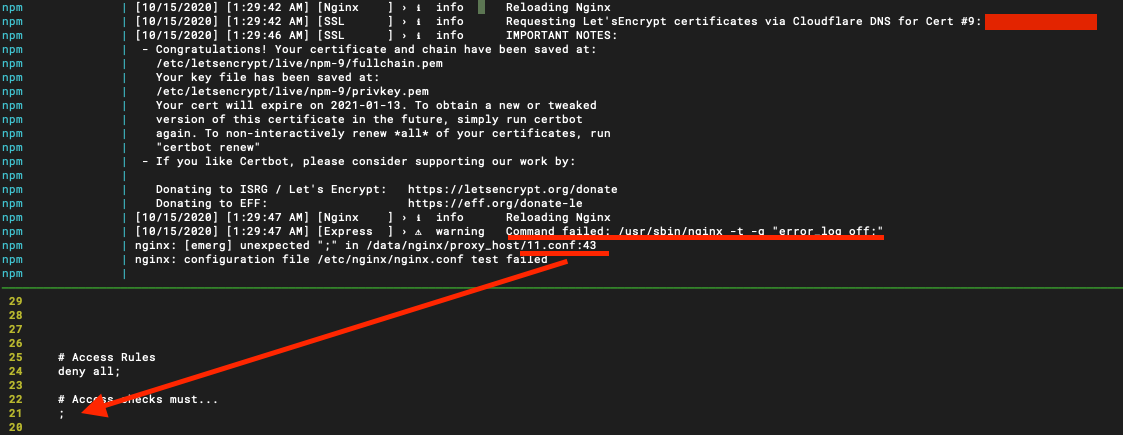
Note relative number column is on. That is line 43 despite the picture saying otherwise.
Operating System
Additional context
Edit the first: Failure to use web GUI as there is a startup failure for the same conf file issue. Just keeps looping, checking, failing, looping.
Edit the second: forcefully removing the stray semicolon allows the configuration to save the SSL options and apply the cert to proxy conf.
@jc21 commented on GitHub (Oct 16, 2020):
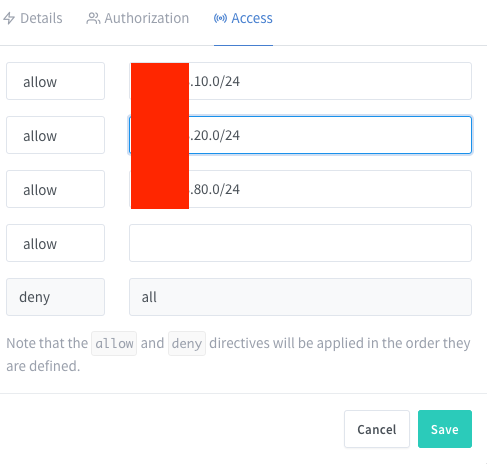
Looks like you forgot to mention that you've assigned an Access List to this failing host?
@fanuch commented on GitHub (Oct 16, 2020):
Guess so.
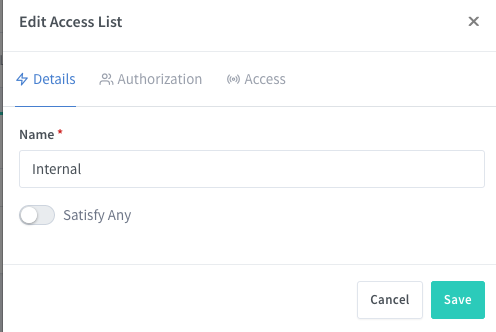
Valid internal CIDRs
@jc21 commented on GitHub (Oct 16, 2020):
Just pushed a commit to fix this. Keep an eye out for it in v2.6.1 soon
@fanuch commented on GitHub (Oct 16, 2020):
Thank you!
Not sure if this helps, but manually created a wildcard cert and have been using that after deleting the failed conf without issues on all new proxy hosts.
I'll try recreate the issue after the release 😄