mirror of
https://github.com/NginxProxyManager/nginx-proxy-manager.git
synced 2026-04-28 10:55:54 +03:00
[GH-ISSUE #629] Web-Interface also creates entry for SSL-Cert that failed to initially create using Letsencrypt #532
Labels
No labels
awaiting feedback
bug
cannot reproduce
dns provider request
duplicate
enhancement
enhancement
enhancement
good first issue
help wanted
invalid
need more info
no certbot plugin available
product-support
pull-request
question
stale
troll
upstream issue
v2
v2
v2
v3
wontfix
No milestone
No project
No assignees
1 participant

Notifications
Due date
No due date set.
Dependencies
No dependencies set.
Reference
starred/nginx-proxy-manager-NginxProxyManager#532
Loading…
Add table
Add a link
Reference in a new issue
No description provided.
Delete branch "%!s()"
Deleting a branch is permanent. Although the deleted branch may continue to exist for a short time before it actually gets removed, it CANNOT be undone in most cases. Continue?
Originally created by @typoworx-de on GitHub (Oct 5, 2020).
Original GitHub issue: https://github.com/NginxProxyManager/nginx-proxy-manager/issues/629
Checklist
jc21/nginx-proxy-manager:latestdocker image?Yes
Yes
Yes
Describe the bug
Tried to roll-out some SSL>Letsencrypt certs and got "Internal error" trying to deploy them using Letsencrypt and Cloudflare API (see #628).
Anyway there will be created an Cert-Entry in SSL Certificates list for an invalid cert. This is very confusing and does not make sense!
v2.5.0
To Reproduce
Steps to reproduce the behavior:
see #628
Expected behavior
Either successfully fetch a cert and create the entry or throw an error and don't create a cert-entry in the SSL Certificates list!
Screenshots
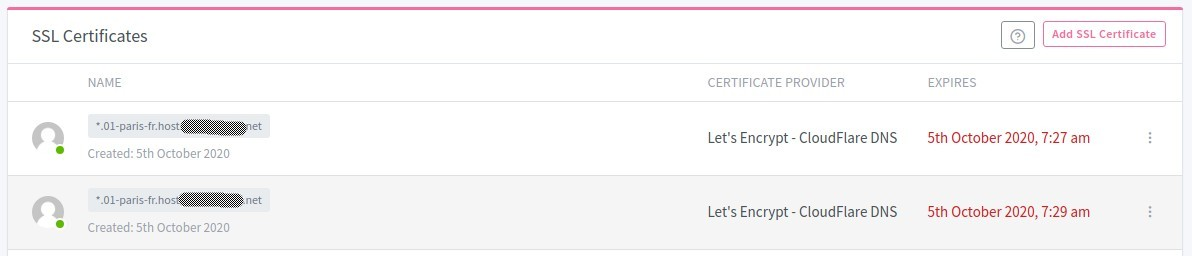
If applicable, add screenshots to help explain your problem.
Operating System
Docker + Ubuntu 20
Additional context