[GH-ISSUE #628] Letsencrypt Cert can't create Wildcard-Cert using Cloudflare DNS #530

Closed
opened 2026-02-26 06:33:16 +03:00 by kerem · 7 comments
Owner

Originally created by @typoworx-de on GitHub (Oct 5, 2020).
Original GitHub issue: https://github.com/NginxProxyManager/nginx-proxy-manager/issues/628

Checklist

  • Have you pulled and found the error with jc21/nginx-proxy-manager:latest docker image?
    Yes
  • Are you sure you're not using someone else's docker image?
    Yes
  • If having problems with Lets Encrypt, have you made absolutely sure your site is accessible from outside of your network?
    Yes

Describe the bug

  • A clear and concise description of what the bug is.
    Tried to create wildcard-domain certificate using Letsencrypt + Cloudflare. This worked great for "regular" (non-wildcard) domains, but fails for something like "*.host.my-hosting-service.net".

I only get js-alert saying "Internal Error". Please also note my other ticket #627 that more verbose error-dialogs (modal dialogs would be great) will be a great improvement to figure out what the reason is for some issues.

  • What version of Nginx Proxy Manager is reported on the login page?
    v2.5.0

To Reproduce
Steps to reproduce the behavior:
Go to SSL and try to create a Letsencrypt + Cloudflare verification cert with wildcard in it. Don't forget to enter Cloudflare DNS API Token. My token is approved to work with regular domains.

Expected behavior
Rolling out the requested cert or telling me a more verbose error-message what's wrong behind.

Screenshots
If applicable, add screenshots to help explain your problem.
image

Operating System
Docker running on Ubuntu 20

Additional context

Originally created by @typoworx-de on GitHub (Oct 5, 2020). Original GitHub issue: https://github.com/NginxProxyManager/nginx-proxy-manager/issues/628 **Checklist** - Have you pulled and found the error with `jc21/nginx-proxy-manager:latest` docker image? Yes - Are you sure you're not using someone else's docker image? Yes - If having problems with Lets Encrypt, have you made absolutely sure your site is accessible from outside of your network? Yes **Describe the bug** - A clear and concise description of what the bug is. Tried to create wildcard-domain certificate using Letsencrypt + Cloudflare. This worked great for "regular" (non-wildcard) domains, but fails for something like "*.host.my-hosting-service.net". I only get js-alert saying "Internal Error". Please also note my other ticket #627 that more verbose error-dialogs (modal dialogs would be great) will be a great improvement to figure out what the reason is for some issues. - What version of Nginx Proxy Manager is reported on the login page? v2.5.0 **To Reproduce** Steps to reproduce the behavior: Go to SSL and try to create a Letsencrypt + Cloudflare verification cert with wildcard in it. Don't forget to enter Cloudflare DNS API Token. My token is approved to work with regular domains. **Expected behavior** Rolling out the requested cert or telling me a more verbose error-message what's wrong behind. **Screenshots** If applicable, add screenshots to help explain your problem. ![image](https://user-images.githubusercontent.com/1282298/95052344-0d98cc00-06ef-11eb-82f4-2a2e721785c0.png) **Operating System** Docker running on Ubuntu 20 **Additional context**
kerem 2026-02-26 06:33:16 +03:00
  • closed this issue
  • added the
    bug
    label
Author
Owner

@dugaa95 commented on GitHub (Oct 8, 2020):

I have same Problem

<!-- gh-comment-id:705662953 --> @dugaa95 commented on GitHub (Oct 8, 2020): I have same Problem
Author
Owner

@chaptergy commented on GitHub (Nov 6, 2020):

This has most likely changed since #635, does this issue still persist or can it be closed?

<!-- gh-comment-id:723035121 --> @chaptergy commented on GitHub (Nov 6, 2020): This has most likely changed since #635, does this issue still persist or can it be closed?
Author
Owner

@chris1668 commented on GitHub (Dec 19, 2020):

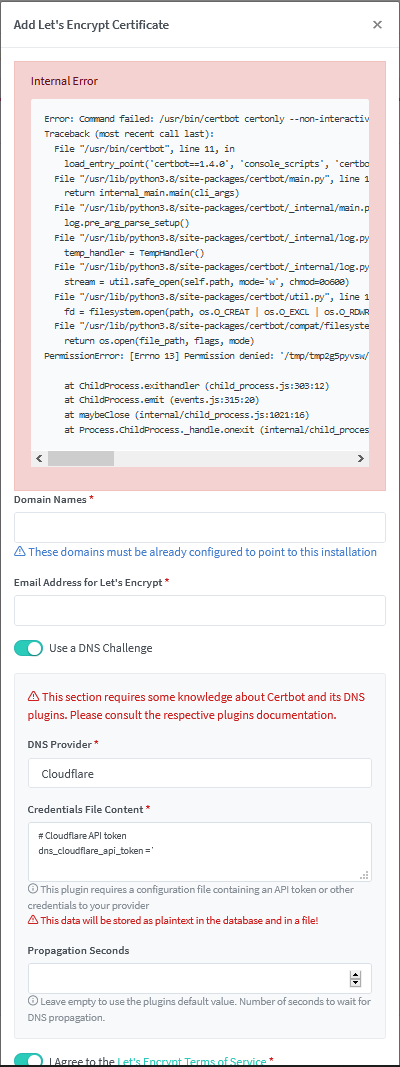
An internal error still persists, I just tried to use Cloudflare DNS Challenge and it seems the Docker Image from JLesage does not have the Cloudflare-DNS module installed, so after running pip3 install certbot-dns-cloudflare==1.8.0
matching the version from the internal error message has now lead me to this Command Failed Error with no obvious reason standing out to me.
`Error: Command failed: /usr/bin/certbot certonly --non-interactive --cert-name "npm-15" --agree-tos --email "" --domains "*.example.com" --authenticator dns-cloudflare --dns-cloudflare-credentials "/etc/letsencrypt/credentials/credentials-15"
Traceback (most recent call last):
File "/usr/bin/certbot", line 11, in
load_entry_point('certbot==1.4.0', 'console_scripts', 'certbot')()
File "/usr/lib/python3.8/site-packages/certbot/main.py", line 15, in main
return internal_main.main(cli_args)
File "/usr/lib/python3.8/site-packages/certbot/_internal/main.py", line 1315, in main
log.pre_arg_parse_setup()
File "/usr/lib/python3.8/site-packages/certbot/_internal/log.py", line 55, in pre_arg_parse_setup
temp_handler = TempHandler()
File "/usr/lib/python3.8/site-packages/certbot/_internal/log.py", line 243, in init
stream = util.safe_open(self.path, mode='w', chmod=0o600)
File "/usr/lib/python3.8/site-packages/certbot/util.py", line 197, in safe_open
fd = filesystem.open(path, os.O_CREAT | os.O_EXCL | os.O_RDWR, *open_args)
File "/usr/lib/python3.8/site-packages/certbot/compat/filesystem.py", line 149, in open
return os.open(file_path, flags, mode)
PermissionError: [Errno 13] Permission denied: '/tmp/tmpyp2bcu3c/log'

at ChildProcess.exithandler (child_process.js:303:12)
at ChildProcess.emit (events.js:315:20)
at maybeClose (internal/child_process.js:1021:16)
at Process.ChildProcess._handle.onexit (internal/child_process.js:286:5)`
dns_challenege_error

<!-- gh-comment-id:748428974 --> @chris1668 commented on GitHub (Dec 19, 2020): An internal error still persists, I just tried to use Cloudflare DNS Challenge and it seems the Docker Image from JLesage does not have the Cloudflare-DNS module installed, so after running pip3 install certbot-dns-cloudflare==1.8.0 matching the version from the internal error message has now lead me to this Command Failed Error with no obvious reason standing out to me. `Error: Command failed: /usr/bin/certbot certonly --non-interactive --cert-name "npm-15" --agree-tos --email "" --domains "*.example.com" --authenticator dns-cloudflare --dns-cloudflare-credentials "/etc/letsencrypt/credentials/credentials-15" Traceback (most recent call last): File "/usr/bin/certbot", line 11, in load_entry_point('certbot==1.4.0', 'console_scripts', 'certbot')() File "/usr/lib/python3.8/site-packages/certbot/main.py", line 15, in main return internal_main.main(cli_args) File "/usr/lib/python3.8/site-packages/certbot/_internal/main.py", line 1315, in main log.pre_arg_parse_setup() File "/usr/lib/python3.8/site-packages/certbot/_internal/log.py", line 55, in pre_arg_parse_setup temp_handler = TempHandler() File "/usr/lib/python3.8/site-packages/certbot/_internal/log.py", line 243, in init stream = util.safe_open(self.path, mode='w', chmod=0o600) File "/usr/lib/python3.8/site-packages/certbot/util.py", line 197, in safe_open fd = filesystem.open(path, os.O_CREAT | os.O_EXCL | os.O_RDWR, *open_args) File "/usr/lib/python3.8/site-packages/certbot/compat/filesystem.py", line 149, in open return os.open(file_path, flags, mode) PermissionError: [Errno 13] Permission denied: '/tmp/tmpyp2bcu3c/log' at ChildProcess.exithandler (child_process.js:303:12) at ChildProcess.emit (events.js:315:20) at maybeClose (internal/child_process.js:1021:16) at Process.ChildProcess._handle.onexit (internal/child_process.js:286:5)` ![dns_challenege_error](https://user-images.githubusercontent.com/3466448/102682885-b2209b00-4181-11eb-8fd4-abbfc8dfa8a0.png)
Author
Owner

@chaptergy commented on GitHub (Dec 19, 2020):

How did you install the proxy manager? It seems certbot wants to write to a log file inside the /tmp directory, been t has no permission to do so.

<!-- gh-comment-id:748450466 --> @chaptergy commented on GitHub (Dec 19, 2020): How did you install the proxy manager? It seems certbot wants to write to a log file inside the `/tmp` directory, been t has no permission to do so.
Author
Owner

@chris1668 commented on GitHub (Dec 19, 2020):

Its a Docker Container in Unraid with all the default file permissions and UID/GID, I can see the File permissions for the tmp directory is d--------- 1 app users 0 Dec 19 11:38 tmpamks2ml4 not sure why that temp folder it generates for the log has no write permissions as other app directories in /tmp do have write ie.d-w------- 1 app users 0 Dec 19 11:38 pip-req-tracker-0obopsdc

<!-- gh-comment-id:748517110 --> @chris1668 commented on GitHub (Dec 19, 2020): Its a Docker Container in Unraid with all the default file permissions and UID/GID, I can see the File permissions for the tmp directory is `d--------- 1 app users 0 Dec 19 11:38 tmpamks2ml4` not sure why that temp folder it generates for the log has no write permissions as other app directories in /tmp do have write ie.`d-w------- 1 app users 0 Dec 19 11:38 pip-req-tracker-0obopsdc`
Author
Owner

@chaptergy commented on GitHub (Dec 20, 2020):

Unfortunately I am not able to reproduce your issue, not with the official docker image nor with the JLesage docker image. Could you provide the docker-compose file you use?

<!-- gh-comment-id:748672537 --> @chaptergy commented on GitHub (Dec 20, 2020): Unfortunately I am not able to reproduce your issue, not with the official docker image nor with the JLesage docker image. Could you provide the docker-compose file you use?
Author
Owner

@chaptergy commented on GitHub (May 10, 2021):

I will now close this issue as there have not been any updates.

<!-- gh-comment-id:836978504 --> @chaptergy commented on GitHub (May 10, 2021): I will now close this issue as there have not been any updates.
Sign in to join this conversation.
No milestone
No project
No assignees
1 participant
Notifications
Due date
The due date is invalid or out of range. Please use the format "yyyy-mm-dd".

No due date set.

Dependencies

No dependencies set.

Reference
starred/nginx-proxy-manager-NginxProxyManager#530
No description provided.