mirror of
https://github.com/NginxProxyManager/nginx-proxy-manager.git
synced 2026-04-25 17:35:52 +03:00
[GH-ISSUE #596] Unable to set Wildcard Subdomain #500
Labels
No labels
awaiting feedback
bug
cannot reproduce
dns provider request
duplicate
enhancement
enhancement
enhancement
good first issue
help wanted
invalid
need more info
no certbot plugin available
product-support
pull-request
question
stale
troll
upstream issue
v2
v2
v2
v3
wontfix
No milestone
No project
No assignees
1 participant

Notifications
Due date
No due date set.
Dependencies
No dependencies set.
Reference
starred/nginx-proxy-manager-NginxProxyManager#500
Loading…
Add table
Add a link
Reference in a new issue
No description provided.
Delete branch "%!s()"
Deleting a branch is permanent. Although the deleted branch may continue to exist for a short time before it actually gets removed, it CANNOT be undone in most cases. Continue?
Originally created by @socheatsok78 on GitHub (Sep 5, 2020).
Original GitHub issue: https://github.com/NginxProxyManager/nginx-proxy-manager/issues/596
Describe the bug
To Reproduce
Steps to reproduce the behavior:
*.example.comExpected behavior
Unable to add
*.example.comScreenshots
This is the example screenshot on your website:
@leimantas commented on GitHub (Sep 9, 2020):
It works when I create cert from SSL CERTIFICATES menu. I can create wildcard domain.
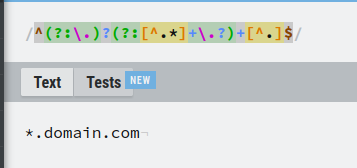
Is it because of this filter?
https://github.com/jc21/nginx-proxy-manager/blob/master/frontend/js/app/nginx/certificates/form.js#L200
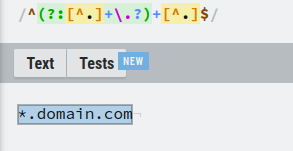
https://github.com/jc21/nginx-proxy-manager/blob/master/frontend/js/app/nginx/proxy/form.js#L227
@socheatsok78 commented on GitHub (Sep 9, 2020):
I think that might be the issue, have been looking at that too.
@leimantas commented on GitHub (Oct 23, 2020):
Any news? Now I manually edit generated nginx file.
@launtony commented on GitHub (Oct 23, 2020):
@leimantas How do you do that manually? What is the modified file?
@leimantas commented on GitHub (Oct 23, 2020):
Make folder for data files, mount it and then after creating PROXY sub.domain.com - go to this folder/nginx/proxy_host ; And there you will find generated conf file. Just edit this line: server_name sub.domain.com; into this: server_name *.domain.com;
It works with cloudflare.
And also! You have to create wildcard subdomain cert first.
@socheatsok78 commented on GitHub (Oct 24, 2020):
The latest update seem to fixed the issues with wildcard domain proxy.
But I haven't had time to try it yet.
@launtony commented on GitHub (Oct 24, 2020):
@socheatsok78 I'm running the latest version and the wildcard is not supported :/ You don't have the "Add" button :/
@leimantas commented on GitHub (Oct 24, 2020):
Ye, not working.
Code =>
Code
Test =>
Test
@felixgeissler commented on GitHub (Nov 3, 2020):
I ran into that same bug. Will have to live with a custom config for now...
Edit:
I just executed the POST /api/nginx/proxy-hosts manually and it worked.
Sample request in CURL (not tested, since I used Insomnia):
Make sure to replace the YOUR-NGINX-PROXMANAGER-INSTANCE, YOUR_JWT_HERE & *.YOURDOMAIN.TLD
@benricok commented on GitHub (Feb 9, 2021):
Update? Otherwise manually editing the file will have to do.
@chaptergy commented on GitHub (May 9, 2021):
It is possible to add a wildcard certificate through the dedicated SSL Certificates tab. You'll need to do the dns challenge then, so your dns provider needs to be supported. It is not possible to add a wildcard certificate from within the create host popup, so you will have to create the certificate beforehand.
@dawnerd commented on GitHub (May 13, 2021):
Latest version still has this problem. Was able to add on an older instance but adding a wildcard subdomain (not a cert) still fails.
@chaptergy commented on GitHub (May 13, 2021):
Ah, sorry, Ivwas ging through these issues quickly, I Seen to have misubderstood. Sorry.