mirror of
https://github.com/NginxProxyManager/nginx-proxy-manager.git
synced 2026-04-25 17:35:52 +03:00
[GH-ISSUE #40] Support for subfolders in proxy hosts #39
Labels
No labels
awaiting feedback
bug
cannot reproduce
dns provider request
duplicate
enhancement
enhancement
enhancement
good first issue
help wanted
invalid
need more info
no certbot plugin available
product-support
pull-request
question
stale
troll
upstream issue
v2
v2
v2
v3
wontfix
No milestone
No project
No assignees
1 participant

Notifications
Due date
No due date set.
Dependencies
No dependencies set.
Reference
starred/nginx-proxy-manager-NginxProxyManager#39
Loading…
Add table
Add a link
Reference in a new issue
No description provided.
Delete branch "%!s()"
Deleting a branch is permanent. Although the deleted branch may continue to exist for a short time before it actually gets removed, it CANNOT be undone in most cases. Continue?
Originally created by @jlesage on GitHub (Jan 3, 2019).
Original GitHub issue: https://github.com/NginxProxyManager/nginx-proxy-manager/issues/40
Currently, a proxy host is hard-coded to the
/(root) location.In addition to this, it would be very useful to support multiple subfolders that can be mapped to different upstream servers. For example:
/app1-->192.168.1.1/app2-->192.168.1.2@jlesage commented on GitHub (Jan 3, 2019):
This would allow using applications like Organizr (https://github.com/causefx/Organizr).
@jc21 commented on GitHub (Jan 3, 2019):
So to be clear, you're wanting a proxy host for
http://example.something.com/to reverse proxy to an upstreamhttp://192.168.0.1:8080/subfolder/?This might have to be a new type of advanced proxy host as far as the UI is concerned.
@jlesage commented on GitHub (Jan 3, 2019):
In fact it's more something like this:
http://example.something.com/app1is forwarded tohttp://192.168.0.1:8080http://example.something.com/app2is forwarded tohttp://192.168.0.2:8080@Grasfer commented on GitHub (Jan 3, 2019):
In my nginx default server config i have this:
it makes to https://www.mydomain.com/nzbhydra works, for some things maybe you dont want a subdomain so would be nice to be able to add subfolder proxies.
@cjackson234 commented on GitHub (Jan 11, 2019):
It would also be nice to be able to group them under one domain.
so:
@didusee commented on GitHub (Jan 14, 2019):
I’d like to second that request, in exactly the same way, that is described iby cjackson234: Subfolders with same IP.
nameoftheserver.com --> 1.1.1.1:80 --> Whatever Content
nameoftheserver.com/Docker1:1111 --> 1.1.1.1:1111 --> AppOrDocker1
nameoftheserver.com/Docker2:2222 --> 1.1.1.1:2222 --> AppOrDocker2
…
In addition to that all of the subfolders would work with the SSL certificate of the main address.
@DracoMilesX commented on GitHub (Jan 14, 2019):
Would love to see this too. For me it would be example.domain.ltd to ip:port/site
@ytwytw commented on GitHub (Feb 10, 2019):
Is it possible to be done with "Custom Nginx Configuration" in Advance?
@Karatekid2407 commented on GitHub (Apr 8, 2019):
Is there any news?
I would also like to do it this way.
@qy2009 commented on GitHub (Jul 30, 2019):
any update on this issue? hope the enhancement will be implemented soon :)
@KrunchMuffin commented on GitHub (Jan 7, 2020):
Just found out about this project in unraid apps. But I need this option to use it. Any word?
@jc21 commented on GitHub (Jan 7, 2020):
Not in version 2. This feature request will be considered in v3, but I can't make any promises yet.
@circa1665 commented on GitHub (Mar 11, 2020):
Any news on this?
@jameski83 commented on GitHub (Mar 18, 2020):
also interested in this to use with https://github.com/causefx/Organizr. This GUI is fantastic. Keep up the good work!
@phobiac commented on GitHub (Jul 13, 2020):
I was butting up against this issue when trying to use this add on with Ombi and found this issue as well as this issue at the Ombi repo that allowed me to get this working. I have not set up a similar reverse proxy for Radarr/Sonarr/Organizr/etc. however I assume the solution for those would work similarly.
What worked for me was to:
Define a custom location, filling in the required values (that I suspect are being overwritten in the next step?)
Set a custom nginx configuration for by clicking the settings gear icon and putting in:
Then, in ombi I had to set the base url to "/ombi". I have checked and sonarr/radarr have a similar setting, so getting things working in those should follow a similar process.
Both of those threads go into detail about varying nginx configurations. I stopped playing with things once they were working, so it's possible some of the other suggested settings would work for you in your specific application.
@stebla27 commented on GitHub (Nov 8, 2020):
I also need this feature! Any updates about this?
@CorneliousJD commented on GitHub (Dec 7, 2020):
Also looking for this - as the "Custom locations" does not work how one might expect it to.
Specifically I need this for SSO Plex integration in Organizr as well (as others have noted)
See here: https://docs.organizr.app/books/setup-features/page/sso/#plex
It requires a domain.com/plex and NOT a plex.domain.com so mydomain.com points to 1.1.1.1:8123 and plex.mydomain.com points to 1.1.1.1:32400 but I need mydomain.com to point to 1.1.1.1:8123 while mydomain.com/plex goes to 1.1.1.1:32400 (custom location)
Hoipng for some good news on this soon as swapping from a config-file based reverse proxy to NPM has broken this SSO feature for me.
Thanks.
@bb12489 commented on GitHub (Dec 18, 2020):
I'm also requesting this feature be added. I've been using the Swag container on Unraid, and this has been working just fine there. I'm kinda surprised to see that this isn't implemented in NPM
@CorneliousJD commented on GitHub (Dec 22, 2020):
So I've resolved my personal issue with this.
I needed domain.com to host Organizr, and domain.com/plex to point to Plex, per my last comment - it has to be a /location and not plex.domain.com
I did this not by adding /plex location but by adding a /web location, because that's what is appened to the end of the Plex URL so this is the ONLY thing that seemed to work for me.
Custom Location of /web with this setup.

I now have Organizr setup with Plex OAuth, SSO across Plex, Ombi, Tautulli, and "watch on plex" buttons working, all via NPM :)
hope this comment helps someone else in the future!
@SF73 commented on GitHub (Jan 12, 2021):
Any news on this feature?
I have several docker container running and I would like to use subfolders instead of subdomain to access them.
@ftruzzi commented on GitHub (Jan 12, 2021):
I was surprised this isn't supported -- what is the
Define locationfeature meant for, then?@SF73 I used https://github.com/linuxserver/docker-swag/, which comes with a few presets you can easily edit (but no UI)
@C-Fu commented on GitHub (Jan 13, 2021):
@ftruzzi @SF73 it's not supported? I was trying to figure out what I did wrong with Define location, since I thought it's for mapping subfolders to a service
@ricardopaiva commented on GitHub (Mar 18, 2021):
Someone found a workaround for this? Thanks
@redtripleAAA commented on GitHub (Mar 21, 2021):
The only workaround for now is using subdomains instead of subfolders
For example:
It's working for me fine, but I would love to see a support for the feature to use subfolders instead.
@ricardopaiva commented on GitHub (Mar 21, 2021):
Thanks @ansred . I’m using subdomains but that means having to create a lot of subdomains on my dns provider.
But for now that’s what I’m going to do.
{return 301 $scheme://$http_host/aboutpage;}What is this for? I haven’t configured any location and it seems to be working properly.
@redtripleAAA commented on GitHub (Mar 21, 2021):
@ricardopaiva on the DNS provider level, for example with Cloudflare, you can create one A or CNAME record using *.domain.com to point to your nginx server IP
And then all the subdmains can be handled on the nginx server as hosts only, no need for creating dozes of subdomains twice.
Only once as wildcard on the DNS provider.
Regarding the location features, it's designed to redirect to specific page. like the example above.
You can test it out on any host you have and use the same location script I used above, just change the aboutpage part to whatever the sub-page you wish to redirect.
@ricardopaiva commented on GitHub (Mar 21, 2021):
That's awesome! Didn't know about that. I'll give it a try. I really appreciated your feedback.
@chaptergy commented on GitHub (May 10, 2021):
So the custom locations do not work for you? Adding a custom location to a host should resolve to
within the nginx config.
@TWART016 commented on GitHub (May 12, 2021):
You mean under Advanced?I tried this
with htttp://mydomain.com I can open another nginx server (IP and Port defined in Details page) but with htttp://mydomain.com/test I get 404 Not Found
This should open the webpage (jDownloader2) from http://192.168.178.15:5801
With htttp://mydomain.com/test2 I get 502 Bad Gateway - openresty
http://192.168.178.15:8082 ist the default Website of NPM (Congratulations! ...)
@chaptergy commented on GitHub (May 12, 2021):
It seems that I do not really understand your issue. I meant using the "custom locations" as in this comment. Those should generate an nginx config exactly as you need.
Do you have an nginx config which works for you, which you want to replicate in NPM?
@TWART016 commented on GitHub (May 12, 2021):
I also tried it with custom locations
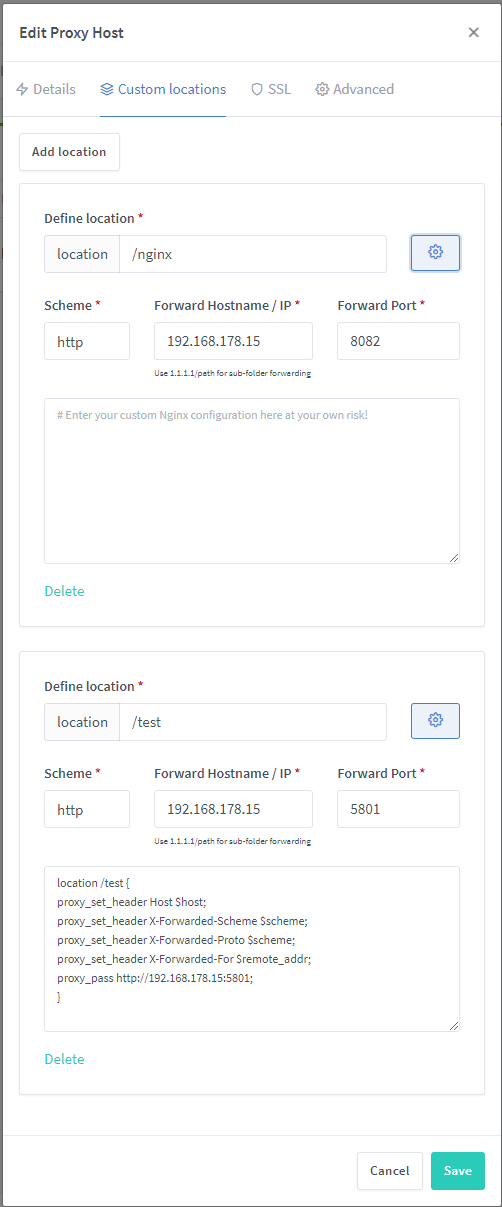
I do not have an existing nginx configuration. I just startet with reverse proxy.
@NeonGOD78 commented on GitHub (May 28, 2021):
this config posted in advanced on the main domain will make plex work in a subfolder :
You will need to edit the line: proxy_pass http://192.168.1.9:32400/; to match your local ip
@tablatronix commented on GitHub (Sep 26, 2021):
I cannot figure this out at all, I am trying to do proxy subpath to port.
I will try advanced in as bit but you have to have an actual proxy record to do that, as they are required fields and I do not really understand how to add custom loc or advanced without a dummy proxy
@casperse commented on GitHub (Oct 20, 2021):
Any news on this?
I think I have the same problem with the Kuma uptime status page:
https://IP:PORT/status
@robinduerhager commented on GitHub (Mar 22, 2022):
So i just discovered that when using this configuration:
I can route to my pihole on the subpath
/admin, by usingpihole.cluster.lan/quack, but when using thecustom locations configuration down below, which should theoretically route me to the/adminsubpath by usingpihole.cluster.lan, it won't work.A custom configuration in the
AdvancedTab helped me out by providing the following configuration:@hugalafutro commented on GitHub (Apr 9, 2022):
I'm trying to achieve exactly this (as opposed to pretty much everybody else it would seem), any pointers how to go about it please? I have a guacamole server that comes up as 404 on hostname and serves the actual content on hostname/guacamole subfolder and for the life of me I can't figure out how to add a proxy to host like this. Thanks!
@oywino commented on GitHub (Nov 28, 2022):
So, just to be clear; Does your answer imply that achieving this is currently not possible with NPM v2.9.19 ?
@IceflowRE commented on GitHub (Feb 1, 2023):
Just want to throw in, that this would also mean to change the access for each subfolder?
@HippyCraig commented on GitHub (Apr 11, 2023):
So I was sort of able to get this to work using the rewrite under the cog for that I was watching the config files that NPM writes out and it creates a server block for this so you just need to add what you want to it, see below:
I got this working with a simple hello world container and it runs fine, but I wanted to have one of the sub directories go to a portainer portal and one going to NPM admin tool, wanted to create an internal website that would host all my configurations inside the network, this wouldnt be exposed based on access controls.
in my example it would be internal.somename.com I ws trying to go for a /npm and /portainer but I get bad gateway errors in the log, but if I find a path that points to the icon for npm that load if I directly add that to my path like this
http://internal.somename.com/proxymanager/images/favicons/favicon-16x16.png
@quux-aivar commented on GitHub (Jul 14, 2023):
Problem
This thread is kinda confusing.
Lets define the goal correctly:
On Details we have
For Custom Locations we want to achieve
If to add into Custom Location for
mydomain.com/dir-first -> http://10.20.30.50:8081this does not work.
How to configure?
What is the proper way for configuration that we could achieve:
including that
mydomain.com/dir-first/somethingelse goeshttp://10.20.30.50:8081/somethingor
mydomain.com/dir-first/something?queryvar=abcelse goeshttp://10.20.30.50:8081?queryvar=abc@quux-aivar commented on GitHub (Jul 14, 2023):
Testing
Testing shows that NXPM generates these lines automatically for custom location in
location /dir-first {:@tmzg0000 commented on GitHub (Jul 15, 2023):
I'm facing a similar issue and I'm looking for a simple setup to handle custom path proxying instead of subdomain proxying.
@quux-aivar commented on GitHub (Jul 15, 2023):
It appears that using subfolders for proxing is more difficult. The fundamental issue is that most apps do not support subdirectories on their own. For example, Nginx Proxy Manager is designed in such a way that it cannot be operated in a subfolder. The only solution is to utilise complex redirecting, but dealing with redirects for POST is pretty difficult. I almost got Nginx Proxy Manager to work in subfolder, but it still fails partially, as it utilises some form of path generation.
If you design your own programmes to adequately support it, you can use subfolders proxing. As containerisation has become a standard, developers who ship their apps as container images must also enable subfolder proxing.
@RexYuan commented on GitHub (Sep 6, 2023):
Any update on this?
I would love to have
@quux-aivar commented on GitHub (Sep 6, 2023):
@RexYuan, I wanted the same.
Actually it’s sometimes too complicated or even impossible to achieve. The easiest option is:
This kind of configuration works flawlessly. On other cases you have to create complicated custom rewriting rules. POST request are the most complicated to handle.
@MickMorley commented on GitHub (Jan 20, 2024):
I have a working solution. @HippyCraig figured it out.
Using a test:
Under Custom Locations
You will have
Click the gear and add:
Under Advanced add
What I have is, syncthing on my NAS is located at
st.mydomain.comand my PCs on my network are nested under the Subfolder proxy conf atst.mydomain.com/one,st.mydomain.com/twoetc.@HippyCraig commented on GitHub (Jan 20, 2024):
@MickMorley Cool when I get back from vacation I will give it a try, thanks for the help!!
@HippyCraig commented on GitHub (Jan 27, 2024):
@MickMorley I gave that a try and its not working for me, I even took away the proxy_hide_header Authorization; just to see if that was related and still nothing. I dont know if this just a limitation of how portainer works and it expects a specific sub directory off the root, other simple apps work fine. I even tried using the port 9000 in the url as thats what portainer expects still nothing. Im kinda stumped and may have to look at Trafik as an alternative.
Also the portal shows offline for that DNS entry and that extra code is removed its back online. Dont if that helps at all
@MickMorley commented on GitHub (Jan 28, 2024):
@HippyCraig, if you give me a quick idea on what your entry looks like I can give it a try. I have portainer on one or 2 PCs and can try to replicate your setup.
@HippyCraig commented on GitHub (Jan 28, 2024):
I have a VM running Docker, that hosts NPM container and Portainer all on the one Virtual Server running in Proxmox.
Inside NPM

When this setup and I go back to the home of NPM I see this
@github-actions[bot] commented on GitHub (Sep 2, 2024):
Issue is now considered stale. If you want to keep it open, please comment 👍
@github-actions[bot] commented on GitHub (Sep 22, 2025):
Issue was closed due to inactivity.
@hagih commented on GitHub (Nov 18, 2025):
This would be really nice to have.......