mirror of
https://github.com/NginxProxyManager/nginx-proxy-manager.git
synced 2026-04-25 17:35:52 +03:00
[GH-ISSUE #453] how to do base URL's #383
Labels
No labels
awaiting feedback
bug
cannot reproduce
dns provider request
duplicate
enhancement
enhancement
enhancement
good first issue
help wanted
invalid
need more info
no certbot plugin available
product-support
pull-request
question
stale
troll
upstream issue
v2
v2
v2
v3
wontfix
No milestone
No project
No assignees
1 participant

Notifications
Due date
No due date set.
Dependencies
No dependencies set.
Reference
starred/nginx-proxy-manager-NginxProxyManager#383
Loading…
Add table
Add a link
Reference in a new issue
No description provided.
Delete branch "%!s()"
Deleting a branch is permanent. Although the deleted branch may continue to exist for a short time before it actually gets removed, it CANNOT be undone in most cases. Continue?
Originally created by @docfactory37 on GitHub (Jun 8, 2020).
Original GitHub issue: https://github.com/NginxProxyManager/nginx-proxy-manager/issues/453
Hi All,
First love Nginx proxy manager.
i just want to ask how to do base URL's
so if i have my gose to one site and if i do /media forward to my media server or if i have /cloud forwards to mt nextcloud server is this possable or not?
Regards
@collunz commented on GitHub (Jun 10, 2020):
I believe this should be possible, yes.
In "Edit Proxy Host" under "Custom locations" add a location, and choose where it should be forwarded to.
Do this for both /paths and you should be set.
Hope this helps.
@docfactory37 commented on GitHub (Jun 10, 2020):
i have done this as below
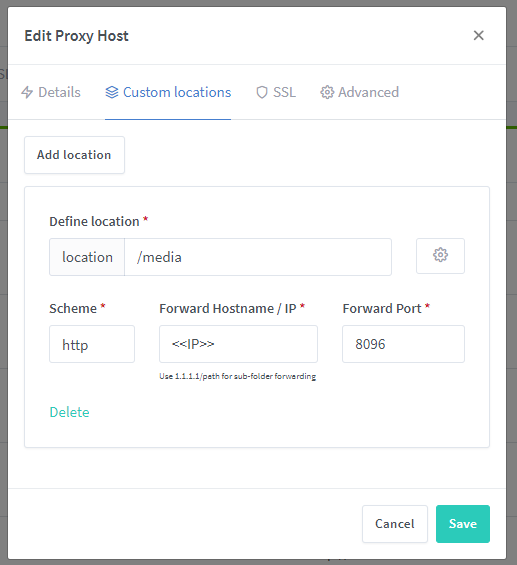
and i get this error
when i go to example.com.au/media
@haisongliang commented on GitHub (Jun 10, 2020):
It seems that domain/path is forward to 1.1.1.1/path, not 1.1.1.1
@docfactory37 commented on GitHub (Jun 12, 2020):
So it looks like it's not possible at this stage, would be great if it was, hope this will be fix / implemented.
@ggl-wolfy commented on GitHub (Jun 14, 2020):
This seems to work for me: instead of
your.ip.addressin the forward hostname field, putyour.ip.address/instead (with the trailing slash).Also enter
set $port 8096;(with your own port number) in the custom nginx configuration (click the gear icon).@docfactory37 commented on GitHub (Jun 14, 2020):
Thank you for your help i will try this, and let you know how I go
@docfactory37 commented on GitHub (Jun 22, 2020):
still dose not work 100% will there be a proper solution develop and implamented in future?
@chaptergy commented on GitHub (May 12, 2021):
This is a general thing with nginx, not with NPM (see e.g. this Stackoverflow. Generally you could replicate most nginx configs using the advanced fields, so there is nothing inherently wrong in NPM.
@luixal commented on GitHub (Jun 16, 2022):
Hi,
Just got here looking for this exact feature. Doing what @ggl-wolfy suggests hasn't worked for me.
It would be nice to have this kind of configuration as it ables you to use dynamic DNS services (DynDNS, tplinkdns, no-ip, etc...). Those services (as far as I know) do not allow you to use another subdomain level so you can only reach your home server with one domain.
Thanks!
@chaptergy I don't get your comment. No one is pointing out anything about NPM as wrong, just asking for a feature that would be nice to have :)
Thanks!