[GH-ISSUE #445] Bug in handling localhost #374

Closed
opened 2026-02-26 06:32:36 +03:00 by kerem · 3 comments
Owner

Originally created by @MartinKuhl on GitHub (Jun 3, 2020).
Original GitHub issue: https://github.com/NginxProxyManager/nginx-proxy-manager/issues/445

Checklist

  • Have you pulled and found the error with jc21/nginx-proxy-manager:latest docker image?
  • Are you sure you're not using someone else's docker image?
  • If having problems with Lets Encrypt, have you made absolutely sure your site is accessible from outside of your network? check

Describe the bug

  • What version of Nginx Proxy Manager is reported on the login page: 2.3.0
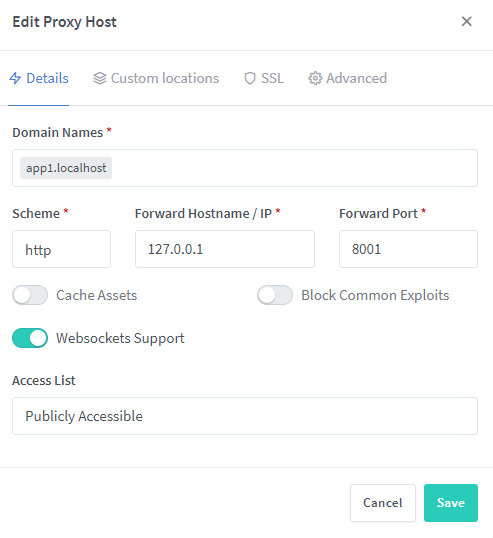
  • I have several local services running e.g. 127.0.0.1:8001, 127.0.0.1:8002 and so on and want to organise them by subdomains of the localhost address (app1.localhost, app2.localhost etc.)
    But when I'm following the http:/app1.localhost/ I get the 502 error message.

To Reproduce
Steps to reproduce the behavior:

  1. Go to Edit Proxy Host
  2. Enter app1.localhost as Domain Names
  3. Scheme: http
  4. IP: 127.0.0.1
  5. Port: 8001
  6. See error

Expected behavior
openenig the the link http:/app1.localhost/

Screenshots
If applicable, add screenshots to help explain your problem.
image

Operating System
Docker for Windows

Originally created by @MartinKuhl on GitHub (Jun 3, 2020). Original GitHub issue: https://github.com/NginxProxyManager/nginx-proxy-manager/issues/445 **Checklist** - Have you pulled and found the error with `jc21/nginx-proxy-manager:latest` docker image? - Are you sure you're not using someone else's docker image? - If having problems with Lets Encrypt, have you made absolutely sure your site is accessible from outside of your network? check **Describe the bug** - What version of Nginx Proxy Manager is reported on the login page: 2.3.0 - I have several local services running e.g. 127.0.0.1:8001, 127.0.0.1:8002 and so on and want to organise them by subdomains of the localhost address (app1.localhost, app2.localhost etc.) But when I'm following the http:/app1.localhost/ I get the 502 error message. **To Reproduce** Steps to reproduce the behavior: 1. Go to Edit Proxy Host 2. Enter app1.localhost as Domain Names 3. Scheme: http 4. IP: 127.0.0.1 5. Port: 8001 6. See error **Expected behavior** openenig the the link http:/app1.localhost/ **Screenshots** If applicable, add screenshots to help explain your problem. ![image](https://user-images.githubusercontent.com/55736453/83641931-7c81df00-a5ae-11ea-9386-38a6c9f12b5c.png) **Operating System** Docker for Windows
kerem 2026-02-26 06:32:36 +03:00
  • closed this issue
  • added the
    bug
    label
Author
Owner

@theraw commented on GitHub (Jun 8, 2020):

i don't see any kind of error.

You should learn read more and understand that

  1. In order to reach app1.localhost you have to add docker container ip into your 'hosts' and not 127.0.0.1 app1.localhost
  2. you should also add it on your hosts on docker container
  3. you should make sure that 127.0.0.1:8001 reaches your application so try curl http://127.0.0.1:8001 from inside nginx-proxy-manager container.
<!-- gh-comment-id:640887510 --> @theraw commented on GitHub (Jun 8, 2020): i don't see any kind of error. You should learn read more and understand that 1. In order to reach `app1.localhost` you have to add docker container ip into your 'hosts' and not `127.0.0.1 app1.localhost` 2. you should also add it on your hosts on docker container 3. you should make sure that 127.0.0.1:8001 reaches your application so try `curl http://127.0.0.1:8001` from inside nginx-proxy-manager container.
Author
Owner

@MartinKuhl commented on GitHub (Jun 9, 2020):

I have to edit the host file

<!-- gh-comment-id:641057556 --> @MartinKuhl commented on GitHub (Jun 9, 2020): I have to edit the host file
Author
Owner

@hgareeballa commented on GitHub (Jul 27, 2023):

I have the same issue !
i can only access services using public ip,, but not with local host

note that i can crul these services with no issues using command line !

<!-- gh-comment-id:1654120016 --> @hgareeballa commented on GitHub (Jul 27, 2023): I have the same issue ! i can only access services using public ip,, but not with local host note that i can crul these services with no issues using command line !
Sign in to join this conversation.
No milestone
No project
No assignees
1 participant
Notifications
Due date
The due date is invalid or out of range. Please use the format "yyyy-mm-dd".

No due date set.

Dependencies

No dependencies set.

Reference
starred/nginx-proxy-manager-NginxProxyManager#374
No description provided.