[GH-ISSUE #400] Configuring Nginx Proxy Manager with wordpress?? #342

Closed
opened 2026-02-26 06:32:26 +03:00 by kerem · 14 comments
Owner

Originally created by @wagners1 on GitHub (May 9, 2020).
Original GitHub issue: https://github.com/NginxProxyManager/nginx-proxy-manager/issues/400

Hi,

Has anyone had any success configuring NPM with wordpress. I have been trying to figure it our for agers with no success. The website can be accessed normally but when I point NPM to the ip address and port it will not work. I just get a connection timeout. I get the domain and the port.

I have about 10 services that NPM work flawlessly with but I just cant get wordpress to work. Can someone assist please?

Thanks in advance.
Simon

Originally created by @wagners1 on GitHub (May 9, 2020). Original GitHub issue: https://github.com/NginxProxyManager/nginx-proxy-manager/issues/400 Hi, Has anyone had any success configuring NPM with wordpress. I have been trying to figure it our for agers with no success. The website can be accessed normally but when I point NPM to the ip address and port it will not work. I just get a connection timeout. I get the domain and the port. I have about 10 services that NPM work flawlessly with but I just cant get wordpress to work. Can someone assist please? Thanks in advance. Simon
kerem 2026-02-26 06:32:26 +03:00
Author
Owner

@wagners1 commented on GitHub (May 9, 2020):

I finally figured it out.... thx to below link. Minor edit below.

https://ahenriksson.com/2020/01/27/how-to-set-up-wordpress-behind-a-reverse-proxy-when-using-nginx/

In order to fix this you first have to add this at the very start of your wp-config.php. This file is the wordpress config file.

define('FORCE_SSL_ADMIN', true);
if ($_SERVER['HTTP_X_FORWARDED_PROTO'] == 'https')
$_SERVER['HTTPS']='on';

Then in the end of the file add the following, replacing “website.com” with your own URL.

define('WP_HOME','https://website.com');
define('WP_SITEURL','https://website.com');

The website should now work correctly.

for me
proxy_set_header X-Forwarded-Proto https;
was not required in NPM

<!-- gh-comment-id:626133146 --> @wagners1 commented on GitHub (May 9, 2020): I finally figured it out.... thx to below link. Minor edit below. https://ahenriksson.com/2020/01/27/how-to-set-up-wordpress-behind-a-reverse-proxy-when-using-nginx/ In order to fix this you first have to add this at the very start of your wp-config.php. This file is the wordpress config file. define('FORCE_SSL_ADMIN', true); if ($_SERVER['HTTP_X_FORWARDED_PROTO'] == 'https') $_SERVER['HTTPS']='on'; Then in the end of the file add the following, replacing “website.com” with your own URL. define('WP_HOME','https://website.com'); define('WP_SITEURL','https://website.com'); The website should now work correctly. for me proxy_set_header X-Forwarded-Proto https; was not required in NPM
Author
Owner

@theraw commented on GitHub (May 10, 2020):

if you install ssl on your wordpress on nginx proxy manager use port 443 not 80 if your wordpress has no ssl then use port 80, i don't see a reason why it should fail.

is same as cloudflare proxy. if cloudflare had failed like that ppl would've had bigger problems.

<!-- gh-comment-id:626400253 --> @theraw commented on GitHub (May 10, 2020): if you install ssl on your wordpress on nginx proxy manager use port `443` not `80` if your wordpress has no ssl then use port 80, i don't see a reason why it should fail. is same as cloudflare proxy. if cloudflare had failed like that ppl would've had bigger problems.
Author
Owner

@styxadmin commented on GitHub (May 12, 2020):

I've got the same problem. Deployed Wordpress using OpenLiteSpeed

The Wordpress Admin page works flawlessly but the main site is not loading all its content.

I tried your fix @wagners1 but it didnt work for me

<!-- gh-comment-id:627375723 --> @styxadmin commented on GitHub (May 12, 2020): I've got the same problem. Deployed Wordpress using OpenLiteSpeed The Wordpress Admin page works flawlessly but the main site is not loading all its content. I tried your fix @wagners1 but it didnt work for me
Author
Owner

@theraw commented on GitHub (May 12, 2020):

@Abs0lutZero that is just your template problems or browser cache has nothing to do with this project
image
image
image
image

tested with multiple themes

<!-- gh-comment-id:627551198 --> @theraw commented on GitHub (May 12, 2020): @Abs0lutZero that is just your template problems or browser cache has nothing to do with this project ![image](https://user-images.githubusercontent.com/32969774/81737526-84ab9a80-9498-11ea-8baa-30057514a900.png) ![image](https://user-images.githubusercontent.com/32969774/81737561-92f9b680-9498-11ea-8f06-552b627b9948.png) ![image](https://user-images.githubusercontent.com/32969774/81737628-ac026780-9498-11ea-8512-6b79412bfafe.png) ![image](https://user-images.githubusercontent.com/32969774/81737654-b7ee2980-9498-11ea-9b56-9dd2c74362bb.png) tested with multiple themes
Author
Owner

@styxadmin commented on GitHub (May 13, 2020):

Thanks @theraw

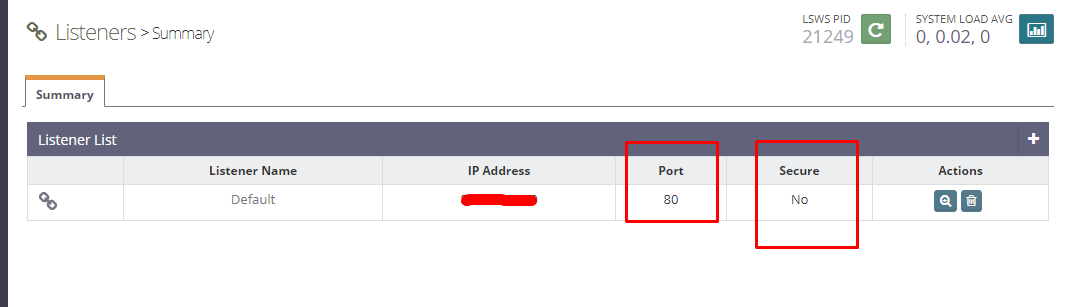
I did a clean install of my OLS + WP deployment and set up the proxy as http on port 80 and now everything works.

<!-- gh-comment-id:628001133 --> @styxadmin commented on GitHub (May 13, 2020): Thanks @theraw I did a clean install of my OLS + WP deployment and set up the proxy as http on port 80 and now everything works.
Author
Owner

@huangwb8 commented on GitHub (Apr 10, 2022):

@wagners1 Your setting is not work for me. I still get ERR_TOO_MANY_REDIRECTS.

Would you please share your NPM settings?

<!-- gh-comment-id:1094161277 --> @huangwb8 commented on GitHub (Apr 10, 2022): @wagners1 Your setting is not work for me. I still get ERR_TOO_MANY_REDIRECTS. Would you please share your NPM settings?
Author
Owner

@ghost commented on GitHub (Jun 2, 2022):

@wagners1 Your setting is not work for me. I still get ERR_TOO_MANY_REDIRECTS.

Would you please share your NPM settings?

A few days ago, I had the same problem as you. This one didn't come from npm, but from the apache config.

I share you my settings if it can help you:

My vhost:
__________________________________________
<VirtualHost *:80>
ServerAdmin webmaster@mydomain.com
ServerName mydomain.com
ServerAlias mydomain.com.dev

DocumentRoot /mnt/nfs/vhost/mydomain.com
<Directory /mnt/nfs/vhost/mydomain.com/>
Options FollowSymLinks
AllowOverride Limit Options FileInfo
DirectoryIndex index.php
Require all granted

<Directory /mnt/nfs/vhost/mydomain.com/wp-content>
Options FollowSymLinks
Require all granted

ErrorLog /mnt/nfs/vhost/system/mydomain.com/logs/error.log
__________________________________________

Line added to my wp-config.php:
__________________________________________
define( 'WP_HOME', 'http://mydomain.com' );
define( 'WP_SITEURL', 'http://mydomain.com' );
__________________________________________

My host in NPM
__________________________________________
Source: mydomain.com
Destination: http://IPADRESS:80
SSL: Custom

Details:
image

SSL:
image
__________________________________________

For me, this config work. I hope it will help you.

<!-- gh-comment-id:1145107330 --> @ghost commented on GitHub (Jun 2, 2022): > @wagners1 Your setting is not work for me. I still get ERR_TOO_MANY_REDIRECTS. > > Would you please share your NPM settings? A few days ago, I had the same problem as you. This one didn't come from npm, but from the apache config. I share you my settings if it can help you: **My vhost:** **__________________________________________** <VirtualHost *:80> ServerAdmin webmaster@mydomain.com ServerName mydomain.com ServerAlias mydomain.com.dev DocumentRoot /mnt/nfs/vhost/mydomain.com <Directory /mnt/nfs/vhost/mydomain.com/> Options FollowSymLinks AllowOverride Limit Options FileInfo DirectoryIndex index.php Require all granted </Directory> <Directory /mnt/nfs/vhost/mydomain.com/wp-content> Options FollowSymLinks Require all granted </Directory> ErrorLog /mnt/nfs/vhost/system/mydomain.com/logs/error.log **__________________________________________** **Line added to my wp-config.php:** **__________________________________________** define( 'WP_HOME', 'http://mydomain.com' ); define( 'WP_SITEURL', 'http://mydomain.com' ); **__________________________________________** **My host in NPM** **__________________________________________** Source: mydomain.com Destination: http://IPADRESS:80 SSL: Custom Details: ![image](https://user-images.githubusercontent.com/86167909/171686326-33a21699-32bf-4058-978a-47786a545ee9.png) SSL: ![image](https://user-images.githubusercontent.com/86167909/171686412-430ba632-c29b-4581-b571-d1fbcd65cb7e.png) **__________________________________________** For me, this config work. I hope it will help you.
Author
Owner

@daominhsangvn commented on GitHub (Dec 15, 2022):

For the people who tried all above method not working, try this (its working for me, none of above did)
Add the following config to your nginx config file

...
location / {
        proxy_set_header        Host $host:$server_port;
        proxy_set_header        X-Real-IP $remote_addr;
        proxy_set_header        X-Forwarded-For $proxy_add_x_forwarded_for;
        proxy_set_header        X-Forwarded-Proto $scheme;
        proxy_pass http://10.0.0.1:80; <<< Correct this to your WordPress internal server IP and port
}
...
<!-- gh-comment-id:1352572993 --> @daominhsangvn commented on GitHub (Dec 15, 2022): For the people who tried all above method not working, try this (its working for me, none of above did) Add the following config to your nginx config file ``` ... location / { proxy_set_header Host $host:$server_port; proxy_set_header X-Real-IP $remote_addr; proxy_set_header X-Forwarded-For $proxy_add_x_forwarded_for; proxy_set_header X-Forwarded-Proto $scheme; proxy_pass http://10.0.0.1:80; <<< Correct this to your WordPress internal server IP and port } ... ```
Author
Owner

@theraw commented on GitHub (Dec 15, 2022):

@daominhsangvn remember that if you change something from panel these custom changes manually done to nginx configs could be lost.

<!-- gh-comment-id:1353605570 --> @theraw commented on GitHub (Dec 15, 2022): @daominhsangvn remember that if you change something from panel these custom changes manually done to nginx configs could be lost.
Author
Owner

@RapidFire05 commented on GitHub (Feb 22, 2023):

I was able to fix using these docs: https://wordpress.org/documentation/article/administration-over-ssl/#using-a-reverse-proxy

I had the 'Too Many Redirects Error'. Do not believe this is an error with NPM. Just needed to edit the wp-config.php file.

<!-- gh-comment-id:1440744746 --> @RapidFire05 commented on GitHub (Feb 22, 2023): I was able to fix using these docs: https://wordpress.org/documentation/article/administration-over-ssl/#using-a-reverse-proxy I had the 'Too Many Redirects Error'. Do not believe this is an error with NPM. Just needed to edit the wp-config.php file.
Author
Owner

@huangwb8 commented on GitHub (Feb 22, 2023):

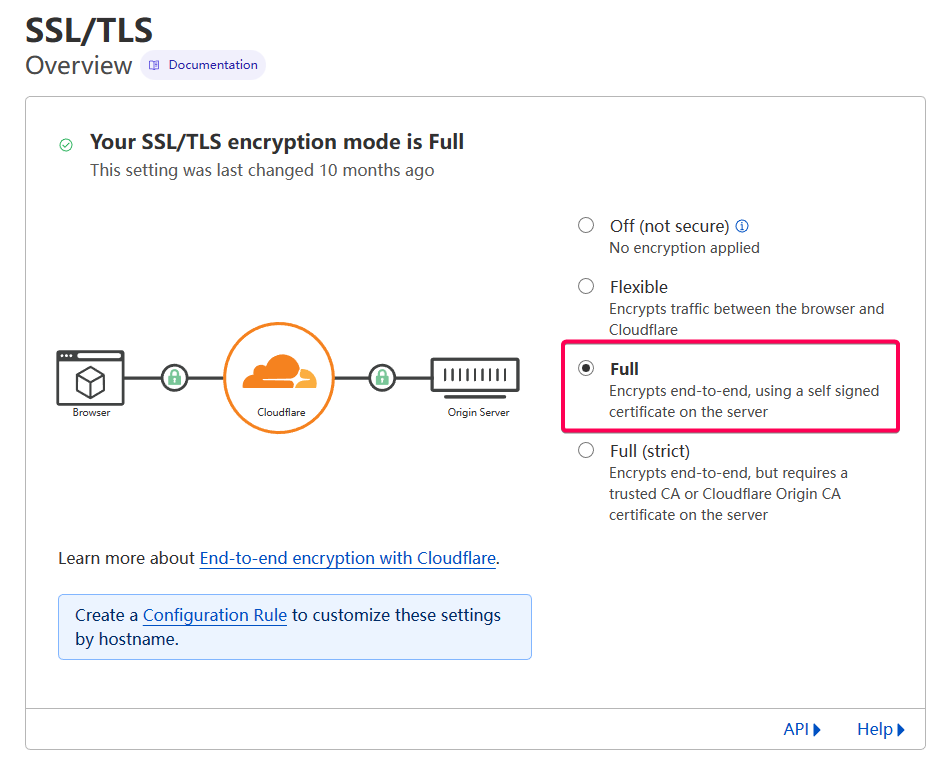
@RapidFire05 Yes, NPM is OK. My solution is using Full mode of SSL/TLS in Cloudflare, the DNS provider of my domain:
image
Sorry for the delay reply. I just forget the problem I ask (ฅ´ω`ฅ)

<!-- gh-comment-id:1440975941 --> @huangwb8 commented on GitHub (Feb 22, 2023): @RapidFire05 Yes, NPM is OK. My solution is **using Full mode** of SSL/TLS in Cloudflare, the DNS provider of my domain: ![image](https://user-images.githubusercontent.com/35643122/220783109-3261dd42-9ada-4883-950c-34e0b4d7b119.png) Sorry for the delay reply. I just forget the problem I ask (ฅ´ω`ฅ)
Author
Owner

@coderofsalvation commented on GitHub (Mar 22, 2023):

Ok, just for completeness, one of the main culprits is $request_uri (which is passed by default, because of include /data/nginx/custom/server_proxy[.]conf;).

$request_uri always represents the original url (not affected by nginx rewrites/redirects etc).
This is sane & secure proxy-behaviour, but for a simple wordpress-docker, you can just add rewrites by copy/pasting this into the advanced-tab (but excluding $request_uri)

# START Nginx Rewrites for Rank Math Sitemaps
rewrite ^/sitemap_index.xml$ /index.php?sitemap=1 last;
rewrite ^/([^/]+?)-sitemap([0-9]+)?.xml$ /index.php?sitemap=$1&sitemap_n=$2 last;
# END Nginx Rewrites for Rank Math Sitemaps 

# this is basically: include /data/nginx/custom/server_proxy[.]conf (but without $request_uri )
location / {
  add_header       X-Served-By $host;
  proxy_set_header Host $host;
  proxy_set_header X-Forwarded-Scheme $scheme;
  proxy_set_header X-Forwarded-Proto  $scheme;
  proxy_set_header X-Forwarded-For    $remote_addr;
  proxy_set_header X-Real-IP          $remote_addr;
  proxy_pass       $forward_scheme://$server:$port;
} 

I'd suggest to not hardcode ip-adresses in the advanced tab, but just use the $server and $port variables (editable via the the userinterface)

<!-- gh-comment-id:1479748876 --> @coderofsalvation commented on GitHub (Mar 22, 2023): Ok, just for completeness, one of the main culprits is `$request_uri` (which is passed by default, because of `include /data/nginx/custom/server_proxy[.]conf;`). `$request_uri` always represents the **original** url (not affected by nginx rewrites/redirects etc). This is sane & secure proxy-behaviour, but for a simple wordpress-docker, you can just add rewrites by copy/pasting this into the advanced-tab (but excluding `$request_uri`) ``` # START Nginx Rewrites for Rank Math Sitemaps rewrite ^/sitemap_index.xml$ /index.php?sitemap=1 last; rewrite ^/([^/]+?)-sitemap([0-9]+)?.xml$ /index.php?sitemap=$1&sitemap_n=$2 last; # END Nginx Rewrites for Rank Math Sitemaps # this is basically: include /data/nginx/custom/server_proxy[.]conf (but without $request_uri ) location / { add_header X-Served-By $host; proxy_set_header Host $host; proxy_set_header X-Forwarded-Scheme $scheme; proxy_set_header X-Forwarded-Proto $scheme; proxy_set_header X-Forwarded-For $remote_addr; proxy_set_header X-Real-IP $remote_addr; proxy_pass $forward_scheme://$server:$port; } ``` > I'd suggest to not hardcode ip-adresses in the advanced tab, but just use the `$server` and `$port` variables (editable via the the userinterface)
Author
Owner

@s-wighton commented on GitHub (Apr 5, 2023):

I've been following this issue as I've had my own problems with the site health complaining of:

  • Error: cURL error 28: connection timed out after 10001 milliseconds (http_request_failed)
  • Error: cURL error 35: error:0A00010B:SSL routines::wrong version number (http_request_failed)

This may help others troubleshooting WP / NPM config issues.

Additional step that resolved the errors for me was adding the NPM server IP and website domain name on the WordPress web server /etc/hosts

127.0.1.1 wp.homelab wp
127.0.0.1 localhost
192.168.1.1 www.website.com

For completeness my configs are:

/var/www/website.com/wp-config.php

define('WP_HOME','https://website.com/');
define('WP_SITEURL','https://website.com/');

if (!empty($_SERVER['HTTP_X_FORWARDED_PROTO']) && $_SERVER['HTTP_X_FORWARDED_PROTO'] === 'https') {
        $_SERVER['HTTPS'] = 'on';
}

if (isset($_SERVER['HTTP_X_FORWARDED_HOST'])) {
        $_SERVER['HTTP_HOST'] = $_SERVER['HTTP_X_FORWARDED_HOST'];
}

if ( isset( $_SERVER['HTTP_X_FORWARDED_FOR'] ) ) {
    $mte_xffaddrs = explode( ',', $_SERVER['HTTP_X_FORWARDED_FOR'] );
    $_SERVER['REMOTE_ADDR'] = $mte_xffaddrs[0];
}

/etc/apache2/sites-enabled/website.com.conf

<VirtualHost *:80>
        ServerAdmin admin@website.com
        ServerName wp.homelab
        ServerAlias www.website.com
        DocumentRoot /var/www/website.com
        <Directory /var/www/website.com/>
                Options FollowSymLinks
                AllowOverride Limit Options FileInfo
                DirectoryIndex index.php
                Require all granted
        </Directory>
        <Directory /var/www/website.com/wp-content>
                Options FollowSymLinks
                Require all granted
        </Directory>
        ErrorLog ${APACHE_LOG_DIR}/error.log
        CustomLog ${APACHE_LOG_DIR}/access.log combined
</VirtualHost>

Same NPM set up as above, however I removed all the Custom Nginx Configuration, and it's still working. 🙏

<!-- gh-comment-id:1497892737 --> @s-wighton commented on GitHub (Apr 5, 2023): I've been following this issue as I've had my own problems with the site health complaining of: - Error: cURL error 28: connection timed out after 10001 milliseconds (http_request_failed) - Error: cURL error 35: error:0A00010B:SSL routines::wrong version number (http_request_failed) This may help others troubleshooting WP / NPM config issues. Additional step that resolved the errors for me was adding the NPM server IP and website domain name on the WordPress web server **/etc/hosts** ```shell 127.0.1.1 wp.homelab wp 127.0.0.1 localhost 192.168.1.1 www.website.com ``` For completeness my configs are: **/var/www/website.com/wp-config.php** ```shell define('WP_HOME','https://website.com/'); define('WP_SITEURL','https://website.com/'); if (!empty($_SERVER['HTTP_X_FORWARDED_PROTO']) && $_SERVER['HTTP_X_FORWARDED_PROTO'] === 'https') { $_SERVER['HTTPS'] = 'on'; } if (isset($_SERVER['HTTP_X_FORWARDED_HOST'])) { $_SERVER['HTTP_HOST'] = $_SERVER['HTTP_X_FORWARDED_HOST']; } if ( isset( $_SERVER['HTTP_X_FORWARDED_FOR'] ) ) { $mte_xffaddrs = explode( ',', $_SERVER['HTTP_X_FORWARDED_FOR'] ); $_SERVER['REMOTE_ADDR'] = $mte_xffaddrs[0]; } ``` **/etc/apache2/sites-enabled/website.com.conf** ```shell <VirtualHost *:80> ServerAdmin admin@website.com ServerName wp.homelab ServerAlias www.website.com DocumentRoot /var/www/website.com <Directory /var/www/website.com/> Options FollowSymLinks AllowOverride Limit Options FileInfo DirectoryIndex index.php Require all granted </Directory> <Directory /var/www/website.com/wp-content> Options FollowSymLinks Require all granted </Directory> ErrorLog ${APACHE_LOG_DIR}/error.log CustomLog ${APACHE_LOG_DIR}/access.log combined </VirtualHost> ``` Same NPM set up as above, however I removed **all** the Custom Nginx Configuration, and it's still working. 🙏
Author
Owner

@robtry commented on GitHub (Jun 23, 2023):

I wrote a tutorial with the config that worked for me
https://robgg.hashnode.dev/wordpress-docker-nginx-proxy-manager-cloudfare

<!-- gh-comment-id:1603666587 --> @robtry commented on GitHub (Jun 23, 2023): I wrote a tutorial with the config that worked for me https://robgg.hashnode.dev/wordpress-docker-nginx-proxy-manager-cloudfare
Sign in to join this conversation.
No milestone
No project
No assignees
1 participant
Notifications
Due date
The due date is invalid or out of range. Please use the format "yyyy-mm-dd".

No due date set.

Dependencies

No dependencies set.

Reference
starred/nginx-proxy-manager-NginxProxyManager#342
No description provided.