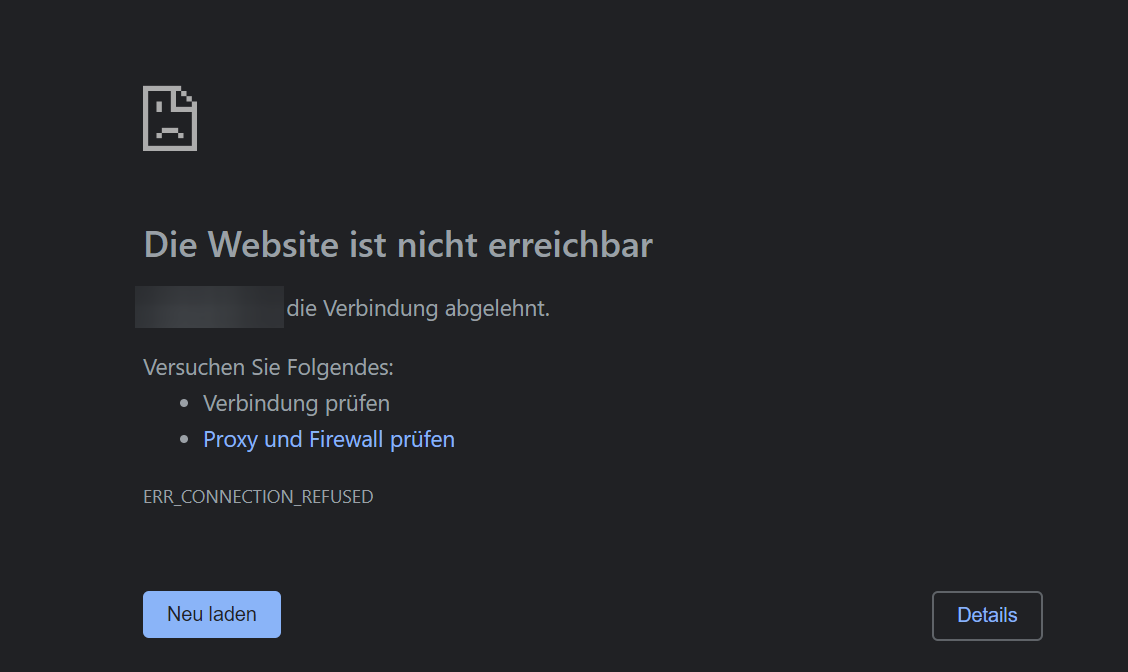
[GH-ISSUE #329] mydomain.com has rejected the connection. #289

Closed
opened 2026-02-26 06:32:03 +03:00 by kerem · 9 comments
Owner

Originally created by @marrobHD on GitHub (Mar 14, 2020).
Original GitHub issue: https://github.com/NginxProxyManager/nginx-proxy-manager/issues/329

Checklist

  • Have you pulled and found the error with jc21/nginx-proxy-manager:latest docker image?
  • Are you sure you're not using someone else's docker image?
  • If having problems with Lets Encrypt, have you made absolutely sure your site is accessible from outside of your network?

Describe the bug

To Reproduce
Steps to reproduce the behavior:

  1. Go to 'Proxy Hosts' and select a domain
  2. Go to 'SSL' tab and select request new SSL Certificate
  3. Click on 'save'
  4. Point browser to https://mydomain.com and see:
The website is unavailable
https://mydomain.com has rejected the connection.
ERR_CONNECTION_REFUSED

Expected behavior
It should show the web page with a closed lock

Screenshots
If applicable, add screenshots to help explain your problem.
image

Operating System

  • (host ) Ubuntu 19.10 LXC Container with keyctl and nesting enabled
  • (client) Win10 Pro

Additional context

  • Docker version 19.03.6, build 369ce74a3c
  • Chrome version 80.0.3987.132 (Official Build) (64-Bit)
Originally created by @marrobHD on GitHub (Mar 14, 2020). Original GitHub issue: https://github.com/NginxProxyManager/nginx-proxy-manager/issues/329 **Checklist** - [x] Have you pulled and found the error with `jc21/nginx-proxy-manager:latest` docker image? - [x] Are you sure you're not using someone else's docker image? - [x] If having problems with Lets Encrypt, have you made absolutely sure your site is accessible from outside of your network? **Describe the bug** - When I try to go to https://mydomain.com, I get the error message https://mydomain.com has rejected the connection. - Nginx Proxy Manager version: v2.2.0 **To Reproduce** Steps to reproduce the behavior: 1. Go to 'Proxy Hosts' and select a domain 2. Go to 'SSL' tab and select request new SSL Certificate 3. Click on 'save' 4. Point browser to https://mydomain.com and see: ``` The website is unavailable https://mydomain.com has rejected the connection. ERR_CONNECTION_REFUSED ``` **Expected behavior** It should show the web page with a closed lock **Screenshots** If applicable, add screenshots to help explain your problem. ![image](https://user-images.githubusercontent.com/29308361/76687371-889b7780-6623-11ea-9a95-2c092a4603e6.png) **Operating System** - (host ) Ubuntu 19.10 LXC Container with keyctl and nesting enabled - (client) Win10 Pro **Additional context** - Docker version 19.03.6, build 369ce74a3c - Chrome version 80.0.3987.132 (Official Build) (64-Bit)
kerem 2026-02-26 06:32:03 +03:00
  • closed this issue
  • added the
    bug
    label
Author
Owner

@miguelwill commented on GitHub (Mar 18, 2020):

validate if port 80 and 443 are correctly allowed in your iptables or docker-compose configuration and mapped ports

<!-- gh-comment-id:600849985 --> @miguelwill commented on GitHub (Mar 18, 2020): validate if port 80 and 443 are correctly allowed in your iptables or docker-compose configuration and mapped ports
Author
Owner

@marrobHD commented on GitHub (Mar 19, 2020):

Checked. All looks good.

#docker-compose.yaml
version: '3'
services:
  app:
    image: 'jc21/nginx-proxy-manager:latest'
    ports:
      - '80:80'
      - '81:81'
      - '443:443'
    volumes:
      - ./config.json:/app/config/production.json
      - ./data:/data
      - ./letsencrypt:/etc/letsencrypt
  db:
    image: 'jc21/mariadb-aria:10.4'
    environment:
      MYSQL_ROOT_PASSWORD: 'npm'
      MYSQL_DATABASE: 'npm'
      MYSQL_USER: 'npm'
      MYSQL_PASSWORD: 'npm'
    volumes:
      - ./data/mysql:/var/lib/mysql
root@nginx-proxy-manager:/home# iptables -S                                        -P INPUT ACCEPT
-P FORWARD DROP
-P OUTPUT ACCEPT
-N DOCKER
-N DOCKER-ISOLATION-STAGE-1
-N DOCKER-ISOLATION-STAGE-2
-N DOCKER-USER
-A INPUT -i lo -j ACCEPT
-A INPUT -m conntrack --ctstate RELATED,ESTABLISHED -j ACCEPT
-A INPUT -m conntrack --ctstate INVALID -j DROP
-A INPUT -p tcp -m tcp --dport 80 -m conntrack --ctstate NEW,ESTABLISHED -j ACCEPT
-A INPUT -p tcp -m multiport --dports 80,443 -m conntrack --ctstate NEW,ESTABLISHED -j ACCEPT
-A FORWARD -j DOCKER-USER
-A FORWARD -j DOCKER-ISOLATION-STAGE-1
-A FORWARD -o br-fc37d6a16a53 -m conntrack --ctstate RELATED,ESTABLISHED -j ACCEPT
-A FORWARD -o br-fc37d6a16a53 -j DOCKER
-A FORWARD -i br-fc37d6a16a53 ! -o br-fc37d6a16a53 -j ACCEPT
-A FORWARD -i br-fc37d6a16a53 -o br-fc37d6a16a53 -j ACCEPT
-A FORWARD -o docker0 -m conntrack --ctstate RELATED,ESTABLISHED -j ACCEPT
-A FORWARD -o docker0 -j DOCKER
-A FORWARD -i docker0 ! -o docker0 -j ACCEPT
-A FORWARD -i docker0 -o docker0 -j ACCEPT
-A OUTPUT -o lo -j ACCEPT
-A OUTPUT -m conntrack --ctstate ESTABLISHED -j ACCEPT
-A OUTPUT -p tcp -m tcp --sport 80 -m conntrack --ctstate ESTABLISHED -j ACCEPT
-A OUTPUT -p tcp -m tcp --sport 443 -m conntrack --ctstate ESTABLISHED -j ACCEPT
-A OUTPUT -p tcp -m multiport --dports 80,443 -m conntrack --ctstate ESTABLISHED -j ACCEPT
-A DOCKER -d 172.18.0.3/32 ! -i br-fc37d6a16a53 -o br-fc37d6a16a53 -p tcp -m tcp --dport 443 -j ACCEPT
-A DOCKER -d 172.18.0.3/32 ! -i br-fc37d6a16a53 -o br-fc37d6a16a53 -p tcp -m tcp --dport 81 -j ACCEPT
-A DOCKER -d 172.18.0.3/32 ! -i br-fc37d6a16a53 -o br-fc37d6a16a53 -p tcp -m tcp --dport 80 -j ACCEPT
-A DOCKER-ISOLATION-STAGE-1 -i br-fc37d6a16a53 ! -o br-fc37d6a16a53 -j DOCKER-ISOLATION-STAGE-2
-A DOCKER-ISOLATION-STAGE-1 -i docker0 ! -o docker0 -j DOCKER-ISOLATION-STAGE-2
-A DOCKER-ISOLATION-STAGE-1 -j RETURN
-A DOCKER-ISOLATION-STAGE-2 -o br-fc37d6a16a53 -j DROP
-A DOCKER-ISOLATION-STAGE-2 -o docker0 -j DROP
-A DOCKER-ISOLATION-STAGE-2 -j RETURN
-A DOCKER-USER -j RETURN
<!-- gh-comment-id:601097701 --> @marrobHD commented on GitHub (Mar 19, 2020): Checked. All looks good. ```yaml #docker-compose.yaml version: '3' services: app: image: 'jc21/nginx-proxy-manager:latest' ports: - '80:80' - '81:81' - '443:443' volumes: - ./config.json:/app/config/production.json - ./data:/data - ./letsencrypt:/etc/letsencrypt db: image: 'jc21/mariadb-aria:10.4' environment: MYSQL_ROOT_PASSWORD: 'npm' MYSQL_DATABASE: 'npm' MYSQL_USER: 'npm' MYSQL_PASSWORD: 'npm' volumes: - ./data/mysql:/var/lib/mysql ``` ``` root@nginx-proxy-manager:/home# iptables -S -P INPUT ACCEPT -P FORWARD DROP -P OUTPUT ACCEPT -N DOCKER -N DOCKER-ISOLATION-STAGE-1 -N DOCKER-ISOLATION-STAGE-2 -N DOCKER-USER -A INPUT -i lo -j ACCEPT -A INPUT -m conntrack --ctstate RELATED,ESTABLISHED -j ACCEPT -A INPUT -m conntrack --ctstate INVALID -j DROP -A INPUT -p tcp -m tcp --dport 80 -m conntrack --ctstate NEW,ESTABLISHED -j ACCEPT -A INPUT -p tcp -m multiport --dports 80,443 -m conntrack --ctstate NEW,ESTABLISHED -j ACCEPT -A FORWARD -j DOCKER-USER -A FORWARD -j DOCKER-ISOLATION-STAGE-1 -A FORWARD -o br-fc37d6a16a53 -m conntrack --ctstate RELATED,ESTABLISHED -j ACCEPT -A FORWARD -o br-fc37d6a16a53 -j DOCKER -A FORWARD -i br-fc37d6a16a53 ! -o br-fc37d6a16a53 -j ACCEPT -A FORWARD -i br-fc37d6a16a53 -o br-fc37d6a16a53 -j ACCEPT -A FORWARD -o docker0 -m conntrack --ctstate RELATED,ESTABLISHED -j ACCEPT -A FORWARD -o docker0 -j DOCKER -A FORWARD -i docker0 ! -o docker0 -j ACCEPT -A FORWARD -i docker0 -o docker0 -j ACCEPT -A OUTPUT -o lo -j ACCEPT -A OUTPUT -m conntrack --ctstate ESTABLISHED -j ACCEPT -A OUTPUT -p tcp -m tcp --sport 80 -m conntrack --ctstate ESTABLISHED -j ACCEPT -A OUTPUT -p tcp -m tcp --sport 443 -m conntrack --ctstate ESTABLISHED -j ACCEPT -A OUTPUT -p tcp -m multiport --dports 80,443 -m conntrack --ctstate ESTABLISHED -j ACCEPT -A DOCKER -d 172.18.0.3/32 ! -i br-fc37d6a16a53 -o br-fc37d6a16a53 -p tcp -m tcp --dport 443 -j ACCEPT -A DOCKER -d 172.18.0.3/32 ! -i br-fc37d6a16a53 -o br-fc37d6a16a53 -p tcp -m tcp --dport 81 -j ACCEPT -A DOCKER -d 172.18.0.3/32 ! -i br-fc37d6a16a53 -o br-fc37d6a16a53 -p tcp -m tcp --dport 80 -j ACCEPT -A DOCKER-ISOLATION-STAGE-1 -i br-fc37d6a16a53 ! -o br-fc37d6a16a53 -j DOCKER-ISOLATION-STAGE-2 -A DOCKER-ISOLATION-STAGE-1 -i docker0 ! -o docker0 -j DOCKER-ISOLATION-STAGE-2 -A DOCKER-ISOLATION-STAGE-1 -j RETURN -A DOCKER-ISOLATION-STAGE-2 -o br-fc37d6a16a53 -j DROP -A DOCKER-ISOLATION-STAGE-2 -o docker0 -j DROP -A DOCKER-ISOLATION-STAGE-2 -j RETURN -A DOCKER-USER -j RETURN ```
Author
Owner

@miguelwill commented on GitHub (Mar 19, 2020):

Okay, the port seems to be allowed in both the mapping and the iptables that the docker manages
the computer is on a local network?
if you try "telnet ip-host 80" can you establish the connection?
try also telnet to port 443

you should be able to connect if you are in the same local network, and after checking that, try remote access

<!-- gh-comment-id:601235458 --> @miguelwill commented on GitHub (Mar 19, 2020): Okay, the port seems to be allowed in both the mapping and the iptables that the docker manages the computer is on a local network? if you try "telnet ip-host 80" can you establish the connection? try also telnet to port 443 you should be able to connect if you are in the same local network, and after checking that, try remote access
Author
Owner

@miguelwill commented on GitHub (Mar 19, 2020):

you can try to define a docker network in the docker-compose.yml file so that the network is not the default bridge

add to the statement of services:

networks:
     - pmanager

and add to the end of the file

networks:
  pmanager:
    name: pmanager
<!-- gh-comment-id:601237191 --> @miguelwill commented on GitHub (Mar 19, 2020): you can try to define a docker network in the docker-compose.yml file so that the network is not the default bridge add to the statement of services: ``` networks: - pmanager ``` and add to the end of the file ``` networks: pmanager: name: pmanager ```
Author
Owner

@marrobHD commented on GitHub (Mar 19, 2020):

Telnet works on both ports.
Thats now my config:

root@nginx-proxy-manager:/home# cat docker-compose.yml
version: '3'
services:
  app:
    image: 'jc21/nginx-proxy-manager:latest'
    ports:
      - '80:80'
      - '81:81'
      - '443:443'
    volumes:
      - ./config.json:/app/config/production.json
      - ./data:/data
      - ./letsencrypt:/etc/letsencrypt
    networks:
         - pmanager
  db:
    image: 'jc21/mariadb-aria:10.4'
    environment:
      MYSQL_ROOT_PASSWORD: 'npm'
      MYSQL_DATABASE: 'npm'
      MYSQL_USER: 'npm'
      MYSQL_PASSWORD: 'npm'
    volumes:
      - ./data/mysql:/var/lib/mysql
    networks:
         - pmanager

networks:
    pmanager:

Still ERR_CONNECTION_REFUSED

<!-- gh-comment-id:601447151 --> @marrobHD commented on GitHub (Mar 19, 2020): Telnet works on both ports. Thats now my config: ``` root@nginx-proxy-manager:/home# cat docker-compose.yml version: '3' services: app: image: 'jc21/nginx-proxy-manager:latest' ports: - '80:80' - '81:81' - '443:443' volumes: - ./config.json:/app/config/production.json - ./data:/data - ./letsencrypt:/etc/letsencrypt networks: - pmanager db: image: 'jc21/mariadb-aria:10.4' environment: MYSQL_ROOT_PASSWORD: 'npm' MYSQL_DATABASE: 'npm' MYSQL_USER: 'npm' MYSQL_PASSWORD: 'npm' volumes: - ./data/mysql:/var/lib/mysql networks: - pmanager networks: pmanager: ``` Still ERR_CONNECTION_REFUSED
Author
Owner

@miguelwill commented on GitHub (Mar 20, 2020):

mm ok
the container log shows that nginx starts up correctly?

port 80 and 443 are managed by nginx, so check if it starts normally

with "docker-compose logs" you can extract the log of both services and check if they are ok
also consider that mysql may take some time to initialize before allowing nginx-proxy-manager to initialize your database the first time you start

you can also clean up the data and configuration directories in order to start with the clean instance and check the services startup log

<!-- gh-comment-id:601518751 --> @miguelwill commented on GitHub (Mar 20, 2020): mm ok the container log shows that nginx starts up correctly? port 80 and 443 are managed by nginx, so check if it starts normally with "docker-compose logs" you can extract the log of both services and check if they are ok also consider that mysql may take some time to initialize before allowing nginx-proxy-manager to initialize your database the first time you start you can also clean up the data and configuration directories in order to start with the clean instance and check the services startup log
Author
Owner

@marrobHD commented on GitHub (Mar 20, 2020):

I started from scratch. Still won't work. All starts correctly

<!-- gh-comment-id:601644417 --> @marrobHD commented on GitHub (Mar 20, 2020): I started from scratch. Still won't work. All starts correctly
Author
Owner

@catalinmiron commented on GitHub (Mar 20, 2020):

Could you please try accessing http://mydomain.com:443 and see if this works?

<!-- gh-comment-id:601656506 --> @catalinmiron commented on GitHub (Mar 20, 2020): Could you please try accessing http://mydomain.com:443 and see if this works?
Author
Owner

@marrobHD commented on GitHub (Mar 20, 2020):

Got it working. I switched to another operating system. Ubuntu 18.04

<!-- gh-comment-id:601678815 --> @marrobHD commented on GitHub (Mar 20, 2020): Got it working. I switched to another operating system. Ubuntu 18.04
Sign in to join this conversation.
No milestone
No project
No assignees
1 participant
Notifications
Due date
The due date is invalid or out of range. Please use the format "yyyy-mm-dd".

No due date set.

Dependencies

No dependencies set.

Reference
starred/nginx-proxy-manager-NginxProxyManager#289
No description provided.