mirror of
https://github.com/NginxProxyManager/nginx-proxy-manager.git
synced 2026-04-27 02:15:51 +03:00
[GH-ISSUE #324] Cannot for the life of me, get nginx-proxy-manager to work with Discourse in a reverse-proxy-configuration. #283
Labels
No labels
awaiting feedback
bug
cannot reproduce
dns provider request
duplicate
enhancement
enhancement
enhancement
good first issue
help wanted
invalid
need more info
no certbot plugin available
product-support
pull-request
question
stale
troll
upstream issue
v2
v2
v2
v3
wontfix
No milestone
No project
No assignees
1 participant

Notifications
Due date
No due date set.
Dependencies
No dependencies set.
Reference
starred/nginx-proxy-manager-NginxProxyManager#283
Loading…
Add table
Add a link
Reference in a new issue
No description provided.
Delete branch "%!s()"
Deleting a branch is permanent. Although the deleted branch may continue to exist for a short time before it actually gets removed, it CANNOT be undone in most cases. Continue?
Originally created by @PhoenixSheppy on GitHub (Mar 12, 2020).
Original GitHub issue: https://github.com/NginxProxyManager/nginx-proxy-manager/issues/324
I tried deploying (locally) a VM running Ubuntu Server 18.04 to run a piece of forum software called "Discourse"
The issue is when I attempt to forward traffic going to
domain.xyzto addressx.x.x.xand using certs installed / created locally on nginx-proxy-manager.The installer (For discourse) refuses to acknowledge port 443 is open, and when checking the authenticity of the domain it fails every time stating that 443 is unreachable, and that 80 IS reachable.
As for testing it myself, I get error 502's via Chrome, indicating the webserver is DOWN. Which is odd. It must be hunting for a file or something when it runs that test. ¯_(ツ)_/¯
I've read their documentation in regards to running it behind an NGINX server, but I don't understand how to apply it to nginx-proxy-manager itself. 🤔
(https://meta.discourse.org/t/running-other-websites-on-the-same-machine-as-discourse/17247)
If anyone here has experience in deploying a Discourse in a situation like this, I'd love some input. But as for now, I'm stuck here and cannot proceed any further.
@PhoenixSheppy commented on GitHub (Mar 12, 2020):
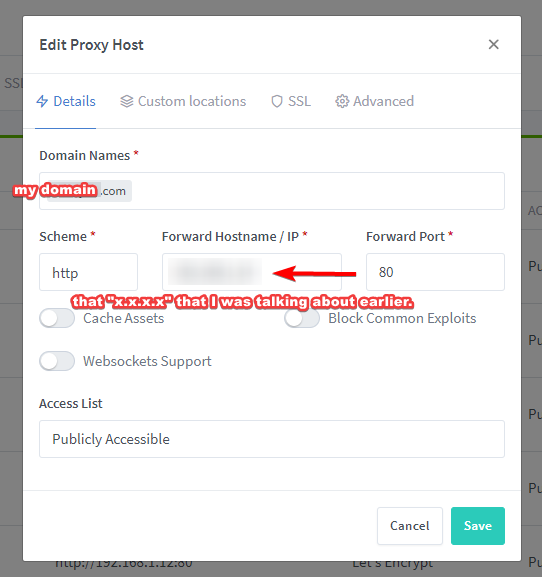
I should probably also include the config as displayed in Nginx-Proxy-Manager itself...
@PhoenixSheppy commented on GitHub (Mar 13, 2020):
After further review, the above configuration was correct.
The issue I was facing was on Discourse's end, and it's configuration documentation in regards to using reverse proxies.
In their documentation they state to use / add the following argument into the
app.ymlfile before compiling / building with Docker:- "templates/web.socketed.template.yml" # <-- Addedand to comment out:
After doing a complete wipe, redownload of Discourse's AiO installer and clean install IGNORING all of the aforementioned "requested steps" Discourse worked right out of the box if you just run
./discourse-installer, ignore the error and just slap your domain details intoapp.ymlas well as SMTP mail server details into the file and compile / build with./launcher rebuild appI'm marking this as closed, and for anyone else who happens upon this issue, this is how you fix it.
You can further contact me via my email listed on my Github Profile. 👍
@Vorkosigan76 commented on GitHub (Mar 16, 2025):
Hi @PhoenixSheppy , how did you finally set up discourse within npm?
which IP address and which port did you enter? My understanding is that the configuration used do not expose any ports...
if you are using the docker network bridge (the default discourse one), did you also install npm on bridge? Thats not very clean.