[GH-ISSUE #2771] cannot login to admin interface - error create table `migrations #1905

Closed
opened 2026-02-26 07:33:09 +03:00 by kerem · 12 comments
Owner

Originally created by @vawaver on GitHub (Mar 29, 2023).
Original GitHub issue: https://github.com/NginxProxyManager/nginx-proxy-manager/issues/2771

Checklist

  • Have you pulled and found the error with jc21/nginx-proxy-manager:latest docker image?
    • Yes
  • Are you sure you're not using someone else's docker image?
    • Yes
  • Have you searched for similar issues (both open and closed)?
  • Yes

Describe the bug

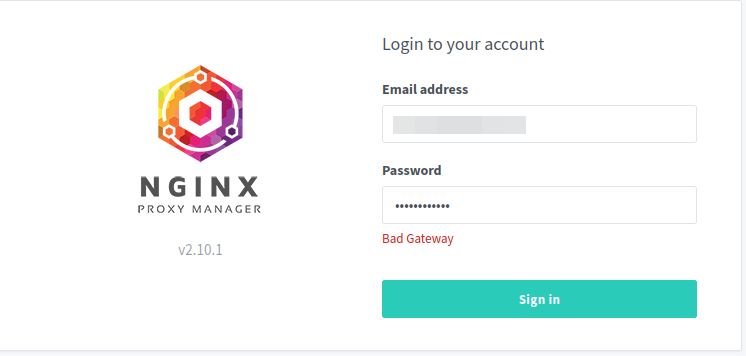
After restarting the docker I found an error in log. I am not able to login to administrator menu.
Bad Gateway error.
nginx_issue

Nginx Proxy Manager Version

v2.10.1

To Reproduce
Steps to reproduce the behavior:

  1. docker-compopse up -d or Portainer restart container
  2. Checking log for
  3. See the error
    [3/29/2023] [5:37:14 AM] [Global ] › ✖ error create table migrations (id int unsigned not null auto_increment primary key, name varchar(255), batch int, migration_time timestamp) - ER_CANT_CREATE_TABLE: Can't create table nginxnew.migrations (errno: 13 "Permission denied")

Expected behavior

No error in the log.

Screenshots

Check the attached log file

Operating System

Ubuntu server 20.04 - latest

Additional context

Originally created by @vawaver on GitHub (Mar 29, 2023). Original GitHub issue: https://github.com/NginxProxyManager/nginx-proxy-manager/issues/2771 <!-- Are you in the right place? - If you are looking for support on how to get your upstream server forwarding, please consider asking the community on Reddit. - If you are writing code changes to contribute and need to ask about the internals of the software, Gitter is the best place to ask. - If you think you found a bug with NPM (not Nginx, or your upstream server or MySql) then you are in the *right place.* --> **Checklist** - Have you pulled and found the error with `jc21/nginx-proxy-manager:latest` docker image? - Yes - Are you sure you're not using someone else's docker image? - Yes - Have you searched for similar issues (both open and closed)? - Yes **Describe the bug** <!-- A clear and concise description of what the bug is. --> After restarting the docker I found an error in log. I am not able to login to administrator menu. Bad Gateway error. ![nginx_issue](https://user-images.githubusercontent.com/52236863/228490092-2049604d-b373-49c8-9e71-e6112d974f17.png) **Nginx Proxy Manager Version** <!-- What version of Nginx Proxy Manager is reported on the login page? --> v2.10.1 **To Reproduce** Steps to reproduce the behavior: 1. docker-compopse up -d or Portainer restart container 2. Checking log for 3. See the error [3/29/2023] [5:37:14 AM] [Global ] › ✖ error create table `migrations` (`id` int unsigned not null auto_increment primary key, `name` varchar(255), `batch` int, `migration_time` timestamp) - ER_CANT_CREATE_TABLE: Can't create table `nginxnew`.`migrations` (errno: 13 "Permission denied") **Expected behavior** <!-- A clear and concise description of what you expected to happen. --> No error in the log. **Screenshots** <!-- If applicable, add screenshots to help explain your problem. --> Check the attached log file **Operating System** <!-- Please specify if using a Rpi, Mac, orchestration tool or any other setups that might affect the reproduction of this error. --> Ubuntu server 20.04 - latest **Additional context** <!-- Add any other context about the problem here, docker version, browser version, logs if applicable to the problem. Too much info is better than too little. -->
kerem 2026-02-26 07:33:09 +03:00
  • closed this issue
  • added the
    stale
    bug
    labels
Author
Owner

@slimbeat commented on GitHub (Mar 29, 2023):

You can use following change in "docker-compose.yml" file as a work around and to login again:

image: 'jc21/mariadb-aria:10.4.15-innodb

Hope it helps you for now.

<!-- gh-comment-id:1488296876 --> @slimbeat commented on GitHub (Mar 29, 2023): You can use following change in "docker-compose.yml" file as a work around and to login again: `image: 'jc21/mariadb-aria:10.4.15-innodb` Hope it helps you for now.
Author
Owner

@vawaver commented on GitHub (Mar 29, 2023):

There is some problem, I returned to version v2.9.22
And everything is working fine.

<!-- gh-comment-id:1488345494 --> @vawaver commented on GitHub (Mar 29, 2023): There is some problem, I returned to version [v2.9.22](https://github.com/NginxProxyManager/nginx-proxy-manager/releases/tag/v2.9.22) And everything is working fine.
Author
Owner

@livealvi commented on GitHub (Mar 29, 2023):

I'm using v2.9.22

<!-- gh-comment-id:1488439684 --> @livealvi commented on GitHub (Mar 29, 2023): I'm using v2.9.22 ✅
Author
Owner

@remisharrock commented on GitHub (Mar 29, 2023):

in #2774 I give a method to check if the mysql folder permissions are ok and how to fix it.

<!-- gh-comment-id:1488999363 --> @remisharrock commented on GitHub (Mar 29, 2023): in #2774 I give a method to check if the mysql folder permissions are ok and how to fix it.
Author
Owner

@wokkeltje13 commented on GitHub (Mar 30, 2023):

I use an install script provided by https://github.com/tteck/Proxmox that is using SQLite, so there is no mysql that can have wrong permissions.
https://github.com/tteck/Proxmox/blob/main/install/nginxproxymanager-install.sh
No idea where I can find logfiles.

<!-- gh-comment-id:1489921649 --> @wokkeltje13 commented on GitHub (Mar 30, 2023): I use an install script provided by https://github.com/tteck/Proxmox that is using SQLite, so there is no mysql that can have wrong permissions. https://github.com/tteck/Proxmox/blob/main/install/nginxproxymanager-install.sh No idea where I can find logfiles.
Author
Owner

@jl-678 commented on GitHub (Mar 31, 2023):

I use an install script provided by https://github.com/tteck/Proxmox that is using SQLite, so there is no mysql that can have wrong permissions. https://github.com/tteck/Proxmox/blob/main/install/nginxproxymanager-install.sh No idea where I can find logfiles.

I use the same script. Another thread here suggests that this could be a permission issue. I will check it out.

<!-- gh-comment-id:1491175567 --> @jl-678 commented on GitHub (Mar 31, 2023): > I use an install script provided by https://github.com/tteck/Proxmox that is using SQLite, so there is no mysql that can have wrong permissions. https://github.com/tteck/Proxmox/blob/main/install/nginxproxymanager-install.sh No idea where I can find logfiles. I use the same script. Another thread here suggests that this could be a permission issue. I will check it out.
Author
Owner

@runbgp commented on GitHub (Mar 31, 2023):

I ran into the same issue on my Docker install. Setting the app image tag to 2.9.22 allowed me to log back into the web UI.

<!-- gh-comment-id:1492270202 --> @runbgp commented on GitHub (Mar 31, 2023): I ran into the same issue on my Docker install. Setting the app image tag to [2.9.22](https://github.com/NginxProxyManager/nginx-proxy-manager/releases/tag/v2.9.22) allowed me to log back into the web UI.
Author
Owner

@marcosvfc commented on GitHub (Mar 31, 2023):

Can someone try this?

<!-- gh-comment-id:1492279829 --> @marcosvfc commented on GitHub (Mar 31, 2023): Can someone try [this](https://github.com/NginxProxyManager/nginx-proxy-manager/issues/2774#issuecomment-1492268281)?
Author
Owner

@jl-678 commented on GitHub (Mar 31, 2023):

I tried again today with the same issue. Here is the log output:

Mar 31 17:27:02 npm systemd[1]: Started Nginx Proxy Manager.
Mar 31 17:27:02 npm node[280706]: [3/31/2023] [5:27:02 PM] [Global   ] › ℹ  info      Using Sqlite: /data/database.sqlite
Mar 31 17:27:02 npm node[280706]: [3/31/2023] [5:27:02 PM] [Global   ] › ℹ  info      Creating a new JWT key pair...
Mar 31 17:27:06 npm node[280706]: [3/31/2023] [5:27:06 PM] [Global   ] › ℹ  info      Wrote JWT key pair to config file: /data/keys.json
Mar 31 17:27:06 npm node[280706]: [3/31/2023] [5:27:06 PM] [Migrate  ] › ℹ  info      Current database version: none
Mar 31 17:27:08 npm node[280706]: [3/31/2023] [5:27:08 PM] [Global   ] › ✖  error     Command failed: . /opt/certbot/bin/activate && pip install --no-cache-dir --user certbot-dns-
cloudflare==$(certbot --version | grep -Eo '[0-9](\.[0-9]+)+') cloudflare && deactivate
Mar 31 17:27:08 npm node[280706]: ERROR: Can not perform a '--user' install. User site-packages are not visible in this virtualenv.
<!-- gh-comment-id:1492642652 --> @jl-678 commented on GitHub (Mar 31, 2023): I tried again today with the same issue. Here is the log output: ``` Mar 31 17:27:02 npm systemd[1]: Started Nginx Proxy Manager. Mar 31 17:27:02 npm node[280706]: [3/31/2023] [5:27:02 PM] [Global ] › ℹ info Using Sqlite: /data/database.sqlite Mar 31 17:27:02 npm node[280706]: [3/31/2023] [5:27:02 PM] [Global ] › ℹ info Creating a new JWT key pair... Mar 31 17:27:06 npm node[280706]: [3/31/2023] [5:27:06 PM] [Global ] › ℹ info Wrote JWT key pair to config file: /data/keys.json Mar 31 17:27:06 npm node[280706]: [3/31/2023] [5:27:06 PM] [Migrate ] › ℹ info Current database version: none Mar 31 17:27:08 npm node[280706]: [3/31/2023] [5:27:08 PM] [Global ] › ✖ error Command failed: . /opt/certbot/bin/activate && pip install --no-cache-dir --user certbot-dns- cloudflare==$(certbot --version | grep -Eo '[0-9](\.[0-9]+)+') cloudflare && deactivate Mar 31 17:27:08 npm node[280706]: ERROR: Can not perform a '--user' install. User site-packages are not visible in this virtualenv. ```
Author
Owner

@FroggMaster commented on GitHub (Apr 6, 2023):

I encountered the same error when upgrading to 2.10.2.
I've worked around the issue for now by adjusting the permissions on the npm/data/mysql folder. Changing the permissions from 755 to 777. (A few others have had success with this as mentioned in https://github.com/NginxProxyManager/nginx-proxy-manager/issues/2774)

The problem very much does appear to be an issue with permissions relative to mysql folder.

A quick/easy workaround:
chmod 777 -R mysql

Once the problem has been resolved the permissions can be adjusted back to 755.

If you're not keen on adjusting the permissions to 777 and I would understand why. Giving complete access to the folder is by no means secure. There is slightly more advanced and permanent workaround, documented here: https://github.com/NginxProxyManager/nginx-proxy-manager/issues/2774#issuecomment-1489466154

<!-- gh-comment-id:1498778909 --> @FroggMaster commented on GitHub (Apr 6, 2023): I encountered the same error when upgrading to 2.10.2. I've worked around the issue for now by adjusting the permissions on the npm/data/mysql folder. Changing the permissions from 755 to 777. (A few others have had success with this as mentioned in https://github.com/NginxProxyManager/nginx-proxy-manager/issues/2774) The problem very much does appear to be an issue with permissions relative to mysql folder. A quick/easy workaround: `chmod 777 -R mysql` Once the problem has been resolved the permissions can be adjusted back to 755. If you're not keen on adjusting the permissions to 777 and I would understand why. Giving complete access to the folder is by no means secure. There is slightly more advanced and permanent workaround, documented here: https://github.com/NginxProxyManager/nginx-proxy-manager/issues/2774#issuecomment-1489466154
Author
Owner

@github-actions[bot] commented on GitHub (Jan 24, 2024):

Issue is now considered stale. If you want to keep it open, please comment 👍

<!-- gh-comment-id:1907216951 --> @github-actions[bot] commented on GitHub (Jan 24, 2024): Issue is now considered stale. If you want to keep it open, please comment :+1:
Author
Owner

@github-actions[bot] commented on GitHub (Mar 10, 2025):

Issue was closed due to inactivity.

<!-- gh-comment-id:2709242938 --> @github-actions[bot] commented on GitHub (Mar 10, 2025): Issue was closed due to inactivity.
Sign in to join this conversation.
No milestone
No project
No assignees
1 participant
Notifications
Due date
The due date is invalid or out of range. Please use the format "yyyy-mm-dd".

No due date set.

Dependencies

No dependencies set.

Reference
starred/nginx-proxy-manager-NginxProxyManager#1905
No description provided.