[GH-ISSUE #2750] nginx: [emerg] bind() to 0.0.0.0:80 failed (13: Permission denied) #1888

Open
opened 2026-02-26 07:32:57 +03:00 by kerem · 86 comments
Owner

Originally created by @maz1987in on GitHub (Mar 27, 2023).
Original GitHub issue: https://github.com/NginxProxyManager/nginx-proxy-manager/issues/2750

Checklist

  • Have you pulled and found the error with jc21/nginx-proxy-manager:latest docker image?
    • Yes
  • Are you sure you're not using someone else's docker image?
    • Yes
  • Have you searched for similar issues (both open and closed)?
    • Yes

Describe the bug

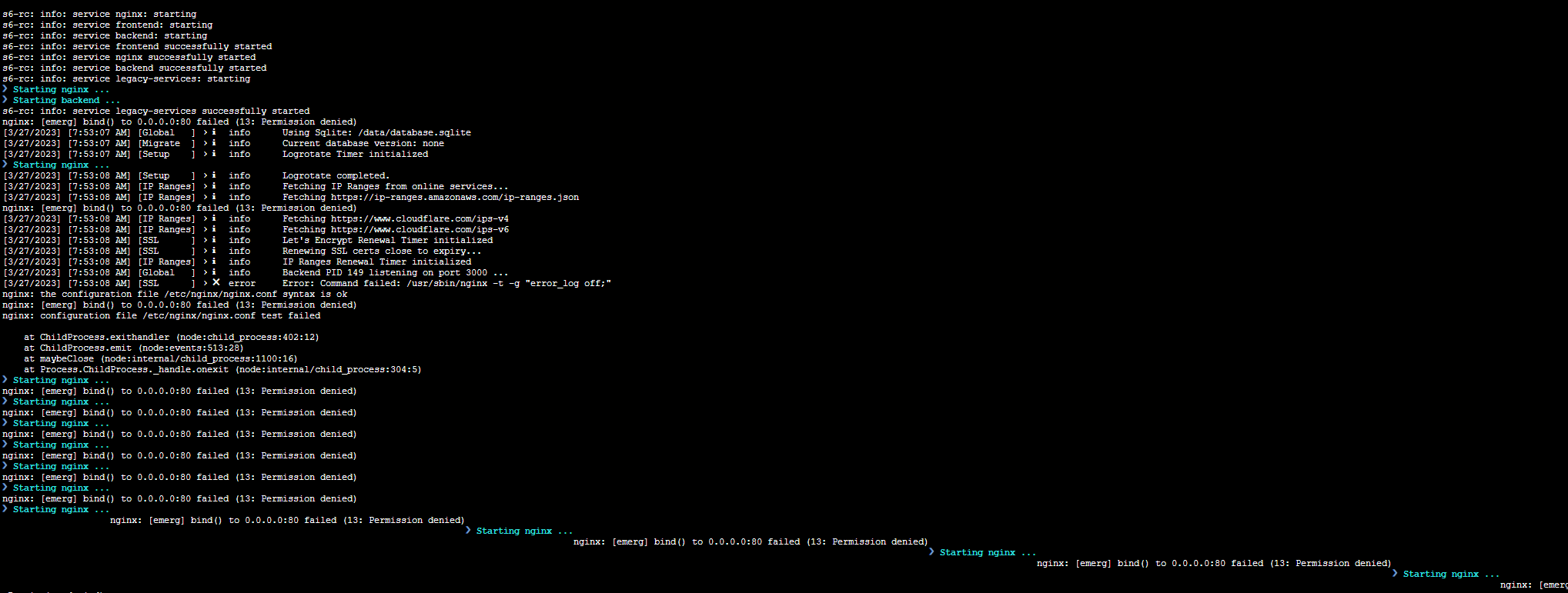
when I upgrade to the latest "2.10.0" I got

nginx: [emerg] bind() to 0.0.0.0:80 failed (13: Permission denied)

Nginx Proxy Manager Version

To Reproduce
Run docker with option "network_mode: host"

Expected behavior

Screenshots
image

Operating System
QNAP NAS

Additional context

Originally created by @maz1987in on GitHub (Mar 27, 2023). Original GitHub issue: https://github.com/NginxProxyManager/nginx-proxy-manager/issues/2750 **Checklist** - Have you pulled and found the error with `jc21/nginx-proxy-manager:latest` docker image? - Yes - Are you sure you're not using someone else's docker image? - Yes - Have you searched for similar issues (both open and closed)? - Yes **Describe the bug** <!-- A clear and concise description of what the bug is. --> when I upgrade to the latest "2.10.0" I got ``` nginx: [emerg] bind() to 0.0.0.0:80 failed (13: Permission denied) ``` **Nginx Proxy Manager Version** <!-- What version of Nginx Proxy Manager is reported on the login page? --> **To Reproduce** Run docker with option "network_mode: host" **Expected behavior** <!-- A clear and concise description of what you expected to happen. --> **Screenshots** ![image](https://user-images.githubusercontent.com/17972936/227838868-0438bb10-67c2-4b96-8e5d-38451d3948b2.png) **Operating System** QNAP NAS **Additional context** <!-- Add any other context about the problem here, docker version, browser version, logs if applicable to the problem. Too much info is better than too little. -->
Author
Owner

@pmoon00 commented on GitHub (Mar 27, 2023):

Can confirm I'm seeing the exact same issue with the same configuration. Have rolled back to 2.9.22 to temporarily resolve the issue.

<!-- gh-comment-id:1484480755 --> @pmoon00 commented on GitHub (Mar 27, 2023): Can confirm I'm seeing the exact same issue with the same configuration. Have rolled back to 2.9.22 to temporarily resolve the issue.
Author
Owner

@kilrah commented on GitHub (Mar 27, 2023):

Same on Unraid with Host network.

<!-- gh-comment-id:1484485145 --> @kilrah commented on GitHub (Mar 27, 2023): Same on Unraid with Host network.
Author
Owner

@hdavid0510 commented on GitHub (Mar 27, 2023):

Can confirm, exact same issue. I also reverted back to 2.9.22.

(edit) Changed host network to bridge, to bypass the issue. No other configuration changed. Since NPM config I'm using does not serve high load, I'm going to stick with bridge network for now.

<!-- gh-comment-id:1484497671 --> @hdavid0510 commented on GitHub (Mar 27, 2023): Can confirm, exact same issue. I also reverted back to 2.9.22. (edit) Changed host network to bridge, to bypass the issue. No other configuration changed. Since NPM config I'm using does not serve high load, I'm going to stick with bridge network for now.
Author
Owner

@jsuelwald commented on GitHub (Mar 27, 2023):

I've got the same problem since the update

<!-- gh-comment-id:1484593094 --> @jsuelwald commented on GitHub (Mar 27, 2023): I've got the same problem since the update
Author
Owner

@psychogun commented on GitHub (Mar 27, 2023):

Same. Using podman on Rocky Linux.

<!-- gh-comment-id:1484633036 --> @psychogun commented on GitHub (Mar 27, 2023): Same. Using podman on Rocky Linux.
Author
Owner

@kahn2k commented on GitHub (Mar 27, 2023):

Same problem running docker on Synology, with portainer and watchtower.

Have been on bridge network without problems before this update.

Reverted back to 2.9.22 and problem resolved.

<!-- gh-comment-id:1484669596 --> @kahn2k commented on GitHub (Mar 27, 2023): Same problem running docker on Synology, with portainer and watchtower. Have been on bridge network without problems before this update. Reverted back to 2.9.22 and problem resolved.
Author
Owner

@functionaldude commented on GitHub (Mar 27, 2023):

Same issue running docker on Synology, DSM 7.1.1-42962
The container is in a bridge network

<!-- gh-comment-id:1484761654 --> @functionaldude commented on GitHub (Mar 27, 2023): Same issue running docker on Synology, DSM 7.1.1-42962 The container is in a bridge network
Author
Owner

@wzzrd commented on GitHub (Mar 27, 2023):

Yup, same: running with podman on RHEL9

<!-- gh-comment-id:1484764069 --> @wzzrd commented on GitHub (Mar 27, 2023): Yup, same: running with podman on RHEL9
Author
Owner

@azchoi commented on GitHub (Mar 27, 2023):

Same here!!!!

[Synology DSM 7.1] npm docker log
nginx: [emerg] bind() to 0.0.0.0:80 failed (13: Permission denied)

<!-- gh-comment-id:1484780553 --> @azchoi commented on GitHub (Mar 27, 2023): Same here!!!! [Synology DSM 7.1] npm docker log nginx: [emerg] bind() to 0.0.0.0:80 failed (13: Permission denied)
Author
Owner

@steindorarnar commented on GitHub (Mar 27, 2023):

Same here, reverted to 2.9.22
Synology, docker, portainer, watchtower.

nginx: [emerg] bind() to 0.0.0.0:80 failed (13: Permission denied)

<!-- gh-comment-id:1484963070 --> @steindorarnar commented on GitHub (Mar 27, 2023): Same here, reverted to 2.9.22 Synology, docker, portainer, watchtower. nginx: [emerg] bind() to 0.0.0.0:80 failed (13: Permission denied)
Author
Owner

@zsmbrvr commented on GitHub (Mar 27, 2023):

I used

app:
  image: 'jc21/nginx-proxy-manager:2.9.22'

to revert to 2.9.22.

<!-- gh-comment-id:1485025293 --> @zsmbrvr commented on GitHub (Mar 27, 2023): I used ``` app: image: 'jc21/nginx-proxy-manager:2.9.22' ``` to revert to 2.9.22.
Author
Owner

@stephanvierkant commented on GitHub (Mar 27, 2023):

Please don't comment with just 'same here!'. I think it's clear that there is an issue with the latest release.

<!-- gh-comment-id:1485048686 --> @stephanvierkant commented on GitHub (Mar 27, 2023): Please don't comment with just 'same here!'. I think it's clear that there is an issue with the latest release.
Author
Owner

@CelticWebSolutions commented on GitHub (Mar 27, 2023):

Same issue here running on Synology with bridge networking. Unfortunately I spent a long time attempting to debug why it coudn’t bind to the port. Stop the container and port 80 became free, start the container at the port is in use via docker-proxy but NPM fails to bind to it.

After deleting everything and attempting to start again, I found it was still the same, permission denied when binding the port. Checked and spotted there’d been a recent update,

Rolling back to 2.9.22 fixes the issue For the time being.

Just realised @stephanvierkant had already mentioned using older release as I had :)

<!-- gh-comment-id:1485203991 --> @CelticWebSolutions commented on GitHub (Mar 27, 2023): Same issue here running on Synology with bridge networking. Unfortunately I spent a long time attempting to debug why it coudn’t bind to the port. Stop the container and port 80 became free, start the container at the port is in use via docker-proxy but NPM fails to bind to it. After deleting everything and attempting to start again, I found it was still the same, permission denied when binding the port. Checked and spotted there’d been a recent update, Rolling back to 2.9.22 fixes the issue For the time being. Just realised @stephanvierkant had already mentioned using older release as I had :)
Author
Owner

@Candinya commented on GitHub (Mar 27, 2023):

It seems that since v2.10.0 the nginx is ran by npmuser rather than default (root maybe?), whom might don't have sufficient permissions to listen on lower ports like 80 & 443. Not sure if this is the cause. 🤔
See full changelogs here: https://github.com/NginxProxyManager/nginx-proxy-manager/compare/v2.9.22...v2.10.0

<!-- gh-comment-id:1485393055 --> @Candinya commented on GitHub (Mar 27, 2023): It seems that since v2.10.0 the nginx is ran by `npmuser` rather than default (root maybe?), whom might don't have sufficient permissions to listen on lower ports like 80 & 443. Not sure if this is the cause. 🤔 See full changelogs here: https://github.com/NginxProxyManager/nginx-proxy-manager/compare/v2.9.22...v2.10.0
Author
Owner

@florisdipt commented on GitHub (Mar 27, 2023):

Same isue here;running inside proxmox lcx container. my docker compose:

version: "3"
services:
  app:
    image: 'jc21/nginx-proxy-manager:latest'
    restart: unless-stopped
    network_mode: host
    volumes:
      - ./data:/data
      - ./letsencrypt:/etc/letsencrypt
  watchtower:
    container_name: watchtower
    image: containrrr/watchtower:latest
    restart: unless-stopped
    volumes:
      - /var/run/docker.sock:/var/run/docker.sock

<!-- gh-comment-id:1485420378 --> @florisdipt commented on GitHub (Mar 27, 2023): Same isue here;running inside proxmox lcx container. my docker compose: ``` version: "3" services: app: image: 'jc21/nginx-proxy-manager:latest' restart: unless-stopped network_mode: host volumes: - ./data:/data - ./letsencrypt:/etc/letsencrypt watchtower: container_name: watchtower image: containrrr/watchtower:latest restart: unless-stopped volumes: - /var/run/docker.sock:/var/run/docker.sock ```
Author
Owner

@redtripleAAA commented on GitHub (Mar 28, 2023):

Would be good to understand what causes the issue.

Same here with Synology DSM, running latest or 2 same issue.

But running image: 'jc21/nginx-proxy-manager:2.9.22' fixed the issue for now

<!-- gh-comment-id:1486219566 --> @redtripleAAA commented on GitHub (Mar 28, 2023): Would be good to understand what causes the issue. Same here with Synology DSM, running latest or 2 same issue. But running image: `'jc21/nginx-proxy-manager:2.9.22'` fixed the issue for now
Author
Owner

@zandhaas commented on GitHub (Mar 28, 2023):

I had this same issue when I tried to install the beta version of the 3.0. I did try to add the PUID and GUID of root but that did not solve the issue for version 3.
But then I thought this is still development so.........

But now I have this same issue with version 2.10
I'm running nginx_pm on my Synology.

<!-- gh-comment-id:1486246499 --> @zandhaas commented on GitHub (Mar 28, 2023): I had this same issue when I tried to install the beta version of the 3.0. I did try to add the PUID and GUID of root but that did not solve the issue for version 3. But then I thought this is still development so......... But now I have this same issue with version 2.10 I'm running nginx_pm on my Synology.
Author
Owner

@907739769 commented on GitHub (Mar 28, 2023):

problem solved please let me know thanks.

<!-- gh-comment-id:1486264566 --> @907739769 commented on GitHub (Mar 28, 2023): problem solved please let me know thanks.
Author
Owner

@zandhaas commented on GitHub (Mar 28, 2023):

Please don't comment with just 'same here!'. I think it's clear that there is an issue with the latest release.

Perhaps you or someone else can give us an update on what is going on to solve this issue instead of giving us Thumb's down's
Something like: " we see there is an error and we are looking into it. We expect to have a solutions in xx days"

And by the way: I think I added some extra information by telling the communicty that I see this exact same error in the new version 3 NGINX-PM

<!-- gh-comment-id:1486264943 --> @zandhaas commented on GitHub (Mar 28, 2023): > Please don't comment with just 'same here!'. I think it's clear that there is an issue with the latest release. Perhaps you or someone else can give us an update on what is going on to solve this issue instead of giving us Thumb's down's Something like: " we see there is an error and we are looking into it. We expect to have a solutions in xx days" And by the way: I think I added some extra information by telling the communicty that I see this exact same error in the new version 3 NGINX-PM
Author
Owner

@evanlabs commented on GitHub (Mar 28, 2023):

I tried to test on CentOS 7 and Debian 10/11, this problem only happens on CentOS 7 system, not on Debian.

Maybe because of npmuser permissions, just guessing.

source: docker/rootfs/etc/s6-overlay/s6-rc.d/prepare/10-npmuser.sh

<!-- gh-comment-id:1486315789 --> @evanlabs commented on GitHub (Mar 28, 2023): I tried to test on CentOS 7 and Debian 10/11, this problem only happens on CentOS 7 system, not on Debian. Maybe because of npmuser permissions, just guessing. source: docker/rootfs/etc/s6-overlay/s6-rc.d/prepare/10-npmuser.sh
Author
Owner

@florisdipt commented on GitHub (Mar 28, 2023):

I tried to test on CentOS 7 and Debian 10/11, this problem only happens on CentOS 7 system, not on Debian.

Are you talking about running directly inside the system without docker? Because i'm running debian + docker and still encountered the issue.

<!-- gh-comment-id:1486470417 --> @florisdipt commented on GitHub (Mar 28, 2023): > I tried to test on CentOS 7 and Debian 10/11, this problem only happens on CentOS 7 system, not on Debian. Are you talking about running directly inside the system without docker? Because i'm running debian + docker and still encountered the issue.
Author
Owner

@evanlabs commented on GitHub (Mar 28, 2023):

Sorry, did not provide complete information.
I use docker to do npm testing on centos and debian.

<!-- gh-comment-id:1486516441 --> @evanlabs commented on GitHub (Mar 28, 2023): > Sorry, did not provide complete information. I use docker to do npm testing on centos and debian.
Author
Owner

@Jojonintendo commented on GitHub (Mar 28, 2023):

The release notes mention this:

Adds support to run processes as a user/group, defined with PUID and PGID environment variables

    Detects if image is run with a user in docker command and fails if so

Users running 2.10.0 won't be able to run this container rootless apparently (as I've been doint with podman). Otherwise this message appears:

[user]$ podman logs -f nginx-test 
s6-rc: info: service s6rc-oneshot-runner: starting
s6-rc: info: service s6rc-oneshot-runner successfully started
s6-rc: info: service fix-attrs: starting
s6-rc: info: service fix-attrs successfully started
s6-rc: info: service legacy-cont-init: starting
s6-rc: info: service legacy-cont-init successfully started
s6-rc: info: service prepare: starting
--------------------------------------
ERROR: This docker container must be run as root, do not specify a user.
You can specify PUID and PGID env vars to run processes as that user and group after initialization.
--------------------------------------

And the container stops. Problem is, even when specifying PUID and PGID, the container shows the errors reported in this thread.

Maybe I don't understand well what the new configuration should be, based on the release notes. If running the container as root is now a requisite, that would be a shame for us rootless users.

Any pointers would be greatly appreciated.

<!-- gh-comment-id:1486517871 --> @Jojonintendo commented on GitHub (Mar 28, 2023): The release notes mention this: ``` Adds support to run processes as a user/group, defined with PUID and PGID environment variables Detects if image is run with a user in docker command and fails if so ``` Users running 2.10.0 won't be able to run this container rootless apparently (as I've been doint with podman). Otherwise this message appears: ``` [user]$ podman logs -f nginx-test s6-rc: info: service s6rc-oneshot-runner: starting s6-rc: info: service s6rc-oneshot-runner successfully started s6-rc: info: service fix-attrs: starting s6-rc: info: service fix-attrs successfully started s6-rc: info: service legacy-cont-init: starting s6-rc: info: service legacy-cont-init successfully started s6-rc: info: service prepare: starting -------------------------------------- ERROR: This docker container must be run as root, do not specify a user. You can specify PUID and PGID env vars to run processes as that user and group after initialization. -------------------------------------- ``` And the container stops. Problem is, even when specifying PUID and PGID, the container shows the errors reported in this thread. Maybe I don't understand well what the new configuration should be, based on the release notes. If running the container as root is now a requisite, that would be a shame for us rootless users. Any pointers would be greatly appreciated.
Author
Owner

@evanlabs commented on GitHub (Mar 28, 2023):

I tried to test on CentOS 7 and Debian 10/11, this problem only happens on CentOS 7 system, not on Debian.

Are you talking about running directly inside the system without docker? Because i'm running debian + docker and still encountered the issue.

I tried to modify the following s6 startup script, but it still didn't solve the problem

source: docker/rootfs/etc/s6-overlay/s6-rc.d/nginx/run
'exec s6-setuidgid npmuser nginx' => 'exec nginx'

<!-- gh-comment-id:1486520705 --> @evanlabs commented on GitHub (Mar 28, 2023): > > I tried to test on CentOS 7 and Debian 10/11, this problem only happens on CentOS 7 system, not on Debian. > > Are you talking about running directly inside the system without docker? Because i'm running debian + docker and still encountered the issue. I tried to modify the following s6 startup script, but it still didn't solve the problem source: docker/rootfs/etc/s6-overlay/s6-rc.d/nginx/run 'exec s6-setuidgid npmuser nginx' => 'exec nginx'
Author
Owner

@BobWs commented on GitHub (Mar 28, 2023):

Same problem running docker on Synology DSM 7.1.1 with Portainer.
Reverted back to 2.9.22 and problem resolved.

<!-- gh-comment-id:1486642816 --> @BobWs commented on GitHub (Mar 28, 2023): Same problem running docker on Synology DSM 7.1.1 with Portainer. Reverted back to 2.9.22 and problem resolved.
Author
Owner

@Nazgile94 commented on GitHub (Mar 28, 2023):

nginx: [emerg] bind() to 0.0.0.0:80 failed (13: Permission denied)
same ubuntu 22.x

<!-- gh-comment-id:1487363490 --> @Nazgile94 commented on GitHub (Mar 28, 2023): nginx: [emerg] bind() to 0.0.0.0:80 failed (13: Permission denied) same ubuntu 22.x
Author
Owner

@gabeosx commented on GitHub (Mar 29, 2023):

Same issue

  • Synology DS918+
  • DSM 7.1.1-42962 Update 4
<!-- gh-comment-id:1487811886 --> @gabeosx commented on GitHub (Mar 29, 2023): Same issue - Synology DS918+ - DSM 7.1.1-42962 Update 4
Author
Owner

@Trolann commented on GitHub (Mar 29, 2023):

This seems to be expected behavior. @maz1987in @Jojonintendo @Candinya @evanlabs

Release notes for 2.9.22 state:
https://github.com/NginxProxyManager/nginx-proxy-manager/releases

v2.9.22

⚠️ The next release v2.10.0 will have changes that may adversely affect you, please pin your docker tag to 2.9.22 and upgrade after you conduct a full backup.

and

v2.10.0

⚠️ This release has changes that may adversely affect you, please pin your docker tag to the previous release 2.9.22 and upgrade after you conduct a full backup.

But I can't find anything about how to prevent this 'adverse affect'.

Copied my comment above from #2761 which appears to be the duplicate

<!-- gh-comment-id:1487966264 --> @Trolann commented on GitHub (Mar 29, 2023): This seems to be expected behavior. @maz1987in @Jojonintendo @Candinya @evanlabs Release notes for 2.9.22 state: https://github.com/NginxProxyManager/nginx-proxy-manager/releases > ### [v2.9.22](https://github.com/NginxProxyManager/nginx-proxy-manager/releases/tag/v2.9.22) > > **⚠️ The next release v2.10.0 will have changes that may adversely affect you, please pin your docker tag to 2.9.22 and upgrade after you conduct a full backup.** and > ### [v2.10.0](https://github.com/NginxProxyManager/nginx-proxy-manager/releases/tag/v2.10.0) > > **⚠️ This release has changes that may adversely affect you, please pin your docker tag to the previous release 2.9.22 and upgrade after you conduct a full backup.** But I can't find anything about how to prevent this 'adverse affect'. Copied my comment above from #2761 which appears to be the duplicate
Author
Owner

@Jojonintendo commented on GitHub (Mar 29, 2023):

Same issue with the new image 2.10.1
I've tested the same as my previous comment, with PUID and PGID, and without them. The issue persists.
I've also tried running the container with sudo, to no avail. So it doesn't seem to be only related to rootless containers.

<!-- gh-comment-id:1487988113 --> @Jojonintendo commented on GitHub (Mar 29, 2023): Same issue with the new image 2.10.1 I've tested the same as my previous comment, with PUID and PGID, and without them. The issue persists. I've also tried running the container with sudo, to no avail. So it doesn't seem to be *only* related to rootless containers.
Author
Owner

@azchoi commented on GitHub (Mar 29, 2023):

Same issue with the new image 2.10.1 I've tested the same as my previous comment, with PUID and PGID, and without them. The issue persists. I've also tried running the container with sudo, to no avail. So it doesn't seem to be only related to rootless containers.

Right, I also tried to install 2.10.1 to Synology 7.1.1, the result was same as before. Only 2.9.22 is the best way to me.

<!-- gh-comment-id:1488192270 --> @azchoi commented on GitHub (Mar 29, 2023): > Same issue with the new image 2.10.1 I've tested the same as my previous comment, with PUID and PGID, and without them. The issue persists. I've also tried running the container with sudo, to no avail. So it doesn't seem to be _only_ related to rootless containers. Right, I also tried to install 2.10.1 to Synology 7.1.1, the result was same as before. Only 2.9.22 is the best way to me.
Author
Owner

@jurjen74 commented on GitHub (Mar 29, 2023):

Same here on Synology. Latest (2.10.1) is not working. Rolled back to 2.9.22

<!-- gh-comment-id:1488297433 --> @jurjen74 commented on GitHub (Mar 29, 2023): Same here on Synology. Latest (2.10.1) is not working. Rolled back to 2.9.22
Author
Owner

@nemccarthy commented on GitHub (Mar 29, 2023):

Having the same issue with this. I suspect the issue is related to the s6 change and this line in nginx config https://github.com/NginxProxyManager/nginx-proxy-manager/compare/v2.9.22...v2.10.0#diff-45b340b2ff6f4d041ae1aad210aaa0cd31b41139574725ef971a38fab076caa4L4

The issue is not just the NET_BIND_SERVICE capability missing from the docker run, its a simple issue with the container itself. A non-root user cannot bind to ports less than 1024. This docker file should give the new npmuser permissions to do this.

If you are seeing nginx: [emerg] bind() to 0.0.0.0:80 failed (13: Permission denied) I have found the following to work...

Temporary solution (without rollback):

  1. Atach an interactive bash shell to your running nginx proxy manager container. In Synology if you go to Docker > Containers > double click the NPM container to view details > Terminal > Create > type bash > Ok
  2. update apt: apt update
  3. install setcap via libcap2-bin:apt install libcap2-bin
  4. allow non-root users to bind to ports <1025: setcap 'cap_net_bind_service=+ep' /usr/sbin/nginx

You should now see nginx proxy manager successfully start! No need to restart the container. The issue with this fix is that if you have something like watchtower running you will lose this on next update until its fixed in the offical docker image.

Good hygine would also be to add the PUID and PGID env vars to a non-root user that lives on your system.

Suggested Proper Fix:

Note that the above is NOT reccomended as a permanent fix, and shouldn't be raised as a PR in the Dockerfile (as it adds portability and security issues - e.g. PSP violations in a locked down k8s cluster).

IMHO, the proper fix will be to move all NPM binds to a different set of ports like 8080... This is probably a bigger change given the config generation. One can bind 80 on their network interfaces to 8080 in the container (i.e. docker run -p 80:8080 ...) so you get the behaviour you need... This avoids the need for elevated privileges, since non-root users can bind to ports higher than 1024 and the only way I know how to get this working...

For reference on Synology:
image

<!-- gh-comment-id:1488381509 --> @nemccarthy commented on GitHub (Mar 29, 2023): Having the same issue with this. I suspect the issue is related to the s6 change and this line in nginx config https://github.com/NginxProxyManager/nginx-proxy-manager/compare/v2.9.22...v2.10.0#diff-45b340b2ff6f4d041ae1aad210aaa0cd31b41139574725ef971a38fab076caa4L4 The issue is not just the `NET_BIND_SERVICE` capability missing from the docker run, its a simple issue with the container itself. A non-root user cannot bind to ports less than `1024`. This docker file should give the new `npmuser` permissions to do this. If you are seeing `nginx: [emerg] bind() to 0.0.0.0:80 failed (13: Permission denied)` I have found the following to work... **Temporary solution (without rollback):** 1. Atach an interactive bash shell to your running nginx proxy manager container. In Synology if you go to Docker > Containers > double click the NPM container to view details > Terminal > Create > type `bash` > Ok 2. update apt: `apt update` 3. install setcap via libcap2-bin:`apt install libcap2-bin` 4. allow non-root users to bind to ports <1025: `setcap 'cap_net_bind_service=+ep' /usr/sbin/nginx` You should now see nginx proxy manager successfully start! No need to restart the container. The issue with this fix is that if you have something like watchtower running you will lose this on next update until its fixed in the offical docker image. Good hygine would also be to add the `PUID` and `PGID` env vars to a non-root user that lives on your system. **Suggested Proper Fix:** Note that the above is NOT reccomended as a permanent fix, and shouldn't be raised as a PR in the Dockerfile (as it adds portability and security issues - e.g. PSP violations in a locked down k8s cluster). IMHO, the proper fix will be to move all NPM binds to a different set of ports like 8080... This is probably a bigger change given the config generation. One can bind 80 on their network interfaces to 8080 in the container (i.e. `docker run -p 80:8080 ...`) so you get the behaviour you need... This avoids the need for elevated privileges, since non-root users can bind to ports higher than 1024 and the only way I know how to get this working... For reference on Synology: ![image](https://user-images.githubusercontent.com/8044836/228513515-fd01e99e-34d5-4cbf-878f-a21f1d63fcb3.png)
Author
Owner

@florisdipt commented on GitHub (Mar 29, 2023):

This seems to be expected behavior. @maz1987in @Jojonintendo @Candinya @evanlabs

Release notes for 2.9.22 state: https://github.com/NginxProxyManager/nginx-proxy-manager/releases

v2.9.22

⚠️ The next release v2.10.0 will have changes that may adversely affect you, please pin your docker tag to 2.9.22 and upgrade after you conduct a full backup.

and

v2.10.0

⚠️ This release has changes that may adversely affect you, please pin your docker tag to the previous release 2.9.22 and upgrade after you conduct a full backup.

But I can't find anything about how to prevent this 'adverse affect'.

Copied my comment above from #2761 which appears to be the duplicate

If Semantic Versioning is respected, this shouldn't be expected behaviour as this is a minor version not a major therefor it shouldn't break compatibility.

Obviously backing up al configuration before changing versions is a good idea, as one could never have enough backups only too little hard drive space ;)

On Another note I see a bugfix version for 2.10 was issued 11 hours ago. But replies so far in this issue seem to indicate that is not a fix for this issue

<!-- gh-comment-id:1488384382 --> @florisdipt commented on GitHub (Mar 29, 2023): > This seems to be expected behavior. @maz1987in @Jojonintendo @Candinya @evanlabs > > Release notes for 2.9.22 state: https://github.com/NginxProxyManager/nginx-proxy-manager/releases > > > ### [v2.9.22](https://github.com/NginxProxyManager/nginx-proxy-manager/releases/tag/v2.9.22) > > **⚠️ The next release v2.10.0 will have changes that may adversely affect you, please pin your docker tag to 2.9.22 and upgrade after you conduct a full backup.** > > and > > > ### [v2.10.0](https://github.com/NginxProxyManager/nginx-proxy-manager/releases/tag/v2.10.0) > > **⚠️ This release has changes that may adversely affect you, please pin your docker tag to the previous release 2.9.22 and upgrade after you conduct a full backup.** > > But I can't find anything about how to prevent this 'adverse affect'. > > Copied my comment above from #2761 which appears to be the duplicate If [Semantic Versioning](https://semver.org/) is respected, this shouldn't be expected behaviour as this is a minor version not a major therefor it shouldn't break compatibility. Obviously backing up al configuration before changing versions is a good idea, as one could never have enough backups only too little hard drive space ;) On Another note I see a bugfix version for 2.10 was issued 11 hours ago. But replies so far in this issue seem to indicate that is not a fix for this issue
Author
Owner

@TarekMSayed commented on GitHub (Mar 29, 2023):

2.9.22 works for me too but I noticed the versions latest, 2, or 2.10 creates files with UID=GID=911 while 2.9.22 use root user
image
image

<!-- gh-comment-id:1488495659 --> @TarekMSayed commented on GitHub (Mar 29, 2023): 2.9.22 works for me too but I noticed the versions latest, 2, or 2.10 creates files with UID=GID=911 while 2.9.22 use root user ![image](https://user-images.githubusercontent.com/24387820/228533493-3c2d2dfb-c28e-4425-ba61-30f6c6ccebab.png) ![image](https://user-images.githubusercontent.com/24387820/228533732-c0dec84a-4b86-4d3f-b0f1-bb411a2ba949.png)
Author
Owner

@Trolann commented on GitHub (Mar 29, 2023):

@florisdipt completely agree, and there should be release notes clearly showing how to correct it. I gave the installation instructions a glance and couldn't see updates there but in off on vacation today so couldn't dig in.

<!-- gh-comment-id:1488616384 --> @Trolann commented on GitHub (Mar 29, 2023): @florisdipt completely agree, and there should be release notes clearly showing how to correct it. I gave the installation instructions a glance and couldn't see updates there but in off on vacation today so couldn't dig in.
Author
Owner

@coalfield commented on GitHub (Mar 30, 2023):

Good hygine would also be to add the PUID and PGID env vars to a non-root user that lives on your system.

thanks for your fix it works and greatly appreciated!! Do you know what permissions this use would need for synology, is it worth creating a specific user for this, and would be keen to know the minimal permissions they would need to allow them to be used with the container?

<!-- gh-comment-id:1489925540 --> @coalfield commented on GitHub (Mar 30, 2023): > Good hygine would also be to add the `PUID` and `PGID` env vars to a non-root user that lives on your system. thanks for your fix it works and greatly appreciated!! Do you know what permissions this use would need for synology, is it worth creating a specific user for this, and would be keen to know the minimal permissions they would need to allow them to be used with the container?
Author
Owner

@nemccarthy commented on GitHub (Mar 30, 2023):

Good hygine would also be to add the PUID and PGID env vars to a non-root user that lives on your system.

thanks for your fix it works and greatly appreciated!! Do you know what permissions this use would need for synology, is it worth creating a specific user for this, and would be keen to know the minimal permissions they would need to allow them to be used with the container?

PUID (Process User ID) and PGID (Process Group ID) so as you know they are environment variables used in Docker containers to set the user and group IDs for the container's processes. They help to manage file and folder permissions for the data shared between the host system and the container - in this case the data folder and cert folder volume mounts for NPM.

I generally create a basic user with no login via the control panel in the Synology NAS that only has access to a volume for my docker containers. I create a user for each domain set of containers say user docker-npm, I think give this user ownership permissions to a docker-npm folder in the NAS where I want to mount volumes in the container.

Once you create a new user, to get the User ID and Group ID on the NAS the easiest way is to create a Task from control panel and add the following command to the steps cat /etc/passwd you should then be able to manually run the task by hitting Run on the list of tasks and view the output (Action > View Result) which show you the user name you create along with the UID and GID.
image

<!-- gh-comment-id:1490332342 --> @nemccarthy commented on GitHub (Mar 30, 2023): > > Good hygine would also be to add the `PUID` and `PGID` env vars to a non-root user that lives on your system. > > thanks for your fix it works and greatly appreciated!! Do you know what permissions this use would need for synology, is it worth creating a specific user for this, and would be keen to know the minimal permissions they would need to allow them to be used with the container? PUID (Process User ID) and PGID (Process Group ID) so as you know they are environment variables used in Docker containers to set the user and group IDs for the container's processes. They help to manage file and folder permissions for the data shared between the host system and the container - in this case the data folder and cert folder volume mounts for NPM. I generally create a basic user with no login via the control panel in the Synology NAS that only has access to a volume for my docker containers. I create a user for each domain set of containers say user `docker-npm`, I think give this user ownership permissions to a docker-npm folder in the NAS where I want to mount volumes in the container. Once you create a new user, to get the User ID and Group ID on the NAS the easiest way is to create a Task from control panel and add the following command to the steps `cat /etc/passwd` you should then be able to manually run the task by hitting Run on the list of tasks and view the output (Action > View Result) which show you the user name you create along with the UID and GID. <img width="544" alt="image" src="https://user-images.githubusercontent.com/8044836/228854068-b87cb65a-348a-4542-90d5-0b042fc96d31.png">
Author
Owner

@apriliars3 commented on GitHub (Mar 30, 2023):

Having the same issue with this. I suspect the issue is related to the s6 change and this line in nginx config v2.9.22...v2.10.0#diff-45b340b2ff6f4d041ae1aad210aaa0cd31b41139574725ef971a38fab076caa4L4

The issue is not just the NET_BIND_SERVICE capability missing from the docker run, its a simple issue with the container itself. A non-root user cannot bind to ports less than 1024. This docker file should give the new npmuser permissions to do this.

If you are seeing nginx: [emerg] bind() to 0.0.0.0:80 failed (13: Permission denied) I have found the following to work...

Temporary solution (without rollback):

  1. Atach an interactive bash shell to your running nginx proxy manager container. In Synology if you go to Docker > Containers > double click the NPM container to view details > Terminal > Create > type bash > Ok
  2. update apt: apt update
  3. install setcap via libcap2-bin:apt install libcap2-bin
  4. allow non-root users to bind to ports <1025: setcap 'cap_net_bind_service=+ep' /usr/sbin/nginx

You should now see nginx proxy manager successfully start! No need to restart the container. The issue with this fix is that if you have something like watchtower running you will lose this on next update until its fixed in the offical docker image.

Good hygine would also be to add the PUID and PGID env vars to a non-root user that lives on your system.

Suggested Proper Fix:

Note that the above is NOT reccomended as a permanent fix, and shouldn't be raised as a PR in the Dockerfile (as it adds portability and security issues - e.g. PSP violations in a locked down k8s cluster).

IMHO, the proper fix will be to move all NPM binds to a different set of ports like 8080... This is probably a bigger change given the config generation. One can bind 80 on their network interfaces to 8080 in the container (i.e. docker run -p 80:8080 ...) so you get the behaviour you need... This avoids the need for elevated privileges, since non-root users can bind to ports higher than 1024 and the only way I know how to get this working...

For reference on Synology: image

Works
I have PUID and PGID with my user on docker. Why not works with this?

docker run -d --name=nginx_proxy_manager
-p 8880:80
-p 81:81
-p 4443:443
-e PUID=1026
-e PGID=100
-e TZ=Europe/Madrid
-v /volume1/docker/npm/config.json:/app/config/production.json
-v /volume1/docker/npm/data:/data
-v /volume1/docker/npm/letsencrypt:/etc/letsencrypt
--restart always
jc21/nginx-proxy-manager

<!-- gh-comment-id:1490894119 --> @apriliars3 commented on GitHub (Mar 30, 2023): > Having the same issue with this. I suspect the issue is related to the s6 change and this line in nginx config [v2.9.22...v2.10.0#diff-45b340b2ff6f4d041ae1aad210aaa0cd31b41139574725ef971a38fab076caa4L4](https://github.com/NginxProxyManager/nginx-proxy-manager/compare/v2.9.22...v2.10.0#diff-45b340b2ff6f4d041ae1aad210aaa0cd31b41139574725ef971a38fab076caa4L4) > > The issue is not just the `NET_BIND_SERVICE` capability missing from the docker run, its a simple issue with the container itself. A non-root user cannot bind to ports less than `1024`. This docker file should give the new `npmuser` permissions to do this. > > If you are seeing `nginx: [emerg] bind() to 0.0.0.0:80 failed (13: Permission denied)` I have found the following to work... > > **Temporary solution (without rollback):** > > 1. Atach an interactive bash shell to your running nginx proxy manager container. In Synology if you go to Docker > Containers > double click the NPM container to view details > Terminal > Create > type `bash` > Ok > 2. update apt: `apt update` > 3. install setcap via libcap2-bin:`apt install libcap2-bin` > 4. allow non-root users to bind to ports <1025: `setcap 'cap_net_bind_service=+ep' /usr/sbin/nginx` > > You should now see nginx proxy manager successfully start! No need to restart the container. The issue with this fix is that if you have something like watchtower running you will lose this on next update until its fixed in the offical docker image. > > Good hygine would also be to add the `PUID` and `PGID` env vars to a non-root user that lives on your system. > > **Suggested Proper Fix:** > > Note that the above is NOT reccomended as a permanent fix, and shouldn't be raised as a PR in the Dockerfile (as it adds portability and security issues - e.g. PSP violations in a locked down k8s cluster). > > IMHO, the proper fix will be to move all NPM binds to a different set of ports like 8080... This is probably a bigger change given the config generation. One can bind 80 on their network interfaces to 8080 in the container (i.e. `docker run -p 80:8080 ...`) so you get the behaviour you need... This avoids the need for elevated privileges, since non-root users can bind to ports higher than 1024 and the only way I know how to get this working... > > For reference on Synology: ![image](https://user-images.githubusercontent.com/8044836/228513515-fd01e99e-34d5-4cbf-878f-a21f1d63fcb3.png) Works I have PUID and PGID with my user on docker. Why not works with this? docker run -d --name=nginx_proxy_manager \ -p 8880:80 \ -p 81:81 \ -p 4443:443 \ -e PUID=1026 \ -e PGID=100 \ -e TZ=Europe/Madrid \ -v /volume1/docker/npm/config.json:/app/config/production.json \ -v /volume1/docker/npm/data:/data \ -v /volume1/docker/npm/letsencrypt:/etc/letsencrypt \ --restart always \ jc21/nginx-proxy-manager
Author
Owner

@coalfield commented on GitHub (Mar 30, 2023):

I generally create a basic user with no login via the control panel in the Synology NAS that only has access to a volume for my docker containers. I create a user for each domain set of containers say user docker-npm, I think give this user ownership permissions to a docker-npm folder in the NAS where I want to mount volumes in the container.

Thanks that's good advice I have taken, although its functioning OK I am getting:

[3/30/2023] [11:46:27 PM] [SSL      ] › ✖  error     Error: Command failed: certbot renew --non-interactive --quiet --config "/etc/letsencrypt.ini" --work-dir "/tmp/letsencrypt-lib" --logs-dir "/tmp/letsencrypt-log" --preferred-challenges "dns,http" --disable-hook-validation  
The following error was encountered:
[Errno 13] Permission denied: '/tmp/letsencrypt-log/.certbot.lock'
Either run as root, or set --config-dir, --work-dir, and --logs-dir to writeable paths.
    at ChildProcess.exithandler (node:child_process:402:12)
    at ChildProcess.emit (node:events:513:28)
    at maybeClose (node:internal/child_process:1100:16)
    at Process.ChildProcess._handle.onexit (node:internal/child_process:304:5)

Didn't notice this error before do you know if there is a way to move the paths that cannot be accessed to within the writable docker folder for example?

<!-- gh-comment-id:1491068568 --> @coalfield commented on GitHub (Mar 30, 2023): > I generally create a basic user with no login via the control panel in the Synology NAS that only has access to a volume for my docker containers. I create a user for each domain set of containers say user `docker-npm`, I think give this user ownership permissions to a docker-npm folder in the NAS where I want to mount volumes in the container. Thanks that's good advice I have taken, although its functioning OK I am getting: ``` [3/30/2023] [11:46:27 PM] [SSL ] › ✖ error Error: Command failed: certbot renew --non-interactive --quiet --config "/etc/letsencrypt.ini" --work-dir "/tmp/letsencrypt-lib" --logs-dir "/tmp/letsencrypt-log" --preferred-challenges "dns,http" --disable-hook-validation The following error was encountered: [Errno 13] Permission denied: '/tmp/letsencrypt-log/.certbot.lock' Either run as root, or set --config-dir, --work-dir, and --logs-dir to writeable paths. at ChildProcess.exithandler (node:child_process:402:12) at ChildProcess.emit (node:events:513:28) at maybeClose (node:internal/child_process:1100:16) at Process.ChildProcess._handle.onexit (node:internal/child_process:304:5) ``` Didn't notice this error before do you know if there is a way to move the paths that cannot be accessed to within the writable docker folder for example?
Author
Owner

@evanlabs commented on GitHub (Mar 31, 2023):

This problem has been solved in the v2.10.2 version, and I tested the docker container on CentOS and Debian without any problems.

Thanks to the developer for fixing this issue quickly.

<!-- gh-comment-id:1491362962 --> @evanlabs commented on GitHub (Mar 31, 2023): This problem has been solved in the v2.10.2 version, and I tested the docker container on CentOS and Debian without any problems. Thanks to the developer for fixing this issue quickly.
Author
Owner

@ituri commented on GitHub (Mar 31, 2023):

What do I need to change on a system that has been working fine up until this recent bug? I'm already on v2.10.2 but it's not working yet.
Still getting this:

s6-rc: info: service s6rc-oneshot-runner: starting s6-rc: info: service s6rc-oneshot-runner successfully started s6-rc: info: service fix-attrs: starting s6-rc: info: service fix-attrs successfully started s6-rc: info: service legacy-cont-init: starting s6-rc: info: service legacy-cont-init successfully started s6-rc: info: service prepare: starting ❯ Configuring npmuser ... id: 'npmuser': no such user ❯ Checking paths ... ❯ Setting ownership ... s6-rc: fatal: timed out /run/s6/basedir/scripts/rc.init: warning: s6-rc failed to properly bring all the services up! Check your logs (in /run/uncaught-logs/current if you have in-container logging) for more information. s6-sudoc: fatal: unable to get exit status from server: Operation timed out

<!-- gh-comment-id:1491385039 --> @ituri commented on GitHub (Mar 31, 2023): What do I need to change on a system that has been working fine up until this recent bug? I'm already on v2.10.2 but it's not working yet. Still getting this: ` s6-rc: info: service s6rc-oneshot-runner: starting s6-rc: info: service s6rc-oneshot-runner successfully started s6-rc: info: service fix-attrs: starting s6-rc: info: service fix-attrs successfully started s6-rc: info: service legacy-cont-init: starting s6-rc: info: service legacy-cont-init successfully started s6-rc: info: service prepare: starting ❯ Configuring npmuser ... id: 'npmuser': no such user ❯ Checking paths ... ❯ Setting ownership ... s6-rc: fatal: timed out /run/s6/basedir/scripts/rc.init: warning: s6-rc failed to properly bring all the services up! Check your logs (in /run/uncaught-logs/current if you have in-container logging) for more information. s6-sudoc: fatal: unable to get exit status from server: Operation timed out `
Author
Owner

@zandhaas commented on GitHub (Mar 31, 2023):

I also have the same issue as @ituri has.

I running the nginx-pm on my Synology
Returned to v 2.9.22 again

<!-- gh-comment-id:1491414835 --> @zandhaas commented on GitHub (Mar 31, 2023): I also have the same issue as @ituri has. I running the nginx-pm on my Synology Returned to v 2.9.22 again
Author
Owner

@azchoi commented on GitHub (Mar 31, 2023):

I also have the same issue as @ituri has.

I running the nginx-pm on my Synology Returned to v 2.9.22 again

I've reinstall 2.10.2 to Synology 7.1.1 without PUID/PGID and issue has been solved.
Are you using PUID/PGID?

Here is my Log....


| \ | | _ | / |
| | | |) | |/| |
| |\ | __/| | | |
|
| _|| || |_|

User ID: 0
Group ID: 0

s6-rc: info: service prepare successfully started
s6-rc: info: service nginx: starting
s6-rc: info: service frontend: starting
s6-rc: info: service backend: starting
s6-rc: info: service nginx successfully started
s6-rc: info: service frontend successfully started
s6-rc: info: service backend successfully started
s6-rc: info: service legacy-services: starting
❯ Starting nginx ...
❯ Starting backend ...
s6-rc: info: service legacy-services successfully started

<!-- gh-comment-id:1491460019 --> @azchoi commented on GitHub (Mar 31, 2023): > I also have the same issue as @ituri has. > > I running the nginx-pm on my Synology Returned to v 2.9.22 again I've reinstall 2.10.2 to Synology 7.1.1 without PUID/PGID and issue has been solved. Are you using PUID/PGID? Here is my Log.... ------------------------------------- _ _ ____ __ __ | \ | | _ \| \/ | | \| | |_) | |\/| | | |\ | __/| | | | |_| \_|_| |_| |_| ------------------------------------- User ID: 0 Group ID: 0 ------------------------------------- s6-rc: info: service prepare successfully started s6-rc: info: service nginx: starting s6-rc: info: service frontend: starting s6-rc: info: service backend: starting s6-rc: info: service nginx successfully started s6-rc: info: service frontend successfully started s6-rc: info: service backend successfully started s6-rc: info: service legacy-services: starting ❯ Starting nginx ... ❯ Starting backend ... s6-rc: info: service legacy-services successfully started
Author
Owner

@zandhaas commented on GitHub (Mar 31, 2023):

I've reinstall 2.10.2 to synology 7.1.1 without PUID/PGID and issue has been solved. Are you using PUID/PGID?
No I do not use the PUID and GUID.

[3/31/2023] [9:54:38 AM] [Global ] › ℹ info Using MySQL configuration
❯ Starting nginx ...
nginx: [emerg] bind() to 0.0.0.0:80 failed (13: Permission denied)
❯ Starting nginx ...
nginx: [emerg] bind() to 0.0.0.0:80 failed (13: Permission denied)
❯ Starting nginx ...
[3/31/2023] [9:54:41 AM] [Migrate ] › ℹ info Current database version: 20211108145214
nginx: [emerg] bind() to 0.0.0.0:80 failed (13: Permission denied)
[3/31/2023] [9:54:41 AM] [Setup ] › ℹ info Logrotate Timer initialized
[3/31/2023] [9:54:41 AM] [Setup ] › ℹ info Logrotate completed.
[3/31/2023] [9:54:41 AM] [IP Ranges] › ℹ info Fetching IP Ranges from online services...
[3/31/2023] [9:54:41 AM] [IP Ranges] › ℹ info Fetching https://ip-ranges.amazonaws.com/ip-ranges.json
[3/31/2023] [9:54:41 AM] [IP Ranges] › ℹ info Fetching https://www.cloudflare.com/ips-v4
[3/31/2023] [9:54:41 AM] [IP Ranges] › ℹ info Fetching https://www.cloudflare.com/ips-v6
[3/31/2023] [9:54:41 AM] [SSL ] › ℹ info Let's Encrypt Renewal Timer initialized
[3/31/2023] [9:54:41 AM] [SSL ] › ℹ info Renewing SSL certs close to expiry...
[3/31/2023] [9:54:41 AM] [IP Ranges] › ℹ info IP Ranges Renewal Timer initialized
[3/31/2023] [9:54:41 AM] [Global ] › ℹ info Backend PID 168 listening on port 3000 ...
❯ Starting nginx ...
nginx: [emerg] bind() to 0.0.0.0:80 failed (13: Permission denied)
❯ Starting nginx ...
nginx: [emerg] bind() to 0.0.0.0:80 failed (13: Permission denied)
❯ Starting nginx ...
nginx: [emerg] bind() to 0.0.0.0:80 failed (13: Permission denied)
❯ Starting nginx ...
nginx: [emerg] bind() to 0.0.0.0:80 failed (13: Permission denied)
❯ Starting nginx ...
nginx: [emerg] bind() to 0.0.0.0:80 failed (13: Permission denied)

<!-- gh-comment-id:1491472902 --> @zandhaas commented on GitHub (Mar 31, 2023): > I've reinstall 2.10.2 to synology 7.1.1 without PUID/PGID and issue has been solved. Are you using PUID/PGID? No I do not use the PUID and GUID. [3/31/2023] [9:54:38 AM] [Global ] › ℹ info Using MySQL configuration ❯ Starting nginx ... nginx: [emerg] bind() to 0.0.0.0:80 failed (13: Permission denied) ❯ Starting nginx ... nginx: [emerg] bind() to 0.0.0.0:80 failed (13: Permission denied) ❯ Starting nginx ... [3/31/2023] [9:54:41 AM] [Migrate ] › ℹ info Current database version: 20211108145214 nginx: [emerg] bind() to 0.0.0.0:80 failed (13: Permission denied) [3/31/2023] [9:54:41 AM] [Setup ] › ℹ info Logrotate Timer initialized [3/31/2023] [9:54:41 AM] [Setup ] › ℹ info Logrotate completed. [3/31/2023] [9:54:41 AM] [IP Ranges] › ℹ info Fetching IP Ranges from online services... [3/31/2023] [9:54:41 AM] [IP Ranges] › ℹ info Fetching https://ip-ranges.amazonaws.com/ip-ranges.json [3/31/2023] [9:54:41 AM] [IP Ranges] › ℹ info Fetching https://www.cloudflare.com/ips-v4 [3/31/2023] [9:54:41 AM] [IP Ranges] › ℹ info Fetching https://www.cloudflare.com/ips-v6 [3/31/2023] [9:54:41 AM] [SSL ] › ℹ info Let's Encrypt Renewal Timer initialized [3/31/2023] [9:54:41 AM] [SSL ] › ℹ info Renewing SSL certs close to expiry... [3/31/2023] [9:54:41 AM] [IP Ranges] › ℹ info IP Ranges Renewal Timer initialized [3/31/2023] [9:54:41 AM] [Global ] › ℹ info Backend PID 168 listening on port 3000 ... ❯ Starting nginx ... nginx: [emerg] bind() to 0.0.0.0:80 failed (13: Permission denied) ❯ Starting nginx ... nginx: [emerg] bind() to 0.0.0.0:80 failed (13: Permission denied) ❯ Starting nginx ... nginx: [emerg] bind() to 0.0.0.0:80 failed (13: Permission denied) ❯ Starting nginx ... nginx: [emerg] bind() to 0.0.0.0:80 failed (13: Permission denied) ❯ Starting nginx ... nginx: [emerg] bind() to 0.0.0.0:80 failed (13: Permission denied)
Author
Owner

@azchoi commented on GitHub (Mar 31, 2023):

te Timer initialized

Here is my script for your reference.

version: "3.8"
services:
app:
image: 'jc21/nginx-proxy-manager:latest'
restart: unless-stopped
ports:
- '8080:80' # Public HTTP Port
- '8443:443' # Public HTTPS Port
- '81:81' # Admin Web Port
environment:
DB_MYSQL_HOST: "db_ip"
DB_MYSQL_PORT: 3306
DB_MYSQL_USER: "db_user_name"
DB_MYSQL_PASSWORD: "db_pw"
DB_MYSQL_NAME: "db_name"
TZ: Asia/Seoul # option
volumes:
- '/volume1/docker/npm/data:/data'
- '/volume1/docker/npm/letsencrypt:/etc/letsencrypt'

PIC

<!-- gh-comment-id:1491482067 --> @azchoi commented on GitHub (Mar 31, 2023): > te Timer initialized Here is my script for your reference. ----------------------------------------------------------- version: "3.8" services: app: image: 'jc21/nginx-proxy-manager:latest' restart: unless-stopped ports: - '8080:80' # Public HTTP Port - '8443:443' # Public HTTPS Port - '81:81' # Admin Web Port environment: DB_MYSQL_HOST: "db_ip" DB_MYSQL_PORT: 3306 DB_MYSQL_USER: "db_user_name" DB_MYSQL_PASSWORD: "db_pw" DB_MYSQL_NAME: "db_name" TZ: Asia/Seoul # option volumes: - '/volume1/docker/npm/data:/data' - '/volume1/docker/npm/letsencrypt:/etc/letsencrypt' ![PIC](https://user-images.githubusercontent.com/111041447/229061528-25f18f62-70ff-4174-9347-aae67b0d697d.jpg)
Author
Owner

@zandhaas commented on GitHub (Mar 31, 2023):

Are you starting docker-compose as root user or as an other user??
I'm starting it as root user.

<!-- gh-comment-id:1491486447 --> @zandhaas commented on GitHub (Mar 31, 2023): Are you starting docker-compose as root user or as an other user?? I'm starting it as root user.
Author
Owner

@azchoi commented on GitHub (Mar 31, 2023):

Are you starting docker-compose as root user or as an other user?? I'm starting it as root user.

root.

sudo -i
docker-compose up -d

<!-- gh-comment-id:1491490261 --> @azchoi commented on GitHub (Mar 31, 2023): > Are you starting docker-compose as root user or as an other user?? I'm starting it as root user. root. sudo -i docker-compose up -d
Author
Owner

@zandhaas commented on GitHub (Mar 31, 2023):

That's what I do. The only difference is that I use a macvlan configuration so I using the original ports 80 and 443.
I try to intall a seperate test nginx-pm the way you have.

<!-- gh-comment-id:1491495282 --> @zandhaas commented on GitHub (Mar 31, 2023): That's what I do. The only difference is that I use a macvlan configuration so I using the original ports 80 and 443. I try to intall a seperate test nginx-pm the way you have.
Author
Owner

@zandhaas commented on GitHub (Mar 31, 2023):

Created a complete new nginx-pm container with corresponding DB.
Below my log

s6-rc: info: service s6rc-oneshot-runner: starting
s6-rc: info: service s6rc-oneshot-runner successfully started
s6-rc: info: service fix-attrs: starting
s6-rc: info: service fix-attrs successfully started
s6-rc: info: service legacy-cont-init: starting
s6-rc: info: service legacy-cont-init successfully started
s6-rc: info: service prepare: starting
❯ Configuring npmuser ...
id: 'npmuser': no such user
❯ Checking paths ...
❯ Setting ownership ...
❯ Dynamic resolvers ...
❯ IPv6 ...
Enabling IPV6 in hosts in: /etc/nginx/conf.d

  • /etc/nginx/conf.d/default.conf
  • /etc/nginx/conf.d/include/assets.conf
  • /etc/nginx/conf.d/include/block-exploits.conf
  • /etc/nginx/conf.d/include/force-ssl.conf
  • /etc/nginx/conf.d/include/ip_ranges.conf
  • /etc/nginx/conf.d/include/letsencrypt-acme-challenge.conf
  • /etc/nginx/conf.d/include/proxy.conf
  • /etc/nginx/conf.d/include/ssl-ciphers.conf
  • /etc/nginx/conf.d/include/resolvers.conf
  • /etc/nginx/conf.d/production.conf
    Enabling IPV6 in hosts in: /data/nginx
    ❯ Docker secrets ...


| \ | | _ | / |
| | | |) | |/| |
| |\ | __/| | | |
|
| _|| || |_|

User UID: 911
User GID: 911

s6-rc: info: service prepare successfully started
s6-rc: info: service nginx: starting
s6-rc: info: service frontend: starting
s6-rc: info: service backend: starting
s6-rc: info: service frontend successfully started
❯ Starting nginx ...
s6-rc: info: service backend successfully started
❯ Starting backend ...
s6-rc: info: service nginx successfully started
s6-rc: info: service legacy-services: starting
s6-rc: info: service legacy-services successfully started
nginx: [emerg] bind() to 0.0.0.0:80 failed (13: Permission denied)
[3/31/2023] [10:15:27 AM] [Global ] › ℹ info Using MySQL configuration
[3/31/2023] [10:15:27 AM] [Global ] › ℹ info Creating a new JWT key pair...
❯ Starting nginx ...
nginx: [emerg] bind() to 0.0.0.0:80 failed (13: Permission denied)
❯ Starting nginx ...
nginx: [emerg] bind() to 0.0.0.0:80 failed (13: Permission denied)
❯ Starting nginx ...
nginx: [emerg] bind() to 0.0.0.0:80 failed (13: Permission denied)
❯ Starting nginx ...
nginx: [emerg] bind() to 0.0.0.0:80 failed (13: Permission denied)
❯ Starting nginx ...
nginx: [emerg] bind() to 0.0.0.0:80 failed (13: Permission denied)
❯ Starting nginx ...
nginx: [emerg] bind() to 0.0.0.0:80 failed (13: Permission denied)
❯ Starting nginx ...
nginx: [emerg] bind() to 0.0.0.0:80 failed (13: Permission denied)
❯ Starting nginx ...
nginx: [emerg] bind() to 0.0.0.0:80 failed (13: Permission denied)
[3/31/2023] [10:15:35 AM] [Global ] › ℹ info Wrote JWT key pair to config file: /data/keys.json
❯ Starting nginx ...
nginx: [emerg] bind() to 0.0.0.0:80 failed (13: Permission denied)
❯ Starting nginx ...
nginx: [emerg] bind() to 0.0.0.0:80 failed (13: Permission denied)
❯ Starting nginx ...
nginx: [emerg] bind() to 0.0.0.0:80 failed (13: Permission denied)
[3/31/2023] [10:15:38 AM] [Migrate ] › ℹ info Current database version: 20211108145214
❯ Starting nginx ...
nginx: [emerg] bind() to 0.0.0.0:80 failed (13: Permission denied)
[3/31/2023] [10:15:39 AM] [Setup ] › ℹ info Logrotate Timer initialized
[3/31/2023] [10:15:39 AM] [Setup ] › ℹ info Logrotate completed.
[3/31/2023] [10:15:39 AM] [IP Ranges] › ℹ info Fetching IP Ranges from online services...
[3/31/2023] [10:15:39 AM] [IP Ranges] › ℹ info Fetching https://ip-ranges.amazonaws.com/ip-ranges.json
[3/31/2023] [10:15:39 AM] [IP Ranges] › ℹ info Fetching https://www.cloudflare.com/ips-v4
[3/31/2023] [10:15:39 AM] [IP Ranges] › ℹ info Fetching https://www.cloudflare.com/ips-v6
[3/31/2023] [10:15:39 AM] [SSL ] › ℹ info Let's Encrypt Renewal Timer initialized
[3/31/2023] [10:15:39 AM] [SSL ] › ℹ info Renewing SSL certs close to expiry...
[3/31/2023] [10:15:39 AM] [IP Ranges] › ℹ info IP Ranges Renewal Timer initialized
[3/31/2023] [10:15:39 AM] [Global ] › ℹ info Backend PID 128 listening on port 3000 ...
❯ Starting nginx ...
nginx: [emerg] bind() to 0.0.0.0:80 failed (13: Permission denied)
❯ Starting nginx ...
nginx: [emerg] bind() to 0.0.0.0:80 failed (13: Permission denied)
[3/31/2023] [10:15:41 AM] [SSL ] › ✖ error Error: Command failed: /usr/sbin/nginx -t -g "error_log off;"
nginx: the configuration file /etc/nginx/nginx.conf syntax is ok
nginx: [emerg] bind() to 0.0.0.0:80 failed (13: Permission denied)
nginx: configuration file /etc/nginx/nginx.conf test failed

at ChildProcess.exithandler (node:child_process:402:12)
at ChildProcess.emit (node:events:513:28)
at maybeClose (node:internal/child_process:1100:16)
at Process.ChildProcess._handle.onexit (node:internal/child_process:304:5)

❯ Starting nginx ...
nginx: [emerg] bind() to 0.0.0.0:80 failed (13: Permission denied)
❯ Starting nginx ...
nginx: [emerg] bind() to 0.0.0.0:80 failed (13: Permission denied)
etc etc

<!-- gh-comment-id:1491519699 --> @zandhaas commented on GitHub (Mar 31, 2023): Created a complete new nginx-pm container with corresponding DB. Below my log > s6-rc: info: service s6rc-oneshot-runner: starting s6-rc: info: service s6rc-oneshot-runner successfully started s6-rc: info: service fix-attrs: starting s6-rc: info: service fix-attrs successfully started s6-rc: info: service legacy-cont-init: starting s6-rc: info: service legacy-cont-init successfully started s6-rc: info: service prepare: starting ❯ Configuring npmuser ... id: 'npmuser': no such user ❯ Checking paths ... ❯ Setting ownership ... ❯ Dynamic resolvers ... ❯ IPv6 ... Enabling IPV6 in hosts in: /etc/nginx/conf.d - /etc/nginx/conf.d/default.conf - /etc/nginx/conf.d/include/assets.conf - /etc/nginx/conf.d/include/block-exploits.conf - /etc/nginx/conf.d/include/force-ssl.conf - /etc/nginx/conf.d/include/ip_ranges.conf - /etc/nginx/conf.d/include/letsencrypt-acme-challenge.conf - /etc/nginx/conf.d/include/proxy.conf - /etc/nginx/conf.d/include/ssl-ciphers.conf - /etc/nginx/conf.d/include/resolvers.conf - /etc/nginx/conf.d/production.conf Enabling IPV6 in hosts in: /data/nginx ❯ Docker secrets ... ------------------------------------- _ _ ____ __ __ | \ | | _ \| \/ | | \| | |_) | |\/| | | |\ | __/| | | | |_| \_|_| |_| |_| ------------------------------------- User UID: 911 User GID: 911 ------------------------------------- s6-rc: info: service prepare successfully started s6-rc: info: service nginx: starting s6-rc: info: service frontend: starting s6-rc: info: service backend: starting s6-rc: info: service frontend successfully started ❯ Starting nginx ... s6-rc: info: service backend successfully started ❯ Starting backend ... s6-rc: info: service nginx successfully started s6-rc: info: service legacy-services: starting s6-rc: info: service legacy-services successfully started nginx: [emerg] bind() to 0.0.0.0:80 failed (13: Permission denied) [3/31/2023] [10:15:27 AM] [Global ] › ℹ info Using MySQL configuration [3/31/2023] [10:15:27 AM] [Global ] › ℹ info Creating a new JWT key pair... ❯ Starting nginx ... nginx: [emerg] bind() to 0.0.0.0:80 failed (13: Permission denied) ❯ Starting nginx ... nginx: [emerg] bind() to 0.0.0.0:80 failed (13: Permission denied) ❯ Starting nginx ... nginx: [emerg] bind() to 0.0.0.0:80 failed (13: Permission denied) ❯ Starting nginx ... nginx: [emerg] bind() to 0.0.0.0:80 failed (13: Permission denied) ❯ Starting nginx ... nginx: [emerg] bind() to 0.0.0.0:80 failed (13: Permission denied) ❯ Starting nginx ... nginx: [emerg] bind() to 0.0.0.0:80 failed (13: Permission denied) ❯ Starting nginx ... nginx: [emerg] bind() to 0.0.0.0:80 failed (13: Permission denied) ❯ Starting nginx ... nginx: [emerg] bind() to 0.0.0.0:80 failed (13: Permission denied) [3/31/2023] [10:15:35 AM] [Global ] › ℹ info Wrote JWT key pair to config file: /data/keys.json ❯ Starting nginx ... nginx: [emerg] bind() to 0.0.0.0:80 failed (13: Permission denied) ❯ Starting nginx ... nginx: [emerg] bind() to 0.0.0.0:80 failed (13: Permission denied) ❯ Starting nginx ... nginx: [emerg] bind() to 0.0.0.0:80 failed (13: Permission denied) [3/31/2023] [10:15:38 AM] [Migrate ] › ℹ info Current database version: 20211108145214 ❯ Starting nginx ... nginx: [emerg] bind() to 0.0.0.0:80 failed (13: Permission denied) [3/31/2023] [10:15:39 AM] [Setup ] › ℹ info Logrotate Timer initialized [3/31/2023] [10:15:39 AM] [Setup ] › ℹ info Logrotate completed. [3/31/2023] [10:15:39 AM] [IP Ranges] › ℹ info Fetching IP Ranges from online services... [3/31/2023] [10:15:39 AM] [IP Ranges] › ℹ info Fetching https://ip-ranges.amazonaws.com/ip-ranges.json [3/31/2023] [10:15:39 AM] [IP Ranges] › ℹ info Fetching https://www.cloudflare.com/ips-v4 [3/31/2023] [10:15:39 AM] [IP Ranges] › ℹ info Fetching https://www.cloudflare.com/ips-v6 [3/31/2023] [10:15:39 AM] [SSL ] › ℹ info Let's Encrypt Renewal Timer initialized [3/31/2023] [10:15:39 AM] [SSL ] › ℹ info Renewing SSL certs close to expiry... [3/31/2023] [10:15:39 AM] [IP Ranges] › ℹ info IP Ranges Renewal Timer initialized [3/31/2023] [10:15:39 AM] [Global ] › ℹ info Backend PID 128 listening on port 3000 ... ❯ Starting nginx ... nginx: [emerg] bind() to 0.0.0.0:80 failed (13: Permission denied) ❯ Starting nginx ... nginx: [emerg] bind() to 0.0.0.0:80 failed (13: Permission denied) [3/31/2023] [10:15:41 AM] [SSL ] › ✖ error Error: Command failed: /usr/sbin/nginx -t -g "error_log off;" nginx: the configuration file /etc/nginx/nginx.conf syntax is ok nginx: [emerg] bind() to 0.0.0.0:80 failed (13: Permission denied) nginx: configuration file /etc/nginx/nginx.conf test failed at ChildProcess.exithandler (node:child_process:402:12) at ChildProcess.emit (node:events:513:28) at maybeClose (node:internal/child_process:1100:16) at Process.ChildProcess._handle.onexit (node:internal/child_process:304:5) ❯ Starting nginx ... nginx: [emerg] bind() to 0.0.0.0:80 failed (13: Permission denied) ❯ Starting nginx ... nginx: [emerg] bind() to 0.0.0.0:80 failed (13: Permission denied) etc etc
Author
Owner

@azchoi commented on GitHub (Mar 31, 2023):

User ID: 0
Group ID: 0

Created a complete new nginx-pm container with corresponding DB. Below my log

s6-rc: info: service s6rc-oneshot-runner: starting
s6-rc: info: service s6rc-oneshot-runner successfully started
s6-rc: info: service fix-attrs: starting
s6-rc: info: service fix-attrs successfully started
s6-rc: info: service legacy-cont-init: starting
s6-rc: info: service legacy-cont-init successfully started
s6-rc: info: service prepare: starting
❯ Configuring npmuser ...
id: 'npmuser': no such user
❯ Checking paths ...
❯ Setting ownership ...
❯ Dynamic resolvers ...
❯ IPv6 ...
Enabling IPV6 in hosts in: /etc/nginx/conf.d

  • /etc/nginx/conf.d/default.conf
  • /etc/nginx/conf.d/include/assets.conf
  • /etc/nginx/conf.d/include/block-exploits.conf
  • /etc/nginx/conf.d/include/force-ssl.conf
  • /etc/nginx/conf.d/include/ip_ranges.conf
  • /etc/nginx/conf.d/include/letsencrypt-acme-challenge.conf
  • /etc/nginx/conf.d/include/proxy.conf
  • /etc/nginx/conf.d/include/ssl-ciphers.conf
  • /etc/nginx/conf.d/include/resolvers.conf
  • /etc/nginx/conf.d/production.conf
    Enabling IPV6 in hosts in: /data/nginx
    ❯ Docker secrets ...

| \ | | _ | / |

| | | |) | |/| | | |\ | __/| | | | || || || ||

User UID: 911

User GID: 911
s6-rc: info: service prepare successfully started s6-rc: info: service nginx: starting s6-rc: info: service frontend: starting s6-rc: info: service backend: starting s6-rc: info: service frontend successfully started ❯ Starting nginx ... s6-rc: info: service backend successfully started ❯ Starting backend ... s6-rc: info: service nginx successfully started s6-rc: info: service legacy-services: starting s6-rc: info: service legacy-services successfully started nginx: [emerg] bind() to 0.0.0.0:80 failed (13: Permission denied) [3/31/2023] [10:15:27 AM] [Global ] › ℹ info Using MySQL configuration [3/31/2023] [10:15:27 AM] [Global ] › ℹ info Creating a new JWT key pair... ❯ Starting nginx ... nginx: [emerg] bind() to 0.0.0.0:80 failed (13: Permission denied) ❯ Starting nginx ... nginx: [emerg] bind() to 0.0.0.0:80 failed (13: Permission denied) ❯ Starting nginx ... nginx: [emerg] bind() to 0.0.0.0:80 failed (13: Permission denied) ❯ Starting nginx ... nginx: [emerg] bind() to 0.0.0.0:80 failed (13: Permission denied) ❯ Starting nginx ... nginx: [emerg] bind() to 0.0.0.0:80 failed (13: Permission denied) ❯ Starting nginx ... nginx: [emerg] bind() to 0.0.0.0:80 failed (13: Permission denied) ❯ Starting nginx ... nginx: [emerg] bind() to 0.0.0.0:80 failed (13: Permission denied) ❯ Starting nginx ... nginx: [emerg] bind() to 0.0.0.0:80 failed (13: Permission denied) [3/31/2023] [10:15:35 AM] [Global ] › ℹ info Wrote JWT key pair to config file: /data/keys.json ❯ Starting nginx ... nginx: [emerg] bind() to 0.0.0.0:80 failed (13: Permission denied) ❯ Starting nginx ... nginx: [emerg] bind() to 0.0.0.0:80 failed (13: Permission denied) ❯ Starting nginx ... nginx: [emerg] bind() to 0.0.0.0:80 failed (13: Permission denied) [3/31/2023] [10:15:38 AM] [Migrate ] › ℹ info Current database version: 20211108145214 ❯ Starting nginx ... nginx: [emerg] bind() to 0.0.0.0:80 failed (13: Permission denied) [3/31/2023] [10:15:39 AM] [Setup ] › ℹ info Logrotate Timer initialized [3/31/2023] [10:15:39 AM] [Setup ] › ℹ info Logrotate completed. [3/31/2023] [10:15:39 AM] [IP Ranges] › ℹ info Fetching IP Ranges from online services... [3/31/2023] [10:15:39 AM] [IP Ranges] › ℹ info Fetching https://ip-ranges.amazonaws.com/ip-ranges.json [3/31/2023] [10:15:39 AM] [IP Ranges] › ℹ info Fetching https://www.cloudflare.com/ips-v4 [3/31/2023] [10:15:39 AM] [IP Ranges] › ℹ info Fetching https://www.cloudflare.com/ips-v6 [3/31/2023] [10:15:39 AM] [SSL ] › ℹ info Let's Encrypt Renewal Timer initialized [3/31/2023] [10:15:39 AM] [SSL ] › ℹ info Renewing SSL certs close to expiry... [3/31/2023] [10:15:39 AM] [IP Ranges] › ℹ info IP Ranges Renewal Timer initialized [3/31/2023] [10:15:39 AM] [Global ] › ℹ info Backend PID 128 listening on port 3000 ... ❯ Starting nginx ... nginx: [emerg] bind() to 0.0.0.0:80 failed (13: Permission denied) ❯ Starting nginx ... nginx: [emerg] bind() to 0.0.0.0:80 failed (13: Permission denied) [3/31/2023] [10:15:41 AM] [SSL ] › ✖ error Error: Command failed: /usr/sbin/nginx -t -g "error_log off;" nginx: the configuration file /etc/nginx/nginx.conf syntax is ok nginx: [emerg] bind() to 0.0.0.0:80 failed (13: Permission denied) nginx: configuration file /etc/nginx/nginx.conf test failed

at ChildProcess.exithandler (node:child_process:402:12)
at ChildProcess.emit (node:events:513:28)
at maybeClose (node:internal/child_process:1100:16)
at Process.ChildProcess._handle.onexit (node:internal/child_process:304:5)

❯ Starting nginx ... nginx: [emerg] bind() to 0.0.0.0:80 failed (13: Permission denied) ❯ Starting nginx ... nginx: [emerg] bind() to 0.0.0.0:80 failed (13: Permission denied) etc etc

BTW, below ID is different from me.

User ID: 0
Group ID: 0

<!-- gh-comment-id:1491559528 --> @azchoi commented on GitHub (Mar 31, 2023): > User ID: 0 > Group ID: 0 > Created a complete new nginx-pm container with corresponding DB. Below my log > > > s6-rc: info: service s6rc-oneshot-runner: starting > > s6-rc: info: service s6rc-oneshot-runner successfully started > > s6-rc: info: service fix-attrs: starting > > s6-rc: info: service fix-attrs successfully started > > s6-rc: info: service legacy-cont-init: starting > > s6-rc: info: service legacy-cont-init successfully started > > s6-rc: info: service prepare: starting > > ❯ Configuring npmuser ... > > id: 'npmuser': no such user > > ❯ Checking paths ... > > ❯ Setting ownership ... > > ❯ Dynamic resolvers ... > > ❯ IPv6 ... > > Enabling IPV6 in hosts in: /etc/nginx/conf.d > > * /etc/nginx/conf.d/default.conf > * /etc/nginx/conf.d/include/assets.conf > * /etc/nginx/conf.d/include/block-exploits.conf > * /etc/nginx/conf.d/include/force-ssl.conf > * /etc/nginx/conf.d/include/ip_ranges.conf > * /etc/nginx/conf.d/include/letsencrypt-acme-challenge.conf > * /etc/nginx/conf.d/include/proxy.conf > * /etc/nginx/conf.d/include/ssl-ciphers.conf > * /etc/nginx/conf.d/include/resolvers.conf > * /etc/nginx/conf.d/production.conf > Enabling IPV6 in hosts in: /data/nginx > ❯ Docker secrets ... > > ## | \ | | _ | / | > | | | |_) | |/| | | |\ | __/| | | | |_| _|_| |_| |_| > ## User UID: 911 > User GID: 911 > s6-rc: info: service prepare successfully started s6-rc: info: service nginx: starting s6-rc: info: service frontend: starting s6-rc: info: service backend: starting s6-rc: info: service frontend successfully started ❯ Starting nginx ... s6-rc: info: service backend successfully started ❯ Starting backend ... s6-rc: info: service nginx successfully started s6-rc: info: service legacy-services: starting s6-rc: info: service legacy-services successfully started nginx: [emerg] bind() to 0.0.0.0:80 failed (13: Permission denied) [3/31/2023] [10:15:27 AM] [Global ] › ℹ info Using MySQL configuration [3/31/2023] [10:15:27 AM] [Global ] › ℹ info Creating a new JWT key pair... ❯ Starting nginx ... nginx: [emerg] bind() to 0.0.0.0:80 failed (13: Permission denied) ❯ Starting nginx ... nginx: [emerg] bind() to 0.0.0.0:80 failed (13: Permission denied) ❯ Starting nginx ... nginx: [emerg] bind() to 0.0.0.0:80 failed (13: Permission denied) ❯ Starting nginx ... nginx: [emerg] bind() to 0.0.0.0:80 failed (13: Permission denied) ❯ Starting nginx ... nginx: [emerg] bind() to 0.0.0.0:80 failed (13: Permission denied) ❯ Starting nginx ... nginx: [emerg] bind() to 0.0.0.0:80 failed (13: Permission denied) ❯ Starting nginx ... nginx: [emerg] bind() to 0.0.0.0:80 failed (13: Permission denied) ❯ Starting nginx ... nginx: [emerg] bind() to 0.0.0.0:80 failed (13: Permission denied) [3/31/2023] [10:15:35 AM] [Global ] › ℹ info Wrote JWT key pair to config file: /data/keys.json ❯ Starting nginx ... nginx: [emerg] bind() to 0.0.0.0:80 failed (13: Permission denied) ❯ Starting nginx ... nginx: [emerg] bind() to 0.0.0.0:80 failed (13: Permission denied) ❯ Starting nginx ... nginx: [emerg] bind() to 0.0.0.0:80 failed (13: Permission denied) [3/31/2023] [10:15:38 AM] [Migrate ] › ℹ info Current database version: 20211108145214 ❯ Starting nginx ... nginx: [emerg] bind() to 0.0.0.0:80 failed (13: Permission denied) [3/31/2023] [10:15:39 AM] [Setup ] › ℹ info Logrotate Timer initialized [3/31/2023] [10:15:39 AM] [Setup ] › ℹ info Logrotate completed. [3/31/2023] [10:15:39 AM] [IP Ranges] › ℹ info Fetching IP Ranges from online services... [3/31/2023] [10:15:39 AM] [IP Ranges] › ℹ info Fetching https://ip-ranges.amazonaws.com/ip-ranges.json [3/31/2023] [10:15:39 AM] [IP Ranges] › ℹ info Fetching https://www.cloudflare.com/ips-v4 [3/31/2023] [10:15:39 AM] [IP Ranges] › ℹ info Fetching https://www.cloudflare.com/ips-v6 [3/31/2023] [10:15:39 AM] [SSL ] › ℹ info Let's Encrypt Renewal Timer initialized [3/31/2023] [10:15:39 AM] [SSL ] › ℹ info Renewing SSL certs close to expiry... [3/31/2023] [10:15:39 AM] [IP Ranges] › ℹ info IP Ranges Renewal Timer initialized [3/31/2023] [10:15:39 AM] [Global ] › ℹ info Backend PID 128 listening on port 3000 ... ❯ Starting nginx ... nginx: [emerg] bind() to 0.0.0.0:80 failed (13: Permission denied) ❯ Starting nginx ... nginx: [emerg] bind() to 0.0.0.0:80 failed (13: Permission denied) [3/31/2023] [10:15:41 AM] [SSL ] › ✖ error Error: Command failed: /usr/sbin/nginx -t -g "error_log off;" nginx: the configuration file /etc/nginx/nginx.conf syntax is ok nginx: [emerg] bind() to 0.0.0.0:80 failed (13: Permission denied) nginx: configuration file /etc/nginx/nginx.conf test failed > > ``` > at ChildProcess.exithandler (node:child_process:402:12) > at ChildProcess.emit (node:events:513:28) > at maybeClose (node:internal/child_process:1100:16) > at Process.ChildProcess._handle.onexit (node:internal/child_process:304:5) > ``` > > ❯ Starting nginx ... nginx: [emerg] bind() to 0.0.0.0:80 failed (13: Permission denied) ❯ Starting nginx ... nginx: [emerg] bind() to 0.0.0.0:80 failed (13: Permission denied) etc etc BTW, below ID is different from me. User ID: 0 Group ID: 0
Author
Owner

@zandhaas commented on GitHub (Mar 31, 2023):

BTW, below ID is different from me.

User ID: 0 Group ID: 0

I know but with that same PUID and GUID version 2.9.22 is working as expected.
When I try to use PUID and GUID 0 (root) docker-compose says it's not a unique UID and thus nginx-pm does not start correctly.

So if some one has an idea on how to get version 2.10.x working that would be nice. I'm getting a bit frustrated because if this issue will not be resolved I have to think about moving to an other reverse proxy because all future development won't work in my environment.

<!-- gh-comment-id:1491623176 --> @zandhaas commented on GitHub (Mar 31, 2023): > BTW, below ID is different from me. > > User ID: 0 Group ID: 0 I know but with that same PUID and GUID version 2.9.22 is working as expected. When I try to use PUID and GUID 0 (root) docker-compose says it's not a unique UID and thus nginx-pm does not start correctly. So if some one has an idea on how to get version 2.10.x working that would be nice. I'm getting a bit frustrated because if this issue will not be resolved I have to think about moving to an other reverse proxy because all future development won't work in my environment.
Author
Owner

@zandhaas commented on GitHub (Mar 31, 2023):

And when I use the version 2.9.22 for my fresh installed environment it's starting right away without an issue.
Very nice such an upgrade.

<!-- gh-comment-id:1491642482 --> @zandhaas commented on GitHub (Mar 31, 2023): And when I use the version 2.9.22 for my fresh installed environment it's starting right away without an issue. Very nice such an upgrade.
Author
Owner

@ebildebil commented on GitHub (Mar 31, 2023):

I've reinstall 2.10.2 to Synology 7.1.1 without PUID/PGID and issue has been solved.
Are you using PUID/PGID?

Looking at your config, it seems that you are not using Host Networking?
I have 2 instances running, and the one that does not use host networking works fine.
When using host networking, i get the same errors.

The only way so far to solve host networking was to allow access to privileged ports to non root users. (as SUggested by nemccarthy earlier)

<!-- gh-comment-id:1492253892 --> @ebildebil commented on GitHub (Mar 31, 2023): > I've reinstall 2.10.2 to Synology 7.1.1 without PUID/PGID and issue has been solved. > Are you using PUID/PGID? Looking at your config, it seems that you are not using Host Networking? I have 2 instances running, and the one that does not use host networking works fine. When using host networking, i get the same errors. The only way so far to solve host networking was to allow access to privileged ports to non root users. (as SUggested by [nemccarthy](https://github.com/nemccarthy) earlier)
Author
Owner

@apriliars3 commented on GitHub (Apr 1, 2023):

I've reinstall 2.10.2 to Synology 7.1.1 without PUID/PGID and issue has been solved.
Are you using PUID/PGID?

Looking at your config, it seems that you are not using Host Networking? I have 2 instances running, and the one that does not use host networking works fine. When using host networking, i get the same errors.

The only way so far to solve host networking was to allow access to privileged ports to non root users. (as SUggested by nemccarthy earlier)
Captura de pantalla 2023-04-01 124314
Captura de pantalla 2023-04-01 124250

<!-- gh-comment-id:1492920859 --> @apriliars3 commented on GitHub (Apr 1, 2023): > > I've reinstall 2.10.2 to Synology 7.1.1 without PUID/PGID and issue has been solved. > > Are you using PUID/PGID? > > Looking at your config, it seems that you are not using Host Networking? I have 2 instances running, and the one that does not use host networking works fine. When using host networking, i get the same errors. > > The only way so far to solve host networking was to allow access to privileged ports to non root users. (as SUggested by [nemccarthy](https://github.com/nemccarthy) earlier) ![Captura de pantalla 2023-04-01 124314](https://user-images.githubusercontent.com/20166427/229283244-4c78ac31-a7d1-4a65-b123-c1f168de8cc7.png) ![Captura de pantalla 2023-04-01 124250](https://user-images.githubusercontent.com/20166427/229283250-03fb5910-3848-4e4c-a3a4-e2c85ef8de9a.png)
Author
Owner

@BobWs commented on GitHub (Apr 2, 2023):

reinstall NPM 2.10.2 without PGID/PUID worked for me on Docker Synology DSM 7.1.1!

<!-- gh-comment-id:1493317553 --> @BobWs commented on GitHub (Apr 2, 2023): reinstall NPM 2.10.2 without PGID/PUID worked for me on Docker Synology DSM 7.1.1!
Author
Owner

@Trolann commented on GitHub (Apr 4, 2023):

Tried 2.10.2 and got "No Reason Phrase" and rolling back to 2.9.22 doesn't work anymore. Now my system is down.

Edit:
Error was due to a 'missing' cert (for a host that was removed long ago). I put a dummy cert in its place and the system came up, but would not let me login (same behavior as before). All my routes were also down. 2.10.2 doesn't seem to fix this, and the installation documentation still isn't updated.

Going to give it another few weeks while I'm busy with school and then migrate if it's not sorted.

<!-- gh-comment-id:1496297269 --> @Trolann commented on GitHub (Apr 4, 2023): Tried 2.10.2 and got "No Reason Phrase" and rolling back to 2.9.22 doesn't work anymore. Now my system is down. Edit: Error was due to a 'missing' cert (for a host that was removed long ago). I put a dummy cert in its place and the system came up, but would not let me login (same behavior as before). All my routes were also down. 2.10.2 doesn't seem to fix this, and the installation documentation still isn't updated. Going to give it another few weeks while I'm busy with school and then migrate if it's not sorted.
Author
Owner

@drchino commented on GitHub (Apr 5, 2023):

I've rolled back to 2.9.22, still left the PGID/PUID and this worked straight away for me.

Will pause my updates until this is resolved

<!-- gh-comment-id:1497809013 --> @drchino commented on GitHub (Apr 5, 2023): I've rolled back to 2.9.22, still left the PGID/PUID and this worked straight away for me. Will pause my updates until this is resolved
Author
Owner

@IDDQD69 commented on GitHub (Apr 13, 2023):

v2.10.2 seems to be working again at least for me when using host network mode.

<!-- gh-comment-id:1507175037 --> @IDDQD69 commented on GitHub (Apr 13, 2023): v2.10.2 seems to be working again at least for me when using host network mode.
Author
Owner

@BobWs commented on GitHub (Apr 16, 2023):

v2.10.2 is working for me with macvlan network!

<!-- gh-comment-id:1510313771 --> @BobWs commented on GitHub (Apr 16, 2023): v2.10.2 is working for me with macvlan network!
Author
Owner

@ituri commented on GitHub (Apr 16, 2023):

Not here. Getting this error:

➜  nginx-proxy-manager sudo docker logs 3df258eb385e
s6-rc: info: service s6rc-oneshot-runner: starting
s6-rc: info: service s6rc-oneshot-runner successfully started
s6-rc: info: service fix-attrs: starting
s6-rc: info: service fix-attrs successfully started
s6-rc: info: service legacy-cont-init: starting
s6-rc: info: service legacy-cont-init successfully started
s6-rc: info: service prepare: starting
❯ Configuring npmuser ...
id: 'npmuser': no such user
❯ Checking paths ...
❯ Setting ownership ...
s6-sudoc: fatal: unable to get exit status from server: Operation timed out
s6-rc: fatal: timed out
/run/s6/basedir/scripts/rc.init: warning: s6-rc failed to properly bring all the services up! Check your logs (in /run/uncaught-logs/current if you have in-container logging) for more information.
➜
<!-- gh-comment-id:1510342067 --> @ituri commented on GitHub (Apr 16, 2023): Not here. Getting this error: ``` ➜ nginx-proxy-manager sudo docker logs 3df258eb385e s6-rc: info: service s6rc-oneshot-runner: starting s6-rc: info: service s6rc-oneshot-runner successfully started s6-rc: info: service fix-attrs: starting s6-rc: info: service fix-attrs successfully started s6-rc: info: service legacy-cont-init: starting s6-rc: info: service legacy-cont-init successfully started s6-rc: info: service prepare: starting ❯ Configuring npmuser ... id: 'npmuser': no such user ❯ Checking paths ... ❯ Setting ownership ... s6-sudoc: fatal: unable to get exit status from server: Operation timed out s6-rc: fatal: timed out /run/s6/basedir/scripts/rc.init: warning: s6-rc failed to properly bring all the services up! Check your logs (in /run/uncaught-logs/current if you have in-container logging) for more information. ➜ ```
Author
Owner

@fischy667 commented on GitHub (Apr 16, 2023):

To avoid the error s6-sudoc: fatal: unable to get exit status from server: Operation timed out I added the line

-e S6_CMD_WAIT_FOR_SERVICES_MAXTIME=60000 \

to my docker run command.

With this line and without PUID and PGID it is working fine.

<!-- gh-comment-id:1510356716 --> @fischy667 commented on GitHub (Apr 16, 2023): To avoid the error `s6-sudoc: fatal: unable to get exit status from server: Operation timed out` I added the line ``` -e S6_CMD_WAIT_FOR_SERVICES_MAXTIME=60000 \ ``` to my docker run command. With this line and without PUID and PGID it is working fine.
Author
Owner

@ituri commented on GitHub (Apr 16, 2023):

To avoid the error s6-sudoc: fatal: unable to get exit status from server: Operation timed out I added the line

-e S6_CMD_WAIT_FOR_SERVICES_MAXTIME=60000 \

to my docker run command.

With this line and without PUID and PGID it is working fine.

Same issue. For reference, here's my docker-compose.yml:

version: "3.8"
services:
  app:
    # image: 'jc21/nginx-proxy-manager:latest'
    # c.f.: https://github.com/NginxProxyManager/nginx-proxy-manager/issues/2750#ref-issue-1641490445
    #image: 'jc21/nginx-proxy-manager:2.9.22'
    image: 'jc21/nginx-proxy-manager:2.10.2'
    restart: unless-stopped
    ports:
      # These ports are in format <host-port>:<container-port>
      - '80:80' # Public HTTP Port
      - '443:443' # Public HTTPS Port
      - '81:81' # Admin Web Port
      # Add any other Stream port you want to expose
      # - '21:21' # FTP

    # Uncomment the next line if you uncomment anything in the section
    environment:
      - PUID=1000
      - PGID=1000
      # Uncomment this if you want to change the location of
      # the SQLite DB file within the container
      # DB_SQLITE_FILE: "/data/database.sqlite"

      # Uncomment this if IPv6 is not enabled on your host
      # DISABLE_IPV6: 'true'
      - S6_CMD_WAIT_FOR_SERVICES_MAXTIME = 60000

    volumes:
      - /mnt/docker/proxmox-nginx-proxy-manager-date:/data
      - /mnt/docker/proxmox-nginx-proxy-manager-letsencrypt:/etc/letsencrypt
<!-- gh-comment-id:1510426649 --> @ituri commented on GitHub (Apr 16, 2023): > To avoid the error `s6-sudoc: fatal: unable to get exit status from server: Operation timed out` I added the line > > ``` > -e S6_CMD_WAIT_FOR_SERVICES_MAXTIME=60000 \ > ``` > > to my docker run command. > > With this line and without PUID and PGID it is working fine. Same issue. For reference, here's my docker-compose.yml: ``` version: "3.8" services: app: # image: 'jc21/nginx-proxy-manager:latest' # c.f.: https://github.com/NginxProxyManager/nginx-proxy-manager/issues/2750#ref-issue-1641490445 #image: 'jc21/nginx-proxy-manager:2.9.22' image: 'jc21/nginx-proxy-manager:2.10.2' restart: unless-stopped ports: # These ports are in format <host-port>:<container-port> - '80:80' # Public HTTP Port - '443:443' # Public HTTPS Port - '81:81' # Admin Web Port # Add any other Stream port you want to expose # - '21:21' # FTP # Uncomment the next line if you uncomment anything in the section environment: - PUID=1000 - PGID=1000 # Uncomment this if you want to change the location of # the SQLite DB file within the container # DB_SQLITE_FILE: "/data/database.sqlite" # Uncomment this if IPv6 is not enabled on your host # DISABLE_IPV6: 'true' - S6_CMD_WAIT_FOR_SERVICES_MAXTIME = 60000 volumes: - /mnt/docker/proxmox-nginx-proxy-manager-date:/data - /mnt/docker/proxmox-nginx-proxy-manager-letsencrypt:/etc/letsencrypt ```
Author
Owner

@coalfield commented on GitHub (Apr 20, 2023):

To avoid the error s6-sudoc: fatal: unable to get exit status from server: Operation timed out I added the line

-e S6_CMD_WAIT_FOR_SERVICES_MAXTIME=60000 \

to my docker run command.

With this line and without PUID and PGID it is working fine.

Thanks this fix works for me on latest version with PUID and PGID.

<!-- gh-comment-id:1516761662 --> @coalfield commented on GitHub (Apr 20, 2023): > To avoid the error `s6-sudoc: fatal: unable to get exit status from server: Operation timed out` I added the line > > ``` > -e S6_CMD_WAIT_FOR_SERVICES_MAXTIME=60000 \ > ``` > > to my docker run command. > > With this line and without PUID and PGID it is working fine. Thanks this fix works for me on latest version **with PUID and PGID.**
Author
Owner

@ljford7 commented on GitHub (May 11, 2023):

Nevermind - fix didn't work.

<!-- gh-comment-id:1544755018 --> @ljford7 commented on GitHub (May 11, 2023): Nevermind - fix didn't work.
Author
Owner

@jc21 commented on GitHub (May 12, 2023):

v2.10.3 adds an unlimited S6_CMD_WAIT_FOR_SERVICES_MAXTIME value so it should not timeout anymore.

That said, the reason for the startup taking a long time is probably because certbot doesn't cleanup old certs and there will be thousands upon thousands of files in your letsencrypt folder that are no longer required. The startup tries to change the ownership of that folder.

I'd recommend running cert-prune from within the docker container to clean them up.

<!-- gh-comment-id:1544993460 --> @jc21 commented on GitHub (May 12, 2023): v2.10.3 adds an unlimited `S6_CMD_WAIT_FOR_SERVICES_MAXTIME` value so it should not timeout anymore. That said, the reason for the startup taking a long time is probably because certbot doesn't cleanup old certs and there will be thousands upon thousands of files in your `letsencrypt` folder that are no longer required. The startup tries to change the ownership of that folder. I'd recommend running `cert-prune` from within the docker container to clean them up.
Author
Owner

@blaine07 commented on GitHub (May 12, 2023):

v2.10.3 adds an unlimited S6_CMD_WAIT_FOR_SERVICES_MAXTIME value so it should not timeout anymore.

That said, the reason for the startup taking a long time is probably because certbot doesn't cleanup old certs and there will be thousands upon thousands of files in your letsencrypt folder that are no longer required. The startup tries to change the ownership of that folder.

I'd recommend running cert-prune from within the docker container to clean them up.

Does cert-prune work correctly now mate? At one point it didn’t/needed amended on owners end or something??

<!-- gh-comment-id:1544996063 --> @blaine07 commented on GitHub (May 12, 2023): > v2.10.3 adds an unlimited `S6_CMD_WAIT_FOR_SERVICES_MAXTIME` value so it should not timeout anymore. > > That said, the reason for the startup taking a long time is probably because certbot doesn't cleanup old certs and there will be thousands upon thousands of files in your `letsencrypt` folder that are no longer required. The startup tries to change the ownership of that folder. > > I'd recommend running `cert-prune` from within the docker container to clean them up. Does cert-prune work correctly now mate? At one point it didn’t/needed amended on owners end or something??
Author
Owner

@coalfield commented on GitHub (May 12, 2023):

For those still struggling with the I have managed to resolve with the brilliant Marius help. I followed these steps:

  • Stopped the nginx container
  • Renamed the container to npm_old
  • renamed the docker npm folder to npm_old
  • Followed the tutorial here: https://mariushosting.com/how-to-install-nginx-proxy-manager-on-your-synology-nas/
  • After the new container span up I stopped it.
  • I renamed the new docker npm folder (from the tutorial) to npm_working
  • Renamed the previous docker folder npm_old back to npm
  • Span up the container again, and its all working with my previous settings

Its likely not all those steps are needed and you can bypass the folder rename, but just saying what I did do with it confirmed working.

Note there is no GUID and PUID in the new version of the install. So anyone having issues with this container on synology can follow the above and you should be back up and running. Absolutely no errors on the log.

<!-- gh-comment-id:1545523587 --> @coalfield commented on GitHub (May 12, 2023): For those still struggling with the I have managed to resolve with the brilliant Marius help. I followed these steps: - Stopped the nginx container - Renamed the container to npm_old - renamed the docker npm folder to npm_old - Followed the tutorial here: https://mariushosting.com/how-to-install-nginx-proxy-manager-on-your-synology-nas/ - After the new container span up I stopped it. - I renamed the new docker npm folder (from the tutorial) to npm_working - Renamed the previous docker folder npm_old back to npm - Span up the container again, and its all working with my previous settings Its likely not all those steps are needed and you can bypass the folder rename, but just saying what I did do with it confirmed working. Note there is no GUID and PUID in the new version of the install. So anyone having issues with this container on synology can follow the above and you should be back up and running. Absolutely no errors on the log.
Author
Owner

@rymancl commented on GitHub (May 12, 2023):

With v2.10.3, npm is now working perfectly again on my Synology. 🎉
I removed

- PUID=0
- PGID=0

from my env vars and that's it.

I tested a fresh install and several server reboots and npm didn't have any issues starting up anymore.

Thanks for the work on this @jc21 !

<!-- gh-comment-id:1545990072 --> @rymancl commented on GitHub (May 12, 2023): With v2.10.3, npm is now working perfectly again on my Synology. 🎉 I removed ``` - PUID=0 - PGID=0 ``` from my env vars and that's it. I tested a fresh install and several server reboots and npm didn't have any issues starting up anymore. Thanks for the work on this @jc21 !
Author
Owner

@boardlord1 commented on GitHub (May 13, 2023):

With v2.10.3, npm is now working perfectly again on my Synology. 🎉 I removed

- PUID=0
- PGID=0

from my env vars and that's it.

I tested a fresh install and several server reboots and npm didn't have any issues starting up anymore.

Thanks for the work on this @jc21 !

Can confirm this, updated to 2.10.3 from 2.9.22. At first, it again failed to bind to 0.0.0.0:80 (permission denied), but after commenting out the PUID and PGID env vars for NPM in my Portainer stack and redeploying it, NPM started up no problem. Thanks!

<!-- gh-comment-id:1546546037 --> @boardlord1 commented on GitHub (May 13, 2023): > With v2.10.3, npm is now working perfectly again on my Synology. 🎉 I removed > > ``` > - PUID=0 > - PGID=0 > ``` > > from my env vars and that's it. > > I tested a fresh install and several server reboots and npm didn't have any issues starting up anymore. > > Thanks for the work on this @jc21 ! Can confirm this, updated to 2.10.3 from 2.9.22. At first, it again failed to bind to 0.0.0.0:80 (permission denied), but after commenting out the PUID and PGID env vars for NPM in my Portainer stack and redeploying it, NPM started up no problem. Thanks!
Author
Owner

@Turiok commented on GitHub (May 28, 2023):

@maz1987in Hi, If it's corrected. Can you close the issue?

<!-- gh-comment-id:1566039161 --> @Turiok commented on GitHub (May 28, 2023): @maz1987in Hi, If it's corrected. Can you close the issue?
Author
Owner

@DDZ-DO commented on GitHub (Jun 27, 2023):

Problem still exists. Tried it with latest release on Ubuntu Server 18.04 LTS.

<!-- gh-comment-id:1609078579 --> @DDZ-DO commented on GitHub (Jun 27, 2023): Problem still exists. Tried it with latest release on Ubuntu Server 18.04 LTS.
Author
Owner

@BobWs commented on GitHub (Jun 28, 2023):

Problem still exists only when commenting out the PUID and PGID env vars it works!

<!-- gh-comment-id:1610812567 --> @BobWs commented on GitHub (Jun 28, 2023): Problem still exists only when commenting out the PUID and PGID env vars it works!
Author
Owner

@newroc commented on GitHub (Jun 28, 2023):

Problem still exists. Tried it with latest release on RouterOS 7.10.1.
I have tried the following scenarios:

  • Don't set PUID and PGID
  • Set PUID and PGID to 0
- PUID=0
- PGID=0
  • Set PUID and PGID to 1000
- PUID=1000
- PGID=1000
<!-- gh-comment-id:1610896218 --> @newroc commented on GitHub (Jun 28, 2023): Problem still exists. Tried it with latest release on RouterOS 7.10.1. I have tried the following scenarios: - Don't set PUID and PGID - Set PUID and PGID to 0 ``` - PUID=0 - PGID=0 ``` - Set PUID and PGID to 1000 ``` - PUID=1000 - PGID=1000 ```
Author
Owner

@DDZ-DO commented on GitHub (Jun 28, 2023):

Problem still exists only when commenting out the PUID and PGID env vars it works!

Never used PUID or PGID env

app:
    image: 'jc21/nginx-proxy-manager:latest'
    depends_on:
      - db
    ports:
      - '80:80'
      - '81:81'
      - '443:443'
    environment:
      DB_MYSQL_HOST: "db"
      DB_MYSQL_PORT: 3306
      DB_MYSQL_USER: "**"
      DB_MYSQL_PASSWORD: "******"
      DB_MYSQL_NAME: "***"
    volumes:
      - npm-data:/data
      - npm-letsencrypt:/etc/letsencrypt
    restart: always
    links:
      - "db:db"
<!-- gh-comment-id:1610906312 --> @DDZ-DO commented on GitHub (Jun 28, 2023): > Problem still exists only when commenting out the PUID and PGID env vars it works! Never used PUID or PGID env ``` app: image: 'jc21/nginx-proxy-manager:latest' depends_on: - db ports: - '80:80' - '81:81' - '443:443' environment: DB_MYSQL_HOST: "db" DB_MYSQL_PORT: 3306 DB_MYSQL_USER: "**" DB_MYSQL_PASSWORD: "******" DB_MYSQL_NAME: "***" volumes: - npm-data:/data - npm-letsencrypt:/etc/letsencrypt restart: always links: - "db:db" ```
Author
Owner

@jeph commented on GitHub (Jul 30, 2023):

For people still experiencing this, here's how I got to the latest container without having to do a clean install or anything from version 2.9.22.

  1. docker-compose up with this image: jc21/nginx-proxy-manager:github-uidgid
  2. Then docker-compose up with the latest image: jc21/nginx-proxy-manager:latest
<!-- gh-comment-id:1657214194 --> @jeph commented on GitHub (Jul 30, 2023): For people still experiencing this, here's how I got to the latest container without having to do a clean install or anything from version `2.9.22`. 1. `docker-compose up` with this image: `jc21/nginx-proxy-manager:github-uidgid` 2. Then `docker-compose up` with the latest image: `jc21/nginx-proxy-manager:latest`
Author
Owner

@pengliaoye commented on GitHub (Aug 7, 2023):

+1. have some issue

<!-- gh-comment-id:1667451892 --> @pengliaoye commented on GitHub (Aug 7, 2023): +1. have some issue
Author
Owner

@bensmith2697 commented on GitHub (Oct 8, 2023):

Still not working with latest, any update on this?

<!-- gh-comment-id:1752115127 --> @bensmith2697 commented on GitHub (Oct 8, 2023): Still not working with latest, any update on this?
Author
Owner

@urbenlegend commented on GitHub (Feb 13, 2024):

For those suggesting to comment out PUID and PGID, isn't this unwise since NPM will be running as root and if it gets compromised it spells trouble for the rest of the system? I thought it was safer to have PUID and PGID as a regular user. I get the same permission denied on port 80 when I have those variables set though.

If this is intended behavior, is it possible to run NPM on 8080 and 8443 to circumvent this issue? I don't know how exactly to do this. I've already tried specifying 8080:80 and 8443:443 in my docker compose but I still get permission denied.

<!-- gh-comment-id:1940078007 --> @urbenlegend commented on GitHub (Feb 13, 2024): For those suggesting to comment out PUID and PGID, isn't this unwise since NPM will be running as root and if it gets compromised it spells trouble for the rest of the system? I thought it was safer to have PUID and PGID as a regular user. I get the same permission denied on port 80 when I have those variables set though. If this is intended behavior, is it possible to run NPM on 8080 and 8443 to circumvent this issue? I don't know how exactly to do this. I've already tried specifying `8080:80` and `8443:443` in my docker compose but I still get permission denied.
Author
Owner

@paoloantinori commented on GitHub (Sep 10, 2024):

For anyone still dealing with this, this works in rootless podman, as of today. latest does not and returns the error in the first post. The solution is to pin the version to 2.9.22

podman run --interactive --tty --rm --user '0:0' --userns 'keep-id'  --env PUID=1000 --env PGID=1000 -p 8080:80 -p 8181:81 -p 8443:443 --name nginx-manager  --volume ./letsencrypt:/etc/letsencrypt:z  'docker.io/jc21/nginx-proxy-manager:2.9.22'
<!-- gh-comment-id:2341039121 --> @paoloantinori commented on GitHub (Sep 10, 2024): For anyone still dealing with this, this works in rootless podman, as of today. `latest` does not and returns the error in the first post. The solution is to pin the version to `2.9.22` ```bash podman run --interactive --tty --rm --user '0:0' --userns 'keep-id' --env PUID=1000 --env PGID=1000 -p 8080:80 -p 8181:81 -p 8443:443 --name nginx-manager --volume ./letsencrypt:/etc/letsencrypt:z 'docker.io/jc21/nginx-proxy-manager:2.9.22' ```
Author
Owner

@johflo commented on GitHub (Sep 16, 2024):

Hi,
I found the possible issue.
I had a container with the bind() to 0.0.0.0:80 failed (13: Permission denied) issue.

After that I made an new npm contaier wich runs without problems. After copying the old proxy and stream configuration teh new container also broke

After deleting the config files, the new container works again. If I make a new configuration, everything works.

<!-- gh-comment-id:2352438012 --> @johflo commented on GitHub (Sep 16, 2024): Hi, I found the possible issue. I had a container with the bind() to 0.0.0.0:80 failed (13: Permission denied) issue. After that I made an new npm contaier wich runs without problems. After copying the old proxy and stream configuration teh new container also broke After deleting the config files, the new container works again. If I make a new configuration, everything works.
Author
Owner

@Inareous commented on GitHub (Nov 27, 2024):

For those running rootless podman without host network but want to keep old config, there seems to be a few options:

  1. Pin the version to 2.9.22.
  2. Use latest, remove env PUID=1000 and PGID=1000, and do a GIDMap/RemapGid and UIDMap/RemapUid to 0:{{your_user}}:1 instead.
<!-- gh-comment-id:2504745613 --> @Inareous commented on GitHub (Nov 27, 2024): For those running rootless podman without host network but want to keep old config, there seems to be a few options: 1. Pin the version to `2.9.22`. 2. Use `latest`, remove env `PUID=1000 and PGID=1000`, and do a `GIDMap/RemapGid` and `UIDMap/RemapUid` to `0:{{your_user}}:1` instead.
Author
Owner

@github-actions[bot] commented on GitHub (Jun 11, 2025):

Issue is now considered stale. If you want to keep it open, please comment 👍

<!-- gh-comment-id:2961024104 --> @github-actions[bot] commented on GitHub (Jun 11, 2025): Issue is now considered stale. If you want to keep it open, please comment :+1:
Author
Owner

@JBlond commented on GitHub (Jun 17, 2025):

This is not stale

<!-- gh-comment-id:2978862080 --> @JBlond commented on GitHub (Jun 17, 2025): This is not stale
Author
Owner

@heinrich-platau commented on GitHub (Jun 19, 2025):

I have installed Nginx Proxy Manager today (19.06.2025) - Version v2.12.3

Had the same problem:

nginx: [emerg] bind() to 0.0.0.0:80 failed (13: Permission denied)].

I'm glad to found this post. Did a downgrade to v2.9.22 and it works without any issues.

Is there a newer Version, that already fixed this problem?

<!-- gh-comment-id:2988989341 --> @heinrich-platau commented on GitHub (Jun 19, 2025): I have installed Nginx Proxy Manager today (19.06.2025) - Version v2.12.3 Had the same problem: nginx: [emerg] bind() to 0.0.0.0:80 failed (13: Permission denied)]. I'm glad to found this post. Did a downgrade to v2.9.22 and it works without any issues. Is there a newer Version, that already fixed this problem?
Author
Owner

@boehle commented on GitHub (Nov 22, 2025):

Ran into the same issue today on TrueNAS Scale. Found this thread, then read the docs: https://nginxproxymanager.com/advanced-config/#running-processes-as-a-user-group where it says:

This may have the side effect of a failed container start due to permission denied trying to open port 80 on some systems. The only course to fix that is to remove the variables and run as the default root user.

So just removed the PUID and PGID values from the env section of my compose file and also added the NET_BIND_SERVICE capability, so the container can bind to ports below 1024 without being privileged. And started fine with no issues.

<!-- gh-comment-id:3565194172 --> @boehle commented on GitHub (Nov 22, 2025): Ran into the same issue today on TrueNAS Scale. Found this thread, then read the docs: [https://nginxproxymanager.com/advanced-config/#running-processes-as-a-user-group](https://nginxproxymanager.com/advanced-config/#running-processes-as-a-user-group) where it says: > This may have the side effect of a failed container start due to permission denied trying to open port 80 on some systems. The only course to fix that is to remove the variables and run as the default root user. So just removed the PUID and PGID values from the env section of my compose file and also added the NET_BIND_SERVICE capability, so the container can bind to ports below 1024 without being privileged. And started fine with no issues.
Author
Owner

@Modged commented on GitHub (Jan 26, 2026):

I’m running NPM on a Synology NAS using a macvlan network. Despite trying multiple configurations such as mapping high ports (>1024), adjusting environment variables for HTTP, HTTPS, and Admin ports, and using NET_BIND_SERVICE every attempt results in the same error:

I would like to use a limited user instead of the default root.
PUID and PGID other than 0.

And I am facing issue which doesnt occur if I stay with root.

bind() to 0.0.0.0:80 failed (13: Permission denied)
nginx: configuration file /usr/local/nginx/conf/nginx.conf test failed

Initially, I hoped to test changing the internal ports to >1024 to see if that would work before bothering you.
From my research and testing, it appears that the root cause is that macvlan prevents non-root users from binding to privileged ports (<1024) on Synology, and Synology’s kernel does not support ip_unprivileged_port_start.

Internal ports change are ignored.
I tried many times always the same result.
From the doc :
# These ports are in format :
- '80:80' # Public HTTP Port
- '443:443' # Public HTTPS Port
- '81:81' # Admin Web Port

I’m not as skilled in Docker as you are, and I wouldn’t know how to create a Docker project like yours. However, to demonstrate the issue, I created a minimal Docker container using a custom nginx.conf file and configured it to run with a different internal port (8181).

Here’s a brief outline of what I did:

Dockerfile Creation: I created a Dockerfile that uses the official Nginx image and copies a custom configuration file into the container.
Nginx Configuration: The nginx.conf is set to listen on port 8181 instead of the default port 81.
Testing: I ran the container using the macvlan network configuration and was able to successfully access the web interface at http://192.168.0.126:8181, confirming that the setup works without the permission error.

Here is my docker run

docker run -d --name mock-npm \
  --network macvlannetwork \
  --ip 192.168.0.226 \
  -e PUID=1034 \
  -e PGID=100 \
  -p 8181:8181 \
  mock-npm
curl 192.168.0.226:8181
<!DOCTYPE html>
<html>
<head>
<title>Welcome to nginx!</title>
<style>
html { color-scheme: light dark; }
body { width: 35em; margin: 0 auto;
font-family: Tahoma, Verdana, Arial, sans-serif; }
</style>
</head>
<body>
<h1>Welcome to nginx!</h1>
<p>If you see this page, the nginx web server is successfully installed and
working. Further configuration is required.</p>

<p>For online documentation and support please refer to
<a href="http://nginx.org/">nginx.org</a>.<br/>
Commercial support is available at
<a href="http://nginx.com/">nginx.com</a>.</p>

<p><em>Thank you for using nginx.</em></p>
</body>
</html>

Through this setup, it is clear that if I could change the internal port configuration in your Docker setup, the issue would be resolved.

BTW.

Just tried NPMPlus and the issue is gone cause changing internal port is supported :
environment:
- "NPM_PORT=8282"
- "HTTP_PORT=8080"
- "HTTPS_PORT=8443"

<!-- gh-comment-id:3797653698 --> @Modged commented on GitHub (Jan 26, 2026): I’m running NPM on a Synology NAS using a macvlan network. Despite trying multiple configurations such as mapping high ports (>1024), adjusting environment variables for HTTP, HTTPS, and Admin ports, and using NET_BIND_SERVICE every attempt results in the same error: I would like to use a limited user instead of the default root. PUID and PGID other than 0. And I am facing issue which doesnt occur if I stay with root. bind() to 0.0.0.0:80 failed (13: Permission denied) nginx: configuration file /usr/local/nginx/conf/nginx.conf test failed Initially, I hoped to test changing the internal ports to >1024 to see if that would work before bothering you. From my research and testing, it appears that the root cause is that macvlan prevents non-root users from binding to privileged ports (<1024) on Synology, and Synology’s kernel does not support ip_unprivileged_port_start. Internal ports change are ignored. I tried many times always the same result. From the doc : # These ports are in format <host-port>:<container-port> - '80:80' # Public HTTP Port - '443:443' # Public HTTPS Port - '81:81' # Admin Web Port I’m not as skilled in Docker as you are, and I wouldn’t know how to create a Docker project like yours. However, to demonstrate the issue, I created a minimal Docker container using a custom nginx.conf file and configured it to run with a different internal port (8181). Here’s a brief outline of what I did: Dockerfile Creation: I created a Dockerfile that uses the official Nginx image and copies a custom configuration file into the container. Nginx Configuration: The nginx.conf is set to listen on port 8181 instead of the default port 81. Testing: I ran the container using the macvlan network configuration and was able to successfully access the web interface at http://192.168.0.126:8181, confirming that the setup works without the permission error. Here is my docker run ``` docker run -d --name mock-npm \ --network macvlannetwork \ --ip 192.168.0.226 \ -e PUID=1034 \ -e PGID=100 \ -p 8181:8181 \ mock-npm ``` ``` curl 192.168.0.226:8181 <!DOCTYPE html> <html> <head> <title>Welcome to nginx!</title> <style> html { color-scheme: light dark; } body { width: 35em; margin: 0 auto; font-family: Tahoma, Verdana, Arial, sans-serif; } </style> </head> <body> <h1>Welcome to nginx!</h1> <p>If you see this page, the nginx web server is successfully installed and working. Further configuration is required.</p> <p>For online documentation and support please refer to <a href="http://nginx.org/">nginx.org</a>.<br/> Commercial support is available at <a href="http://nginx.com/">nginx.com</a>.</p> <p><em>Thank you for using nginx.</em></p> </body> </html> ``` Through this setup, it is clear that if I could change the internal port configuration in your Docker setup, the issue would be resolved. BTW. Just tried NPMPlus and the issue is gone cause changing internal port is supported : environment: - "NPM_PORT=8282" - "HTTP_PORT=8080" - "HTTPS_PORT=8443"
Sign in to join this conversation.
No milestone
No project
No assignees
1 participant
Notifications
Due date
The due date is invalid or out of range. Please use the format "yyyy-mm-dd".

No due date set.

Dependencies

No dependencies set.

Reference
starred/nginx-proxy-manager-NginxProxyManager#1888
No description provided.