[GH-ISSUE #2707] Bad Gateway on login attempt #1866

Closed
opened 2026-02-26 07:32:47 +03:00 by kerem · 14 comments
Owner

Originally created by @walter787a on GitHub (Mar 18, 2023).
Original GitHub issue: https://github.com/NginxProxyManager/nginx-proxy-manager/issues/2707

Checklist

  • Have you pulled and found the error with jc21/nginx-proxy-manager:latest docker image?
    • No
  • Are you sure you're not using someone else's docker image?
    • No
  • Have you searched for similar issues (both open and closed)?
    • Yes

Describe the bug
bad gateway on login attempt i cant accese the ervice

Nginx Proxy Manager Version2.9.21

To Reproduce
Steps to reproduce the behavior:

  1. Go to '...'
  2. Click on '....'
  3. Scroll down to '....'
  4. See error

Expected behavior

Screenshots

Operating System

Additional context

Originally created by @walter787a on GitHub (Mar 18, 2023). Original GitHub issue: https://github.com/NginxProxyManager/nginx-proxy-manager/issues/2707 <!-- Are you in the right place? - If you are looking for support on how to get your upstream server forwarding, please consider asking the community on Reddit. - If you are writing code changes to contribute and need to ask about the internals of the software, Gitter is the best place to ask. - If you think you found a bug with NPM (not Nginx, or your upstream server or MySql) then you are in the *right place.* --> **Checklist** - Have you pulled and found the error with `jc21/nginx-proxy-manager:latest` docker image? - No - Are you sure you're not using someone else's docker image? - No - Have you searched for similar issues (both open and closed)? - Yes **Describe the bug** bad gateway on login attempt i cant accese the ervice **Nginx Proxy Manager Version**2.9.21 **To Reproduce** Steps to reproduce the behavior: 1. Go to '...' 2. Click on '....' 3. Scroll down to '....' 4. See error **Expected behavior** <!-- A clear and concise description of what you expected to happen. --> **Screenshots** <!-- If applicable, add screenshots to help explain your problem. --> **Operating System** <!-- Please specify if using a Rpi, Mac, orchestration tool or any other setups that might affect the reproduction of this error. --> **Additional context** <!-- Add any other context about the problem here, docker version, browser version, logs if applicable to the problem. Too much info is better than too little. -->
kerem 2026-02-26 07:32:47 +03:00
  • closed this issue
  • added the
    bug
    label
Author
Owner

@blaine07 commented on GitHub (Mar 18, 2023):

Did this too .21 on me earlier but reverted from snapshot and fine now. Is this new build broke?

<!-- gh-comment-id:1474969054 --> @blaine07 commented on GitHub (Mar 18, 2023): Did this too .21 on me earlier but reverted from snapshot and fine now. Is this new build broke?
Author
Owner

@walter787a commented on GitHub (Mar 18, 2023):

Only on image with mariadb without it it works properly

El sáb., 18 mar. 2023 20:41, blaine07 @.***> escribió:

Did this too .21 on me earlier but reverted from snapshot and fine now. Is
this new build broke?


Reply to this email directly, view it on GitHub
https://github.com/NginxProxyManager/nginx-proxy-manager/issues/2707#issuecomment-1474969054,
or unsubscribe
https://github.com/notifications/unsubscribe-auth/A6RJGEK3PFRBF7V2VZSRAODW4YFXLANCNFSM6AAAAAAV7NZHHI
.
You are receiving this because you authored the thread.Message ID:
@.***>

<!-- gh-comment-id:1474971227 --> @walter787a commented on GitHub (Mar 18, 2023): Only on image with mariadb without it it works properly El sáb., 18 mar. 2023 20:41, blaine07 ***@***.***> escribió: > Did this too .21 on me earlier but reverted from snapshot and fine now. Is > this new build broke? > > — > Reply to this email directly, view it on GitHub > <https://github.com/NginxProxyManager/nginx-proxy-manager/issues/2707#issuecomment-1474969054>, > or unsubscribe > <https://github.com/notifications/unsubscribe-auth/A6RJGEK3PFRBF7V2VZSRAODW4YFXLANCNFSM6AAAAAAV7NZHHI> > . > You are receiving this because you authored the thread.Message ID: > ***@***.***> >
Author
Owner

@dmalanij commented on GitHub (Mar 19, 2023):

This is kind of same than #2706. @walter787a it would be nice if you completed details as requested in the template to help others to help you better.

I just hit same behaviour. In my case problem appeared after updating my container from working on version 2.9.19 to 2.9.21.

To Reproduce

  1. Go to the login page (usually would be something like http://yourcontainerhost:81/login)
  2. Fill account credentials (email and password)
  3. Press Sign In button
  4. Bad Gateway error is prompted, nothing else can be done from the UI

Expected behaviour

User can login normally to the Nginx Proxy Manager

Workaround

So far I managed to get it back working by downgrading to 2.19.20 (it also continues to work on 2.9.19)

Operating System

My setup is on a Raspberry Pi 4, running on Raspbian 11 - bullseye, recently upgraded.

Details: Linux 5.15.84-v8+ #1613 SMP PREEMPT Thu Jan 5 12:03:08 GMT 2023 aarch64 GNU/Linux

Docker version: 23.0.1, build a5ee5b1

Additional Context

I'm setting the passwords through secrets, therefore the DB_MYSQL_PASSWORD__FILE variable is the one being used to initialize the security bit.

Container logs on 2.9.19

[s6-init] making user provided files available at /var/run/s6/etc...exited 0.
[s6-init] ensuring user provided files have correct perms...exited 0.
[fix-attrs.d] applying ownership & permissions fixes...
[fix-attrs.d] done.
[cont-init.d] executing container initialization scripts...
[cont-init.d] 01_perms.sh: executing... 
Changing ownership of /data/logs to 0:0
[cont-init.d] 01_perms.sh: exited 0.
[cont-init.d] 01_s6-secret-init.sh: executing... 
[secret-init] Evaluating DB_MYSQL_PASSWORD__FILE ...
[secret-init] Success! DB_MYSQL_PASSWORD set from DB_MYSQL_PASSWORD__FILE
[cont-init.d] 01_s6-secret-init.sh: exited 0.
[cont-init.d] done.
[services.d] starting services
[services.d] done.
❯ Enabling IPV6 in hosts: /etc/nginx/conf.d
  ❯ /etc/nginx/conf.d/default.conf
  ❯ /etc/nginx/conf.d/include/ssl-ciphers.conf
  ❯ /etc/nginx/conf.d/include/letsencrypt-acme-challenge.conf
  ❯ /etc/nginx/conf.d/include/assets.conf
  ❯ /etc/nginx/conf.d/include/proxy.conf
  ❯ /etc/nginx/conf.d/include/force-ssl.conf
  ❯ /etc/nginx/conf.d/include/block-exploits.conf
  ❯ /etc/nginx/conf.d/include/ip_ranges.conf
  ❯ /etc/nginx/conf.d/include/resolvers.conf
  ❯ /etc/nginx/conf.d/production.conf
❯ Enabling IPV6 in hosts: /data/nginx
  ❯ /data/nginx/proxy_host/6.conf
  ❯ /data/nginx/proxy_host/4.conf
  ❯ /data/nginx/proxy_host/10.conf
  ❯ /data/nginx/proxy_host/5.conf
  ❯ /data/nginx/proxy_host/8.conf
  ❯ /data/nginx/proxy_host/7.conf
  ❯ /data/nginx/proxy_host/3.conf
  ❯ /data/nginx/default_host/site.conf
nginx: [warn] low address bits of <REDACTED> are meaningless in /data/nginx/proxy_host/10.conf:46
nginx: [warn] low address bits of <REDACTED> are meaningless in /data/nginx/proxy_host/5.conf:46
nginx: [warn] low address bits of <REDACTED> are meaningless in /data/nginx/proxy_host/6.conf:46
nginx: [warn] low address bits of <REDACTED> are meaningless in /data/nginx/proxy_host/7.conf:46
nginx: [warn] low address bits of <REDACTED> are meaningless in /data/nginx/proxy_host/8.conf:50
[3/19/2023] [1:00:48 PM] [Global   ] › ℹ  info      Generating MySQL knex configuration from environment variables
[3/19/2023] [1:00:49 PM] [Global   ] › ⬤  debug     Wrote db configuration to config file: ./config/production.json
[3/19/2023] [1:00:52 PM] [Migrate  ] › ℹ  info      Current database version: 20211108145214
[3/19/2023] [1:00:52 PM] [Setup    ] › ℹ  info      Creating a new JWT key pair...
[3/19/2023] [1:01:10 PM] [Setup    ] › ℹ  info      Wrote JWT key pair to config file: /app/config/production.json

Container logs on 2.9.20

[s6-init] making user provided files available at /var/run/s6/etc...exited 0.
[s6-init] ensuring user provided files have correct perms...exited 0.
[fix-attrs.d] applying ownership & permissions fixes...
[fix-attrs.d] done.
[cont-init.d] executing container initialization scripts...
[cont-init.d] 01_perms.sh: executing... 
Changing ownership of /data/logs to 0:0
[cont-init.d] 01_perms.sh: exited 0.
[cont-init.d] 01_s6-secret-init.sh: executing... 
[secret-init] Evaluating DB_MYSQL_PASSWORD__FILE ...
[secret-init] Success! DB_MYSQL_PASSWORD set from DB_MYSQL_PASSWORD__FILE
[cont-init.d] 01_s6-secret-init.sh: exited 0.
[cont-init.d] done.
[services.d] starting services
[services.d] done.
❯ Enabling IPV6 in hosts: /etc/nginx/conf.d
  ❯ /etc/nginx/conf.d/default.conf
  ❯ /etc/nginx/conf.d/include/ssl-ciphers.conf
  ❯ /etc/nginx/conf.d/include/letsencrypt-acme-challenge.conf
  ❯ /etc/nginx/conf.d/include/assets.conf
  ❯ /etc/nginx/conf.d/include/proxy.conf
  ❯ /etc/nginx/conf.d/include/force-ssl.conf
  ❯ /etc/nginx/conf.d/include/block-exploits.conf
  ❯ /etc/nginx/conf.d/include/ip_ranges.conf
  ❯ /etc/nginx/conf.d/include/resolvers.conf
  ❯ /etc/nginx/conf.d/production.conf
❯ Enabling IPV6 in hosts: /data/nginx
  ❯ /data/nginx/proxy_host/6.conf
  ❯ /data/nginx/proxy_host/4.conf
  ❯ /data/nginx/proxy_host/10.conf
  ❯ /data/nginx/proxy_host/5.conf
  ❯ /data/nginx/proxy_host/8.conf
  ❯ /data/nginx/proxy_host/7.conf
  ❯ /data/nginx/proxy_host/3.conf
  ❯ /data/nginx/default_host/site.conf
nginx: [warn] low address bits of <REDACTED> are meaningless in /data/nginx/proxy_host/10.conf:46
nginx: [warn] low address bits of <REDACTED> are meaningless in /data/nginx/proxy_host/5.conf:46
nginx: [warn] low address bits of <REDACTED> are meaningless in /data/nginx/proxy_host/6.conf:46
nginx: [warn] low address bits of <REDACTED> are meaningless in /data/nginx/proxy_host/7.conf:46
nginx: [warn] low address bits of <REDACTED> are meaningless in /data/nginx/proxy_host/8.conf:50
[3/19/2023] [1:18:47 PM] [Global   ] › ℹ  info      Generating MySQL knex configuration from environment variables
[3/19/2023] [1:18:47 PM] [Global   ] › ⬤  debug     Wrote db configuration to config file: ./config/production.json
[3/19/2023] [1:18:50 PM] [Migrate  ] › ℹ  info      Current database version: 20211108145214
[3/19/2023] [1:18:51 PM] [Setup    ] › ℹ  info      Creating a new JWT key pair...

Container logs on 2.9.21

s6-rc: info: service s6rc-oneshot-runner: starting
s6-rc: info: service s6rc-oneshot-runner successfully started
s6-rc: info: service fix-attrs: starting
s6-rc: info: service fix-attrs successfully started
s6-rc: info: service legacy-cont-init: starting
cont-init: info: running /etc/cont-init.d/01_perms.sh
/package/admin/s6-overlay-3.1.4.1/etc/s6-rc/scripts/cont-init: 20: /package/admin/s6-overlay-3.1.4.1/etc/s6-rc/scripts/cont-init: /etc/cont-init.d/01_perms.sh: not found
cont-init: info: /etc/cont-init.d/01_perms.sh exited 127
cont-init: info: running /etc/cont-init.d/01_s6-secret-init.sh
/package/admin/s6-overlay-3.1.4.1/etc/s6-rc/scripts/cont-init: 20: /package/admin/s6-overlay-3.1.4.1/etc/s6-rc/scripts/cont-init: /etc/cont-init.d/01_s6-secret-init.sh: Permission denied
cont-init: info: /etc/cont-init.d/01_s6-secret-init.sh exited 126
cont-init: warning: some scripts exited nonzero
s6-rc: info: service legacy-cont-init successfully started
s6-rc: info: service prepare: starting
❯ Checking folder structure ...
❯ Enabling IPV6 in hosts: /etc/nginx/conf.d
  ❯ /etc/nginx/conf.d/default.conf
  ❯ /etc/nginx/conf.d/include/ssl-ciphers.conf
  ❯ /etc/nginx/conf.d/include/letsencrypt-acme-challenge.conf
  ❯ /etc/nginx/conf.d/include/assets.conf
  ❯ /etc/nginx/conf.d/include/proxy.conf
  ❯ /etc/nginx/conf.d/include/force-ssl.conf
  ❯ /etc/nginx/conf.d/include/block-exploits.conf
  ❯ /etc/nginx/conf.d/include/ip_ranges.conf
  ❯ /etc/nginx/conf.d/include/resolvers.conf
  ❯ /etc/nginx/conf.d/production.conf
❯ Enabling IPV6 in hosts: /data/nginx
  ❯ /data/nginx/proxy_host/6.conf
  ❯ /data/nginx/proxy_host/4.conf
  ❯ /data/nginx/proxy_host/10.conf
  ❯ /data/nginx/proxy_host/5.conf
  ❯ /data/nginx/proxy_host/8.conf
  ❯ /data/nginx/proxy_host/7.conf
  ❯ /data/nginx/proxy_host/3.conf
  ❯ /data/nginx/default_host/site.conf
-------------------------------------
 _   _ ____  __  __
| \ | |  _ \|  \/  |
|  \| | |_) | |\/| |
| |\  |  __/| |  | |
|_| \_|_|   |_|  |_|
-------------------------------------
s6-rc: info: service prepare successfully started
s6-rc: info: service nginx: starting
s6-rc: info: service frontend: starting
s6-rc: info: service backend: starting
s6-rc: info: service nginx successfully started
s6-rc: info: service frontend successfully started
s6-rc: info: service backend successfully started
s6-rc: info: service legacy-services: starting
❯ Starting nginx ...
❯ Starting backend ...
nginx: [warn] low address bits of <REDACTED> are meaningless in /data/nginx/proxy_host/10.conf:46
nginx: [warn] low address bits of <REDACTED> are meaningless in /data/nginx/proxy_host/5.conf:46
nginx: [warn] low address bits of <REDACTED> are meaningless in /data/nginx/proxy_host/6.conf:46
nginx: [warn] low address bits of <REDACTED> are meaningless in /data/nginx/proxy_host/7.conf:46
nginx: [warn] low address bits of <REDACTED> are meaningless in /data/nginx/proxy_host/8.conf:50
s6-rc: info: service legacy-services successfully started
[3/19/2023] [12:40:03 PM] [Global   ] › ℹ  info      Generating MySQL knex configuration from environment variables
[3/19/2023] [12:40:03 PM] [Global   ] › ⬤  debug     Wrote db configuration to config file: ./config/production.json
[3/19/2023] [12:40:05 PM] [Global   ] › ✖  error     ER_ACCESS_DENIED_ERROR: Access denied for user '<REDACTED>'@'<REDACTED>' (using password: YES)
[3/19/2023] [12:40:06 PM] [Global   ] › ✖  error     ER_ACCESS_DENIED_ERROR: Access denied for user '<REDACTED>'@'<REDACTED>' (using password: YES)
[3/19/2023] [12:40:07 PM] [Global   ] › ✖  error     ER_ACCESS_DENIED_ERROR: Access denied for user '<REDACTED>'@'<REDACTED>' (using password: YES)
[3/19/2023] [12:40:08 PM] [Global   ] › ✖  error     ER_ACCESS_DENIED_ERROR: Access denied for user '<REDACTED>'@'<REDACTED>' (using password: YES)

Probable cause

Based on the logs, problem is happening as the database password can't be initialized from the secret file. Paying attention to the early container initialization stage it can be seen that script for setting the variables based on the ones with _FILE suffix fails due to permissions:

cont-init: info: running /etc/cont-init.d/01_s6-secret-init.sh
/package/admin/s6-overlay-3.1.4.1/etc/s6-rc/scripts/cont-init: 20: /package/admin/s6-overlay-3.1.4.1/etc/s6-rc/scripts/cont-init: /etc/cont-init.d/01_s6-secret-init.sh: Permission denied
cont-init: info: /etc/cont-init.d/01_s6-secret-init.sh exited 126

And just before that another failure that is leading to that lack of permissions:

cont-init: info: running /etc/cont-init.d/01_perms.sh
/package/admin/s6-overlay-3.1.4.1/etc/s6-rc/scripts/cont-init: 20: /package/admin/s6-overlay-3.1.4.1/etc/s6-rc/scripts/cont-init: /etc/cont-init.d/01_perms.sh: not found
cont-init: info: /etc/cont-init.d/01_perms.sh exited 127

In the container itself I

> ls /etc/cont-init.d/ -l
total 8
-rwxr-xr-x 1 root root  159 Mar 18 06:10 01_perms.sh
-rw-r--r-- 1 root root 1370 Mar 18 06:10 01_s6-secret-init.sh

>cat /etc/cont-init.d/01_perms.sh
#!/usr/bin/with-contenv bash
set -e

mkdir -p /data/logs
echo "Changing ownership of /data/logs to $(id -u):$(id -g)"
chown -R "$(id -u):$(id -g)" /data/logs

> /etc/cont-init.d/01_perms.sh
bash: /etc/cont-init.d/01_perms.sh: /usr/bin/with-contenv: bad interpreter: No such file or directory

That points to the /usr/bin/with-contenv witch indeed is missing, unlike in previous version (this is for 2.9.20):

> ls /usr/bin/with* -l             
-rwxr-xr-x 1 root root 203 Mar 21  2019 /usr/bin/with-contenv
-rwxr-xr-x 1 root root 426 Mar 21  2019 /usr/bin/with-retries

I'll give it a try to review changes in the last version, related to how the image is being built that seems to be the root cause. I'll update if I find anything.

<!-- gh-comment-id:1475271328 --> @dmalanij commented on GitHub (Mar 19, 2023): This is kind of same than #2706. @walter787a it would be nice if you completed details as requested in the template to help others to help you better. I just hit same behaviour. In my case problem appeared after updating my container from working on version `2.9.19` to `2.9.21`. ## To Reproduce 1. Go to the login page (usually would be something like `http://yourcontainerhost:81/login`) 2. Fill account credentials (email and password) 3. Press `Sign In` button 4. `Bad Gateway` error is prompted, nothing else can be done from the UI ## Expected behaviour User can login normally to the **Nginx Proxy Manager** ## Workaround So far I managed to get it back working by downgrading to `2.19.20` (it also continues to work on `2.9.19`) ## Operating System My setup is on a Raspberry Pi 4, running on Raspbian 11 - bullseye, recently upgraded. Details: `Linux 5.15.84-v8+ #1613 SMP PREEMPT Thu Jan 5 12:03:08 GMT 2023 aarch64 GNU/Linux` Docker version: `23.0.1, build a5ee5b1` ## Additional Context I'm setting the passwords through secrets, therefore the `DB_MYSQL_PASSWORD__FILE` variable is the one being used to initialize the security bit. ### Container logs on `2.9.19` ```log [s6-init] making user provided files available at /var/run/s6/etc...exited 0. [s6-init] ensuring user provided files have correct perms...exited 0. [fix-attrs.d] applying ownership & permissions fixes... [fix-attrs.d] done. [cont-init.d] executing container initialization scripts... [cont-init.d] 01_perms.sh: executing... Changing ownership of /data/logs to 0:0 [cont-init.d] 01_perms.sh: exited 0. [cont-init.d] 01_s6-secret-init.sh: executing... [secret-init] Evaluating DB_MYSQL_PASSWORD__FILE ... [secret-init] Success! DB_MYSQL_PASSWORD set from DB_MYSQL_PASSWORD__FILE [cont-init.d] 01_s6-secret-init.sh: exited 0. [cont-init.d] done. [services.d] starting services [services.d] done. ❯ Enabling IPV6 in hosts: /etc/nginx/conf.d ❯ /etc/nginx/conf.d/default.conf ❯ /etc/nginx/conf.d/include/ssl-ciphers.conf ❯ /etc/nginx/conf.d/include/letsencrypt-acme-challenge.conf ❯ /etc/nginx/conf.d/include/assets.conf ❯ /etc/nginx/conf.d/include/proxy.conf ❯ /etc/nginx/conf.d/include/force-ssl.conf ❯ /etc/nginx/conf.d/include/block-exploits.conf ❯ /etc/nginx/conf.d/include/ip_ranges.conf ❯ /etc/nginx/conf.d/include/resolvers.conf ❯ /etc/nginx/conf.d/production.conf ❯ Enabling IPV6 in hosts: /data/nginx ❯ /data/nginx/proxy_host/6.conf ❯ /data/nginx/proxy_host/4.conf ❯ /data/nginx/proxy_host/10.conf ❯ /data/nginx/proxy_host/5.conf ❯ /data/nginx/proxy_host/8.conf ❯ /data/nginx/proxy_host/7.conf ❯ /data/nginx/proxy_host/3.conf ❯ /data/nginx/default_host/site.conf nginx: [warn] low address bits of <REDACTED> are meaningless in /data/nginx/proxy_host/10.conf:46 nginx: [warn] low address bits of <REDACTED> are meaningless in /data/nginx/proxy_host/5.conf:46 nginx: [warn] low address bits of <REDACTED> are meaningless in /data/nginx/proxy_host/6.conf:46 nginx: [warn] low address bits of <REDACTED> are meaningless in /data/nginx/proxy_host/7.conf:46 nginx: [warn] low address bits of <REDACTED> are meaningless in /data/nginx/proxy_host/8.conf:50 [3/19/2023] [1:00:48 PM] [Global ] › ℹ info Generating MySQL knex configuration from environment variables [3/19/2023] [1:00:49 PM] [Global ] › ⬤ debug Wrote db configuration to config file: ./config/production.json [3/19/2023] [1:00:52 PM] [Migrate ] › ℹ info Current database version: 20211108145214 [3/19/2023] [1:00:52 PM] [Setup ] › ℹ info Creating a new JWT key pair... [3/19/2023] [1:01:10 PM] [Setup ] › ℹ info Wrote JWT key pair to config file: /app/config/production.json ``` ### Container logs on `2.9.20` ```log [s6-init] making user provided files available at /var/run/s6/etc...exited 0. [s6-init] ensuring user provided files have correct perms...exited 0. [fix-attrs.d] applying ownership & permissions fixes... [fix-attrs.d] done. [cont-init.d] executing container initialization scripts... [cont-init.d] 01_perms.sh: executing... Changing ownership of /data/logs to 0:0 [cont-init.d] 01_perms.sh: exited 0. [cont-init.d] 01_s6-secret-init.sh: executing... [secret-init] Evaluating DB_MYSQL_PASSWORD__FILE ... [secret-init] Success! DB_MYSQL_PASSWORD set from DB_MYSQL_PASSWORD__FILE [cont-init.d] 01_s6-secret-init.sh: exited 0. [cont-init.d] done. [services.d] starting services [services.d] done. ❯ Enabling IPV6 in hosts: /etc/nginx/conf.d ❯ /etc/nginx/conf.d/default.conf ❯ /etc/nginx/conf.d/include/ssl-ciphers.conf ❯ /etc/nginx/conf.d/include/letsencrypt-acme-challenge.conf ❯ /etc/nginx/conf.d/include/assets.conf ❯ /etc/nginx/conf.d/include/proxy.conf ❯ /etc/nginx/conf.d/include/force-ssl.conf ❯ /etc/nginx/conf.d/include/block-exploits.conf ❯ /etc/nginx/conf.d/include/ip_ranges.conf ❯ /etc/nginx/conf.d/include/resolvers.conf ❯ /etc/nginx/conf.d/production.conf ❯ Enabling IPV6 in hosts: /data/nginx ❯ /data/nginx/proxy_host/6.conf ❯ /data/nginx/proxy_host/4.conf ❯ /data/nginx/proxy_host/10.conf ❯ /data/nginx/proxy_host/5.conf ❯ /data/nginx/proxy_host/8.conf ❯ /data/nginx/proxy_host/7.conf ❯ /data/nginx/proxy_host/3.conf ❯ /data/nginx/default_host/site.conf nginx: [warn] low address bits of <REDACTED> are meaningless in /data/nginx/proxy_host/10.conf:46 nginx: [warn] low address bits of <REDACTED> are meaningless in /data/nginx/proxy_host/5.conf:46 nginx: [warn] low address bits of <REDACTED> are meaningless in /data/nginx/proxy_host/6.conf:46 nginx: [warn] low address bits of <REDACTED> are meaningless in /data/nginx/proxy_host/7.conf:46 nginx: [warn] low address bits of <REDACTED> are meaningless in /data/nginx/proxy_host/8.conf:50 [3/19/2023] [1:18:47 PM] [Global ] › ℹ info Generating MySQL knex configuration from environment variables [3/19/2023] [1:18:47 PM] [Global ] › ⬤ debug Wrote db configuration to config file: ./config/production.json [3/19/2023] [1:18:50 PM] [Migrate ] › ℹ info Current database version: 20211108145214 [3/19/2023] [1:18:51 PM] [Setup ] › ℹ info Creating a new JWT key pair... ``` ### Container logs on `2.9.21` ```log s6-rc: info: service s6rc-oneshot-runner: starting s6-rc: info: service s6rc-oneshot-runner successfully started s6-rc: info: service fix-attrs: starting s6-rc: info: service fix-attrs successfully started s6-rc: info: service legacy-cont-init: starting cont-init: info: running /etc/cont-init.d/01_perms.sh /package/admin/s6-overlay-3.1.4.1/etc/s6-rc/scripts/cont-init: 20: /package/admin/s6-overlay-3.1.4.1/etc/s6-rc/scripts/cont-init: /etc/cont-init.d/01_perms.sh: not found cont-init: info: /etc/cont-init.d/01_perms.sh exited 127 cont-init: info: running /etc/cont-init.d/01_s6-secret-init.sh /package/admin/s6-overlay-3.1.4.1/etc/s6-rc/scripts/cont-init: 20: /package/admin/s6-overlay-3.1.4.1/etc/s6-rc/scripts/cont-init: /etc/cont-init.d/01_s6-secret-init.sh: Permission denied cont-init: info: /etc/cont-init.d/01_s6-secret-init.sh exited 126 cont-init: warning: some scripts exited nonzero s6-rc: info: service legacy-cont-init successfully started s6-rc: info: service prepare: starting ❯ Checking folder structure ... ❯ Enabling IPV6 in hosts: /etc/nginx/conf.d ❯ /etc/nginx/conf.d/default.conf ❯ /etc/nginx/conf.d/include/ssl-ciphers.conf ❯ /etc/nginx/conf.d/include/letsencrypt-acme-challenge.conf ❯ /etc/nginx/conf.d/include/assets.conf ❯ /etc/nginx/conf.d/include/proxy.conf ❯ /etc/nginx/conf.d/include/force-ssl.conf ❯ /etc/nginx/conf.d/include/block-exploits.conf ❯ /etc/nginx/conf.d/include/ip_ranges.conf ❯ /etc/nginx/conf.d/include/resolvers.conf ❯ /etc/nginx/conf.d/production.conf ❯ Enabling IPV6 in hosts: /data/nginx ❯ /data/nginx/proxy_host/6.conf ❯ /data/nginx/proxy_host/4.conf ❯ /data/nginx/proxy_host/10.conf ❯ /data/nginx/proxy_host/5.conf ❯ /data/nginx/proxy_host/8.conf ❯ /data/nginx/proxy_host/7.conf ❯ /data/nginx/proxy_host/3.conf ❯ /data/nginx/default_host/site.conf ------------------------------------- _ _ ____ __ __ | \ | | _ \| \/ | | \| | |_) | |\/| | | |\ | __/| | | | |_| \_|_| |_| |_| ------------------------------------- s6-rc: info: service prepare successfully started s6-rc: info: service nginx: starting s6-rc: info: service frontend: starting s6-rc: info: service backend: starting s6-rc: info: service nginx successfully started s6-rc: info: service frontend successfully started s6-rc: info: service backend successfully started s6-rc: info: service legacy-services: starting ❯ Starting nginx ... ❯ Starting backend ... nginx: [warn] low address bits of <REDACTED> are meaningless in /data/nginx/proxy_host/10.conf:46 nginx: [warn] low address bits of <REDACTED> are meaningless in /data/nginx/proxy_host/5.conf:46 nginx: [warn] low address bits of <REDACTED> are meaningless in /data/nginx/proxy_host/6.conf:46 nginx: [warn] low address bits of <REDACTED> are meaningless in /data/nginx/proxy_host/7.conf:46 nginx: [warn] low address bits of <REDACTED> are meaningless in /data/nginx/proxy_host/8.conf:50 s6-rc: info: service legacy-services successfully started [3/19/2023] [12:40:03 PM] [Global ] › ℹ info Generating MySQL knex configuration from environment variables [3/19/2023] [12:40:03 PM] [Global ] › ⬤ debug Wrote db configuration to config file: ./config/production.json [3/19/2023] [12:40:05 PM] [Global ] › ✖ error ER_ACCESS_DENIED_ERROR: Access denied for user '<REDACTED>'@'<REDACTED>' (using password: YES) [3/19/2023] [12:40:06 PM] [Global ] › ✖ error ER_ACCESS_DENIED_ERROR: Access denied for user '<REDACTED>'@'<REDACTED>' (using password: YES) [3/19/2023] [12:40:07 PM] [Global ] › ✖ error ER_ACCESS_DENIED_ERROR: Access denied for user '<REDACTED>'@'<REDACTED>' (using password: YES) [3/19/2023] [12:40:08 PM] [Global ] › ✖ error ER_ACCESS_DENIED_ERROR: Access denied for user '<REDACTED>'@'<REDACTED>' (using password: YES) ``` ## Probable cause Based on the logs, problem is happening as the database password can't be initialized from the secret file. Paying attention to the early container initialization stage it can be seen that script for setting the variables based on the ones with `_FILE` suffix fails due to permissions: ```log cont-init: info: running /etc/cont-init.d/01_s6-secret-init.sh /package/admin/s6-overlay-3.1.4.1/etc/s6-rc/scripts/cont-init: 20: /package/admin/s6-overlay-3.1.4.1/etc/s6-rc/scripts/cont-init: /etc/cont-init.d/01_s6-secret-init.sh: Permission denied cont-init: info: /etc/cont-init.d/01_s6-secret-init.sh exited 126 ``` And just before that another failure that is leading to that lack of permissions: ```log cont-init: info: running /etc/cont-init.d/01_perms.sh /package/admin/s6-overlay-3.1.4.1/etc/s6-rc/scripts/cont-init: 20: /package/admin/s6-overlay-3.1.4.1/etc/s6-rc/scripts/cont-init: /etc/cont-init.d/01_perms.sh: not found cont-init: info: /etc/cont-init.d/01_perms.sh exited 127 ``` In the container itself I ```bash > ls /etc/cont-init.d/ -l total 8 -rwxr-xr-x 1 root root 159 Mar 18 06:10 01_perms.sh -rw-r--r-- 1 root root 1370 Mar 18 06:10 01_s6-secret-init.sh >cat /etc/cont-init.d/01_perms.sh #!/usr/bin/with-contenv bash set -e mkdir -p /data/logs echo "Changing ownership of /data/logs to $(id -u):$(id -g)" chown -R "$(id -u):$(id -g)" /data/logs > /etc/cont-init.d/01_perms.sh bash: /etc/cont-init.d/01_perms.sh: /usr/bin/with-contenv: bad interpreter: No such file or directory ``` That points to the `/usr/bin/with-contenv` witch indeed is missing, unlike in previous version (this is for `2.9.20`): ```bash > ls /usr/bin/with* -l -rwxr-xr-x 1 root root 203 Mar 21 2019 /usr/bin/with-contenv -rwxr-xr-x 1 root root 426 Mar 21 2019 /usr/bin/with-retries ``` I'll give it a try to review changes in the last version, related to how the image is being built that seems to be the root cause. I'll update if I find anything.
Author
Owner

@dmalanij commented on GitHub (Mar 19, 2023):

@jc21 I think the root cause is that the new model for s6 is missing a bit, I want to clarify I've never used s6 on my own so clearly is not an authoritative opinion.

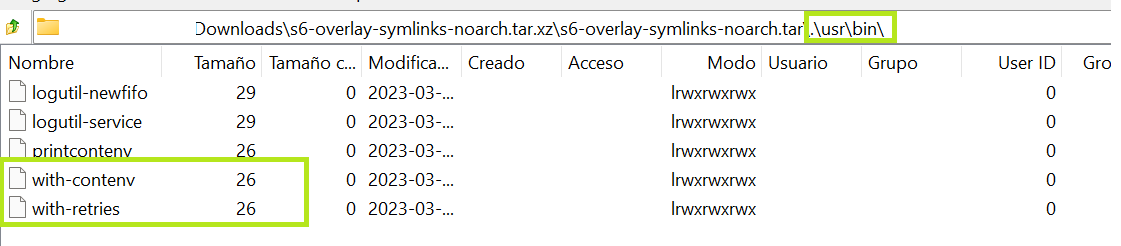
My reasoned guess after checking your commits and latest changes is that the installation is missing the s6-overlay-symlinks-noarch.tar.xz contents. I've donwloaded that myself and on inspection I found that the mentioned with-contenv is there:
image

I checked also that you pushed 82d9452, which looks like a workaround. I can't say it for sure, but seems you can avoid some of that by just getting the symlinks and the rest should be aligned with what is provided by s6.

Hope it helps, cheers!

<!-- gh-comment-id:1475281431 --> @dmalanij commented on GitHub (Mar 19, 2023): @jc21 I think the root cause is that the new model for s6 is missing a bit, I want to clarify I've never used s6 on my own so clearly is not an authoritative opinion. My reasoned guess after checking your commits and latest changes is that the [installation](https://github.com/NginxProxyManager/nginx-proxy-manager/blob/develop/docker/scripts/install-s6#L31) is missing the `s6-overlay-symlinks-noarch.tar.xz` contents. I've donwloaded that myself and on inspection I found that the mentioned `with-contenv` is there: ![image](https://user-images.githubusercontent.com/13454997/226183653-f25bc5a4-28aa-42a5-ac6b-73c44fe9a37e.png) I checked also that you pushed 82d9452, which looks like a workaround. I can't say it for sure, but seems you can avoid some of that by just getting the _symlinks_ and the rest should be aligned with what is provided by s6. Hope it helps, cheers!
Author
Owner

@jc21 commented on GitHub (Mar 19, 2023):

Yes I intentionally didn't use the symlinks package as the documentation suggested it was only really used for backwards compatibility. The new scripts use the proper paths. The scripts that 20/21 were having issues with were not meant to be in the codebase and have been removed/fixed on the develop branch and the secrets script works once again. You're welcome to try the github-develop docker image tag to test that.

I have a feeling though that even with these init scripts working, there might be a file permission issue on your hosts that I'm unable to replicate. The secrets file support was added by a contributor long ago and I don't use them. My database configuration is defined in a file in my data folder and I don't specify them as environment variables.

<!-- gh-comment-id:1475417004 --> @jc21 commented on GitHub (Mar 19, 2023): Yes I intentionally didn't use the symlinks package as the documentation suggested it was only really used for backwards compatibility. The new scripts use the proper paths. The scripts that 20/21 were having issues with were not meant to be in the codebase and have been removed/fixed on the develop branch and the secrets script works once again. You're welcome to try the `github-develop` docker image tag to test that. I have a feeling though that even with these init scripts working, there might be a file permission issue on your hosts that I'm unable to replicate. The secrets file support was added by a contributor long ago and I don't use them. My database configuration is defined in a file in my `data` folder and I don't specify them as environment variables.
Author
Owner

@jc21 commented on GitHub (Mar 20, 2023):

I've tested the documented way of specifying env vars instead of a mounted config file and everything still works as I expect. I'll do some more digging with s6.

Is it possible that you're running the docker image as a non-priveleged user?
ie:

docker run --user 1000:1000 ...

or

services:
  npm:
    user: 1000:1000
...

I'll check what happens with this next, but yeah let me know how you're bringing up your stack if not using the command line directly. Has someone created a portainer template that you're using for example..

<!-- gh-comment-id:1475473680 --> @jc21 commented on GitHub (Mar 20, 2023): I've tested the documented way of specifying env vars instead of a mounted config file and everything still works as I expect. I'll do some more digging with s6. Is it possible that you're running the docker image as a non-priveleged user? ie: ```bash docker run --user 1000:1000 ... ``` or ```yml services: npm: user: 1000:1000 ... ``` I'll check what happens with this next, but yeah let me know how you're bringing up your stack if not using the command line directly. Has someone created a portainer template that you're using for example..
Author
Owner

@dmalanij commented on GitHub (Mar 20, 2023):

Just tried the github-develop tag and it also worked fine, here are the logs:

s6-rc: info: service s6rc-oneshot-runner: starting
s6-rc: info: service s6rc-oneshot-runner successfully started
s6-rc: info: service fix-attrs: starting
s6-rc: info: service fix-attrs successfully started
s6-rc: info: service legacy-cont-init: starting
s6-rc: info: service legacy-cont-init successfully started
s6-rc: info: service prepare: starting
❯ Checking folder structure ...
Changing ownership of /data/logs to 0:0
❯ Enabling IPV6 in hosts: /etc/nginx/conf.d
  ❯ /etc/nginx/conf.d/default.conf
  ❯ /etc/nginx/conf.d/include/ssl-ciphers.conf
  ❯ /etc/nginx/conf.d/include/letsencrypt-acme-challenge.conf
  ❯ /etc/nginx/conf.d/include/assets.conf
  ❯ /etc/nginx/conf.d/include/proxy.conf
  ❯ /etc/nginx/conf.d/include/force-ssl.conf
  ❯ /etc/nginx/conf.d/include/block-exploits.conf
  ❯ /etc/nginx/conf.d/include/ip_ranges.conf
  ❯ /etc/nginx/conf.d/include/resolvers.conf
  ❯ /etc/nginx/conf.d/production.conf
❯ Enabling IPV6 in hosts: /data/nginx
  ❯ /data/nginx/proxy_host/6.conf
  ❯ /data/nginx/proxy_host/4.conf
  ❯ /data/nginx/proxy_host/10.conf
  ❯ /data/nginx/proxy_host/5.conf
  ❯ /data/nginx/proxy_host/8.conf
  ❯ /data/nginx/proxy_host/7.conf
  ❯ /data/nginx/proxy_host/3.conf
  ❯ /data/nginx/default_host/site.conf
❯ Secrets-init ...
[secret-init] Evaluating DB_MYSQL_PASSWORD__FILE ...
[secret-init] Success! DB_MYSQL_PASSWORD set from DB_MYSQL_PASSWORD__FILE
-------------------------------------
 _   _ ____  __  __
| \ | |  _ \|  \/  |
|  \| | |_) | |\/| |
| |\  |  __/| |  | |
|_| \_|_|   |_|  |_|
-------------------------------------
s6-rc: info: service prepare successfully started
s6-rc: info: service nginx: starting
s6-rc: info: service frontend: starting
s6-rc: info: service backend: starting
s6-rc: info: service nginx successfully started
s6-rc: info: service frontend successfully started
s6-rc: info: service backend successfully started
❯ Starting nginx ...
s6-rc: info: service legacy-services: starting
❯ Starting backend ...
s6-rc: info: service legacy-services successfully started
nginx: [warn] low address bits of <REDACTED> are meaningless in /data/nginx/proxy_host/10.conf:46
nginx: [warn] low address bits of <REDACTED> are meaningless in /data/nginx/proxy_host/5.conf:46
nginx: [warn] low address bits of <REDACTED> are meaningless in /data/nginx/proxy_host/6.conf:46
nginx: [warn] low address bits of <REDACTED> are meaningless in /data/nginx/proxy_host/7.conf:46
nginx: [warn] low address bits of <REDACTED> are meaningless in /data/nginx/proxy_host/8.conf:50
[3/20/2023] [4:58:38 PM] [Global   ] › ℹ  info      Generating MySQL knex configuration from environment variables
[3/20/2023] [4:58:38 PM] [Global   ] › ⬤  debug     Wrote db configuration to config file: ./config/production.json
[3/20/2023] [4:58:41 PM] [Migrate  ] › ℹ  info      Current database version: 20211108145214
[3/20/2023] [4:58:41 PM] [Setup    ] › ℹ  info      Creating a new JWT key pair...
[3/20/2023] [4:58:56 PM] [Setup    ] › ℹ  info      Wrote JWT key pair to config file: /app/config/production.json

As per your question, no, I'm not changing the user at all. Here is an excerpt from my compose file:

services:
  app:
    image: jc21/nginx-proxy-manager:github-develop
    restart: unless-stopped
    depends_on:
      - db
    environment:
      DB_MYSQL_HOST: db
      DB_MYSQL_PORT: 3306
      DB_MYSQL_NAME: <REDACTED>
      DB_MYSQL_USER: <REDACTED>
      DB_MYSQL_PASSWORD__FILE: /run/secrets/mysql_password
    ports:
      - 8080:80
      - 8443:443
    volumes:
      - ./npm-data:/data
      - ./letsencrypt:/etc/letsencrypt
    secrets:
      - mysql_pasword
  db:
# removed for clarity

Last night was thinking around the original scripts and realised that even with the symlinks it wouldn't have worked due to the the strange permissions for the cont-init scripts (with no execution rights for the 01_s6-secret-init.sh), I'm still puzzled about that but couldn't figure out anything from the changes in the 2.9.21.

Let me know if you'd like me to test a given scenario. And by the way, thanks a lot for this great tool!

<!-- gh-comment-id:1476652602 --> @dmalanij commented on GitHub (Mar 20, 2023): Just tried the `github-develop` tag and it also worked fine, here are the logs: ```log s6-rc: info: service s6rc-oneshot-runner: starting s6-rc: info: service s6rc-oneshot-runner successfully started s6-rc: info: service fix-attrs: starting s6-rc: info: service fix-attrs successfully started s6-rc: info: service legacy-cont-init: starting s6-rc: info: service legacy-cont-init successfully started s6-rc: info: service prepare: starting ❯ Checking folder structure ... Changing ownership of /data/logs to 0:0 ❯ Enabling IPV6 in hosts: /etc/nginx/conf.d ❯ /etc/nginx/conf.d/default.conf ❯ /etc/nginx/conf.d/include/ssl-ciphers.conf ❯ /etc/nginx/conf.d/include/letsencrypt-acme-challenge.conf ❯ /etc/nginx/conf.d/include/assets.conf ❯ /etc/nginx/conf.d/include/proxy.conf ❯ /etc/nginx/conf.d/include/force-ssl.conf ❯ /etc/nginx/conf.d/include/block-exploits.conf ❯ /etc/nginx/conf.d/include/ip_ranges.conf ❯ /etc/nginx/conf.d/include/resolvers.conf ❯ /etc/nginx/conf.d/production.conf ❯ Enabling IPV6 in hosts: /data/nginx ❯ /data/nginx/proxy_host/6.conf ❯ /data/nginx/proxy_host/4.conf ❯ /data/nginx/proxy_host/10.conf ❯ /data/nginx/proxy_host/5.conf ❯ /data/nginx/proxy_host/8.conf ❯ /data/nginx/proxy_host/7.conf ❯ /data/nginx/proxy_host/3.conf ❯ /data/nginx/default_host/site.conf ❯ Secrets-init ... [secret-init] Evaluating DB_MYSQL_PASSWORD__FILE ... [secret-init] Success! DB_MYSQL_PASSWORD set from DB_MYSQL_PASSWORD__FILE ------------------------------------- _ _ ____ __ __ | \ | | _ \| \/ | | \| | |_) | |\/| | | |\ | __/| | | | |_| \_|_| |_| |_| ------------------------------------- s6-rc: info: service prepare successfully started s6-rc: info: service nginx: starting s6-rc: info: service frontend: starting s6-rc: info: service backend: starting s6-rc: info: service nginx successfully started s6-rc: info: service frontend successfully started s6-rc: info: service backend successfully started ❯ Starting nginx ... s6-rc: info: service legacy-services: starting ❯ Starting backend ... s6-rc: info: service legacy-services successfully started nginx: [warn] low address bits of <REDACTED> are meaningless in /data/nginx/proxy_host/10.conf:46 nginx: [warn] low address bits of <REDACTED> are meaningless in /data/nginx/proxy_host/5.conf:46 nginx: [warn] low address bits of <REDACTED> are meaningless in /data/nginx/proxy_host/6.conf:46 nginx: [warn] low address bits of <REDACTED> are meaningless in /data/nginx/proxy_host/7.conf:46 nginx: [warn] low address bits of <REDACTED> are meaningless in /data/nginx/proxy_host/8.conf:50 [3/20/2023] [4:58:38 PM] [Global ] › ℹ info Generating MySQL knex configuration from environment variables [3/20/2023] [4:58:38 PM] [Global ] › ⬤ debug Wrote db configuration to config file: ./config/production.json [3/20/2023] [4:58:41 PM] [Migrate ] › ℹ info Current database version: 20211108145214 [3/20/2023] [4:58:41 PM] [Setup ] › ℹ info Creating a new JWT key pair... [3/20/2023] [4:58:56 PM] [Setup ] › ℹ info Wrote JWT key pair to config file: /app/config/production.json ``` As per your question, no, I'm not changing the user at all. Here is an excerpt from my compose file: ```yaml services: app: image: jc21/nginx-proxy-manager:github-develop restart: unless-stopped depends_on: - db environment: DB_MYSQL_HOST: db DB_MYSQL_PORT: 3306 DB_MYSQL_NAME: <REDACTED> DB_MYSQL_USER: <REDACTED> DB_MYSQL_PASSWORD__FILE: /run/secrets/mysql_password ports: - 8080:80 - 8443:443 volumes: - ./npm-data:/data - ./letsencrypt:/etc/letsencrypt secrets: - mysql_pasword db: # removed for clarity ``` Last night was thinking around the original scripts and realised that even with the symlinks it wouldn't have worked due to the the strange permissions for the cont-init scripts (with no execution rights for the `01_s6-secret-init.sh`), I'm still puzzled about that but couldn't figure out anything from the changes in the `2.9.21`. Let me know if you'd like me to test a given scenario. And by the way, **thanks a lot for this great tool!**
Author
Owner

@geistchevalier commented on GitHub (Mar 22, 2023):

I'm facing the exact same issue as @dmalanij when I upgraded from .19 to .21, I am using a similar compose setup file with the DB credentials being referenced to a docker secret. The only difference is that my OS is Rocky 8.7 x86_64 instead.

Inspecting the NPM logs when it was on the .21 update gives the same error of
ER_ACCESS_DENIED_ERROR: Access denied for user <REDACTED>@<npm docker network> (using password: YES)

Inspecting the logs on the DB side I get
Access denied for user '<REDACTED>@<npm docker network>' (using password: YES)

I can also confirm that reverting NPM to version .20 resolves the issue for the time being. My mariadb container is still on the latest tag with no further issues.

<!-- gh-comment-id:1478843194 --> @geistchevalier commented on GitHub (Mar 22, 2023): I'm facing the exact same issue as @dmalanij when I upgraded from .19 to .21, I am using a similar compose setup file with the DB credentials being referenced to a docker secret. The only difference is that my OS is Rocky 8.7 x86_64 instead. Inspecting the NPM logs when it was on the .21 update gives the same error of `ER_ACCESS_DENIED_ERROR: Access denied for user <REDACTED>@<npm docker network> (using password: YES)` Inspecting the logs on the DB side I get `Access denied for user '<REDACTED>@<npm docker network>' (using password: YES)` I can also confirm that reverting NPM to version .20 resolves the issue for the time being. My mariadb container is still on the **latest** tag with no further issues.
Author
Owner

@jc21 commented on GitHub (Mar 22, 2023):

@geistchevalier what about github-develop docker image tag?

fwiw 2.9.20 has a bad bug with access lists, so use that with care

<!-- gh-comment-id:1478878668 --> @jc21 commented on GitHub (Mar 22, 2023): @geistchevalier what about `github-develop` docker image tag? fwiw 2.9.20 has a bad bug with access lists, so use that with care
Author
Owner

@geistchevalier commented on GitHub (Mar 22, 2023):

using github-develop tag seems to be working as it should, nothing abnormal in the logs

<!-- gh-comment-id:1478882868 --> @geistchevalier commented on GitHub (Mar 22, 2023): using `github-develop` tag seems to be working as it should, nothing abnormal in the logs
Author
Owner

@jc21 commented on GitHub (Mar 23, 2023):

2.9.22 has been released so I'd recommend using that docker tag instead of github-develop as I'm about to merge some new stuff to develop.

<!-- gh-comment-id:1482030160 --> @jc21 commented on GitHub (Mar 23, 2023): `2.9.22` has been released so I'd recommend using that docker tag instead of `github-develop` as I'm about to merge some new stuff to develop.
Author
Owner

@dmalanij commented on GitHub (Mar 27, 2023):

Back to normal with 2.9.22. Thanks a lot, @jc21

<!-- gh-comment-id:1485165451 --> @dmalanij commented on GitHub (Mar 27, 2023): Back to normal with `2.9.22`. Thanks a lot, @jc21
Author
Owner

@tiftiabc1234 commented on GitHub (Mar 28, 2023):

i realized that you have to use the ip of the container.
For example 172.19.0.2:81

image

<!-- gh-comment-id:1486150640 --> @tiftiabc1234 commented on GitHub (Mar 28, 2023): i realized that you have to use the ip of the container. For example 172.19.0.2:81 ![image](https://user-images.githubusercontent.com/21130176/228120363-02a68c13-c974-4644-9efb-3d9f47bc0e55.png)
Author
Owner

@dmalanij commented on GitHub (Mar 28, 2023):

I'm not sure what are you trying to say with:

you have to use the ip of the container

In any case how you access and refer to your NPM admin interface is determined by other parts of your particular environment setup; based on what can be seen from your Portainer screenshot I'd say you should be able to access NPM with http://<your-portainer-host-name>:81. I'd always try to avoid using IP address, specially those assigned to Docker networks... but that's me.

<!-- gh-comment-id:1486899875 --> @dmalanij commented on GitHub (Mar 28, 2023): I'm not sure what are you trying to say with: > you have to use the ip of the container In any case how you access and refer to your **NPM** admin interface is determined by other parts of your particular environment setup; based on what can be seen from your Portainer screenshot I'd say you should be able to access **NPM** with `http://<your-portainer-host-name>:81`. I'd always try to avoid using IP address, specially those assigned to Docker networks... but that's me.
Sign in to join this conversation.
No milestone
No project
No assignees
1 participant
Notifications
Due date
The due date is invalid or out of range. Please use the format "yyyy-mm-dd".

No due date set.

Dependencies

No dependencies set.

Reference
starred/nginx-proxy-manager-NginxProxyManager#1866
No description provided.