[GH-ISSUE #2446] Question: How to configure frontend, backend, cdn #1719

Closed
opened 2026-02-26 07:32:12 +03:00 by kerem · 5 comments
Owner

Originally created by @tayfunyasar on GitHub (Dec 3, 2022).
Original GitHub issue: https://github.com/NginxProxyManager/nginx-proxy-manager/issues/2446

Hello

I have been dealing with mapping my previous nginx configuration to NPM

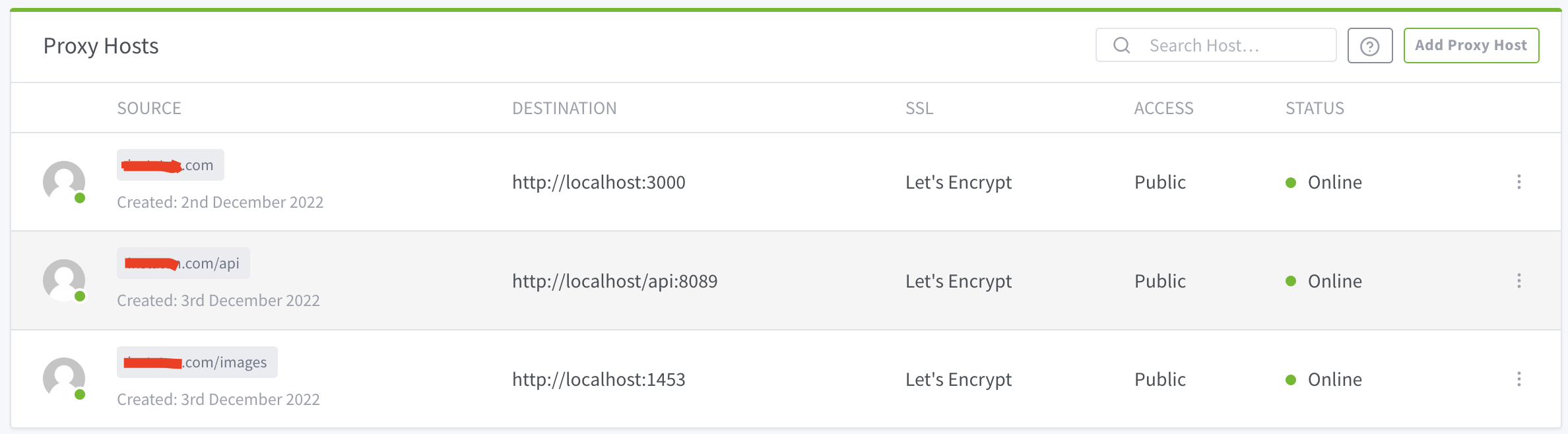
current NPM config:
image

Whats wrong with my configuration?

previous nginx config:

server`

{

rewrite_log on;

server_name domain.com www.domain.com;

root /var/www/domain.com;
index index.html;

location /
{

	# try_files $uri $uri/ =404;
	try_files $uri $uri/ /index.html;
}

location /api/
{

	proxy_read_timeout 1800;
	proxy_connect_timeout 1800;
	proxy_send_timeout 1800;
	send_timeout 1800;
	proxy_pass http://127.0.0.1:8089/api/;
}

location /images/
{

	proxy_read_timeout 1800;
	proxy_connect_timeout 1800;
	proxy_send_timeout 1800;
	send_timeout 1800;
	proxy_pass http://127.0.0.1:1453/;
}

# rewrite ^/images/(.*)$ http://localhost:1453/$1 redirect;

listen 443 ssl; # managed by Certbot
ssl_certificate /etc/letsencrypt/live/domain.com/fullchain.pem; # managed by Certbot
ssl_certificate_key /etc/letsencrypt/live/domain.com/privkey.pem; # managed by Certbot
include /etc/letsencrypt/options-ssl-nginx.conf; # managed by Certbot
ssl_dhparam /etc/letsencrypt/ssl-dhparams.pem; # managed by Certbot

}`

when i open domain.com over browser, this is the result
{"status":"OK","version":{"major":2,"minor":9,"revision":19}}

domain.com:3000/ > react app
domain.com:8089/api > backend app
domain.com:1453/images > ftp path

Originally created by @tayfunyasar on GitHub (Dec 3, 2022). Original GitHub issue: https://github.com/NginxProxyManager/nginx-proxy-manager/issues/2446 Hello I have been dealing with mapping my previous nginx configuration to NPM current NPM config: <img width="1188" alt="image" src="https://user-images.githubusercontent.com/1577843/205434729-c9de325c-5417-482b-bd2b-f1dda65395a5.png"> Whats wrong with my configuration? previous nginx config: server` { rewrite_log on; server_name domain.com www.domain.com; root /var/www/domain.com; index index.html; location / { # try_files $uri $uri/ =404; try_files $uri $uri/ /index.html; } location /api/ { proxy_read_timeout 1800; proxy_connect_timeout 1800; proxy_send_timeout 1800; send_timeout 1800; proxy_pass http://127.0.0.1:8089/api/; } location /images/ { proxy_read_timeout 1800; proxy_connect_timeout 1800; proxy_send_timeout 1800; send_timeout 1800; proxy_pass http://127.0.0.1:1453/; } # rewrite ^/images/(.*)$ http://localhost:1453/$1 redirect; listen 443 ssl; # managed by Certbot ssl_certificate /etc/letsencrypt/live/domain.com/fullchain.pem; # managed by Certbot ssl_certificate_key /etc/letsencrypt/live/domain.com/privkey.pem; # managed by Certbot include /etc/letsencrypt/options-ssl-nginx.conf; # managed by Certbot ssl_dhparam /etc/letsencrypt/ssl-dhparams.pem; # managed by Certbot }` when i open domain.com over browser, this is the result `{"status":"OK","version":{"major":2,"minor":9,"revision":19}}` domain.com:3000/ > react app domain.com:8089/api > backend app domain.com:1453/images > ftp path
kerem 2026-02-26 07:32:12 +03:00
  • closed this issue
  • added the
    stale
    label
Author
Owner

@Casal0x commented on GitHub (Dec 13, 2022):

@tayfunyasar did you find answer?

<!-- gh-comment-id:1349594329 --> @Casal0x commented on GitHub (Dec 13, 2022): @tayfunyasar did you find answer?
Author
Owner

@tayfunyasar commented on GitHub (Dec 20, 2022):

@Casal0x still no hope

<!-- gh-comment-id:1359889900 --> @tayfunyasar commented on GitHub (Dec 20, 2022): @Casal0x still no hope
Author
Owner

@JoeHaenf commented on GitHub (Dec 23, 2022):

I think you should not define three independent proxy hosts.
You might rather take your first proxy host, go to edit, and then insert a custom location for /api and /images. You then can paste any additional configuration when you hit the gear icon on the right side.

Screenshot 2022-12-23 234025

When you check your data directory from you container (for example ./data/nginx/proxy_host), you can control the conf file NginxProxyManager creates and tune it until it matches your previoius configuration.

<!-- gh-comment-id:1364370830 --> @JoeHaenf commented on GitHub (Dec 23, 2022): I think you should not define three independent proxy hosts. You might rather take your first proxy host, go to edit, and then insert a custom location for /api and /images. You then can paste any additional configuration when you hit the gear icon on the right side. ![Screenshot 2022-12-23 234025](https://user-images.githubusercontent.com/53969751/209411109-29c76ab5-83f5-4c1f-9837-530d2178e22b.png) When you check your data directory from you container (for example ./data/nginx/proxy_host), you can control the conf file NginxProxyManager creates and tune it until it matches your previoius configuration.
Author
Owner

@github-actions[bot] commented on GitHub (Feb 3, 2024):

Issue is now considered stale. If you want to keep it open, please comment 👍

<!-- gh-comment-id:1925010967 --> @github-actions[bot] commented on GitHub (Feb 3, 2024): Issue is now considered stale. If you want to keep it open, please comment :+1:
Author
Owner

@github-actions[bot] commented on GitHub (Mar 20, 2025):

Issue was closed due to inactivity.

<!-- gh-comment-id:2738872127 --> @github-actions[bot] commented on GitHub (Mar 20, 2025): Issue was closed due to inactivity.
Sign in to join this conversation.
No milestone
No project
No assignees
1 participant
Notifications
Due date
The due date is invalid or out of range. Please use the format "yyyy-mm-dd".

No due date set.

Dependencies

No dependencies set.

Reference
starred/nginx-proxy-manager-NginxProxyManager#1719
No description provided.