mirror of
https://github.com/NginxProxyManager/nginx-proxy-manager.git
synced 2026-04-26 01:45:54 +03:00
[GH-ISSUE #2321] Custom Certificate Import not working Cant enter local path? #1645
Labels
No labels
awaiting feedback
bug
cannot reproduce
dns provider request
duplicate
enhancement
enhancement
enhancement
good first issue
help wanted
invalid
need more info
no certbot plugin available
product-support
pull-request
question
stale
troll
upstream issue
v2
v2
v2
v3
wontfix
No milestone
No project
No assignees
1 participant

Notifications
Due date
No due date set.
Dependencies
No dependencies set.
Reference
starred/nginx-proxy-manager-NginxProxyManager#1645
Loading…
Add table
Add a link
Reference in a new issue
No description provided.
Delete branch "%!s()"
Deleting a branch is permanent. Although the deleted branch may continue to exist for a short time before it actually gets removed, it CANNOT be undone in most cases. Continue?
Originally created by @1liminal1 on GitHub (Oct 13, 2022).
Original GitHub issue: https://github.com/NginxProxyManager/nginx-proxy-manager/issues/2321
Describe the bug
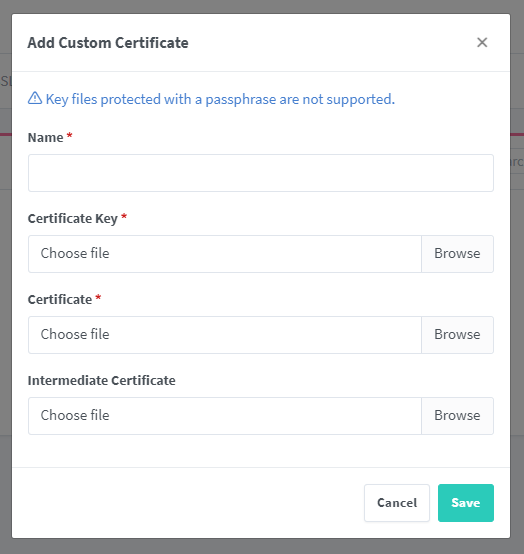
When trying to specify the path local NPM docker instance path to certificates I just get a dialog box keep popping up with access to the local computer.
Nginx Proxy Manager Version
v2.9.18
To Reproduce
Steps to reproduce the behavior:
Expected behavior
Am able to enter the local NPM docker instance path to my the certificates already on the NPM server
Screenshots
Operating System
Debian
Additional context
People have certs that they want to use and not being able to automate that is a PIA
@the1ts commented on GitHub (Oct 13, 2022):
@1liminal1 When you say local path, do you mean local to the npm server or local to the browser? I'm not sure because you use local twice in the report.
If you mean local to the npm server, then the correct method would be to use docker volumes to put the cert into the correct location within the npm docker container.
@1liminal1 commented on GitHub (Oct 13, 2022):
Hi there,
Thanks for that. Yes, local server path. I have the certs already on the docker instance ready to go. But I cant specify a path.
If there is a path where the certs will be automatically loaded, can you advise what that is. Is there doco for it?
@the1ts commented on GitHub (Oct 14, 2022):
custom ssl certs are held in the data volume under custom_ssl/npm-number, I suggest you create a cert with the correct names in the UI. Then the npm-number directory will be made, then link in your cert and key.
@1liminal1 commented on GitHub (Oct 15, 2022):
Ok... So what your saying is;
Add the cert though the UI the first time and make a note of what the directory name was created under the "custom_ssl" directory. For me using Portainer its;
/portainer/Files/AppData/Config/Nginx-Proxy/data/custom_ssl/npm-1/
Then set up an export, or whatever sync method you want, to export the certs to that folder after renewal and NPM with pick up the new certs automatically.
Is that right?
@the1ts commented on GitHub (Oct 15, 2022):
yes, as long as your certs end up in the custom_ssl/npm-number and are readable by nginx it will work. You will have to restart NPM when they change, but that is true of apache/nginx or any SSL protected service.
In short NPM does not store the cert in the DB, just pointers to the location they are on the file system which is why this works.
@the1ts commented on GitHub (Oct 16, 2022):
Hoping we can close this off since docker images cannot get access to host files not presented as volumes so it doesn't make sense as a development request. So the only sensible thing is to present the cert and key as docker volumes as suggested.
@1liminal1 commented on GitHub (Oct 16, 2022):
Yes thanks, I wanted to convert this to a feature request, but seems its easier to just open one.
Thanks for your help, I do appreciate it :)