mirror of
https://github.com/NginxProxyManager/nginx-proxy-manager.git
synced 2026-04-25 09:25:55 +03:00
[GH-ISSUE #2290] Problem in setting up minio to work through a nginx-proxy-manager #1628
Labels
No labels
awaiting feedback
bug
cannot reproduce
dns provider request
duplicate
enhancement
enhancement
enhancement
good first issue
help wanted
invalid
need more info
no certbot plugin available
product-support
pull-request
question
stale
troll
upstream issue
v2
v2
v2
v3
wontfix
No milestone
No project
No assignees
1 participant

Notifications
Due date
No due date set.
Dependencies
No dependencies set.
Reference
starred/nginx-proxy-manager-NginxProxyManager#1628
Loading…
Add table
Add a link
Reference in a new issue
No description provided.
Delete branch "%!s()"
Deleting a branch is permanent. Although the deleted branch may continue to exist for a short time before it actually gets removed, it CANNOT be undone in most cases. Continue?
Originally created by @Adigezalov on GitHub (Sep 25, 2022).
Original GitHub issue: https://github.com/NginxProxyManager/nginx-proxy-manager/issues/2290
Hi.
I need help installing minio through a nginx-proxy-manager.
I'm not a professional devops so this question makes me panic.
I installed nginx-proxy-manager and minio in docker containers.
Set up all the necessary urls.
Now I have url console.DOMAIN.com that enters the console, and url minio.DOMAIN.com can connect to api minio to send files.
Through the console everything works fine.
But the problem is that when sending a file from the frontend, minio gives me the following error: MinIO API responded with message=The request signature we calculated does not match the signature you provided. Check your key and signing method.
I understand that this means that somewhere my nginx-proxy has lost some headers.
But I don’t understand which ones and how to install them exactly in the nginx-proxy-manager.
@github-actions[bot] commented on GitHub (Feb 8, 2024):
Issue is now considered stale. If you want to keep it open, please comment 👍
@wudingjian commented on GitHub (Mar 19, 2024):
如果你需要部署对象存储的网站是https,需要在Nginx Proxy Manager 中进行反代,并在路由器进行端口映射。例如:端口映射到99,那你的endpoint就变成了https://域名:99
1、Nginx Proxy Manager 无法反向代理
官网Issues上这类问题很多:https://github.com/NginxProxyManager/nginx-proxy-manager/issues?q=minio
具体解方法:详见官方文档:https://www.minio.org.cn/docs/minio/linux/integrations/setup-nginx-proxy-with-minio.html
(1)api服务端反向代理配置如下:
管理端服务端反向代理配置如下:
复制下列代码:
2、共享文件外部域分享,显示为内部域ip(127.0.0.1:端口) (大坑)
经阅读官方文档:https://www.minio.org.cn/docs/minio/linux/integrations/setup-nginx-proxy-with-minio.html
(1)需要设置两个变量:
您还必须为MinIO部署设置以下环境变量:
(2)修改 docker-compose.yml内容如下:
(3)运行容器:
(4)无法登录管理页面
(5)找原因
官网Issues上这类问题很多
大多数并没有给我带来帮助:https://github.com/minio/minio/issues?q=MINIO_ROOT_USER
有一篇提问提到这个问题:
minio启动后,会主动验证~ MINIO_SERVER_URL=https://api.example.com:99 ~的可通性
面临两个问题:
A.反向代理后方,无证书
B.反向代理后方,内部如何域名解析到127.0.0.1
最终还是在官方文档上找到了方法
先解决证书问题:
官方文档详见:https://www.minio.org.cn/docs/minio/linux/operations/network-encryption.html
使用 MinIO 的 certgen 工具来生成自签名的TLS证书的方法,详见:https://www.cnblogs.com/hahaha111122222/p/15984957.html
下载地址:https://github.com/minio/certgen/releases/tag/v0.0.2
下载certgen-windows-amd64.exe 放到任意文件夹,例如:.\desktop\1
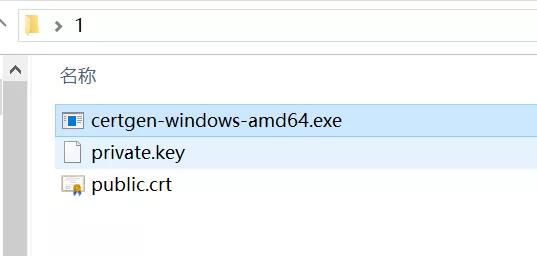
2022/03/09 14:10:58 wrote public.crt
2022/03/09 14:10:58 wrote private.key
如图:
解释一下ip和域名:
127.0.0.1 主机环回地址
192.168.30.2 主机ip
172.18.0.22 容器内ip
api.example.com 服务域名
s3.example.com 管理域我
minio hostname
复制public.crt private.key 到 主机的./config 映射目录下
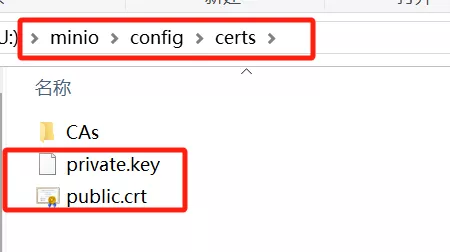
反向代理后面的域名解析到127.0.0.1
可以在docker-compose中增加dns记录解决
解决容器内部无法访问到99端口的问题
家庭网络环境中,路由器会转发端口
例如:
A路由器外部公网端口:99 #运营商限制不能使用80 没办法只能用99代替
B反向代理端口:80/443
C主机端口:9080 # 详见docker-compose 的配置
D容器内部端口:9000
访问的传递是 A->B->C->D
在容器内部,无法使用99端口
这就需要将容器服务端口与外部端口统一使用 “:99”
综上修改后的docker-compos.yml如下:
运行容器:
完美解决
------------完毕------------
@github-actions[bot] commented on GitHub (Nov 21, 2024):
Issue is now considered stale. If you want to keep it open, please comment 👍
@github-actions[bot] commented on GitHub (Dec 3, 2025):
Issue was closed due to inactivity.