mirror of
https://github.com/NginxProxyManager/nginx-proxy-manager.git
synced 2026-04-25 09:25:55 +03:00
[GH-ISSUE #2141] Access List not working! How can I setup NPM to protect certain subdomain for outside access? #1539
Labels
No labels
awaiting feedback
bug
cannot reproduce
dns provider request
duplicate
enhancement
enhancement
enhancement
good first issue
help wanted
invalid
need more info
no certbot plugin available
product-support
pull-request
question
stale
troll
upstream issue
v2
v2
v2
v3
wontfix
No milestone
No project
No assignees
1 participant

Notifications
Due date
No due date set.
Dependencies
No dependencies set.
Reference
starred/nginx-proxy-manager-NginxProxyManager#1539
Loading…
Add table
Add a link
Reference in a new issue
No description provided.
Delete branch "%!s()"
Deleting a branch is permanent. Although the deleted branch may continue to exist for a short time before it actually gets removed, it CANNOT be undone in most cases. Continue?
Originally created by @BobWs on GitHub (Jul 7, 2022).
Original GitHub issue: https://github.com/NginxProxyManager/nginx-proxy-manager/issues/2141
Hi,
I've setup NPM-Docker on my Synology NAS and when I try to setup Access List to protect certain sub.domains form outside access it doesn't work. See screenshot for my Access List setup and the proxy setup for subdomains.


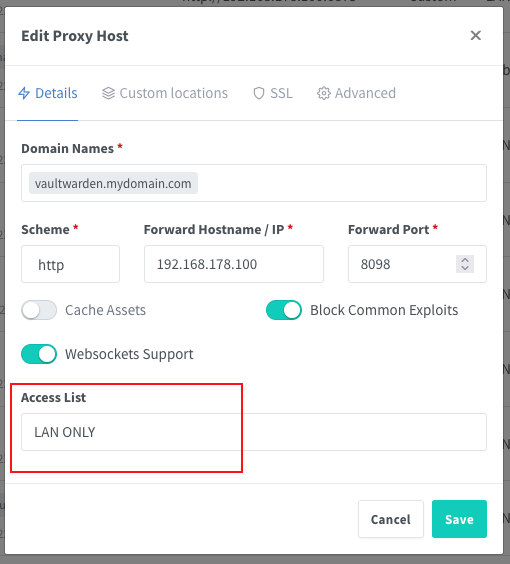
I have also tried to add a Custom Nginx Configuration to the Advanced Tab but that is also not working.
Any help please how to setup NPM with Access List protection to work properly.
TIA
@UrekD commented on GitHub (Jul 7, 2022):
I think you are missing a deny rule on your access list. This worked for me ex.
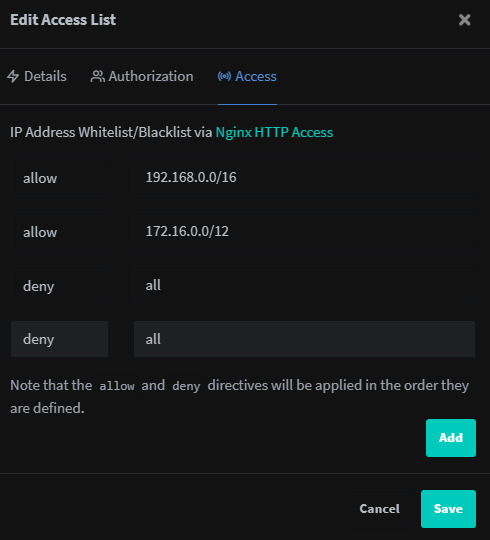
@BobWs commented on GitHub (Jul 8, 2022):
The deny rule is activated by default, but I could give it a try.
@UrekD commented on GitHub (Jul 8, 2022):
I thought so myself, but it didn't work without it. Also check the console it could not like the networks you specified. You see in my screenshot I use large ranges because it wouldn't accept smaller /24 for some reason. It only shows error in the console.
Personally I'm planning to switch to standard nginx as this just breaks every so often, no fail2ban and other missing features.
@BobWs commented on GitHub (Jul 9, 2022):
Okay I will make the necessary changes and see if it works. Did you also enable Satisfy Any?
@UrekD commented on GitHub (Jul 9, 2022):
No I did not. I checked and as you said the deny all doesn't matter not does Satisfy Any from what I can see, just the 2 rules do everything.Eh it worked for 5 min... Satisfy on and 2 rules without the deny all works for now, removed and re added the rule.
@BobWs commented on GitHub (Jul 11, 2022):
So I have tried both ways, with and without the “extra deny rule” and they are both working.
For now I removed the extra rule and will see what happens overtime. Satisfy All is off.
I also checked the proxy hosts config files after removing the extra deny rule and I can confirm that the default rule is still present.
One thing I noticed is that you have to save all the proxy hosts again after editing the ACL.
@kingfisher77 commented on GitHub (Jul 15, 2022):
We experience also irritating problems with the access feature. We added some ip subnets with net masks and all of a sudden access ist not possible anymore. Browser reports "Your connection is not private”. Problem is, that also the nginx proxy admin interface is behind a secured subdomain and not accessible anymore.
It seems that nginx proxy manager is not matured... We just set it up like it is ment to.
@jmo161 commented on GitHub (Jul 20, 2022):
After any changes to any access list, I've found that you need to edit the proxy configuration that uses that access list and re-save it (you don't need to make any changes) for it to un-break itself and take the modified access list.
I'm not sure if there's an issue for this specifically yet, if there isn't, we should create one as I do believe it to be a bug. It's pretty irritating when you have 30 proxy hosts sharing the same access list...
@kingfisher77 commented on GitHub (Jul 20, 2022):
True. Could you create a first version of the bug ticket as i am not so fluently with these kind of tasks. I would be delighted to finalize it together with you. Is this okay?
@BobWs commented on GitHub (Jul 21, 2022):
That is the problem indeed I have noticed too. It’s very annoying if your proxy list is long!
@talondnb commented on GitHub (Jul 23, 2022):
Yes, I have found this too. Any modification to access lists needs to be re-applied on the proxy hosts.
I have also found another issue; if you have custom advanced configuration that defines stuff within a 'location /', your access list on that proxy host is not actually applied to the proxy host .conf file!
e.g.
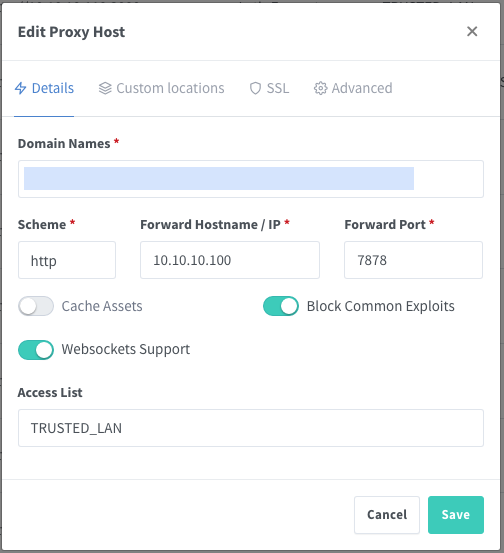
below conf with custom advanced config via gui, missing access list section (even after re-applying)
@MrSmits commented on GitHub (Aug 30, 2022):
Check my comment on here, this workaround seems to work for me at least
https://github.com/NginxProxyManager/nginx-proxy-manager/issues/383#issuecomment-1231453474
@mgutt commented on GitHub (Nov 26, 2022):
I can verify this behavior. Screenshots:
https://forums.unraid.net/topic/131150-nextcloud-benutzer-anlegen-klappt-nicht/?do=findComment&comment=1195344
A workaround is to add the code manually to the own location / block, but it will break if an access list is deleted.
@Vanillabacke commented on GitHub (Feb 27, 2023):
the access list has no effect on my server, which has the latest version installed ( v2.9.19 ).
tried all possible configurations / workarounds, what i have found. the login dialog won't show up.
@bbrfkr commented on GitHub (Mar 24, 2023):
+1
@github-actions[bot] commented on GitHub (Feb 14, 2024):
Issue is now considered stale. If you want to keep it open, please comment 👍
@github-actions[bot] commented on GitHub (Mar 30, 2025):
Issue was closed due to inactivity.