[GH-ISSUE #1791] Redirection does not work with active Cloudflare proxy #1325

Closed
opened 2026-02-26 07:30:30 +03:00 by kerem · 12 comments
Owner

Originally created by @talesam on GitHub (Jan 22, 2022).
Original GitHub issue: https://github.com/NginxProxyManager/nginx-proxy-manager/issues/1791

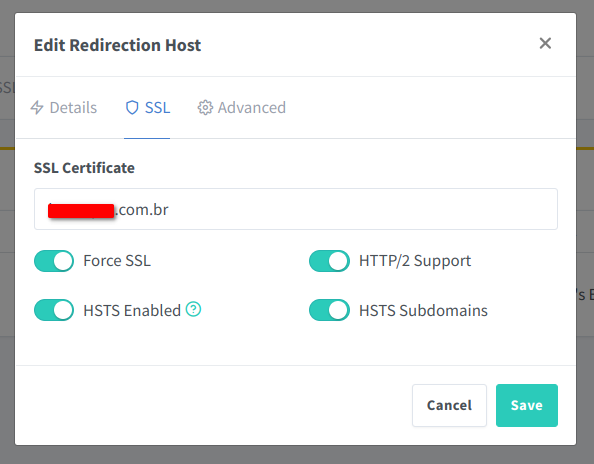
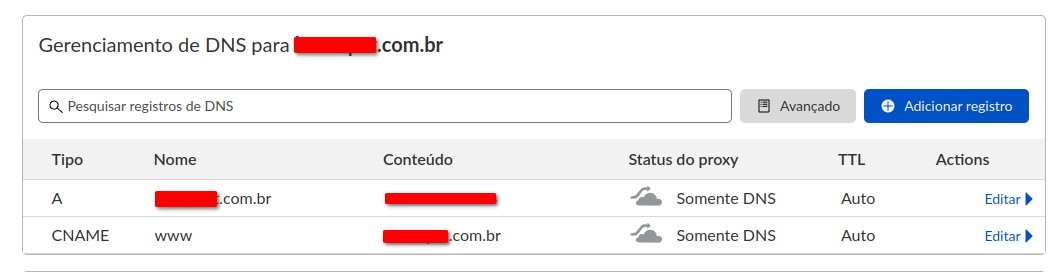
Domain redirect does not work if I enable proxy on Cloudflare, does anyone know what this could be?, When I disable proxy for www (CNAME) on cloudflare, the redirect stops working.
Screenshot_20220122_140307
Screenshot_20220122_140153
Screenshot_20220122_140725

Originally created by @talesam on GitHub (Jan 22, 2022). Original GitHub issue: https://github.com/NginxProxyManager/nginx-proxy-manager/issues/1791 Domain redirect does not work if I enable proxy on Cloudflare, does anyone know what this could be?, When I disable proxy for www (CNAME) on cloudflare, the redirect stops working. ![Screenshot_20220122_140307](https://user-images.githubusercontent.com/981368/150648423-d81921f5-0650-4e4e-b3bf-8260e4aa5f0c.png) ![Screenshot_20220122_140153](https://user-images.githubusercontent.com/981368/150648425-742c4a9c-4311-4795-9185-b196f5795aeb.png) ![Screenshot_20220122_140725](https://user-images.githubusercontent.com/981368/150648532-01e99355-ee20-4a19-88b8-cc8c13e92543.png)
kerem 2026-02-26 07:30:30 +03:00
  • closed this issue
  • added the
    stale
    bug
    labels
Author
Owner

@whytf commented on GitHub (Jan 24, 2022):

From what you say, it doesn't work when you disable cloudflare proxy.

First of all when cloudflare proxy is disabled it only works as a regular dns and there's something wrong with your configuration .

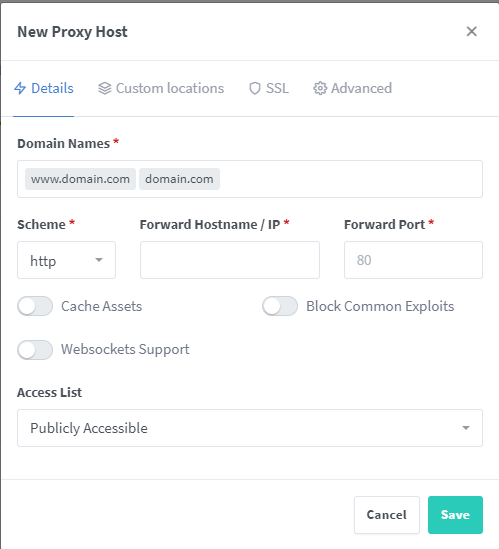
Second, you can achieve the same result just by creating a single proxy host while specifying both domain at same time or separately, does not matter, like here:
image

<!-- gh-comment-id:1020173493 --> @whytf commented on GitHub (Jan 24, 2022): From what you say, it doesn't work when you disable cloudflare proxy. First of all when cloudflare proxy is disabled it only works as a regular dns and there's something wrong with your configuration . Second, you can achieve the same result just by creating a single proxy host while specifying both domain at same time or separately, does not matter, like here: ![image](https://user-images.githubusercontent.com/35870617/150803761-175e13e8-3ba9-48a1-b4e9-c0b54e7af785.png)
Author
Owner

@talesam commented on GitHub (Jan 24, 2022):

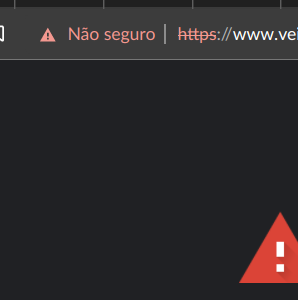
This does not work, the domain that has www it will say that it does not have SSL active.
Screenshot_20220124_120052

<!-- gh-comment-id:1020191647 --> @talesam commented on GitHub (Jan 24, 2022): This does not work, the domain that has www it will say that it does not have SSL active. ![Screenshot_20220124_120052](https://user-images.githubusercontent.com/981368/150807448-2211f557-4697-4353-8bd8-062a158c0873.png)
Author
Owner

@whytf commented on GitHub (Jan 24, 2022):

Did you setup the SSL tab ?

<!-- gh-comment-id:1020312210 --> @whytf commented on GitHub (Jan 24, 2022): Did you setup the SSL tab ?
Author
Owner

@talesam commented on GitHub (Jan 24, 2022):

Yes of course it works for domain without www

https://veidahavan.com/

<!-- gh-comment-id:1020345548 --> @talesam commented on GitHub (Jan 24, 2022): Yes of course it works for domain without www https://veidahavan.com/
Author
Owner

@whytf commented on GitHub (Jan 24, 2022):

Your certificate is not wildcard, thus not working on subdomains and also the www is invalid because it is generated for localhost and signed by localhost.
https://www.ssllabs.com/ssltest/analyze.html?d=www.veidahavan.com

Here google for example has *.google in alternative names so it does work for subdomains as www.
https://www.ssllabs.com/ssltest/analyze.html?d=google.sk&s=142.250.191.67&latest

<!-- gh-comment-id:1020371944 --> @whytf commented on GitHub (Jan 24, 2022): Your certificate is not wildcard, thus not working on subdomains and also the www is invalid because it is generated for localhost and signed by localhost. https://www.ssllabs.com/ssltest/analyze.html?d=www.veidahavan.com Here google for example has *.google in alternative names so it does work for subdomains as www. https://www.ssllabs.com/ssltest/analyze.html?d=google.sk&s=142.250.191.67&latest
Author
Owner

@talesam commented on GitHub (Jan 24, 2022):

Got it, I'll test it, I have to generate a certificate with *.veidahavan.com

<!-- gh-comment-id:1020387350 --> @talesam commented on GitHub (Jan 24, 2022): Got it, I'll test it, I have to generate a certificate with *.veidahavan.com
Author
Owner

@talesam commented on GitHub (Feb 4, 2022):

Your certificate is not wildcard, thus not working on subdomains and also the www is invalid because it is generated for localhost and signed by localhost. https://www.ssllabs.com/ssltest/analyze.html?d=www.veidahavan.com

Here google for example has *.google in alternative names so it does work for subdomains as www. https://www.ssllabs.com/ssltest/analyze.html?d=google.sk&s=142.250.191.67&latest

I couldn't generate a domain with valid www, do you have any documentation that explains how to do it?

I tried to generate with the wildcard * but it gave an error.

<!-- gh-comment-id:1029532676 --> @talesam commented on GitHub (Feb 4, 2022): > Your certificate is not wildcard, thus not working on subdomains and also the www is invalid because it is generated for localhost and signed by localhost. https://www.ssllabs.com/ssltest/analyze.html?d=www.veidahavan.com > > Here google for example has *.google in alternative names so it does work for subdomains as [www](http://www). https://www.ssllabs.com/ssltest/analyze.html?d=google.sk&s=142.250.191.67&latest I couldn't generate a domain with valid www, do you have any documentation that explains how to do it? I tried to generate with the wildcard * but it gave an error.
Author
Owner

@fabriziosalmi commented on GitHub (Feb 7, 2022):

Since You've a Cloudflare account just put that redirect in the Cloudflare's bulk redirects section.
For any Cloudflare + NginxProxyManager user I suggest to enable Cloudflare proxy even if You're using nginx proxy manager. This because it just works and that way You can set Cloudflare SSL/TLS mode to strict instead of full since You've a valid certificate on the nginx proxy layer too and not just on the publc endpoint managed by Cloudflare. Of course real ip stuff need to be correctly forwarded to the app servers (it's the latest entry in the x-forwarded-for header or is the value of CF-connecting-IP header provided by Cloudflare).

<!-- gh-comment-id:1031306558 --> @fabriziosalmi commented on GitHub (Feb 7, 2022): Since You've a Cloudflare account just put that redirect in the Cloudflare's **bulk redirects** section. For any Cloudflare + NginxProxyManager user I suggest to enable Cloudflare proxy even if You're using nginx proxy manager. This because it just works and that way You can set Cloudflare SSL/TLS mode to **strict** instead of **full** since You've a valid certificate on the nginx proxy layer too and not just on the publc endpoint managed by Cloudflare. Of course real ip stuff need to be correctly forwarded to the app servers (it's the latest entry in the x-forwarded-for header or is the value of CF-connecting-IP header provided by Cloudflare).
Author
Owner

@talesam commented on GitHub (Feb 7, 2022):

Since You've a Cloudflare account just put that redirect in the Cloudflare's bulk redirects section.
For any Cloudflare + NginxProxyManager user I suggest to enable Cloudflare proxy even if You're using nginx proxy manager. This because it just works and that way You can set Cloudflare SSL/TLS mode to strict instad of full since You've a valid certificate on the nginx proxy layer too and not just on the publc endpoint managed by Cloudflare. Of course real ip stuff need to be correctly forwarded to the app servers (it's the latest entry in the x-forwarded-for header or is the value of CF-connecting-IP header provided by Cloudflare).

I've tried several times to use the CF certificate and I could never get it to work in NPM :-(

<!-- gh-comment-id:1031443280 --> @talesam commented on GitHub (Feb 7, 2022): > Since You've a Cloudflare account just put that redirect in the Cloudflare's **bulk redirects** section. > For any Cloudflare + NginxProxyManager user I suggest to enable Cloudflare proxy even if You're using nginx proxy manager. This because it just works and that way You can set Cloudflare SSL/TLS mode to **strict** instad of **full** since You've a valid certificate on the nginx proxy layer too and not just on the publc endpoint managed by Cloudflare. Of course real ip stuff need to be correctly forwarded to the app servers (it's the latest entry in the x-forwarded-for header or is the value of CF-connecting-IP header provided by Cloudflare). I've tried several times to use the CF certificate and I could never get it to work in NPM :-(
Author
Owner

@fabriziosalmi commented on GitHub (Feb 7, 2022):

maybe you need to install cloudflare root certificate in the npm CA vault?

Il giorno lun 7 feb 2022 alle 14:01 Tales A. Mendonça <
@.***> ha scritto:

Since You've a Cloudflare account just put that redirect in the
Cloudflare's bulk redirects section.
For any Cloudflare + NginxProxyManager user I suggest to enable Cloudflare
proxy even if You're using nginx proxy manager. This because it just works
and that way You can set Cloudflare SSL/TLS mode to strict instad of
full since You've a valid certificate on the nginx proxy layer too and
not just on the publc endpoint managed by Cloudflare. Of course real ip
stuff need to be correctly forwarded to the app servers (it's the latest
entry in the x-forwarded-for header or is the value of CF-connecting-IP
header provided by Cloudflare).

I've tried several times to use the CF certificate and I could never get
it to work in NPM :-(


Reply to this email directly, view it on GitHub
https://github.com/NginxProxyManager/nginx-proxy-manager/issues/1791#issuecomment-1031443280,
or unsubscribe
https://github.com/notifications/unsubscribe-auth/AAL7CVEETGZFDBRYHIHRDW3UZ67BVANCNFSM5MSCJM3A
.
You are receiving this because you commented.Message ID:
@.***>

<!-- gh-comment-id:1031445177 --> @fabriziosalmi commented on GitHub (Feb 7, 2022): maybe you need to install cloudflare root certificate in the npm CA vault? Il giorno lun 7 feb 2022 alle 14:01 Tales A. Mendonça < ***@***.***> ha scritto: > Since You've a Cloudflare account just put that redirect in the > Cloudflare's *bulk redirects* section. > For any Cloudflare + NginxProxyManager user I suggest to enable Cloudflare > proxy even if You're using nginx proxy manager. This because it just works > and that way You can set Cloudflare SSL/TLS mode to *strict* instad of > *full* since You've a valid certificate on the nginx proxy layer too and > not just on the publc endpoint managed by Cloudflare. Of course real ip > stuff need to be correctly forwarded to the app servers (it's the latest > entry in the x-forwarded-for header or is the value of CF-connecting-IP > header provided by Cloudflare). > > I've tried several times to use the CF certificate and I could never get > it to work in NPM :-( > > — > Reply to this email directly, view it on GitHub > <https://github.com/NginxProxyManager/nginx-proxy-manager/issues/1791#issuecomment-1031443280>, > or unsubscribe > <https://github.com/notifications/unsubscribe-auth/AAL7CVEETGZFDBRYHIHRDW3UZ67BVANCNFSM5MSCJM3A> > . > You are receiving this because you commented.Message ID: > ***@***.***> >
Author
Owner

@github-actions[bot] commented on GitHub (Feb 26, 2024):

Issue is now considered stale. If you want to keep it open, please comment 👍

<!-- gh-comment-id:1963182128 --> @github-actions[bot] commented on GitHub (Feb 26, 2024): Issue is now considered stale. If you want to keep it open, please comment :+1:
Author
Owner

@github-actions[bot] commented on GitHub (Apr 11, 2025):

Issue was closed due to inactivity.

<!-- gh-comment-id:2795662604 --> @github-actions[bot] commented on GitHub (Apr 11, 2025): Issue was closed due to inactivity.
Sign in to join this conversation.
No milestone
No project
No assignees
1 participant
Notifications
Due date
The due date is invalid or out of range. Please use the format "yyyy-mm-dd".

No due date set.

Dependencies

No dependencies set.

Reference
starred/nginx-proxy-manager-NginxProxyManager#1325
No description provided.