[GH-ISSUE #1782] Unable to proxy DSM web #1320

Closed
opened 2026-02-26 07:30:29 +03:00 by kerem · 5 comments
Owner

Originally created by @whytf on GitHub (Jan 20, 2022).
Original GitHub issue: https://github.com/NginxProxyManager/nginx-proxy-manager/issues/1782

Checklist

  • Have you pulled and found the error with jc21/nginx-proxy-manager:latest docker image?
    • Yes
  • Are you sure you're not using someone else's docker image?
    • Yes
  • Have you searched for similar issues (both open and closed)?
    • Yes

Describe the bug
Unable to proxy to anything running on DSM, built in services & dsm web hosting service.

Nginx Proxy Manager Version
Latest from docker.

To Reproduce
Steps to reproduce the behavior:

  1. Point subdomain to proxy server.
  2. Set proxy to DSM ip with port for web managment or any other DSM service.
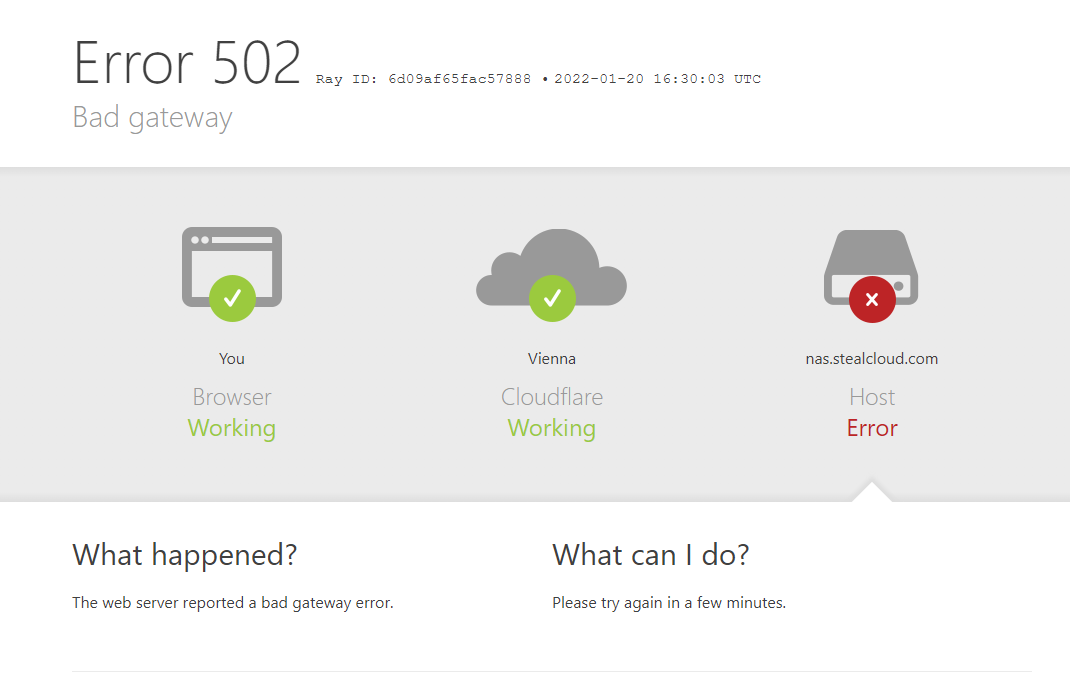
  3. Bad Gateway 502.

Expected behavior
Would proxy correctly.

Screenshots
image

Operating System
Debian 11 LTS (bullseye)

Additional context
Running in vm on proxmox - kvm64, virtio block virtio scsi controller qcow2, virtio network adapter, vm machine type i440fx with seabios, 4 cores, ssd, 4gb ram, on either node with i5-3350p or e5-2690 v1, latest bios

Was investigating this problem with synology support, even did packet capturing, but didn't find a solution.

Originally created by @whytf on GitHub (Jan 20, 2022). Original GitHub issue: https://github.com/NginxProxyManager/nginx-proxy-manager/issues/1782 **Checklist** - Have you pulled and found the error with `jc21/nginx-proxy-manager:latest` docker image? - Yes - Are you sure you're not using someone else's docker image? - Yes - Have you searched for similar issues (both open and closed)? - Yes **Describe the bug** Unable to proxy to anything running on DSM, built in services & dsm web hosting service. **Nginx Proxy Manager Version** Latest from docker. **To Reproduce** Steps to reproduce the behavior: 1. Point subdomain to proxy server. 2. Set proxy to DSM ip with port for web managment or any other DSM service. 3. Bad Gateway 502. **Expected behavior** Would proxy correctly. **Screenshots** ![image](https://user-images.githubusercontent.com/35870617/150380771-4d5381a2-8764-48a2-b2a2-4177b58f60b6.png) **Operating System** Debian 11 LTS (bullseye) **Additional context** Running in vm on proxmox - kvm64, virtio block virtio scsi controller qcow2, virtio network adapter, vm machine type i440fx with seabios, 4 cores, ssd, 4gb ram, on either node with i5-3350p or e5-2690 v1, latest bios Was investigating this problem with synology support, even did packet capturing, but didn't find a solution.
kerem 2026-02-26 07:30:29 +03:00
  • closed this issue
  • added the
    stale
    bug
    labels
Author
Owner

@niek1992 commented on GitHub (Feb 3, 2022):

@KILLERMANTV But the error you're attaching to your post is actually one from Cloudflare? You're trying to proxy from cloudflare to your home IP? What does the logs say of NPM (check the Proxy Host, Access and Error logs to check for clues). Upload them here if possible.

<!-- gh-comment-id:1029338078 --> @niek1992 commented on GitHub (Feb 3, 2022): @KILLERMANTV But the error you're attaching to your post is actually one from Cloudflare? You're trying to proxy from cloudflare to your home IP? What does the logs say of NPM (check the Proxy Host, Access and Error logs to check for clues). Upload them here if possible.
Author
Owner

@whytf commented on GitHub (Jan 14, 2023):

@KILLERMANTV But the error you're attaching to your post is actually one from Cloudflare? You're trying to proxy from cloudflare to your home IP? What does the logs say of NPM (check the Proxy Host, Access and Error logs to check for clues). Upload them here if possible.

I migrated to native nginx installation anyway, i actually contacted synology support and was doing packet capture and nginx proxy manager didn't even send anything to synology what was confirmed by synology and my packet capture.

Also cloudflare does not have anything to do with it, nginx proxy manager didn't care to send anything back to cloudflare either.

<!-- gh-comment-id:1382846689 --> @whytf commented on GitHub (Jan 14, 2023): > @KILLERMANTV But the error you're attaching to your post is actually one from Cloudflare? You're trying to proxy from cloudflare to your home IP? What does the logs say of NPM (check the Proxy Host, Access and Error logs to check for clues). Upload them here if possible. I migrated to native nginx installation anyway, i actually contacted synology support and was doing packet capture and nginx proxy manager didn't even send anything to synology what was confirmed by synology and my packet capture. Also cloudflare does not have anything to do with it, nginx proxy manager didn't care to send anything back to cloudflare either.
Author
Owner

@github-actions[bot] commented on GitHub (Feb 26, 2024):

Issue is now considered stale. If you want to keep it open, please comment 👍

<!-- gh-comment-id:1963182233 --> @github-actions[bot] commented on GitHub (Feb 26, 2024): Issue is now considered stale. If you want to keep it open, please comment :+1:
Author
Owner

@github-actions[bot] commented on GitHub (Dec 3, 2024):

Issue is now considered stale. If you want to keep it open, please comment 👍

<!-- gh-comment-id:2513385931 --> @github-actions[bot] commented on GitHub (Dec 3, 2024): Issue is now considered stale. If you want to keep it open, please comment :+1:
Author
Owner

@github-actions[bot] commented on GitHub (Dec 5, 2025):

Issue was closed due to inactivity.

<!-- gh-comment-id:3615035390 --> @github-actions[bot] commented on GitHub (Dec 5, 2025): Issue was closed due to inactivity.
Sign in to join this conversation.
No milestone
No project
No assignees
1 participant
Notifications
Due date
The due date is invalid or out of range. Please use the format "yyyy-mm-dd".

No due date set.

Dependencies

No dependencies set.

Reference
starred/nginx-proxy-manager-NginxProxyManager#1320
No description provided.