mirror of
https://github.com/NginxProxyManager/nginx-proxy-manager.git
synced 2026-04-25 17:35:52 +03:00
[GH-ISSUE #1629] Error login #1224
Labels
No labels
awaiting feedback
bug
cannot reproduce
dns provider request
duplicate
enhancement
enhancement
enhancement
good first issue
help wanted
invalid
need more info
no certbot plugin available
product-support
pull-request
question
stale
troll
upstream issue
v2
v2
v2
v3
wontfix
No milestone
No project
No assignees
1 participant

Notifications
Due date
No due date set.
Dependencies
No dependencies set.
Reference
starred/nginx-proxy-manager-NginxProxyManager#1224
Loading…
Add table
Add a link
Reference in a new issue
No description provided.
Delete branch "%!s()"
Deleting a branch is permanent. Although the deleted branch may continue to exist for a short time before it actually gets removed, it CANNOT be undone in most cases. Continue?
Originally created by @Kaczuc on GitHub (Dec 3, 2021).
Original GitHub issue: https://github.com/NginxProxyManager/nginx-proxy-manager/issues/1629
When you try to log in and enter your access data correctly, you are not redirected to the panel
This happens when I add a proxy for him
@chaptergy commented on GitHub (Dec 3, 2021):
You really need to provide more information. See https://github.com/jc21/nginx-proxy-manager/issues/1271, sections For any error and NPM admin page is staying blank or behaving weirdly.
@Kaczuc commented on GitHub (Dec 3, 2021):
So I added a reverse proxy for the software itself and then I am not able to log in using the subdomain only using the ip address: port I am able to do this
@chaptergy commented on GitHub (Dec 3, 2021):
This is still not enough to start debugging this problem, as it is not reproducible. Please provide logs:
See #1271, sections For any error and NPM admin page is staying blank or behaving weirdly.
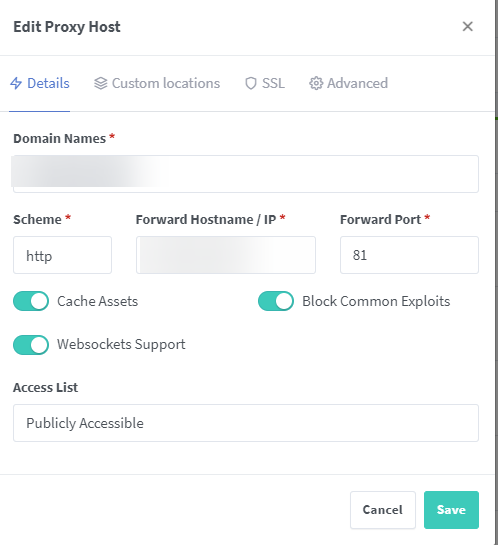
Showing how you set up the reverse proxy might also help.
@Kaczuc commented on GitHub (Dec 3, 2021):
So this is my configuration for web panel nginx proxy manger I using cloudflare for SSL. After I try login to admin dashboard using my subdomain page only reload and back to login arena
@chaptergy commented on GitHub (Dec 3, 2021):
Please, just provide some logs (logs from the developer console and the docker logs), I can't help you otherwise
👇👇👇👇👇👇👇👇👇
☝️☝️☝️☝️☝️☝️☝️☝️☝️
@Kaczuc commented on GitHub (Dec 3, 2021):
@Kaczuc commented on GitHub (Dec 3, 2021):
In web console I don't have any error
@Kaczuc commented on GitHub (Dec 3, 2021):
it looks like this when using a subdomain for nginx resolve proxy
@chaptergy commented on GitHub (Dec 3, 2021):
Allright, is your system clock correct? It might be that the access token expires instantly due to an incorrect system clock.
Otherwise please open the "network" tab in your web console, and check the "Preserve log" checkmark (1). Try to log in again. After your issue occurred, click the download button (2) to download it as a har file. Then please provide this file to me. Since this file contains sensitive information (the domain name, your username and your password), you should upload it to a file hoster where the file expires after a short period of time like file.io where the file is deleted after a single download.
@Kaczuc commented on GitHub (Dec 3, 2021):
[link removed] and yes, I have the current date and time
This i news file
@chaptergy commented on GitHub (Dec 3, 2021):
Hm, were there really only two requests for the font files? The file you provided does not contain any more. The second file you provided after updating your comment was deleted before I could even download it.
@Kaczuc commented on GitHub (Dec 3, 2021):
Oh sorry, I think I accidentally downloaded it already adds a new link I covered my e-mail address and password in the document
[link removed]
@chaptergy commented on GitHub (Dec 3, 2021):
It seems you are using cloudflare, have you tried disabling cloudflare and see if that fixes it?
@Kaczuc commented on GitHub (Dec 3, 2021):
I will try it immediately, however, when I turn off cloudflare, the subdomain does not correspond to what I should have A or CNAME record?
@chaptergy commented on GitHub (Dec 3, 2021):
I don't understand what you are trying to ask. Are you asking whether you should put the IP address of your npm instance in an A or CNAME record? It should be an A record, CNAME is only for an alias if you have a different domain already pointing to your npm instance.
@Kaczuc commented on GitHub (Dec 3, 2021):
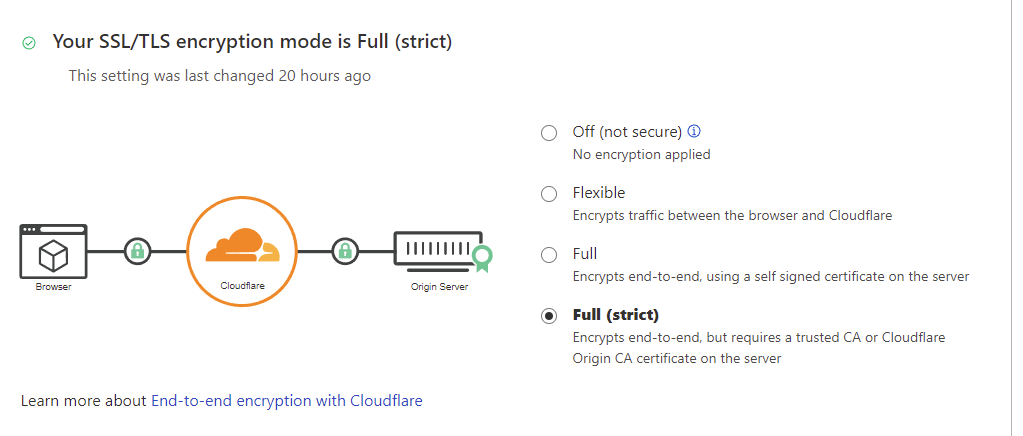
So I turned off cloudflare and apply SSL let's encrypt but still having this problem I can't completely remove SSL because I have
@Kaczuc commented on GitHub (Dec 3, 2021):
In google chrome private mode, my login was fine after disconnecting cloudflare
@chaptergy commented on GitHub (Dec 3, 2021):
Then unfortunately I don't really know what the issue could be then, your network logs do look really weird but mostly due to cloudflare stuff. But nothing other I could put my finger on.
But if it seems to work in a private tab with cloudflare disabled, then cloudflare might well be the issue and the browser has cached something which causes it to still not work in non-private tabs
@Kaczuc commented on GitHub (Dec 3, 2021):
I'll try to wait some time and let you know if it helped at all
@Kaczuc commented on GitHub (Dec 4, 2021):
It looks like the problem is on my side and it's about google chrome on a clean install in a virtual machine no problem
@chaptergy commented on GitHub (Dec 4, 2021):
Good to know, then I will go ahead and close this issue.