mirror of
https://github.com/NginxProxyManager/nginx-proxy-manager.git
synced 2026-04-25 09:25:55 +03:00
[GH-ISSUE #1560] HSTS always applied on port 81 #1182
Labels
No labels
awaiting feedback
bug
cannot reproduce
dns provider request
duplicate
enhancement
enhancement
enhancement
good first issue
help wanted
invalid
need more info
no certbot plugin available
product-support
pull-request
question
stale
troll
upstream issue
v2
v2
v2
v3
wontfix
No milestone
No project
No assignees
1 participant

Notifications
Due date
No due date set.
Dependencies
No dependencies set.
Reference
starred/nginx-proxy-manager-NginxProxyManager#1182
Loading…
Add table
Add a link
Reference in a new issue
No description provided.
Delete branch "%!s()"
Deleting a branch is permanent. Although the deleted branch may continue to exist for a short time before it actually gets removed, it CANNOT be undone in most cases. Continue?
Originally created by @lug-gh on GitHub (Nov 4, 2021).
Original GitHub issue: https://github.com/NginxProxyManager/nginx-proxy-manager/issues/1560
Checklist
jc21/nginx-proxy-manager:latestdocker image?Describe the bug

To access my NPM Webinterface I created this proxy, should be self explaining so far.
So whenever something is wrong with NPM (which happens from time to time) I access the site from http://npm.example.org:81, but because I enabled "Force SSL" for this host, it redirect's to https://npm.example.org:81, which obviously results in an SSL error.
I think "Force SSL" should not be applied to Port 81, or Port 80 only. I'm not really sure if this should be handled like a bug or like a feature request.
Nginx Proxy Manager Version
2.9.11
To Reproduce
Steps to reproduce the behavior:
Expected behavior
see description above
Screenshots
see description above
Operating System
alpine linux x64
Additional context
@chaptergy commented on GitHub (Nov 4, 2021):
So you are sure this has to do with the Force SSL config? Because I think this has to do with the HSTS config, not the Force SSL, since I am pretty sure it is not proxied at all when you request it on port 81. However since you have enabled HSTS, you browser remembers this HSTS instruction for this domain. So even when you request a different port, your browser still recognizes the the domain
npm.example.orghas sent a HSTS header a while ago and it should only be accessed via HTTPS (and that is what it's then doing). You could look up how to remove the HSTS entry for this domain in your browser and see if that works.@lug-gh commented on GitHub (Nov 4, 2021):
Forgot to mention, I do not have HSTS or HTTP2 enabled. Only "Force SSL"
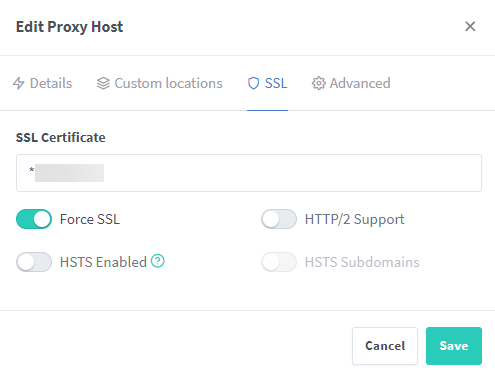
This is set for every host. But it looks like hsts is still the issue, even if disabled?!
PS: the root Domain has no hsts enabled either (so no includesubdomains hsts heaeder can be set)
@chaptergy commented on GitHub (Nov 4, 2021):
Ah, the admin ui seems to always set the header. Not sure why it does though, I'll try to find out. but for now you could manually go into your container and edit the
app.jsfile and remove that line.