mirror of
https://github.com/NginxProxyManager/nginx-proxy-manager.git
synced 2026-04-25 17:35:52 +03:00
[GH-ISSUE #1540] Transfer requests incorrectly #1168
Labels
No labels
awaiting feedback
bug
cannot reproduce
dns provider request
duplicate
enhancement
enhancement
enhancement
good first issue
help wanted
invalid
need more info
no certbot plugin available
product-support
pull-request
question
stale
troll
upstream issue
v2
v2
v2
v3
wontfix
No milestone
No project
No assignees
1 participant

Notifications
Due date
No due date set.
Dependencies
No dependencies set.
Reference
starred/nginx-proxy-manager-NginxProxyManager#1168
Loading…
Add table
Add a link
Reference in a new issue
No description provided.
Delete branch "%!s()"
Deleting a branch is permanent. Although the deleted branch may continue to exist for a short time before it actually gets removed, it CANNOT be undone in most cases. Continue?
Originally created by @saeed-raeisi on GitHub (Oct 31, 2021).
Original GitHub issue: https://github.com/NginxProxyManager/nginx-proxy-manager/issues/1540
Checklist
jc21/nginx-proxy-manager:latestdocker image?-No
Describe the bug
Requests are sent incorrectly when working with odoo
And causes the user to move and cancel sessions
I used portainer and odoo image without any problems with multiple users at the same time
I used nginx proxy manager to redirect ports
But I got into trouble
User A logs in but has user B account ???? !!!
Nginx Proxy Manager Version
2.9.9
Expected behavior
Only requests are sent correctly
Operating System
ubuntu 20 server
portainer last version
@chaptergy commented on GitHub (Oct 31, 2021):
I assume with
Udo imageyou meanodoo image? And you are talking about odoo erp? How does you setup look, do you have three odoo instances each on 8071, 8070 and 8069?What requests are incorrectly sent? Where are they supposed to go and where do they go? You can view the logs inside your container at
/data/logs/proxy_host-x_access.log, replacingxwith the host id. The host ID can be viewed when clicking on the tree dots next to the host, the dropdown containProxy Host #x.I really can't think of a way a proxy would be able to log you in as some other user, as the proxy does not retain any states and could store e.g. an access token from a different account to return it on some other request. That has to be an issue with the software itself. Maybe if you are running NPM and your odoo container on the same host using
localhostas the target host would be better than using the domain again?@saeed-raeisi commented on GitHub (Oct 31, 2021):
Hi yes it meant odoo
I have three separate stacks using portainer
For complete separation
The problem started exactly when I used portainer, nginx proxy manager
And this has already been reported by another team
My goal is simply to research where the problem comes from.
@chaptergy commented on GitHub (Oct 31, 2021):
Have you personally heard about another team reporting this issue? Or is this something you could provide a link to?
Let me know if you have found anything or if you have any additional information as I have no clue as well what could be happening on your npm instance
@saeed-raeisi commented on GitHub (Nov 1, 2021):
Yes, I heard about another team, but they said that after two weeks, the problem was solved and they did not follow up.
This problem was repeated for us today. And I am somewhat checking the logs
But what is clear:
User requests are moved.
Sessions are canceled.
And have csrf token error
We have been working with another server for several months without any problems
The current server with portainer is nginx proxy manager
But the previous config server was done manually and has not been a problem to date
@saeed-raeisi commented on GitHub (Nov 1, 2021):
My goal is to identify the cause of the problem
It may be from odoo or any other program.
Do you have a solution to help me diagnose?
User B If he works with the system for a while but user D is active
Suddenly user B logs into account D and user D himself encounters csrf error, closing session
@chaptergy commented on GitHub (Nov 1, 2021):
As I have said in my first response, use the access logs to start diagnosing what might be happening.
Maybe this could have to do with caching, you could add a custom location
/using the same target data as on the main page of the proxy host, click on the cog and add the following config to disable caching both in nginx as well as in the browser:As Nginx Proxy Manager is just a user interface to generate nginx config files, you might have more luck when researching this issue in connection with nginx, not nginx proxy manager specifically.
@saeed-raeisi commented on GitHub (Nov 3, 2021):
Hi, I have assigned one of the technical teams to investigate these cases
We are currently using bitnami
And we have no problem, I will close this issue, but if the technical team results are related to nginx proxy manager, I will send them here.
@Inovvia commented on GitHub (Aug 10, 2022):
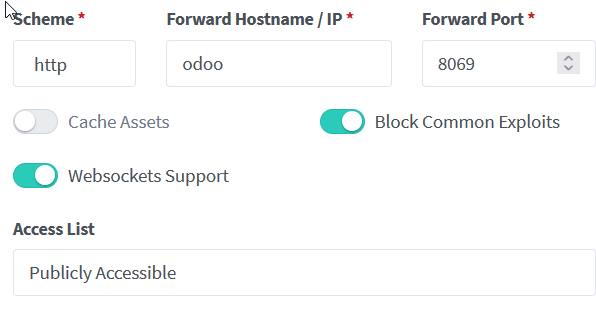
To anyone that experiences this issue while using Odoo and Nginx Proxy Manager. I found that the solution was to disable cache assets.