[GH-ISSUE #1510] Block Incomming for Dockernetworks #1157

Closed
opened 2026-02-26 06:35:59 +03:00 by kerem · 4 comments
Owner

Originally created by @calvinthefreak on GitHub (Oct 21, 2021).
Original GitHub issue: https://github.com/NginxProxyManager/nginx-proxy-manager/issues/1510

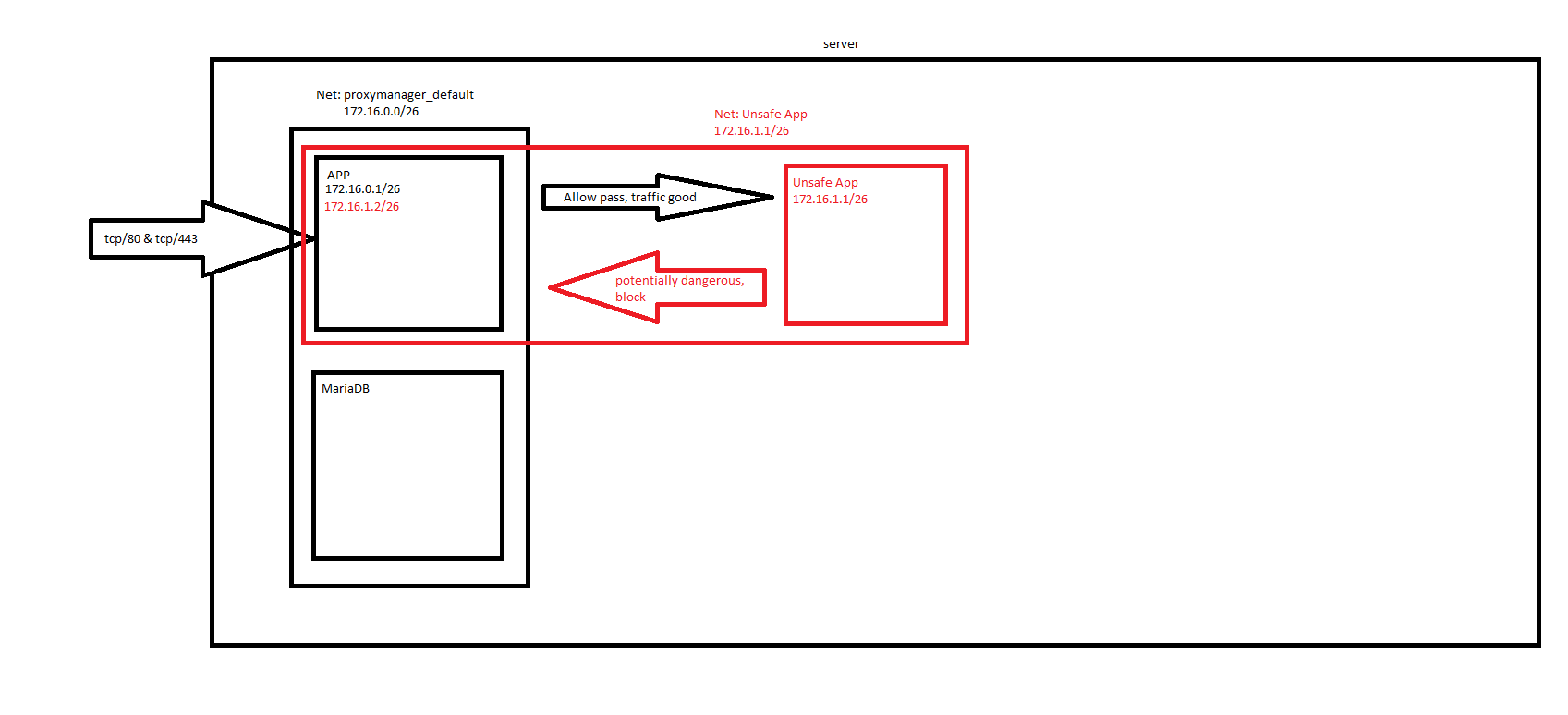
Is your feature request related to a problem? Please describe.
I am not that Happy with the "Docker-Attach" Network feature.
Since I am running potentially wnsafe apps behind the Proxymanager inside the docker-networks, I want to Isolate the WebUI.

So, when I am attaching the "app" container to an network, to let it see the Backend, I don't want the backend to be able, to access all Ports on the "app" container.
Schematic:
grafik

Describe the solution you'd like
Propably the functionality, to blacklist the IPs from accessing incomming to the Container.
I googled for iptables functionality, I found the following:
https://dev.to/andre/docker-restricting-in--and-outbound-network-traffic-67p

You could propably implement blacklisting on IP-Adress base like this example shows (changed a bit, to block and allow the rest):

#!/bin/bash
#Only apply when user did set the ALLOWED_CIDR env. and it has more than 4 octets
if [ ${#ALLOWED_CIDR} -gt 7 ]; then
    ACCEPT_CIDR=${ALLOWED_CIDR}
    iptables -A INPUT -s $ACCEPT_CIDR -j DENY
    iptables -A INPUT -j ACCEPT
fi

and running this with the Enrtypoint to be filled with an ENV, so that it is only applied when the User sets this variable.

Describe alternatives you've considered
Building a proxy for the Proxy... or lets say, a firewall container... but I am quite unsure how to do this.

Additional context

Originally created by @calvinthefreak on GitHub (Oct 21, 2021). Original GitHub issue: https://github.com/NginxProxyManager/nginx-proxy-manager/issues/1510 <!-- Are you in the right place? - If you are looking for support on how to get your upstream server forwarding, please consider asking the community on Reddit. - If you are writing code changes to contribute and need to ask about the internals of the software, Gitter is the best place to ask. - If you think you found a bug with NPM (not Nginx, or your upstream server or MySql) then you are in the *right place.* --> **Is your feature request related to a problem? Please describe.** I am not that Happy with the "Docker-Attach" Network feature. Since I am running potentially wnsafe apps behind the Proxymanager inside the docker-networks, I want to Isolate the WebUI. So, when I am attaching the "app" container to an network, to let it see the Backend, I don't want the backend to be able, to access all Ports on the "app" container. Schematic: ![grafik](https://user-images.githubusercontent.com/5560381/138289544-4b613b12-00b2-4a4c-bfdc-ebfc8d47ab84.png) **Describe the solution you'd like** Propably the functionality, to blacklist the IPs from accessing incomming to the Container. I googled for iptables functionality, I found the following: https://dev.to/andre/docker-restricting-in--and-outbound-network-traffic-67p You could propably implement blacklisting on IP-Adress base like this example shows (changed a bit, to block and allow the rest): ```bash #!/bin/bash #Only apply when user did set the ALLOWED_CIDR env. and it has more than 4 octets if [ ${#ALLOWED_CIDR} -gt 7 ]; then ACCEPT_CIDR=${ALLOWED_CIDR} iptables -A INPUT -s $ACCEPT_CIDR -j DENY iptables -A INPUT -j ACCEPT fi ``` and running this with the Enrtypoint to be filled with an ENV, so that it is only applied when the User sets this variable. **Describe alternatives you've considered** Building a proxy for the Proxy... or lets say, a firewall container... but I am quite unsure how to do this. **Additional context** <!-- Add any other context or screenshots about the feature request here. -->
kerem 2026-02-26 06:35:59 +03:00
Author
Owner

@calvinthefreak commented on GitHub (Oct 21, 2021):

It would also be possible, to ship the container with UFW and iptables and make it persistant.

<!-- gh-comment-id:948656848 --> @calvinthefreak commented on GitHub (Oct 21, 2021): It would also be possible, to ship the container with UFW and iptables and make it persistant.
Author
Owner

@calvinthefreak commented on GitHub (Oct 21, 2021):

Well, who cares, I build my self a new overlay:
Create following files in the same dir:
"iptables-service":

#!/usr/bin/with-contenv bash
/usr/sbin/iptables-restore < /iptables.rules

"iptables.rules":

# Generated by xtables-save v1.8.2 on Thu Oct 21 15:45:57 2021
*filter
:INPUT DROP [0:0]
:FORWARD DROP [0:0]
:OUTPUT ACCEPT [0:0]
:ufw-before-logging-input - [0:0]
:ufw-before-logging-output - [0:0]
:ufw-before-logging-forward - [0:0]
:ufw-before-input - [0:0]
:ufw-before-output - [0:0]
:ufw-before-forward - [0:0]
:ufw-after-input - [0:0]
:ufw-after-output - [0:0]
:ufw-after-forward - [0:0]
:ufw-after-logging-input - [0:0]
:ufw-after-logging-output - [0:0]
:ufw-after-logging-forward - [0:0]
:ufw-reject-input - [0:0]
:ufw-reject-output - [0:0]
:ufw-reject-forward - [0:0]
:ufw-track-input - [0:0]
:ufw-track-output - [0:0]
:ufw-track-forward - [0:0]
:ufw-logging-deny - [0:0]
:ufw-logging-allow - [0:0]
:ufw-skip-to-policy-input - [0:0]
:ufw-skip-to-policy-output - [0:0]
:ufw-skip-to-policy-forward - [0:0]
:ufw-not-local - [0:0]
:ufw-user-input - [0:0]
:ufw-user-output - [0:0]
:ufw-user-forward - [0:0]
:ufw-user-logging-input - [0:0]
:ufw-user-logging-output - [0:0]
:ufw-user-logging-forward - [0:0]
:ufw-user-limit - [0:0]
:ufw-user-limit-accept - [0:0]
-A INPUT -j ufw-before-logging-input
-A INPUT -j ufw-before-input
-A INPUT -j ufw-after-input
-A INPUT -j ufw-after-logging-input
-A INPUT -j ufw-reject-input
-A INPUT -j ufw-track-input
-A FORWARD -j ufw-before-logging-forward
-A FORWARD -j ufw-before-forward
-A FORWARD -j ufw-after-forward
-A FORWARD -j ufw-after-logging-forward
-A FORWARD -j ufw-reject-forward
-A FORWARD -j ufw-track-forward
-A OUTPUT -j ufw-before-logging-output
-A OUTPUT -j ufw-before-output
-A OUTPUT -j ufw-after-output
-A OUTPUT -j ufw-after-logging-output
-A OUTPUT -j ufw-reject-output
-A OUTPUT -j ufw-track-output
-A ufw-before-input -i lo -j ACCEPT
-A ufw-before-input -m conntrack --ctstate RELATED,ESTABLISHED -j ACCEPT
-A ufw-before-input -m conntrack --ctstate INVALID -j ufw-logging-deny
-A ufw-before-input -m conntrack --ctstate INVALID -j DROP
-A ufw-before-input -p 1 -m icmp --icmp-type 3 -j ACCEPT
-A ufw-before-input -p 1 -m icmp --icmp-type 11 -j ACCEPT
-A ufw-before-input -p 1 -m icmp --icmp-type 12 -j ACCEPT
-A ufw-before-input -p 1 -m icmp --icmp-type 8 -j ACCEPT
-A ufw-before-input -p 17 -m udp --sport 67 --dport 68 -j ACCEPT
-A ufw-before-input -j ufw-not-local
-A ufw-before-input -d 224.0.0.251/32 -p 17 -m udp --dport 5353 -j ACCEPT
-A ufw-before-input -d 239.255.255.250/32 -p 17 -m udp --dport 1900 -j ACCEPT
-A ufw-before-input -j ufw-user-input
-A ufw-before-output -o lo -j ACCEPT
-A ufw-before-output -m conntrack --ctstate RELATED,ESTABLISHED -j ACCEPT
-A ufw-before-output -j ufw-user-output
-A ufw-before-forward -m conntrack --ctstate RELATED,ESTABLISHED -j ACCEPT
-A ufw-before-forward -p 1 -m icmp --icmp-type 3 -j ACCEPT
-A ufw-before-forward -p 1 -m icmp --icmp-type 11 -j ACCEPT
-A ufw-before-forward -p 1 -m icmp --icmp-type 12 -j ACCEPT
-A ufw-before-forward -p 1 -m icmp --icmp-type 8 -j ACCEPT
-A ufw-before-forward -j ufw-user-forward
-A ufw-after-input -p 17 -m udp --dport 137 -j ufw-skip-to-policy-input
-A ufw-after-input -p 17 -m udp --dport 138 -j ufw-skip-to-policy-input
-A ufw-after-input -p 6 -m tcp --dport 139 -j ufw-skip-to-policy-input
-A ufw-after-input -p 6 -m tcp --dport 445 -j ufw-skip-to-policy-input
-A ufw-after-input -p 17 -m udp --dport 67 -j ufw-skip-to-policy-input
-A ufw-after-input -p 17 -m udp --dport 68 -j ufw-skip-to-policy-input
-A ufw-after-input -m addrtype --dst-type BROADCAST -j ufw-skip-to-policy-input
-A ufw-after-logging-input -m limit --limit 3/min --limit-burst 10 -j LOG --log-prefix "[UFW BLOCK] "
-A ufw-after-logging-forward -m limit --limit 3/min --limit-burst 10 -j LOG --log-prefix "[UFW BLOCK] "
-A ufw-track-output -p 6 -m conntrack --ctstate NEW -j ACCEPT
-A ufw-track-output -p 17 -m conntrack --ctstate NEW -j ACCEPT
-A ufw-logging-deny -m conntrack --ctstate INVALID -m limit --limit 3/min --limit-burst 10 -j RETURN
-A ufw-logging-deny -m limit --limit 3/min --limit-burst 10 -j LOG --log-prefix "[UFW BLOCK] "
-A ufw-logging-allow -m limit --limit 3/min --limit-burst 10 -j LOG --log-prefix "[UFW ALLOW] "
-A ufw-skip-to-policy-input -j DROP
-A ufw-skip-to-policy-output -j ACCEPT
-A ufw-skip-to-policy-forward -j DROP
-A ufw-not-local -m addrtype --dst-type LOCAL -j RETURN
-A ufw-not-local -m addrtype --dst-type MULTICAST -j RETURN
-A ufw-not-local -m addrtype --dst-type BROADCAST -j RETURN
-A ufw-not-local -m limit --limit 3/min --limit-burst 10 -j ufw-logging-deny
-A ufw-not-local -j DROP
-A ufw-user-input -p 6 -m tcp --dport 443 -j ACCEPT
-A ufw-user-input -p 17 -m udp --dport 443 -j ACCEPT
-A ufw-user-limit -m limit --limit 3/min -j LOG --log-prefix "[UFW LIMIT BLOCK] "
-A ufw-user-limit -j REJECT --reject-with icmp-port-unreachable
-A ufw-user-limit-accept -j ACCEPT
COMMIT
# Completed on Thu Oct 21 15:45:57 2021
# Warning: iptables-legacy tables present, use iptables-legacy-save to see them

and finally a "Dockerfile":

# syntax=docker/dockerfile:
FROM jc21/nginx-proxy-manager:latest
RUN apt-get update \
        && apt-get install iptables -y \
        && apt-get clean \
        && rm -rf /var/lib/apt/lists/*

COPY iptables.rules /iptables.rules
RUN mkdir /etc/services.d/iptables/ -p
COPY iptables-service /etc/services.d/iptables/run
RUN chmod 777 /etc/services.d/iptables/run

VOLUME [ "/data", "/etc/letsencrypt" ]
ENTRYPOINT [ "/init" ]

After that, you can build a new Overlay:
docker build -t 64i.de/nginxproxymanager .
64i.de/nginxproxymanager is the new Packagename.

So in your dockercompose on the block "app" place '64i.de/nginxproxymanager' as image.

Best Regards. Calvin.

<!-- gh-comment-id:948764862 --> @calvinthefreak commented on GitHub (Oct 21, 2021): Well, who cares, I build my self a new overlay: Create following files in the same dir: "iptables-service": ```bash #!/usr/bin/with-contenv bash /usr/sbin/iptables-restore < /iptables.rules ``` "iptables.rules": ```iptables # Generated by xtables-save v1.8.2 on Thu Oct 21 15:45:57 2021 *filter :INPUT DROP [0:0] :FORWARD DROP [0:0] :OUTPUT ACCEPT [0:0] :ufw-before-logging-input - [0:0] :ufw-before-logging-output - [0:0] :ufw-before-logging-forward - [0:0] :ufw-before-input - [0:0] :ufw-before-output - [0:0] :ufw-before-forward - [0:0] :ufw-after-input - [0:0] :ufw-after-output - [0:0] :ufw-after-forward - [0:0] :ufw-after-logging-input - [0:0] :ufw-after-logging-output - [0:0] :ufw-after-logging-forward - [0:0] :ufw-reject-input - [0:0] :ufw-reject-output - [0:0] :ufw-reject-forward - [0:0] :ufw-track-input - [0:0] :ufw-track-output - [0:0] :ufw-track-forward - [0:0] :ufw-logging-deny - [0:0] :ufw-logging-allow - [0:0] :ufw-skip-to-policy-input - [0:0] :ufw-skip-to-policy-output - [0:0] :ufw-skip-to-policy-forward - [0:0] :ufw-not-local - [0:0] :ufw-user-input - [0:0] :ufw-user-output - [0:0] :ufw-user-forward - [0:0] :ufw-user-logging-input - [0:0] :ufw-user-logging-output - [0:0] :ufw-user-logging-forward - [0:0] :ufw-user-limit - [0:0] :ufw-user-limit-accept - [0:0] -A INPUT -j ufw-before-logging-input -A INPUT -j ufw-before-input -A INPUT -j ufw-after-input -A INPUT -j ufw-after-logging-input -A INPUT -j ufw-reject-input -A INPUT -j ufw-track-input -A FORWARD -j ufw-before-logging-forward -A FORWARD -j ufw-before-forward -A FORWARD -j ufw-after-forward -A FORWARD -j ufw-after-logging-forward -A FORWARD -j ufw-reject-forward -A FORWARD -j ufw-track-forward -A OUTPUT -j ufw-before-logging-output -A OUTPUT -j ufw-before-output -A OUTPUT -j ufw-after-output -A OUTPUT -j ufw-after-logging-output -A OUTPUT -j ufw-reject-output -A OUTPUT -j ufw-track-output -A ufw-before-input -i lo -j ACCEPT -A ufw-before-input -m conntrack --ctstate RELATED,ESTABLISHED -j ACCEPT -A ufw-before-input -m conntrack --ctstate INVALID -j ufw-logging-deny -A ufw-before-input -m conntrack --ctstate INVALID -j DROP -A ufw-before-input -p 1 -m icmp --icmp-type 3 -j ACCEPT -A ufw-before-input -p 1 -m icmp --icmp-type 11 -j ACCEPT -A ufw-before-input -p 1 -m icmp --icmp-type 12 -j ACCEPT -A ufw-before-input -p 1 -m icmp --icmp-type 8 -j ACCEPT -A ufw-before-input -p 17 -m udp --sport 67 --dport 68 -j ACCEPT -A ufw-before-input -j ufw-not-local -A ufw-before-input -d 224.0.0.251/32 -p 17 -m udp --dport 5353 -j ACCEPT -A ufw-before-input -d 239.255.255.250/32 -p 17 -m udp --dport 1900 -j ACCEPT -A ufw-before-input -j ufw-user-input -A ufw-before-output -o lo -j ACCEPT -A ufw-before-output -m conntrack --ctstate RELATED,ESTABLISHED -j ACCEPT -A ufw-before-output -j ufw-user-output -A ufw-before-forward -m conntrack --ctstate RELATED,ESTABLISHED -j ACCEPT -A ufw-before-forward -p 1 -m icmp --icmp-type 3 -j ACCEPT -A ufw-before-forward -p 1 -m icmp --icmp-type 11 -j ACCEPT -A ufw-before-forward -p 1 -m icmp --icmp-type 12 -j ACCEPT -A ufw-before-forward -p 1 -m icmp --icmp-type 8 -j ACCEPT -A ufw-before-forward -j ufw-user-forward -A ufw-after-input -p 17 -m udp --dport 137 -j ufw-skip-to-policy-input -A ufw-after-input -p 17 -m udp --dport 138 -j ufw-skip-to-policy-input -A ufw-after-input -p 6 -m tcp --dport 139 -j ufw-skip-to-policy-input -A ufw-after-input -p 6 -m tcp --dport 445 -j ufw-skip-to-policy-input -A ufw-after-input -p 17 -m udp --dport 67 -j ufw-skip-to-policy-input -A ufw-after-input -p 17 -m udp --dport 68 -j ufw-skip-to-policy-input -A ufw-after-input -m addrtype --dst-type BROADCAST -j ufw-skip-to-policy-input -A ufw-after-logging-input -m limit --limit 3/min --limit-burst 10 -j LOG --log-prefix "[UFW BLOCK] " -A ufw-after-logging-forward -m limit --limit 3/min --limit-burst 10 -j LOG --log-prefix "[UFW BLOCK] " -A ufw-track-output -p 6 -m conntrack --ctstate NEW -j ACCEPT -A ufw-track-output -p 17 -m conntrack --ctstate NEW -j ACCEPT -A ufw-logging-deny -m conntrack --ctstate INVALID -m limit --limit 3/min --limit-burst 10 -j RETURN -A ufw-logging-deny -m limit --limit 3/min --limit-burst 10 -j LOG --log-prefix "[UFW BLOCK] " -A ufw-logging-allow -m limit --limit 3/min --limit-burst 10 -j LOG --log-prefix "[UFW ALLOW] " -A ufw-skip-to-policy-input -j DROP -A ufw-skip-to-policy-output -j ACCEPT -A ufw-skip-to-policy-forward -j DROP -A ufw-not-local -m addrtype --dst-type LOCAL -j RETURN -A ufw-not-local -m addrtype --dst-type MULTICAST -j RETURN -A ufw-not-local -m addrtype --dst-type BROADCAST -j RETURN -A ufw-not-local -m limit --limit 3/min --limit-burst 10 -j ufw-logging-deny -A ufw-not-local -j DROP -A ufw-user-input -p 6 -m tcp --dport 443 -j ACCEPT -A ufw-user-input -p 17 -m udp --dport 443 -j ACCEPT -A ufw-user-limit -m limit --limit 3/min -j LOG --log-prefix "[UFW LIMIT BLOCK] " -A ufw-user-limit -j REJECT --reject-with icmp-port-unreachable -A ufw-user-limit-accept -j ACCEPT COMMIT # Completed on Thu Oct 21 15:45:57 2021 # Warning: iptables-legacy tables present, use iptables-legacy-save to see them ``` and finally a "Dockerfile": ```Dockerfile # syntax=docker/dockerfile: FROM jc21/nginx-proxy-manager:latest RUN apt-get update \ && apt-get install iptables -y \ && apt-get clean \ && rm -rf /var/lib/apt/lists/* COPY iptables.rules /iptables.rules RUN mkdir /etc/services.d/iptables/ -p COPY iptables-service /etc/services.d/iptables/run RUN chmod 777 /etc/services.d/iptables/run VOLUME [ "/data", "/etc/letsencrypt" ] ENTRYPOINT [ "/init" ] ``` After that, you can build a new Overlay: ``docker build -t 64i.de/nginxproxymanager .`` 64i.de/nginxproxymanager is the new Packagename. So in your dockercompose on the block "app" place '64i.de/nginxproxymanager' as image. Best Regards. Calvin.
Author
Owner

@github-actions[bot] commented on GitHub (Mar 2, 2024):

Issue is now considered stale. If you want to keep it open, please comment 👍

<!-- gh-comment-id:1974181406 --> @github-actions[bot] commented on GitHub (Mar 2, 2024): Issue is now considered stale. If you want to keep it open, please comment :+1:
Author
Owner

@github-actions[bot] commented on GitHub (Apr 15, 2025):

Issue was closed due to inactivity.

<!-- gh-comment-id:2803559759 --> @github-actions[bot] commented on GitHub (Apr 15, 2025): Issue was closed due to inactivity.
Sign in to join this conversation.
No milestone
No project
No assignees
1 participant
Notifications
Due date
The due date is invalid or out of range. Please use the format "yyyy-mm-dd".

No due date set.

Dependencies

No dependencies set.

Reference
starred/nginx-proxy-manager-NginxProxyManager#1157
No description provided.