mirror of
https://github.com/netbootxyz/netboot.xyz.git
synced 2026-04-25 07:05:56 +03:00
[GH-ISSUE #843] Ubuntu focal (subiquity) trying to connect over ipv6 for image download when no ipv6 is available #237
Labels
No labels
Hacktoberfest
Hacktoberfest
bootloader
bsd
bug
confirmed
documentation
duplicate
enhancement
enhancement
enhancement
eol
experimental-merged
freebsd
help wanted
invalid
investigate
ipxe
linux
live-os
memdisk
menu
no-issue-activity
no-issue-activity
pull-request
released
todo
upstream
windows
windows
work-in-progress
No milestone
No project
No assignees
1 participant

Notifications
Due date
No due date set.
Dependencies
No dependencies set.
Reference
starred/netboot.xyz#237
Loading…
Add table
Add a link
Reference in a new issue
No description provided.
Delete branch "%!s()"
Deleting a branch is permanent. Although the deleted branch may continue to exist for a short time before it actually gets removed, it CANNOT be undone in most cases. Continue?
Originally created by @rknightion on GitHub (Feb 10, 2021).
Original GitHub issue: https://github.com/netbootxyz/netboot.xyz/issues/843
Describe the bug
When trying to install Ubuntu focal subiquity from the menu, it fails to download the release from releases.ubuntu.com as the DNS resolution is returning an ipv6 address, even though there is no ipv6 configured in the network (see screenshot):
This is causing the install to fail on my networks where there is no ipv6 connectivity.
To Reproduce
Steps to reproduce the behavior:
Try installing ubuntu focal subiquity from the netboot menu on a network with ipv6 disabled
Expected behavior
That the ipv4 address returned by DNS is used to pull the iso file
Screenshots
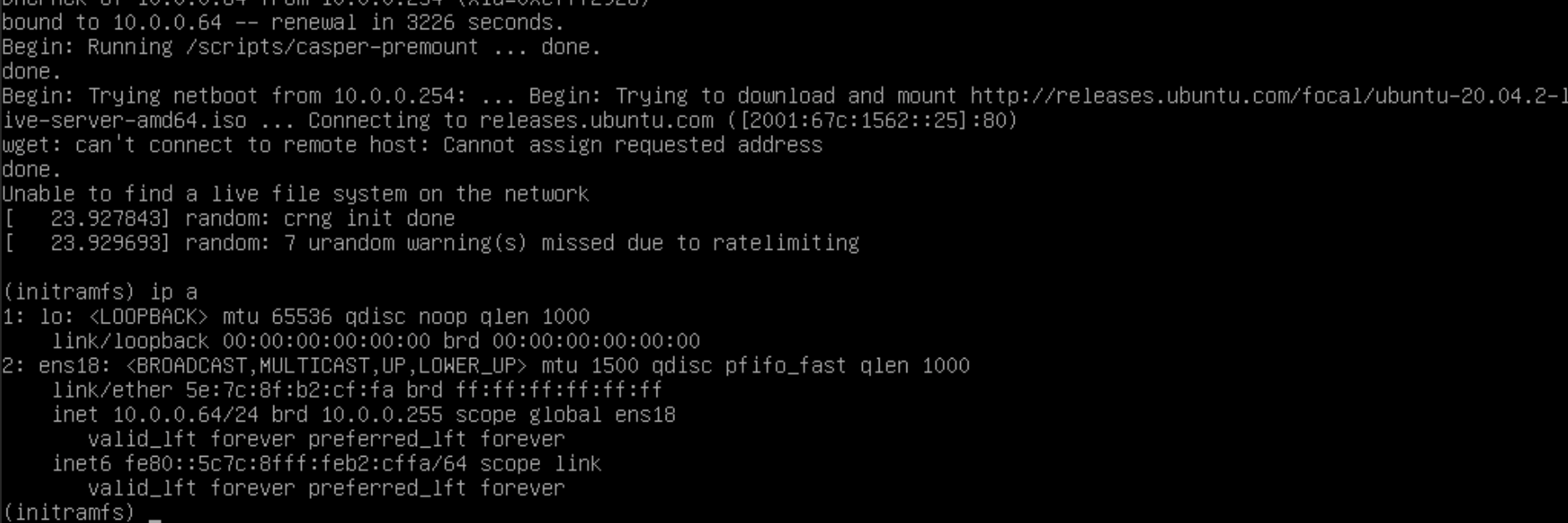
Additional context
I'm using the linuxserver.io self hosted netboot.xyz, but with no changes to any menu files. Perhaps there is a menu option I should change to disable ipv6 at kernel time boot?
Using the legacy installer method seems to work fine
@github-actions[bot] commented on GitHub (Mar 13, 2021):
This issue has been automatically marked as stale because it has not had recent activity. It will be closed if no further activity occurs. Thank you for your contributions.
@thelamer commented on GitHub (Apr 30, 2021):
I can't duplicate this because I don't have ipv6 setup on my local network. The kernel command line option you are looking for is:
I am hesitant to disable this project wide though not sure if it is only something on your network.
@rknightion commented on GitHub (May 23, 2021):
I'm not sure if I explained myself properly, but I don't have ipv6 on my network at all. That's what's caused the issue in a way; something is trying to use the ipv6 address to download the files but I don't have ipv6 enabled on the network so it fales.
Doing the ipv6.disable=1 option worked for me as a workaround, so that is much appreciated.
@thelamer commented on GitHub (May 23, 2021):
Something on your DHCP setup has to be offering a ipv6 address. I get IPv4 on two different networks I tested it on, so it is not a default setting or something.
@antonym commented on GitHub (Jul 8, 2021):
Closing for now, if it becomes an issue, we could always add as an option, but you should be able to override the kernel command line for now.