mirror of
https://github.com/netbootxyz/netboot.xyz.git
synced 2026-04-25 23:25:54 +03:00
[GH-ISSUE #1003] Netboot.xyz hangs on EFI boot in Virtualbox 6.1.26 #1805
Labels
No labels
Hacktoberfest
Hacktoberfest
bootloader
bsd
bug
confirmed
documentation
duplicate
enhancement
enhancement
enhancement
eol
experimental-merged
freebsd
help wanted
invalid
investigate
ipxe
linux
live-os
memdisk
menu
no-issue-activity
no-issue-activity
pull-request
released
todo
upstream
windows
windows
work-in-progress
No milestone
No project
No assignees
1 participant

Notifications
Due date
No due date set.
Dependencies
No dependencies set.
Reference
starred/netboot.xyz#1805
Loading…
Add table
Add a link
Reference in a new issue
No description provided.
Delete branch "%!s()"
Deleting a branch is permanent. Although the deleted branch may continue to exist for a short time before it actually gets removed, it CANNOT be undone in most cases. Continue?
Originally created by @tayrayb on GitHub (Sep 23, 2021).
Original GitHub issue: https://github.com/netbootxyz/netboot.xyz/issues/1003
As the title says, Netboot hangs when booting the BOOTX64.EFI from the EFI shell in Virtualbox.
To Reproduce
Steps to reproduce the behavior:
Expected behavior
Locks up on iPXE initializing devices.
Screenshots
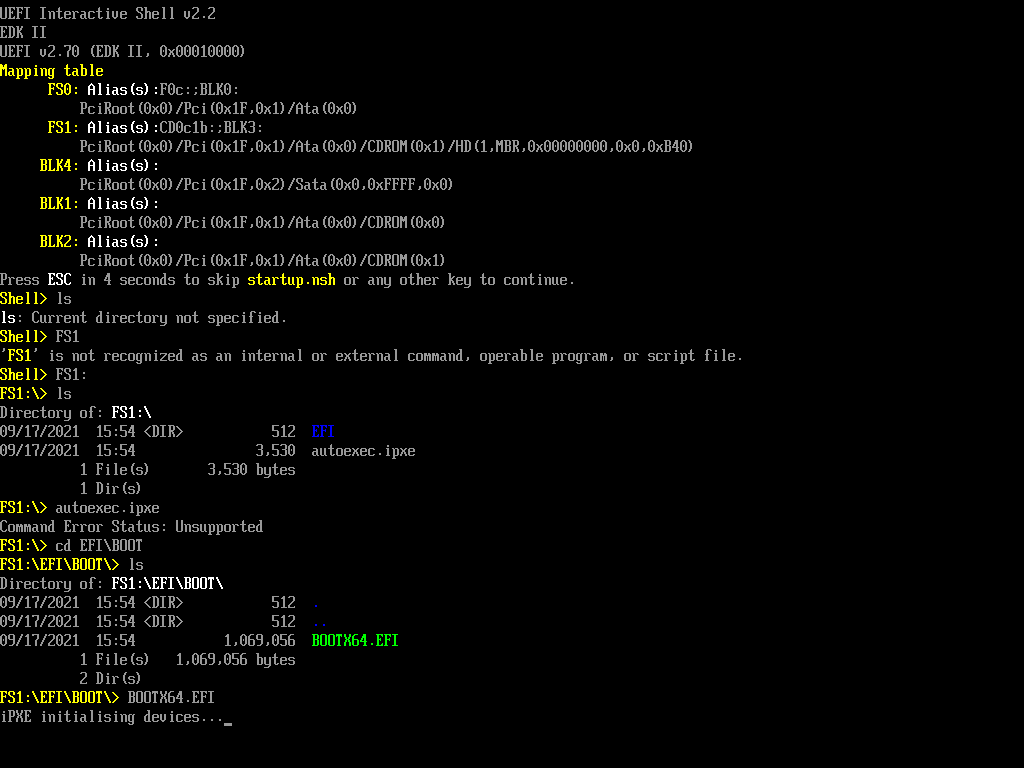
Additional context
My CPU is an AMD Ryzen 9 3900X, not sure if that information helps. I also have made sure SVM and all the needed stuff is enabled in the BIOS as well.
@antonym commented on GitHub (Sep 28, 2021):
Have you tried the netboot.xyz ISO directly in VirtualBox to see if that path is successful? There typically should be no interaction with UEFI required until you hit the netboot.xyz menu.
@tayrayb commented on GitHub (Sep 30, 2021):
No, it just boots straight into the UEFI shell like this.
I've done this before, I'm sure I remember I did the same with older versions of Virtualbox, having to navigate to the BOOTX64.EFI manually.
It just hangs when its booted manually on the latest Virtualbox with the CPU maxed out.
@antonym commented on GitHub (Oct 17, 2021):
You may need to adjust your boot order, if you are getting the UEFI shell first, it's more than likely skipping the ISO or network boot options.
In my old setup on Virtual Box, I'd add the ISO, set CDROM to boot first and then it would immediately boot into netboot.xyz. You shouldn't see the UEFI shell and shouldn't need to interact with anything until the menu loads.
@tayrayb commented on GitHub (Oct 26, 2021):
That's the bizarre part, I tried setting the Optical drive only to boot and it still drops straight into the EFI shell. Booting Non-EFI works perfectly fine and will boot straight up into netboot.xyz. I also tried booting from the bios menu in Virtualbox as well.
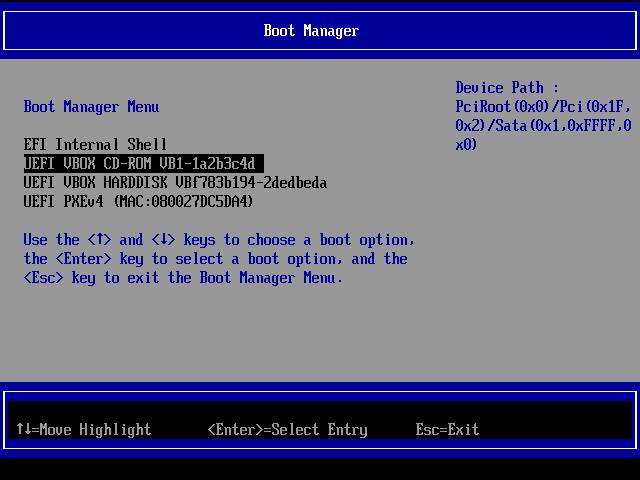
But it just does nothing, the screen flickers and then just goes back to the boot menu. Not sure whats going on, but I'm suspecting its just the Virtualbox EFI shell just not handling it correctly, but I think I'll just close the issue until I can figure out a workaround.
@mindrunner commented on GitHub (Nov 12, 2023):
I know, this is an old issue, but it seems unresolved to me and is still reproducible on latest virtualbox. Is there anything I am missing?