[GH-ISSUE #1005] HP EliteBook 755 G5 - AMD Ryzen 5 Pro 2500U #868

Closed
opened 2026-02-26 00:33:47 +03:00 by kerem · 13 comments
Owner

Originally created by @iq-404 on GitHub (Oct 13, 2020).
Original GitHub issue: https://github.com/hirschmann/nbfc/issues/1005

Hi there,

i'm missing a Config for the HP EliteBook 755 G5 (AMD Ryzen 5 Pro 2500U).
Is there any way to add this?

Many Thanks!

Originally created by @iq-404 on GitHub (Oct 13, 2020). Original GitHub issue: https://github.com/hirschmann/nbfc/issues/1005 Hi there, i'm missing a Config for the HP EliteBook 755 G5 (AMD Ryzen 5 Pro 2500U). Is there any way to add this? Many Thanks!
kerem 2026-02-26 00:33:47 +03:00
  • closed this issue
  • added the
    Stale
    label
Author
Owner

@SevcanAlkan commented on GitHub (Oct 20, 2020):

Hello, I'm using this config on my Elitebook 850 G5. May it can work on your machine. I couldn't see into the configs folder of the repository, probably, I had found from an issue. But I don't remember which issue.

<?xml version="1.0"?>
<FanControlConfigV2 xmlns:xsd="http://www.w3.org/2001/XMLSchema" xmlns:xsi="http://www.w3.org/2001/XMLSchema-instance">
  <NotebookModel>HP EliteBook 840 G5</NotebookModel>
  <Author>viliks</Author>
  <EcPollInterval>2000</EcPollInterval>
  <ReadWriteWords>false</ReadWriteWords>
  <CriticalTemperature>85</CriticalTemperature>
  <FanConfigurations>
    <FanConfiguration>
      <ReadRegister>46</ReadRegister>
      <WriteRegister>47</WriteRegister>
      <MinSpeedValue>255</MinSpeedValue>
      <MaxSpeedValue>42</MaxSpeedValue>
      <IndependentReadMinMaxValues>false</IndependentReadMinMaxValues>
      <MinSpeedValueRead>0</MinSpeedValueRead>
      <MaxSpeedValueRead>0</MaxSpeedValueRead>
      <ResetRequired>true</ResetRequired>
      <FanSpeedResetValue>255</FanSpeedResetValue>
      <FanDisplayName>CPU fan</FanDisplayName>
      <TemperatureThresholds>
        <TemperatureThreshold>
          <UpThreshold>0</UpThreshold>
          <DownThreshold>0</DownThreshold>
          <FanSpeed>0</FanSpeed>
        </TemperatureThreshold>
        <TemperatureThreshold>
          <UpThreshold>54</UpThreshold>
          <DownThreshold>47</DownThreshold>
          <FanSpeed>20</FanSpeed>
        </TemperatureThreshold>
        <TemperatureThreshold>
          <UpThreshold>63</UpThreshold>
          <DownThreshold>52</DownThreshold>
          <FanSpeed>32.7659569</FanSpeed>
        </TemperatureThreshold>
        <TemperatureThreshold>
          <UpThreshold>66</UpThreshold>
          <DownThreshold>59</DownThreshold>
          <FanSpeed>48.93617</FanSpeed>
        </TemperatureThreshold>
        <TemperatureThreshold>
          <UpThreshold>68</UpThreshold>
          <DownThreshold>62</DownThreshold>
          <FanSpeed>65.7277</FanSpeed>
        </TemperatureThreshold>
        <TemperatureThreshold>
          <UpThreshold>73</UpThreshold>
          <DownThreshold>65</DownThreshold>
          <FanSpeed>92.95775</FanSpeed>
        </TemperatureThreshold>
        <TemperatureThreshold>
          <UpThreshold>78</UpThreshold>
          <DownThreshold>72</DownThreshold>
          <FanSpeed>97.65259</FanSpeed>
        </TemperatureThreshold>
      </TemperatureThresholds>
      <FanSpeedPercentageOverrides>
        <FanSpeedPercentageOverride>
          <FanSpeedPercentage>0</FanSpeedPercentage>
          <FanSpeedValue>255</FanSpeedValue>
          <TargetOperation>ReadWrite</TargetOperation>
        </FanSpeedPercentageOverride>
      </FanSpeedPercentageOverrides>
    </FanConfiguration>
  </FanConfigurations>
  <RegisterWriteConfigurations>
    <RegisterWriteConfiguration>
      <WriteMode>Set</WriteMode>
      <WriteOccasion>OnInitialization</WriteOccasion>
      <Register>34</Register>
      <Value>1</Value>
      <ResetRequired>true</ResetRequired>
      <ResetValue>1</ResetValue>
      <ResetWriteMode>Set</ResetWriteMode>
      <Description>Select thermal zone</Description>
    </RegisterWriteConfiguration>
    <RegisterWriteConfiguration>
      <WriteMode>Set</WriteMode>
      <WriteOccasion>OnInitialization</WriteOccasion>
      <Register>38</Register>
      <Value>28</Value>
      <ResetRequired>true</ResetRequired>
      <ResetValue>0</ResetValue>
      <ResetWriteMode>Set</ResetWriteMode>
      <Description>Fake thermal zone temperature</Description>
    </RegisterWriteConfiguration>
  </RegisterWriteConfigurations>
</FanControlConfigV2>
<!-- gh-comment-id:712786289 --> @SevcanAlkan commented on GitHub (Oct 20, 2020): Hello, I'm using this config on my Elitebook 850 G5. May it can work on your machine. I couldn't see into the configs folder of the repository, probably, I had found from an issue. But I don't remember which issue. ```xml <?xml version="1.0"?> <FanControlConfigV2 xmlns:xsd="http://www.w3.org/2001/XMLSchema" xmlns:xsi="http://www.w3.org/2001/XMLSchema-instance"> <NotebookModel>HP EliteBook 840 G5</NotebookModel> <Author>viliks</Author> <EcPollInterval>2000</EcPollInterval> <ReadWriteWords>false</ReadWriteWords> <CriticalTemperature>85</CriticalTemperature> <FanConfigurations> <FanConfiguration> <ReadRegister>46</ReadRegister> <WriteRegister>47</WriteRegister> <MinSpeedValue>255</MinSpeedValue> <MaxSpeedValue>42</MaxSpeedValue> <IndependentReadMinMaxValues>false</IndependentReadMinMaxValues> <MinSpeedValueRead>0</MinSpeedValueRead> <MaxSpeedValueRead>0</MaxSpeedValueRead> <ResetRequired>true</ResetRequired> <FanSpeedResetValue>255</FanSpeedResetValue> <FanDisplayName>CPU fan</FanDisplayName> <TemperatureThresholds> <TemperatureThreshold> <UpThreshold>0</UpThreshold> <DownThreshold>0</DownThreshold> <FanSpeed>0</FanSpeed> </TemperatureThreshold> <TemperatureThreshold> <UpThreshold>54</UpThreshold> <DownThreshold>47</DownThreshold> <FanSpeed>20</FanSpeed> </TemperatureThreshold> <TemperatureThreshold> <UpThreshold>63</UpThreshold> <DownThreshold>52</DownThreshold> <FanSpeed>32.7659569</FanSpeed> </TemperatureThreshold> <TemperatureThreshold> <UpThreshold>66</UpThreshold> <DownThreshold>59</DownThreshold> <FanSpeed>48.93617</FanSpeed> </TemperatureThreshold> <TemperatureThreshold> <UpThreshold>68</UpThreshold> <DownThreshold>62</DownThreshold> <FanSpeed>65.7277</FanSpeed> </TemperatureThreshold> <TemperatureThreshold> <UpThreshold>73</UpThreshold> <DownThreshold>65</DownThreshold> <FanSpeed>92.95775</FanSpeed> </TemperatureThreshold> <TemperatureThreshold> <UpThreshold>78</UpThreshold> <DownThreshold>72</DownThreshold> <FanSpeed>97.65259</FanSpeed> </TemperatureThreshold> </TemperatureThresholds> <FanSpeedPercentageOverrides> <FanSpeedPercentageOverride> <FanSpeedPercentage>0</FanSpeedPercentage> <FanSpeedValue>255</FanSpeedValue> <TargetOperation>ReadWrite</TargetOperation> </FanSpeedPercentageOverride> </FanSpeedPercentageOverrides> </FanConfiguration> </FanConfigurations> <RegisterWriteConfigurations> <RegisterWriteConfiguration> <WriteMode>Set</WriteMode> <WriteOccasion>OnInitialization</WriteOccasion> <Register>34</Register> <Value>1</Value> <ResetRequired>true</ResetRequired> <ResetValue>1</ResetValue> <ResetWriteMode>Set</ResetWriteMode> <Description>Select thermal zone</Description> </RegisterWriteConfiguration> <RegisterWriteConfiguration> <WriteMode>Set</WriteMode> <WriteOccasion>OnInitialization</WriteOccasion> <Register>38</Register> <Value>28</Value> <ResetRequired>true</ResetRequired> <ResetValue>0</ResetValue> <ResetWriteMode>Set</ResetWriteMode> <Description>Fake thermal zone temperature</Description> </RegisterWriteConfiguration> </RegisterWriteConfigurations> </FanControlConfigV2> ```
Author
Owner

@ktgktg commented on GitHub (Oct 23, 2020):

Looking for a similar one, HP ProBook 645 G4 (AMD Ryzen 7 Pro 2700U).
Every xml I've tried shows a fan speed of less than 0 or more than 100 %.

Thanks SevcanAlkan, but your file didn't work for me at least.

There's a HP Ryzen config included, HP ENVY x360 Convertible 13-ag0xxx.xml, but it doesn't work for me. I don't think the CPU brand is the crucial part here anyway, not sure tho.

<!-- gh-comment-id:714832558 --> @ktgktg commented on GitHub (Oct 23, 2020): Looking for a similar one, HP ProBook 645 G4 (AMD Ryzen 7 Pro 2700U). Every xml I've tried shows a fan speed of less than 0 or more than 100 %. Thanks SevcanAlkan, but your file didn't work for me at least. There's a HP Ryzen config included, **HP ENVY x360 Convertible 13-ag0xxx.xml**, but it doesn't work for me. I don't think the CPU brand is the crucial part here anyway, not sure tho.
Author
Owner

@ktgktg commented on GitHub (Oct 24, 2020):

I missed the part about Secure Boot in requirements, and I bet I'm not the only one.

Anyway, I disassembled my laptop and found this chip. I hope it's not the TPM chip..
Didn't find any datasheet for it though.

image

<!-- gh-comment-id:716058356 --> @ktgktg commented on GitHub (Oct 24, 2020): I missed the part about Secure Boot in requirements, and I bet I'm not the only one. Anyway, I disassembled my laptop and found this chip. I hope it's not the TPM chip.. Didn't find any datasheet for it though. ![image](https://user-images.githubusercontent.com/36174328/97094062-838ab600-1651-11eb-8016-3d9a8ede94f8.png)
Author
Owner

@iq-404 commented on GitHub (Oct 26, 2020):

I've tried a little with existing configurations and it seems that the HP EliteBook 8760w could work ... maybe as a basis?
The Fan runs audible quieter but i'm not sure about the display values.
Temperatures are OK with "normal use", have not yet tested under full load.
Best regards!

<!-- gh-comment-id:716366292 --> @iq-404 commented on GitHub (Oct 26, 2020): I've tried a little with existing configurations and it seems that the HP EliteBook 8760w could work ... maybe as a basis? The Fan runs audible quieter but i'm not sure about the display values. Temperatures are OK with "normal use", have not yet tested under full load. Best regards!
Author
Owner

@iq-404 commented on GitHub (Oct 26, 2020):

Screenshot 2020-10-26 141617

<!-- gh-comment-id:716539399 --> @iq-404 commented on GitHub (Oct 26, 2020): ![Screenshot 2020-10-26 141617](https://user-images.githubusercontent.com/72799057/97176936-f43aeb00-1795-11eb-96fe-aa83d8c616a3.jpg)
Author
Owner

@ktgktg commented on GitHub (Oct 26, 2020):

How about when it's set to Auto, does it change fan speed as expected? Does it run at 10 % when dropping under 63° C?

      <UpThreshold>63</UpThreshold>
      <DownThreshold>48</DownThreshold>
      <FanSpeed>10</FanSpeed>
<!-- gh-comment-id:716550056 --> @ktgktg commented on GitHub (Oct 26, 2020): How about when it's set to Auto, does it change fan speed as expected? Does it run at 10 % when dropping under 63° C? <UpThreshold>63</UpThreshold> <DownThreshold>48</DownThreshold> <FanSpeed>10</FanSpeed>
Author
Owner

@iq-404 commented on GitHub (Oct 26, 2020):

Hmm, it don't seems so:

nbfc.exe status
Service enabled         : True
Read-only               : False
Selected config name    : HP EliteBook 8760w
Temperature             : 48

Fan display name        : CPU fan
Auto control enabled    : False
Critical mode enabled   : False
Current fan speed       : 50.00
Target fan speed        : 50.00
Fan speed steps         : 70

nbfc.exe set -a

nbfc.exe status
Service enabled         : True
Read-only               : False
Selected config name    : HP EliteBook 8760w
Temperature             : 44

Fan display name        : CPU fan
Auto control enabled    : True
Critical mode enabled   : False
Current fan speed       : 87.14
Target fan speed        : 0.00
Fan speed steps         : 70
<!-- gh-comment-id:716559503 --> @iq-404 commented on GitHub (Oct 26, 2020): Hmm, it don't seems so: ``` nbfc.exe status Service enabled : True Read-only : False Selected config name : HP EliteBook 8760w Temperature : 48 Fan display name : CPU fan Auto control enabled : False Critical mode enabled : False Current fan speed : 50.00 Target fan speed : 50.00 Fan speed steps : 70 nbfc.exe set -a nbfc.exe status Service enabled : True Read-only : False Selected config name : HP EliteBook 8760w Temperature : 44 Fan display name : CPU fan Auto control enabled : True Critical mode enabled : False Current fan speed : 87.14 Target fan speed : 0.00 Fan speed steps : 70 ```
Author
Owner

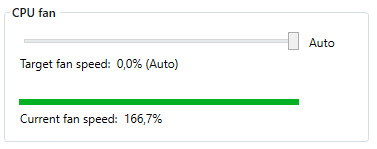
@ktgktg commented on GitHub (Oct 26, 2020):

No need for CMD AFAIK, you just drag the slider to the right.
image

<!-- gh-comment-id:716577760 --> @ktgktg commented on GitHub (Oct 26, 2020): No need for CMD AFAIK, you just drag the slider to the right. ![image](https://user-images.githubusercontent.com/36174328/97183963-abd3fb00-179e-11eb-9c18-64989ffd3a4a.png)
Author
Owner

@iq-404 commented on GitHub (Oct 26, 2020):

No need for CMD AFAIK, you just drag the slider to the right.
image

Nice to know :)

Screenshot 2020-10-26 152825

<!-- gh-comment-id:716588831 --> @iq-404 commented on GitHub (Oct 26, 2020): > No need for CMD AFAIK, you just drag the slider to the right. > ![image](https://user-images.githubusercontent.com/36174328/97183963-abd3fb00-179e-11eb-9c18-64989ffd3a4a.png) Nice to know :) ![Screenshot 2020-10-26 152825](https://user-images.githubusercontent.com/72799057/97185951-fe161b80-17a0-11eb-82da-f24f5bf9e5ec.jpg)
Author
Owner

@ktgktg commented on GitHub (Oct 26, 2020):

Over 100 %.. doesn't seem to work properly.
Do you have secure boot disabled?

<!-- gh-comment-id:716589880 --> @ktgktg commented on GitHub (Oct 26, 2020): Over 100 %.. doesn't seem to work properly. Do you have secure boot disabled?
Author
Owner

@iq-404 commented on GitHub (Oct 26, 2020):

Secure Boot is enabled ... if necessary i can disable for testing

image

<!-- gh-comment-id:716598254 --> @iq-404 commented on GitHub (Oct 26, 2020): Secure Boot is enabled ... if necessary i can disable for testing ![image](https://user-images.githubusercontent.com/72799057/97187354-a8db0980-17a2-11eb-8211-49b9aae4ed56.png)
Author
Owner

@ktgktg commented on GitHub (Oct 26, 2020):

Sorry, I misread. It's for Linux users only.

https://github.com/hirschmann/nbfc/wiki/First-steps

It's more likely that you have the wrong config file. The 8760W is SEVEN years older than your laptop, not very likely that it will work. Given that it's launched at the same time as my laptop with the same CPU's, your laptop probably has the same EC as mine, pictured above.

<!-- gh-comment-id:716604398 --> @ktgktg commented on GitHub (Oct 26, 2020): Sorry, I misread. It's for Linux users only. https://github.com/hirschmann/nbfc/wiki/First-steps It's more likely that you have the wrong config file. The 8760W is SEVEN years older than your laptop, not very likely that it will work. Given that it's launched at the same time as my laptop with the same CPU's, your laptop probably has the same EC as mine, pictured above.
Author
Owner

@github-actions[bot] commented on GitHub (Apr 26, 2021):

This issue is stale because it has been open more than 180 days with no activity. If nobody comments within 7 days, this issue will be closed

<!-- gh-comment-id:826418773 --> @github-actions[bot] commented on GitHub (Apr 26, 2021): This issue is stale because it has been open more than 180 days with no activity. If nobody comments within 7 days, this issue will be closed
Sign in to join this conversation.
No milestone
No project
No assignees
1 participant
Notifications
Due date
The due date is invalid or out of range. Please use the format "yyyy-mm-dd".

No due date set.

Dependencies

No dependencies set.

Reference
starred/nbfc-hirschmann#868
No description provided.