mirror of
https://github.com/hirschmann/nbfc.git
synced 2026-04-26 17:15:58 +03:00
[GH-ISSUE #846] ec-probe monitoring has no output #736
Labels
No labels
Stale
bug
config
discussion
duplicate
enhancement
experimental
feature
help-wanted
info
invalid
invalid
pull-request
question
up-for-grabs
wontfix
No milestone
No project
No assignees
1 participant

Notifications
Due date
No due date set.
Dependencies
No dependencies set.
Reference
starred/nbfc-hirschmann#736
Loading…
Add table
Add a link
Reference in a new issue
No description provided.
Delete branch "%!s()"
Deleting a branch is permanent. Although the deleted branch may continue to exist for a short time before it actually gets removed, it CANNOT be undone in most cases. Continue?
Originally created by @Adeptius on GitHub (Mar 24, 2020).
Original GitHub issue: https://github.com/hirschmann/nbfc/issues/846
After run ec-probe.exe monitor with admin rights it has no output. Just one "monitoring..." text only
@Adeptius commented on GitHub (Mar 24, 2020):
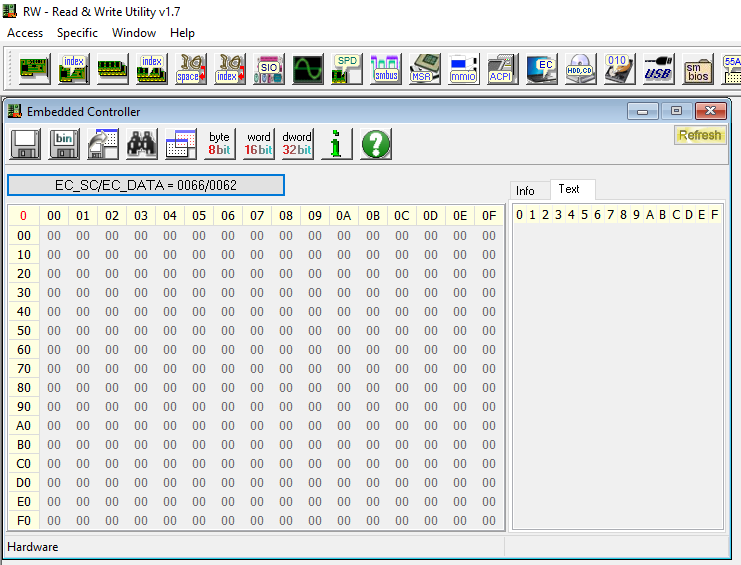
Little googling shows that RWEverything does not work too
@ghost commented on GitHub (Mar 31, 2020):
Same issue Asus VivoBook Pro 17
BIOS : X705FD.314
Windows 10 1809 x64
NBFC version 1.6.3
so far i have tried:
Hyper-Threading (on/off)
Intel Virtualization (on/off)
Intel AES-NI (on/off)
VT-D (on/off)
Memory Integrity (off/on)
@citizenserious commented on GitHub (Apr 6, 2020):
Same issue here: https://github.com/hirschmann/nbfc/issues/848
@citizenserious commented on GitHub (Apr 6, 2020):
Monitor the EC registers and save a report: ec-probe.exe monitor -r report.txt
If no timespan is provided, ec-probe will run until you cancel it by pressing Ctrl + C.
@Adeptius commented on GitHub (Apr 8, 2020):
i run "ec-probe.exe monitor -r report.txt" after few seconds console just going blank and thats it... no any report.txt files appear.
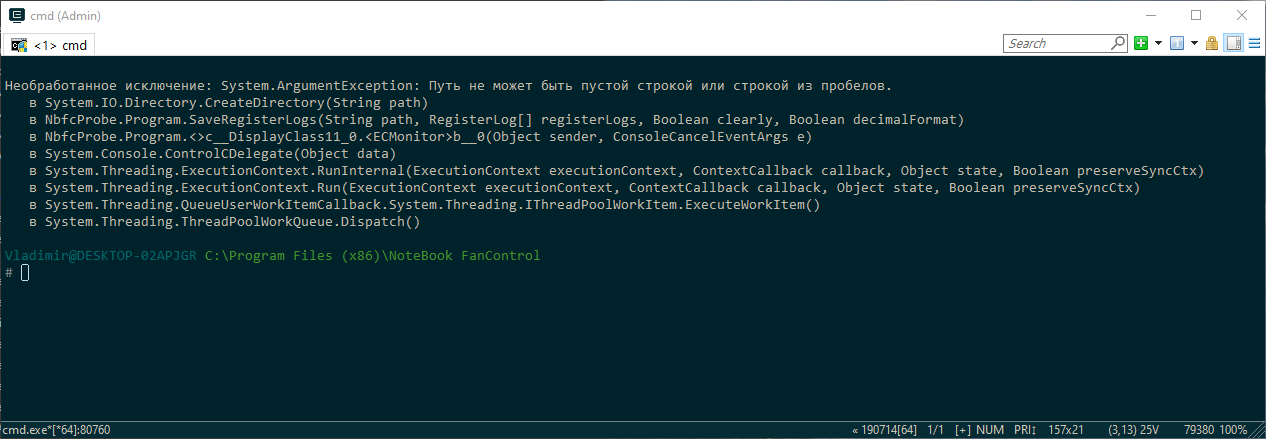
If i press ctrl+с than it show stack trace.
It means "Unhandled exception: The path cannot be empty"
@ghost commented on GitHub (Apr 8, 2020):
Absolutely the same issue i also tried to put Windows in Test mode but that had no effect.
NBFC Shows my CPU temp without a problem.
Some Configs show fan speed but its incorrect mostly around 150-160%
@Adeptius commented on GitHub (Apr 8, 2020):
For me too.
Shows only or you can set some value?
@ghost commented on GitHub (Apr 8, 2020):
I can click enable and move the slider but nothing happens i find it weird that it even shows anything different than 0 on some profiles because the whole EC is only 00.
I was able to find what EC chip my laptop has it might be a good idea to post your also.
ITE
IT8995E-128
1735-DXS
S00G3A
@Adeptius commented on GitHub (Apr 8, 2020):
EC chip? Do you mean that need to disassemble laptop to find it?
@ghost commented on GitHub (Apr 8, 2020):
No just go on google and look for a dissasembly video of your laptop model and look for a chip that has any of these names on it.
ITE
Microchip/SMSC
Nuvoton
Renesas
I also found that my chip is not listed as supported on the RWeverything website :(
@github-actions[bot] commented on GitHub (Oct 7, 2020):
This issue is stale because it has been open more than 180 days with no activity. If nobody comments within 7 days, this issue will be closed