[GH-ISSUE #793] HP Spectre x360 - 13-aw0013dx (ice lake) - profile configuration/findings #694

Closed
opened 2026-02-26 00:33:20 +03:00 by kerem · 11 comments
Owner

Originally created by @ghost on GitHub (Nov 24, 2019).
Original GitHub issue: https://github.com/hirschmann/nbfc/issues/793

I'm trying to create the profile for this laptop but having a difficulty to force the fan to work in manual mode.
After the whole day of testing I suspect that the correct writeRegister is 0x2E, however no matter what I do, I'm unable to force the fan into manual mode.
In the guide we can read "you must enable the EC's manual control mode which disables the EC's builtin fan control logic and lets you control the fan(s) manually" does anyone have any tip on how to find it? I've tries to change a few suspected registers but no luck.

Here is the extract from probe-monitor:

0x03: ...,13                                                                                                                                       ,4A,13
0x04: ...,FF                                                                                                                                       ,90,FF
0x05: ...,FF                                                                                                                                       ,90,FF
0x1B: ...,00                                                                                                                                       ,90,00
0x1C: ...,00                                                                                                                                       ,90,00
0x2E: ...,00,40,45      ,46,52,51,52,51,52,51,52,51,52,51   ,52,51   ,52,51      ,52,51,52,51,52,51,52,51,48,45,44,40      ,3E,35         ,00
0x2F: ...,00,3E,42      ,43,50   ,4F                                    ,50   ,4F,50         ,4F,50   ,4F,45,43,42,3D,3E,3F,3B,33         ,00
0x48: ...,2E   ,2F      ,30   ,31,32         ,33      ,34            ,33      ,32      ,31,30      ,2F   ,2E      ,2D      ,2C            ,2B            ,2A
0x49: ...,39,3A,3B         ,3C      ,3D,3C,3D,3C      ,3B   ,3A,39   ,38,37   ,36,35,34   ,33   ,32      ,31   ,30            ,2F,2E,2F,2E            ,2D,2E
0x50: ...,4A   ,6A      ,4A                  ,6A      ,4A            ,6A               ,4A         ,6A            ,4A      ,6A                     ,05,07
0x58: ...,5E,61      ,60                           ,5D               ,4C               ,3B               ,37                  ,34               ,33
0x59: ...,3D,3E,3F         ,40,3F               ,3E,3D   ,3C,3B,3A,39,38   ,36   ,35,34   ,33   ,32   ,31      ,30      ,2F   ,2E,2F,2E         ,2D,2E
0x87: ...,34,31,32,31,30,31,30      ,34   ,31      ,30         ,34,33   ,31      ,30         ,34,33,34,31      ,30               ,33   ,31      ,30   ,31,30
0x9D: ...,03                              ,04                                                                              ,03,04      ,03
0xB0: ...,00,A4,7C,45,6A,C5,D8,BF,D8,BF,F1,BF,F1,BF,0B,BF   ,25,A6,BF,25,BF   ,A6,F1,A6,F1,BF,D8,BF,A6,BF,72,45,34,A4,76,D3,0C,C2,E2,AD,C2,00
0xB1: ...,00,16,18         ,1C                     ,1D,1C   ,1D,1C   ,1D,1C                              ,19,18   ,16         ,12         ,00
0xB2: ...,00,EF,87   ,65,DC,2B   ,FB,13,E3,FB   ,13   ,FB      ,13,FB   ,2B   ,FB,5C,2B,13,2B,FB,43,E3,FB,8E,A8,54,8A,98,2A,BE,3B,FF   ,31,00
0xB3: ...,00,15,17         ,1C   ,1B,1C,1B      ,1C   ,1B      ,1C,1B   ,1C   ,1B,1C         ,1B,1C,1B   ,18,17   ,15   ,16,14,12,11   ,12,00
0xD2: ...,2E   ,32                           ,34                                       ,32                        ,2E
0xDC: ...,2D   ,30                           ,34                                       ,30                        ,2D

My suspiction is that 0x2E is readRegister, 0x2F is wrtireRegister, while 0x49 allows to select the current thermal zone and 0x59 and allows us to get (or set) the temperature of the currently selected thermal zone.

Here is a probe dump from the time when the fan was running:

00 01 02 03 04 05 06 07 08 09 0A 0B 0C 0D 0E 0F
00 00 80 16 13 FF FF 4F 4E 30 36 30 58 4C 43 52 31
10 50 4E 00 01 00 00 00 00 00 00 00 00 00 00 00 00
20 00 00 01 00 04 00 00 00 00 00 00 00 FF FF 35 32
30 00 00 01 00 00 00 00 00 00 00 00 00 00 00 00 00
40 0B 01 04 0C 04 10 00 00 2C 2E 00 00 00 00 DC 09
50 6B 00 04 00 00 00 00 00 35 2F 00 00 00 08 00 00
60 00 00 00 50 00 00 00 00 08 70 00 0A 00 07 07 00
70 6A 0F B5 0F 28 3C 80 33 33 33 2D 41 43 2D 36 36
80 2D 41 00 00 00 B5 0F 2A 44 00 00 00 01 E0 00 00
90 00 00 B5 0F AD 01 64 00 00 00 00 00 00 05 0C 03
A0 90 80 00 2D 01 00 00 40 00 15 14 00 00 04 00 00
B0 D7 12 CE 11 00 B9 89 00 00 00 00 04 00 00 00 00
C0 00 00 00 00 00 00 00 00 00 00 00 00 00 10 00 00
D0 64 00 2D 3A 21 06 00 01 64 00 1D 00 2D 00 00 00
E0 00 00 00 FE 00 00 00 02 00 00 00 00 20 4A 00 00
F0 08 00 20 00 00 00 6D 0B 00 00 38 37 32 36 30 30

and here from the time when the fan was stopped:

00 01 02 03 04 05 06 07 08 09 0A 0B 0C 0D 0E 0F
00 00 80 16 13 FF FF 4F 4E 30 36 30 58 4C 43 52 31
10 50 4E 00 01 00 00 00 00 00 00 00 00 00 00 00 00
20 00 00 01 00 04 00 00 00 00 00 00 00 FF FF 00 00
30 00 00 01 00 00 00 00 00 00 00 00 00 00 00 00 00
40 0B 01 04 0C 04 10 00 00 2B 2E 00 00 00 00 DC 09
50 6B 00 04 00 00 00 00 00 34 2F 00 00 00 08 00 00
60 00 00 00 50 00 00 00 00 08 70 00 0A 00 07 07 00
70 6A 0F B5 0F 28 3C 80 33 33 33 2D 41 43 2D 36 36
80 2D 41 00 00 00 B5 0F 2C 44 00 00 00 01 E0 00 00
90 90 00 B5 0F AD 01 64 00 00 00 00 00 00 05 0C 03
A0 0D 80 00 2D 01 00 00 40 00 15 14 00 00 04 00 00
B0 00 00 00 00 00 B9 89 00 00 00 00 04 00 00 00 00
C0 00 00 00 00 00 00 00 00 00 00 00 00 00 10 00 00
D0 64 00 2D 3A 21 06 00 01 64 00 1D 00 2D 00 00 00
E0 00 00 00 FE 00 00 00 02 00 00 00 00 20 4A 00 00
F0 08 00 20 00 00 00 6D 0B 00 00 38 37 32 36 30 30

Also chhached an extract of DSDT.

Anyone have any idea?
DSDT.txt

Originally created by @ghost on GitHub (Nov 24, 2019). Original GitHub issue: https://github.com/hirschmann/nbfc/issues/793 I'm trying to create the profile for this laptop but having a difficulty to force the fan to work in manual mode. After the whole day of testing I suspect that the correct writeRegister is 0x2E, however no matter what I do, I'm unable to force the fan into manual mode. In the guide we can read "you must enable the EC's manual control mode which disables the EC's builtin fan control logic and lets you control the fan(s) manually" does anyone have any tip on how to find it? I've tries to change a few suspected registers but no luck. Here is the extract from probe-monitor: ``` 0x03: ...,13 ,4A,13 0x04: ...,FF ,90,FF 0x05: ...,FF ,90,FF 0x1B: ...,00 ,90,00 0x1C: ...,00 ,90,00 0x2E: ...,00,40,45 ,46,52,51,52,51,52,51,52,51,52,51 ,52,51 ,52,51 ,52,51,52,51,52,51,52,51,48,45,44,40 ,3E,35 ,00 0x2F: ...,00,3E,42 ,43,50 ,4F ,50 ,4F,50 ,4F,50 ,4F,45,43,42,3D,3E,3F,3B,33 ,00 0x48: ...,2E ,2F ,30 ,31,32 ,33 ,34 ,33 ,32 ,31,30 ,2F ,2E ,2D ,2C ,2B ,2A 0x49: ...,39,3A,3B ,3C ,3D,3C,3D,3C ,3B ,3A,39 ,38,37 ,36,35,34 ,33 ,32 ,31 ,30 ,2F,2E,2F,2E ,2D,2E 0x50: ...,4A ,6A ,4A ,6A ,4A ,6A ,4A ,6A ,4A ,6A ,05,07 0x58: ...,5E,61 ,60 ,5D ,4C ,3B ,37 ,34 ,33 0x59: ...,3D,3E,3F ,40,3F ,3E,3D ,3C,3B,3A,39,38 ,36 ,35,34 ,33 ,32 ,31 ,30 ,2F ,2E,2F,2E ,2D,2E 0x87: ...,34,31,32,31,30,31,30 ,34 ,31 ,30 ,34,33 ,31 ,30 ,34,33,34,31 ,30 ,33 ,31 ,30 ,31,30 0x9D: ...,03 ,04 ,03,04 ,03 0xB0: ...,00,A4,7C,45,6A,C5,D8,BF,D8,BF,F1,BF,F1,BF,0B,BF ,25,A6,BF,25,BF ,A6,F1,A6,F1,BF,D8,BF,A6,BF,72,45,34,A4,76,D3,0C,C2,E2,AD,C2,00 0xB1: ...,00,16,18 ,1C ,1D,1C ,1D,1C ,1D,1C ,19,18 ,16 ,12 ,00 0xB2: ...,00,EF,87 ,65,DC,2B ,FB,13,E3,FB ,13 ,FB ,13,FB ,2B ,FB,5C,2B,13,2B,FB,43,E3,FB,8E,A8,54,8A,98,2A,BE,3B,FF ,31,00 0xB3: ...,00,15,17 ,1C ,1B,1C,1B ,1C ,1B ,1C,1B ,1C ,1B,1C ,1B,1C,1B ,18,17 ,15 ,16,14,12,11 ,12,00 0xD2: ...,2E ,32 ,34 ,32 ,2E 0xDC: ...,2D ,30 ,34 ,30 ,2D ``` My suspiction is that 0x2E is readRegister, 0x2F is wrtireRegister, while 0x49 allows to select the current thermal zone and 0x59 and allows us to get (or set) the temperature of the currently selected thermal zone. Here is a probe dump from the time when the fan was running: | 00 01 02 03 04 05 06 07 08 09 0A 0B 0C 0D 0E 0F ---|------------------------------------------------ 00 | 00 80 16 13 FF FF 4F 4E 30 36 30 58 4C 43 52 31 10 | 50 4E 00 01 00 00 00 00 00 00 00 00 00 00 00 00 20 | 00 00 01 00 04 00 00 00 00 00 00 00 FF FF 35 32 30 | 00 00 01 00 00 00 00 00 00 00 00 00 00 00 00 00 40 | 0B 01 04 0C 04 10 00 00 2C 2E 00 00 00 00 DC 09 50 | 6B 00 04 00 00 00 00 00 35 2F 00 00 00 08 00 00 60 | 00 00 00 50 00 00 00 00 08 70 00 0A 00 07 07 00 70 | 6A 0F B5 0F 28 3C 80 33 33 33 2D 41 43 2D 36 36 80 | 2D 41 00 00 00 B5 0F 2A 44 00 00 00 01 E0 00 00 90 | 00 00 B5 0F AD 01 64 00 00 00 00 00 00 05 0C 03 A0 | 90 80 00 2D 01 00 00 40 00 15 14 00 00 04 00 00 B0 | D7 12 CE 11 00 B9 89 00 00 00 00 04 00 00 00 00 C0 | 00 00 00 00 00 00 00 00 00 00 00 00 00 10 00 00 D0 | 64 00 2D 3A 21 06 00 01 64 00 1D 00 2D 00 00 00 E0 | 00 00 00 FE 00 00 00 02 00 00 00 00 20 4A 00 00 F0 | 08 00 20 00 00 00 6D 0B 00 00 38 37 32 36 30 30 and here from the time when the fan was stopped: | 00 01 02 03 04 05 06 07 08 09 0A 0B 0C 0D 0E 0F ---|------------------------------------------------ 00 | 00 80 16 13 FF FF 4F 4E 30 36 30 58 4C 43 52 31 10 | 50 4E 00 01 00 00 00 00 00 00 00 00 00 00 00 00 20 | 00 00 01 00 04 00 00 00 00 00 00 00 FF FF 00 00 30 | 00 00 01 00 00 00 00 00 00 00 00 00 00 00 00 00 40 | 0B 01 04 0C 04 10 00 00 2B 2E 00 00 00 00 DC 09 50 | 6B 00 04 00 00 00 00 00 34 2F 00 00 00 08 00 00 60 | 00 00 00 50 00 00 00 00 08 70 00 0A 00 07 07 00 70 | 6A 0F B5 0F 28 3C 80 33 33 33 2D 41 43 2D 36 36 80 | 2D 41 00 00 00 B5 0F 2C 44 00 00 00 01 E0 00 00 90 | 90 00 B5 0F AD 01 64 00 00 00 00 00 00 05 0C 03 A0 | 0D 80 00 2D 01 00 00 40 00 15 14 00 00 04 00 00 B0 | 00 00 00 00 00 B9 89 00 00 00 00 04 00 00 00 00 C0 | 00 00 00 00 00 00 00 00 00 00 00 00 00 10 00 00 D0 | 64 00 2D 3A 21 06 00 01 64 00 1D 00 2D 00 00 00 E0 | 00 00 00 FE 00 00 00 02 00 00 00 00 20 4A 00 00 F0 | 08 00 20 00 00 00 6D 0B 00 00 38 37 32 36 30 30 Also chhached an extract of DSDT. Anyone have any idea? [DSDT.txt](https://github.com/hirschmann/nbfc/files/3883136/DSDT.txt)
kerem 2026-02-26 00:33:20 +03:00
  • closed this issue
  • added the
    Stale
    label
Author
Owner

@hirschmann commented on GitHub (Dec 2, 2019):

Have a look at this field:

OperationRegion(ERAM, EmbeddedControl, Zero, 0xFF)
Field(ERAM, ByteAcc, NoLock, Preserve)
{
	
// ...
	Offset(0xB2),	//Offset(178),
	RPM1, 8,
	RPM2, 8,
	Offset(0xBA),	//Offset(186),
	CLOW, 8,
	CMAX, 8,
	Offset(0xC1),	//Offset(193),
	DPPC, 8,
	Offset(0xC5),	//Offset(197),
	SHB1, 1,
	SHB2, 1,
	SHB3, 1,
	SHB4, 1,
	SHOK, 1,
	SHFL, 1,
	SHNP, 1,
	, 1,
	, 1,
	CVTS, 1,
	Offset(0xCA),	//Offset(202),
	CSFG, 8,
	Offset(0xCE),	//Offset(206),
	NVDX, 8,
	ECDX, 8,
	EBPL, 1,
	Offset(0xD2),	//Offset(210),
	S1A1, 8,
	S2A1, 8,
	PSHD, 8,
	PSLD, 8,
	DBPL, 8,
	STSP, 8,
	Offset(0xDA),	//Offset(218),
	PSIN, 8,
	PSKB, 1,
	PSTP, 1,
	, 1,
	PWOL, 1,
	RTCE, 1,
	, 3,
	S1A0, 8,
	S2A0, 8,
	Offset(0xE0),	//Offset(224),
	DLYT, 8,
	DLY2, 8,
	Offset(0xE6),	//Offset(230),
	SFHK, 8,
	Offset(0xE9),	//Offset(233),
	DTMT, 8,
	PL12, 8,
	ETMT, 8,
	Offset(0xF2),	//Offset(242),
	ZPDD, 1,
	, 6,
	ENPA, 1,
	, 8,
	SFAN, 8,
	Offset(0xF8),	//Offset(248),
	NVDS, 1,
	, 7,
	, 7,
	FTHM, 1,
}

You should be able to read the fan speeds from 0xB2 (RPM1) and 0xB3 (RPM2) and set something fan related by writing either 0 or 2 to 0xF4 (SFAN).

There are also 2 methods in the DSDT which access those fields:

Name(FMAX, 0x1388)
Name(FMIN, Zero)
Method(FRSP, 0, NotSerialized)
{
	Store(Zero, Local2)
	If(LEqual(\_SB.PCI0.LPCB.EC0.ECOK, One))
	{
		Store(\_SB.PCI0.LPCB.EC0.RPM1, Local0)
		Store(\_SB.PCI0.LPCB.EC0.RPM2, Local1)
		ShiftLeft(Local1, 0x08, Local1)
		Or(Local0, Local1, Local0)
		If(LNotEqual(Local0, Zero))
		{
			Divide(0x00075300, Local0, Local0, Local2)
		}
	}
	Return(Local2)
}
Method(FSSP, 1, NotSerialized)
{
	If(LEqual(\_SB.PCI0.LPCB.EC0.ECOK, One))
	{
		If(LNotEqual(Arg0, Zero))
		{
			Store(Zero, \_SB.PCI0.LPCB.EC0.SFAN)
		}
		Else
		{
			Store(0x02, \_SB.PCI0.LPCB.EC0.SFAN)
		}
	}
}

I know it's not much, but I hope it helps anyway :)

<!-- gh-comment-id:560434961 --> @hirschmann commented on GitHub (Dec 2, 2019): Have a look at this field: ```js OperationRegion(ERAM, EmbeddedControl, Zero, 0xFF) Field(ERAM, ByteAcc, NoLock, Preserve) { // ... Offset(0xB2), //Offset(178), RPM1, 8, RPM2, 8, Offset(0xBA), //Offset(186), CLOW, 8, CMAX, 8, Offset(0xC1), //Offset(193), DPPC, 8, Offset(0xC5), //Offset(197), SHB1, 1, SHB2, 1, SHB3, 1, SHB4, 1, SHOK, 1, SHFL, 1, SHNP, 1, , 1, , 1, CVTS, 1, Offset(0xCA), //Offset(202), CSFG, 8, Offset(0xCE), //Offset(206), NVDX, 8, ECDX, 8, EBPL, 1, Offset(0xD2), //Offset(210), S1A1, 8, S2A1, 8, PSHD, 8, PSLD, 8, DBPL, 8, STSP, 8, Offset(0xDA), //Offset(218), PSIN, 8, PSKB, 1, PSTP, 1, , 1, PWOL, 1, RTCE, 1, , 3, S1A0, 8, S2A0, 8, Offset(0xE0), //Offset(224), DLYT, 8, DLY2, 8, Offset(0xE6), //Offset(230), SFHK, 8, Offset(0xE9), //Offset(233), DTMT, 8, PL12, 8, ETMT, 8, Offset(0xF2), //Offset(242), ZPDD, 1, , 6, ENPA, 1, , 8, SFAN, 8, Offset(0xF8), //Offset(248), NVDS, 1, , 7, , 7, FTHM, 1, } ``` You should be able to read the fan speeds from 0xB2 (RPM1) and 0xB3 (RPM2) and set something fan related by writing either 0 or 2 to 0xF4 (SFAN). There are also 2 methods in the DSDT which access those fields: ```js Name(FMAX, 0x1388) Name(FMIN, Zero) Method(FRSP, 0, NotSerialized) { Store(Zero, Local2) If(LEqual(\_SB.PCI0.LPCB.EC0.ECOK, One)) { Store(\_SB.PCI0.LPCB.EC0.RPM1, Local0) Store(\_SB.PCI0.LPCB.EC0.RPM2, Local1) ShiftLeft(Local1, 0x08, Local1) Or(Local0, Local1, Local0) If(LNotEqual(Local0, Zero)) { Divide(0x00075300, Local0, Local0, Local2) } } Return(Local2) } Method(FSSP, 1, NotSerialized) { If(LEqual(\_SB.PCI0.LPCB.EC0.ECOK, One)) { If(LNotEqual(Arg0, Zero)) { Store(Zero, \_SB.PCI0.LPCB.EC0.SFAN) } Else { Store(0x02, \_SB.PCI0.LPCB.EC0.SFAN) } } } ``` I know it's not much, but I hope it helps anyway :)
Author
Owner

@hirschmann commented on GitHub (Dec 2, 2019):

To be more clear - you can get the fan RPM like this: ((RPM2 << 8) | RPM1) / 0x00075300

<!-- gh-comment-id:560437354 --> @hirschmann commented on GitHub (Dec 2, 2019): To be more clear - you can get the fan RPM like this: ((RPM2 << 8) | RPM1) / 0x00075300
Author
Owner

@ghost commented on GitHub (Dec 7, 2019):

With your help I was able to create a profile which makes the fan start only at 80C and stop when reaching 65C (by modifying the 0xF4 register). Not optimal, but much better then default. Thank you!

<!-- gh-comment-id:562881362 --> @ghost commented on GitHub (Dec 7, 2019): With your help I was able to create a profile which makes the fan start only at 80C and stop when reaching 65C (by modifying the 0xF4 register). Not optimal, but much better then default. Thank you!
Author
Owner

@sensus261 commented on GitHub (Dec 19, 2019):

@pkakol7 , Hello mate,
Have you succeded in making a config for it ? If so, care to share ?

<!-- gh-comment-id:567636249 --> @sensus261 commented on GitHub (Dec 19, 2019): @pkakol7 , Hello mate, Have you succeded in making a config for it ? If so, care to share ?
Author
Owner

@ghost commented on GitHub (Dec 23, 2019):

Here is the profile I use:
https://www59.zippyshare.com/v/uBJKg4eW/file.html

it's configured in a way that the fan will only spin after reaching 80C and will stop when below 65C. You can change those values as you wish of course. Note that when fan start sniping, it's controlled by laptop itself so it will ramp up to quite fast (and loud) speed very quickly.

<!-- gh-comment-id:568460142 --> @ghost commented on GitHub (Dec 23, 2019): Here is the profile I use: https://www59.zippyshare.com/v/uBJKg4eW/file.html it's configured in a way that the fan will only spin after reaching 80C and will stop when below 65C. You can change those values as you wish of course. Note that when fan start sniping, it's controlled by laptop itself so it will ramp up to quite fast (and loud) speed very quickly.
Author
Owner

@sensus261 commented on GitHub (Dec 24, 2019):

Thank you, will try ! :)

<!-- gh-comment-id:568724084 --> @sensus261 commented on GitHub (Dec 24, 2019): Thank you, will try ! :)
Author
Owner

@mrgoindol commented on GitHub (Jan 11, 2020):

Hello! I have some questions.
I use same laptop (spectre x360 13, aw0000).

and I did..

  1. Uninstall "HP Support Assistant" and "Command Center"
  2. Install "NBFC"
  3. Change BIOS setting "Fan Always On" to "Disable"
  4. Load your(pkakol7) profile.

but, I think.. it's not working.
temperature is just appear correctly.
What did I wrong?

<!-- gh-comment-id:573330875 --> @mrgoindol commented on GitHub (Jan 11, 2020): Hello! I have some questions. I use same laptop (spectre x360 13, aw0000). and I did.. 1) Uninstall "HP Support Assistant" and "Command Center" 2) Install "NBFC" 3) Change BIOS setting "Fan Always On" to "Disable" 4) Load your(pkakol7) profile. but, I think.. it's not working. temperature is just appear correctly. What did I wrong?
Author
Owner

@nimda32 commented on GitHub (Jan 12, 2020):

Here is the profile I use:
https://www59.zippyshare.com/v/uBJKg4eW/file.html

Thanks for sharing @pkakol7 !
This link is now dead - could you please reupload it?

<!-- gh-comment-id:573464398 --> @nimda32 commented on GitHub (Jan 12, 2020): > Here is the profile I use: > https://www59.zippyshare.com/v/uBJKg4eW/file.html Thanks for sharing @pkakol7 ! This link is now dead - could you please reupload it?
Author
Owner

@nimda32 commented on GitHub (Jan 13, 2020):

I was wrong, it's working just not with adblock. Thanks. Here's a mirror

<!-- gh-comment-id:573496910 --> @nimda32 commented on GitHub (Jan 13, 2020): I was wrong, it's working just not with adblock. Thanks. [Here's a mirror](https://www.dropbox.com/s/q2phrdh06g8ev1u/HP%20Spectre%20x360%20-%2013-aw0013dx.xml?dl=0)
Author
Owner

@tomasiser commented on GitHub (Feb 11, 2020):

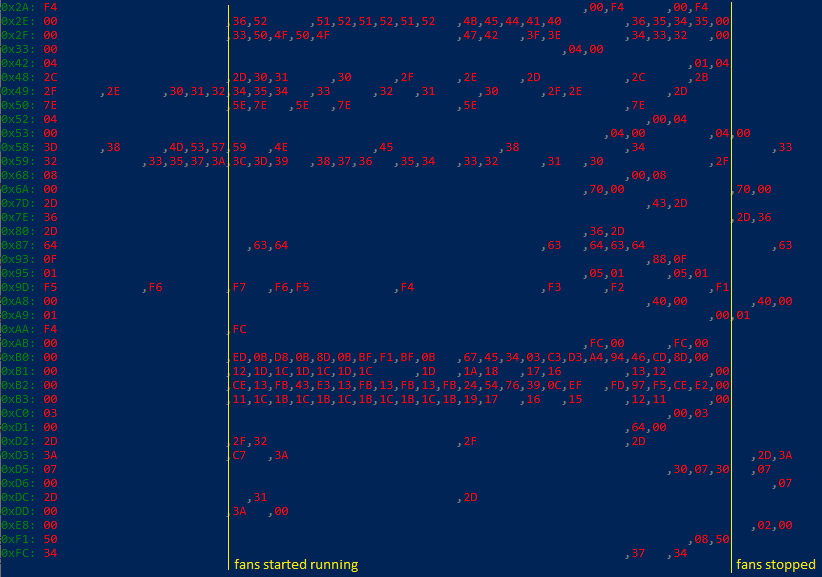
My laptop sometimes only turns on the left fan instead of both of them, which enabled me to support my hypothesis that 0x2E-0x2F and 0xB0-0xB3 all correspond to the fans. Here are my observations:

  • no fans running: 0x2E-0x2F and 0xB0-0xB3 are all 0,
  • only left fan running: 0x2E, 0xB0-0xB1 are non-zero,
  • both fans running: 0x2E-0x2F and 0xB0-0xB3 are non-zero.

Hence, I suspect 0x2E and 0x2F to specify the target speed of the left and right fans, respectively, and then 0xB0-0xB1 and 0xB2-0xB3 are the measured RPM of the left and right fans, respectively.

Furthermore, I think that 0x48, 0x49, 0x58, 0x59, 0x9D represent some kind of temperatures as these values got higher in load and then lower again after the fans were turned on for a while.

Separately from that, 0xF4 can be used to completely stop all fans by setting it to a non-zero value, which is what you are already doing in the configs you uploaded here.

Unfortunately, I still have no idea how to set the fans to a manual speed. I would assume that setting 0x2E and 0x2F values would start the fans, but that did not work for me, probably because it is overridden by another process / BIOS.

It is interesting, though, that only 0xB2-0xB3 and 0xF4 are present in the DSDT code.

It would be super cool if we finally managed to control both fans manually as no one has managed to figure that out yet for HP Spectre.

Attaching a log from when both fans were running:
image

<!-- gh-comment-id:584816630 --> @tomasiser commented on GitHub (Feb 11, 2020): My laptop sometimes only turns on the left fan instead of both of them, which enabled me to support my hypothesis that `0x2E`-`0x2F` and `0xB0`-`0xB3` all correspond to the fans. Here are my observations: - no fans running: `0x2E`-`0x2F` and `0xB0`-`0xB3` are all 0, - only left fan running: `0x2E`, `0xB0`-`0xB1` are non-zero, - both fans running: `0x2E`-`0x2F` and `0xB0`-`0xB3` are non-zero. Hence, I suspect `0x2E` and `0x2F` to specify the target speed of the left and right fans, respectively, and then `0xB0`-`0xB1` and `0xB2`-`0xB3` are the measured RPM of the left and right fans, respectively. Furthermore, I think that `0x48`, `0x49`, `0x58`, `0x59`, `0x9D` represent some kind of temperatures as these values got higher in load and then lower again after the fans were turned on for a while. Separately from that, `0xF4` can be used to completely stop all fans by setting it to a non-zero value, which is what you are already doing in the configs you uploaded here. Unfortunately, I still have no idea how to set the fans to a manual speed. I would assume that setting `0x2E` and `0x2F` values would start the fans, but that did not work for me, probably because it is overridden by another process / BIOS. It is interesting, though, that only `0xB2`-`0xB3` and `0xF4` are present in the DSDT code. It would be super cool if we finally managed to control both fans manually as no one has managed to figure that out yet for HP Spectre. Attaching a log from when both fans were running: ![image](https://user-images.githubusercontent.com/10374559/74283223-d6ba1400-4d21-11ea-924f-25754f486bd6.png)
Author
Owner

@github-actions[bot] commented on GitHub (Aug 11, 2020):

This issue is stale because it has been open more than 180 days with no activity. If nobody comments within 7 days, this issue will be closed

<!-- gh-comment-id:671649026 --> @github-actions[bot] commented on GitHub (Aug 11, 2020): This issue is stale because it has been open more than 180 days with no activity. If nobody comments within 7 days, this issue will be closed
Sign in to join this conversation.
No milestone
No project
No assignees
1 participant
Notifications
Due date
The due date is invalid or out of range. Please use the format "yyyy-mm-dd".

No due date set.

Dependencies

No dependencies set.

Reference
starred/nbfc-hirschmann#694
No description provided.