mirror of
https://github.com/hirschmann/nbfc.git
synced 2026-04-26 09:06:00 +03:00
[GH-ISSUE #614] Asus UX430UA doesn't work #551
Labels
No labels
Stale
bug
config
discussion
duplicate
enhancement
experimental
feature
help-wanted
info
invalid
invalid
pull-request
question
up-for-grabs
wontfix
No milestone
No project
No assignees
1 participant

Notifications
Due date
No due date set.
Dependencies
No dependencies set.
Reference
starred/nbfc-hirschmann#551
Loading…
Add table
Add a link
Reference in a new issue
No description provided.
Delete branch "%!s()"
Deleting a branch is permanent. Although the deleted branch may continue to exist for a short time before it actually gets removed, it CANNOT be undone in most cases. Continue?
Originally created by @aronluka on GitHub (Dec 31, 2018).
Original GitHub issue: https://github.com/hirschmann/nbfc/issues/614
I tried almost all version of NBFC, and a lot of Asus Zenbook profiles, none of them works.
Although a lot of users of UX430UA seems happy, it doesn't do anything for me. I can select the profile, I can adjust the fan speed, but the fan is still running on 100%. Tried all BIOS versions (303,304,305) from Asus download site.
The program is even showing me, that the fan speed should be zero, but the fan is still at 100%.
Does anyone else have a similar problem?
I'm running reinstalled Windows 10 64-bit without Asus bloatware. Can this be the issue? I tried installing even some Asus programs, but no difference.
Thanks for any help.
@ghost commented on GitHub (Jan 1, 2019):
I also have the UX430UA and it does not work, but then again, even setting the fans manually does not work.
I believe that this may be an issue with the latest ACPI software for Linux, not so much NBFC
@mmassic commented on GitHub (Mar 1, 2019):
I also own an Asus UX430UA running on Windows 10, 64 bits, and it works fine! I use this configuration:
https://github.com/hirschmann/nbfc/blob/master/Configs/Asus%20Zenbook%20UX430UA.xml
I run the latest Beta version of the software.
@aronluka commented on GitHub (Mar 3, 2019):
That is the inbuilt config in latest beta, right? I tried all of them. Lot of versions lot of versions, even the new config on older version of NBFC.
@mmassic Could you please provide which BIOS version and Asus software you are having on your computer? Maybe even which Windows 10 version -> 1803 or 1809.
To get windows version just write "winver" into start and open.
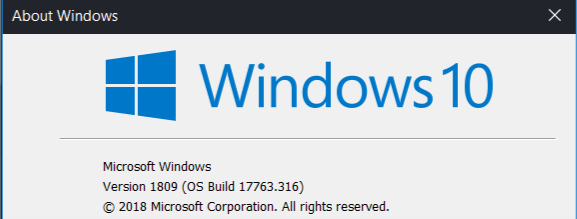
BIOS version should be in "msinfo" (again open from start menu). (Im at the moment on different machine)

Asus software list would be best via image of "appwiz.cpl" sorted by Publisher.
Thanks in advance if you are going to provide help.
@mmassic commented on GitHub (Mar 3, 2019):
That is the inbuilt config in latest beta, right? => RIGHT
I should add that the bios is trying to take over NBFC from time to time. Every half an hour (maybe), the fan starts for one second and stops.
Bios version: American Megatrends Inc. UX430UA,305, 2018-03-15 (Which is the latest if I am not mistaken)
Windows 10 64 Home Edition version: 1809, build 17763.316
As for Asus apps, here are the ones I have installed on my PC:
The latest versions I found on the Asus tool/drivers website.
@aronluka commented on GitHub (Mar 3, 2019):
Thank you very much, for all the information. It's so weird to see that working correctly for you but doesn't for me. I might try to set it up later again.
@mmassic commented on GitHub (Mar 3, 2019):
@ghost commented on GitHub (Mar 5, 2019):
As a note, this does not work for me on Linux. I haven't attempted on Windows as I don't run it. It seems to detect the temp and set and read the fan speed, but the physical speed of the fan does not change. Using the UX430UQ config works fine. Perhaps its in the way it controls the fan?
@github-actions[bot] commented on GitHub (Nov 20, 2019):
This issue is stale because it has been open more than 180 days with no activity. If nobody comments within 7 days, this issue will be closed