mirror of
https://github.com/hirschmann/nbfc.git
synced 2026-04-26 00:56:01 +03:00
[GH-ISSUE #607] Lenovo Ideapad 310-15ISK #546
Labels
No labels
Stale
bug
config
discussion
duplicate
enhancement
experimental
feature
help-wanted
info
invalid
invalid
pull-request
question
up-for-grabs
wontfix
No milestone
No project
No assignees
1 participant

Notifications
Due date
No due date set.
Dependencies
No dependencies set.
Reference
starred/nbfc-hirschmann#546
Loading…
Add table
Add a link
Reference in a new issue
No description provided.
Delete branch "%!s()"
Deleting a branch is permanent. Although the deleted branch may continue to exist for a short time before it actually gets removed, it CANNOT be undone in most cases. Continue?
Originally created by @Fusseldieb on GitHub (Dec 22, 2018).
Original GitHub issue: https://github.com/hirschmann/nbfc/issues/607
Hi,
I dug around in the configs and found that the Lenovo 310 is not on the list.
I tried to pick other Lenovo's, but it obviosuly didn't work.
I would love to see if someone has figured it out how to control the fan on this particular model.
@Gitarski commented on GitHub (Dec 23, 2018):
You can try running "nbfc config -r" from the directory where NBFC is installed.
This will recommend a config that might work.
If nothing shows up, you'll have to create a config yourself. You may want to contribute that to NBFC once it's working properly.
You can use other configs as a template. Instructions on how to do this can be found in the wiki.
@Fusseldieb commented on GitHub (Dec 23, 2018):
I already tried all of them, none works.
I'm not even sure what those "registers" are and how I can find the right one... Any point in the right direction would be great.
@Gitarski commented on GitHub (Dec 23, 2018):
If it showed some configurations that are compatible, that's a good sign. Before trying to make a new config, try to use one of the recommended configurations.
First, make sure you are using NBFC properly.
The way I use it is to first enable it using the radio box in the NBFC window. I believe it is not selected by default. Following that, you can move the displayed slider to set the target fan speed. It will take a few seconds to be put into effect.
You may have already done this, but wanted to confirm how you are enabling NBFC.
Does the temperature look correct? Does the fan speed seem correct? If you click on the buttons with the two dots, to select a config, the dialog box that shows up will have an edit button. Clicking on the edit button brings up the config editor.
The Fan configuration tab in the config editor shows the fan configuration. Mine only has one line for CPU fan. Double-clicking that shows details of the configuration. Probably the most interesting one here is the Temperature thresholds tab. This shows the fan speed settings at different temperature settings.
So, to confirm, please explain how your NBFC is behaving and what you are expecting.
Just trying to help!
@renoxtv commented on GitHub (Feb 3, 2019):
Hi. Set your config to Lenovo Yoga 510 and edit the write register to 189. This will allow you to set your fan speed only to 100% but its still useful to fight that 61C temp limit that im sure you hate :D
@Fusseldieb commented on GitHub (Feb 4, 2019):
@renoxtv I did that just to test
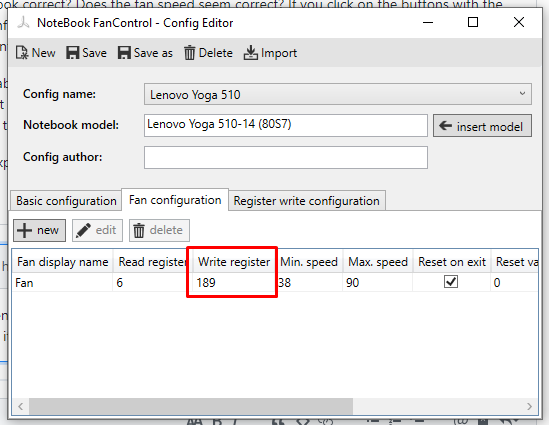
Yeah, it works, somehow... It unfortunately only goes to near 100%. True 100% is a little louder. And we can't adjust the speed too.
But thanks for your effort nonetheless :)
@github-actions[bot] commented on GitHub (Nov 20, 2019):
This issue is stale because it has been open more than 180 days with no activity. If nobody comments within 7 days, this issue will be closed