mirror of
https://github.com/hirschmann/nbfc.git
synced 2026-04-26 00:56:01 +03:00
[GH-ISSUE #554] ec-probe monitor not working in linux #499
Labels
No labels
Stale
bug
config
discussion
duplicate
enhancement
experimental
feature
help-wanted
info
invalid
invalid
pull-request
question
up-for-grabs
wontfix
No milestone
No project
No assignees
1 participant

Notifications
Due date
No due date set.
Dependencies
No dependencies set.
Reference
starred/nbfc-hirschmann#499
Loading…
Add table
Add a link
Reference in a new issue
No description provided.
Delete branch "%!s()"
Deleting a branch is permanent. Although the deleted branch may continue to exist for a short time before it actually gets removed, it CANNOT be undone in most cases. Continue?
Originally created by @franciscocox on GitHub (Sep 9, 2018).
Original GitHub issue: https://github.com/hirschmann/nbfc/issues/554
I'm trying to make a config file for Lenovo Legion Y520, and whenever I run
ec-probe monitorit returnsCould not load EC plugin. Try to run ec-probe with elevated privileges.The problem is, I tried it with sudo, as well as
sudo su -on gnome terminal, and as root in tty.I'm currently running Arch Linux 4.18
@erkexzcx commented on GitHub (Sep 18, 2018):
read this: https://wiki.archlinux.org/index.php/Fan_speed_control#NBFC
@franciscocox commented on GitHub (Sep 18, 2018):
Already did to install it, and it says nothing about my error, but I did reinstall arch for dual booting with windows, maybe this time it wants to work... I still find it weird that even by loging in with root ec-probe returns that error message
@erkexzcx commented on GitHub (Sep 18, 2018):
The command is
sudo suthenec-probe monitor?Also, you might be interested to try this out: http://linuxbsdos.com/2016/06/05/how-to-disable-fast-startup-in-windows-10/ (might be related I guess).
EDIT: This is how it works to me:
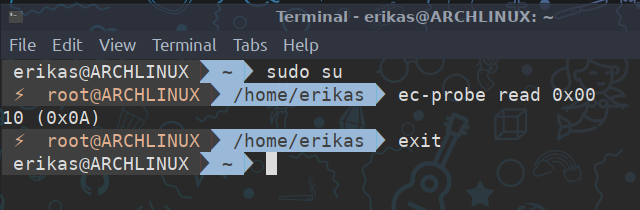
@franciscocox commented on GitHub (Sep 18, 2018):
I tried with arch as my only OS, now I installed windows and dual booted with arch (windows to game and arch for everything else). Also I tried sudo, sudo su -, and loging in with root (both in gnome and tty of it makes any difference), as I stated in the first post. But I haven't tried it since I reinstalled.
edit: I already disabled fast boot and safe boot as it is (I think) required for dual booting windows and linux
@erkexzcx commented on GitHub (Sep 18, 2018):
Umm then what nbfc version did you install? If you are using
nbfcrather thannbfc-git- installnbfc-gitand try again. Let me know how it goes.@franciscocox commented on GitHub (Sep 18, 2018):
I used nbfc-git, can't try right now as I'm away frome my home with no wifi, and I've already abused too much my cellphone's mobile data.
As soon as I get usable wifi I'll try again and update with my results
@franciscocox commented on GitHub (Oct 6, 2018):
So, after reinstalling arch linux and then NBFC it now works... so yeah... thanks :p
@github-actions[bot] commented on GitHub (Nov 23, 2019):
This issue is stale because it has been open more than 180 days with no activity. If nobody comments within 7 days, this issue will be closed