mirror of
https://github.com/modoboa/modoboa.git
synced 2026-04-25 00:46:03 +03:00
[GH-ISSUE #1142] How to connect to IMAP/SMTP after installation? #942
Labels
No labels
bug
bug
dependencies
design
documentation
duplicate
enhancement
enhancement
enhancement
feedback-needed
help-needed
help-needed
installer
invalid
looking-for-sponsors
modoboa-contacts
new-ui
new-ui
pr
pull-request
pyconfr
python
question
security
stale
webmail
wontfix
No milestone
No project
No assignees
1 participant

Notifications
Due date
No due date set.
Dependencies
No dependencies set.
Reference
starred/modoboa-modoboa#942
Loading…
Add table
Add a link
Reference in a new issue
No description provided.
Delete branch "%!s()"
Deleting a branch is permanent. Although the deleted branch may continue to exist for a short time before it actually gets removed, it CANNOT be undone in most cases. Continue?
Originally created by @brylie on GitHub (Jun 17, 2017).
Original GitHub issue: https://github.com/modoboa/modoboa/issues/1142
Impacted versions
Steps to reproduce
Current behavior
I cannot connect my mail client to the Modoboa server. I am also getting errors when running checks from MXtoolbox.
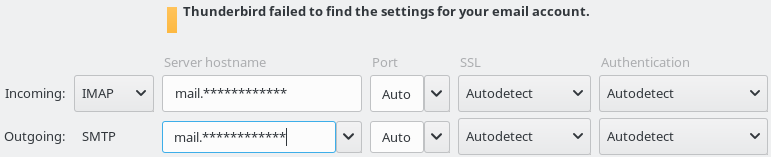
Thunderbird cannot seem to connect to the server via IMAP or SMTP, while MXtoolbox says it fails to connect to SMTP.
Expected behavior
There would be clear documentation about how to connect to the mail server with an IMAP/SMTP client.
Video/Screenshot link (optional)
The MX and DNSBL checks are currently passing:

However, Thunderbird cannot detect any settings for the domain:
@tonioo commented on GitHub (Jun 18, 2017):
Have you enabled automx during the installation? Try those settings:
@brylie commented on GitHub (Jun 18, 2017):
No, I didn't know to enable automx during the installation - although it sounds like a nice feature.
Thanks for the quick response. Would you consider adding these settings to some end-user facing screen or documentation, so there isn't any guesswork?
@tonioo commented on GitHub (Jun 18, 2017):
Yes, I can add something but I don't know where... FYI, automx is an auto configuration service.
@brylie commented on GitHub (Jun 18, 2017):
Alright, cool. It seems that some of this could be ironed out by an installation 'wizard, which could explain various components to the end-user during the installation process.
Full disclosure, I set up mail-in-a-box today, because I needed an SMTP server ASAP (we are deploying our service for usage tomorrow). mail-in-a-box has a full page of usage instructions, which are accessible from the user interface:
@brylie commented on GitHub (Jun 18, 2017):
Perhaps usage instructions could be included on the domain detail page in a 'usage' panel?
@tonioo commented on GitHub (Jun 19, 2017):
yes, that's one possible solution :)
@Nodeswitch commented on GitHub (Jul 13, 2017):
We're having the same issue as above. We can connect to the web client for mail, but when I try to connect via Thunderbird, getting nothing.
Ports 25, 587, 143 and 993 are all set to listen and it looks like iptables is set to allow everything by default.
Automx was enabled at install. We've tried both automatic settings and using the open ports with different settings for authentication, but getting nowhere.
Running 1.8.1, but upgraded from a version installed back in April. Using a client has never worked, as far as we're aware.
@rebornweb commented on GitHub (Nov 11, 2019):
Modoboa does work on Thunderbird, just make sure you have open Inbound Port 993 open on your firewall/security for (IMAP/SMTP), that your username is: support@blah.com (email) and you have your Outbound ports open too! *So your security & ports are open both inbound and outbound correctly.
Peace