mirror of
https://github.com/modoboa/modoboa.git
synced 2026-04-26 17:36:01 +03:00
[GH-ISSUE #2229] Can't send/receive E-Mails internally/externally at all #1547
Labels
No labels
bug
bug
dependencies
design
documentation
duplicate
enhancement
enhancement
enhancement
feedback-needed
help-needed
help-needed
installer
invalid
looking-for-sponsors
modoboa-contacts
new-ui
new-ui
pr
pull-request
pyconfr
python
question
security
stale
webmail
wontfix
No milestone
No project
No assignees
1 participant

Notifications
Due date
No due date set.
Dependencies
No dependencies set.
Reference
starred/modoboa-modoboa#1547
Loading…
Add table
Add a link
Reference in a new issue
No description provided.
Delete branch "%!s()"
Deleting a branch is permanent. Although the deleted branch may continue to exist for a short time before it actually gets removed, it CANNOT be undone in most cases. Continue?
Originally created by @itzMiney on GitHub (Apr 24, 2021).
Original GitHub issue: https://github.com/modoboa/modoboa/issues/2229
Impacted versions
Steps to reproduce
install dependencies, open ports
freshly install Modoboa with the installer
reboot server
go to mail.example.com
add a domain
make all the dns records
wait for checks (all checks green for me)
make simple user
Compose & Send test E-mail with simple user
Current behavior
nothing, only clears out "From" and "To" fields (not Subject)
Expected behavior
green message saying "Message sent!" and redirect to Inbox just like in the online demo
Video/Screenshot link (optional)
[Edited]

Online Demo after clicking "Send"
My own Webmail after clicking "Send"

Browser Console after clicking "Send"
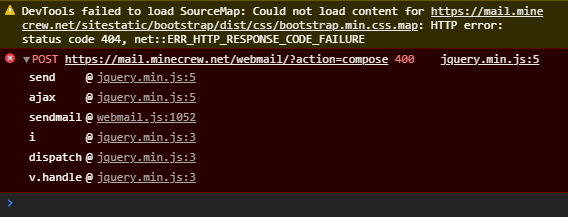
@ksaadDE commented on GitHub (May 9, 2021):
Hey,
I'm not of the dev team here, but it looks a bit like you have a bug in your nginx config. Why? you got a 404... not found and a 400 Bad request!
And it's a POST Request to /webmail/?action=compose
I experienced the same when I forget the API Url rewrites in the sites-enabled cfg of your vhost.
Try to setup a mailbox + email acc with Thunderbird and check if stuff gets send out. Then you know it isn't the underlying postfix, only the Webinterface and the Webserver config, since you use nginx. :)
And also your sitestatic is not configured in the vhost file as it seems (again a 404, see above the warning)
You need to do "link" the /sitestatic location in nginx to root like:
But it seems you have linked the webinterface is it UWSGI or ...?
The message sent message is also interesting, since it somehow ignores the 400 error.
400 means bad request. So you have a bug in your links to uwsgi. You usually get that when you didn't connect the sock correctly.
That means your nginx can't forward that message to the underlying modoboa webserver.
The confusing thing is.. it loads the assets to a certain point ?!
/E: Maybe you should post some parts of your nginx/sites-enabled conf. Otherwise people here might not in the possibility to help you.
/E: 10th May 2021: You could also just forward EVERYTHING, EXCEPT sitestatic (via uwsgi_pass) to the underlying modoboa webserver, this should work too. It seems you have that configuraiton already, so I'm a bit unsure if it's the conf
@antonbowe commented on GitHub (Jun 1, 2021):
Hey,
I have the exact same issue with my clean Modoboa installation. I can't even link my mail inbox with Thunderbird and I also cant receive any mails from apart. A few seconds after sending an email to my inbox I get an error on my mobile, that says, that my email has been rejected by the server.
When sending emails, the recipient and the from field clears immediatly and I cant send any emails?
Is there another solution to this issue?
@tonioo commented on GitHub (Jun 5, 2021):
Can one of you enable DEBUG mode in settings.py (reload uwsgi) and check the response content of the request that comes back with a 400 error?
@ScionOfDesign commented on GitHub (Jun 11, 2021):
I can replicate this error when trying to install modoboa into an empty ubuntu container using the installer:
Here is the response:
{"error": "dest@gmail.com: (451, b'4.3.5 <dest@gmail.com>: Recipient address rejected: Server configuration problem')"mail.log has the same error, as expected.
@ScionOfDesign commented on GitHub (Jun 11, 2021):
The issue seems to be in
/etc/postfix/main.cfUnder
smtpd_recipient_restrictions =you should remove/comment outcheck_policy_service inet:127.0.0.1:9999, now you should be able to send emails after callingpostfix reload.@tonioo commented on GitHub (Jun 11, 2021):
@ScionOfDesign It is not a good idea, unless you don't need the policy daemon. Have you checked if it is running on your server?
@ScionOfDesign commented on GitHub (Jun 11, 2021):
It does not seem to be running in an example container I was using, as it also had that line removed. I have not verified whether the daemon is installed and just not running or not installed at all.