mirror of
https://github.com/modoboa/modoboa.git
synced 2026-04-26 01:16:01 +03:00
[GH-ISSUE #1706] cannot send/reply to emails #1342
Labels
No labels
bug
bug
dependencies
design
documentation
duplicate
enhancement
enhancement
enhancement
feedback-needed
help-needed
help-needed
installer
invalid
looking-for-sponsors
modoboa-contacts
new-ui
new-ui
pr
pull-request
pyconfr
python
question
security
stale
webmail
wontfix
No milestone
No project
No assignees
1 participant

Notifications
Due date
No due date set.
Dependencies
No dependencies set.
Reference
starred/modoboa-modoboa#1342
Loading…
Add table
Add a link
Reference in a new issue
No description provided.
Delete branch "%!s()"
Deleting a branch is permanent. Although the deleted branch may continue to exist for a short time before it actually gets removed, it CANNOT be undone in most cases. Continue?
Originally created by @tonyguadagno on GitHub (Mar 22, 2019).
Original GitHub issue: https://github.com/modoboa/modoboa/issues/1706
hi, i have just installed modoboa 1.13.1 using the auto installer on centos 7 with nginx. I have it working and receiving emails. i just noticed that i cannot compose or reply to emails using the web client. For example, if i receive an email and hit reply (or reply all), i then add text to the body and hit send. immediately, the from and to fields go blank and nothing else happens. the email never sends. I have tried this with both current chrome and current firefox.....any ideas
thanks in advance
@tonioo commented on GitHub (Mar 25, 2019):
@tonyguadagno Have you checked all issues related to CentOS and SELinux?
@tonyguadagno commented on GitHub (Mar 25, 2019):
i think it is not selinux, there seems to be no alerts in the logs:
as for the os logging, all i see is this, and I am not sure it is indicating anything
@hexitex commented on GitHub (Jul 8, 2019):
Same here on Ubuntu 18.x, everything just goes blank when you hit the send button
@tonyguadagno commented on GitHub (Mar 30, 2020):
hi, its been a while and this has never worked for me. i have now upgraded to 1.14.0 and i am having the same issue. also when i hit send, there are no log entries in /var/log/maillog.....
can you please point me in the right direction????
@tonioo commented on GitHub (Mar 31, 2020):
@tonyguadagno Set DEBUG to True inside settings.py, reload uwsgi and then open your web browser console, look at the Network tab, you should see requests returning with wrong codes (400 or 500).
@tonyguadagno commented on GitHub (Mar 31, 2020):
hi, i set debug as you said and restarted uwsgi. when i reproduce the issue, i see no difference on my screen.
i see these in /var/log/messages, where should i look for the debug messages?
@tonyguadagno commented on GitHub (Mar 31, 2020):
sorry, i re-read your post. i do see 2 404's and then a 500 error. but there is not much detail, where on the server would this 500 error show up, in a log somewhere?
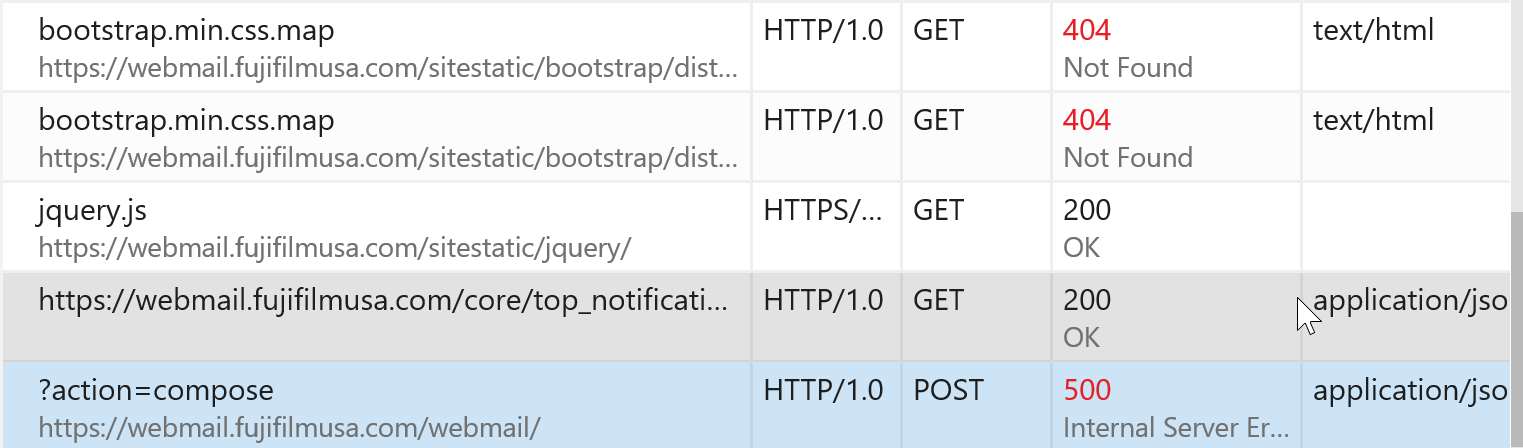
@tonyguadagno commented on GitHub (Mar 31, 2020):
here is more from that 500
@tonyguadagno commented on GitHub (Apr 1, 2020):
tonioo, any idea what my next step would be? sorry to nag, but i have users complaining.
thanks
@tonioo commented on GitHub (Apr 1, 2020):
@tonyguadagno you should be able to inspect the server's response from your debugger, without this I can't help you...
@tonyguadagno commented on GitHub (Apr 1, 2020):
@tonioo hi, from the debugger, all i see is a 500 internal server error. i think from that i need to go to the server logs, but i don't see any logs to look at...can you tell me where on the server would the logs be for more detail on the 500?
I have looked in these files, and you can see the 500 but nothing else.
I think modoboa needs to log this error, where does modoboa log?
nginx/mail.ffusa.com-error.log
nginx/mail.ffusa.com-access.log
maillog
@tonyguadagno commented on GitHub (Apr 2, 2020):
hi, i have a clue, i noticed in the maillog this error, could this be the reason this is broke? any idea how to fix it?
@tonyguadagno commented on GitHub (Apr 2, 2020):
I have been digging deeper into this. i see you are using uwsgi as a framework and i was able to turn on logging at that level. I was hoping to get the actual cause of the 500 error. with uwsgi logging turned on, i see this in those logs
unfortunately, no more help than before. i researched this and found a similar post. i understand that you may not be using pyramid, but if you read this post, the dev realized that the underlying code was not presenting the exception stack to uwsgi so the 500 error was not explained.
https://serverfault.com/questions/643513/pyramid-nginx-uwsgi-server-500-errors
Is it possible for you to add logging so that the 500 error would be more descriptive. I really need to get at the 500 error to figure out why this is not working for me.
thanks
@tonyguadagno commented on GitHub (Apr 6, 2020):
update, in an effort to fix this, i tried to Rebuild the Virtual environment https://modoboa.readthedocs.io/en/latest/upgrade.html
it did not help, same results
i have also disable selinux and that did not help either
@tonioo commented on GitHub (Apr 6, 2020):
@tonyguadagno you won't see anything in uwsgi logs because django catches the error to display an HTML page when DEBUG is on. Since Modoboa uses a lot of AJAX requests, you can't see them directly and that's why you need to inspect the server responses from a javascript console... You should be able to see responses, look for a response tab somewhere.
@tonyguadagno commented on GitHub (Apr 6, 2020):
YOUR a GENIUS! as it turns out, the fix for my auto reply problem was also the fix for this....the web interface (evidently) could not send because postfix was not listening on localhost. once i made that change, the web interface started working as well.
thanks!