mirror of
https://github.com/FiloSottile/mkcert.git
synced 2026-04-25 13:36:02 +03:00
[GH-ISSUE #115] Bad naming when used on IIS #66
Labels
No labels
TLS stack issue
Windows
bug
duplicate
duplicate
enhancement
help wanted
help wanted
pull-request
question
question
root store
waiting for info
No milestone
No project
No assignees
1 participant

Notifications
Due date
No due date set.
Dependencies
No dependencies set.
Reference
starred/mkcert#66
Loading…
Add table
Add a link
Reference in a new issue
No description provided.
Delete branch "%!s()"
Deleting a branch is permanent. Although the deleted branch may continue to exist for a short time before it actually gets removed, it CANNOT be undone in most cases. Continue?
Originally created by @svc-user on GitHub (Jan 10, 2019).
Original GitHub issue: https://github.com/FiloSottile/mkcert/issues/115
Hello,
When importing the certificates into IIS, the Organization Unit (OU) and Organization (O) are shown in the UI, which is the same across all certificates.
I could be helpful to use one of the domains (the first one, possibly), or the certificate file name in the Organisation field of the certificate to easily differentiate the different certificates in bad GUI's.
This is the imported certificates on he IIS. (Censored parts are my host and user name)

This is where I select my certificate for a site binding. (Censored parts are my host and user name)
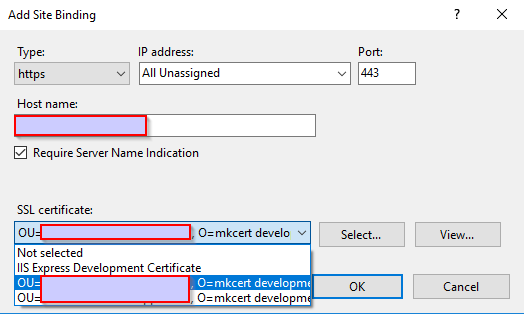
@FiloSottile commented on GitHub (Jan 13, 2019):
I suppose I should just give in and fill the CN field.
@ShaneYu commented on GitHub (Jan 14, 2019):
It might also be good to write up some instructions on how to use mkcert with IIS. I've not knowledgeable with this sort of stuff, but it seems you need to use something like openssl to convert the two pem files into a PFX file that can be imported into IIS.
However when I've done this, it says 'NET::ERR_CERT_COMMON_NAME_INVALID' in chrome when accessing the website hosted in IIS using that generated PFX.
Should this not work and have a green bar/indicator as per your screenshot?
@FiloSottile commented on GitHub (Jan 14, 2019):
We support
-pkcs12to generate a PFX file, no need to use openssl. No idea about the other error you got though, I don't actually have a Windows machine to test on.@ShaneYu commented on GitHub (Jan 22, 2019):
No worries @FiloSottile, I shall give it another go and see if I can get to the bottom of my issue. Many thanks. 😄
@ShaneYu commented on GitHub (Jan 22, 2019):
@FiloSottile Thanks for the suggestion to use -pkcs12 with the mkcert command, I hadn't realised it was available as it is not in the repository documentation. Using this method I was able to generate a PFX file and use it in IIS without the issue I previously mentioned; only issue is that the password is hardcoded to "changeit"; I may try put a PR in to allow passing in a custom password at a later date.
@adamdecaf commented on GitHub (Jan 22, 2019):
Would you mind creating a Pull Request with documentation changes?
There was a previous request to change
changeit, but that was closed. See: https://github.com/FiloSottile/mkcert/pull/58#issuecomment-451782395@ShaneYu commented on GitHub (Jan 23, 2019):
Ah, I didn't see that PR previously; in that case I shall leave it and use it as is for now. Need to work out how to use the new format(s) with IIS 🤔
@FiloSottile commented on GitHub (Feb 2, 2019):
Added a Common Name field when
-pkcs12is used.@RGVGreatCoder commented on GitHub (Sep 12, 2019):
How do we add a common name when -pkcs12 is used? Any docs to learn how to use mkcert? :)
@FiloSottile commented on GitHub (Sep 12, 2019):
Use the
-p12-fileflag.https://github.com/FiloSottile/mkcert#advanced-options