[GH-ISSUE #30] Wildcard on second-level domain does not work #17

Closed
opened 2026-02-25 22:32:23 +03:00 by kerem · 7 comments
Owner

Originally created by @mcdado on GitHub (Jul 3, 2018).
Original GitHub issue: https://github.com/FiloSottile/mkcert/issues/30

I have setup mkcert, and in apache config successfully created two sites: hostname.local and somename.test. These two work, but then I also tried to setup a wildcard *.test system where other folders in the ~/Sites are "converted" to .test domains:

<VirtualHost *:443>
  ServerName test
  ServerAlias *.test

  VirtualDocumentRoot "/Users/David/Sites/%-2+"

  SSLEngine on
  SSLCertificateFile "/Users/David/ssl/_wildcard.test.pem"
  SSLCertificateKeyFile "/Users/David/ssl/_wildcard.test-key.pem"
</VirtualHost>

This system in Apache works, but the certificate doesn't work:

screen shot 2018-07-03 at 14 09 31

screen shot 2018-07-03 at 14 09 27

FWIW, in Chrome the error is NET::ERR_CERT_COMMON_NAME_INVALID.

Originally created by @mcdado on GitHub (Jul 3, 2018). Original GitHub issue: https://github.com/FiloSottile/mkcert/issues/30 I have setup mkcert, and in apache config successfully created two sites: `hostname.local` and `somename.test`. These two work, but then I also tried to setup a wildcard `*.test` system where other folders in the `~/Sites` are "converted" to `.test` domains: ``` <VirtualHost *:443> ServerName test ServerAlias *.test VirtualDocumentRoot "/Users/David/Sites/%-2+" SSLEngine on SSLCertificateFile "/Users/David/ssl/_wildcard.test.pem" SSLCertificateKeyFile "/Users/David/ssl/_wildcard.test-key.pem" </VirtualHost> ``` This system in Apache works, but the certificate doesn't work: ![screen shot 2018-07-03 at 14 09 31](https://user-images.githubusercontent.com/898057/42220867-7c0e26de-7ed0-11e8-8d93-f1cd7c5e9966.png) ![screen shot 2018-07-03 at 14 09 27](https://user-images.githubusercontent.com/898057/42220885-7e3339f4-7ed0-11e8-83da-33c7e981d5fc.png) FWIW, in Chrome the error is ` NET::ERR_CERT_COMMON_NAME_INVALID`.
kerem closed this issue 2026-02-25 22:32:23 +03:00
Author
Owner

@kohenkatz commented on GitHub (Jul 3, 2018):

Most web browsers will not trust a second-level wildcard certificate. See here for example, which links to the source code in Chromiun (Google Chrome) that disallows it.

<!-- gh-comment-id:402194735 --> @kohenkatz commented on GitHub (Jul 3, 2018): Most web browsers will not trust a second-level wildcard certificate. See [here](https://security.stackexchange.com/a/6874) for example, which links to the source code in Chromiun (Google Chrome) that disallows it.
Author
Owner

@FiloSottile commented on GitHub (Jul 3, 2018):

Indeed, this is not something that can be handled by mkcert AFAICT. It will work if you use a name like *.wild.test.

<!-- gh-comment-id:402277818 --> @FiloSottile commented on GitHub (Jul 3, 2018): Indeed, this is not something that can be handled by mkcert AFAICT. It will work if you use a name like `*.wild.test`.
Author
Owner

@FiloSottile commented on GitHub (Jul 3, 2018):

I'll add a warning though.

<!-- gh-comment-id:402289182 --> @FiloSottile commented on GitHub (Jul 3, 2018): I'll add a warning though.
Author
Owner

@bradical commented on GitHub (Nov 14, 2019):

I get that this is a fundamental browser limitation but anyone think of why the certificate might work for one domain and not another? I've got a "*.me" certificate installed into Apache for a VirtualHost proxy to puma/puma-dev. And while one domain gives me a warning:

image

the other says not secure but doesn't mention the certificate:

image

Any ideas?

<!-- gh-comment-id:553683039 --> @bradical commented on GitHub (Nov 14, 2019): I get that this is a fundamental browser limitation but anyone think of why the certificate might work for one domain and not another? I've got a "*.me" certificate installed into Apache for a VirtualHost proxy to [`puma/puma-dev`](https://github.com/puma/puma-dev). And while one domain gives me a warning: ![image](https://user-images.githubusercontent.com/191132/68819046-f2474d00-0654-11ea-94fe-da074e6252a0.png) the other says not secure but doesn't mention the certificate: ![image](https://user-images.githubusercontent.com/191132/68819062-fb381e80-0654-11ea-8c71-f709823d9e3e.png) Any ideas?
Author
Owner

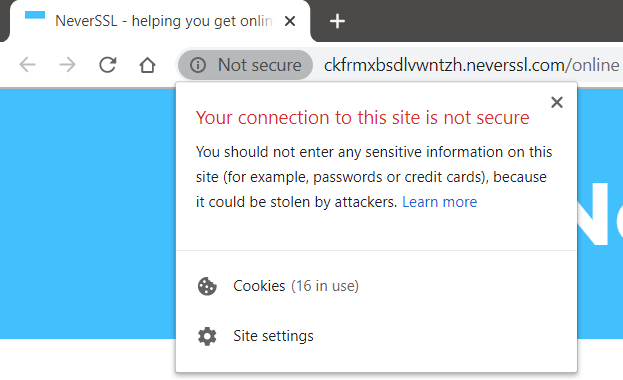
@kohenkatz commented on GitHub (Nov 14, 2019):

@bradical Are you sure you accessed the second site using https:// and not just plain http://? Plain http:// without the s is what your second screenshot looks like.

For example:
image

<!-- gh-comment-id:553716400 --> @kohenkatz commented on GitHub (Nov 14, 2019): @bradical Are you sure you accessed the second site using `https://` and not just plain `http://`? Plain `http://` without the `s` is what your second screenshot looks like. For example: ![image](https://user-images.githubusercontent.com/88755/68826251-1a41ab00-066b-11ea-8e11-6ef0de4d9bfc.png)
Author
Owner

@mcdado commented on GitHub (Nov 14, 2019):

It would appear you’re using Chrome, right? If you open DevTools there’s a security tab with more information about the certificate

<!-- gh-comment-id:553772629 --> @mcdado commented on GitHub (Nov 14, 2019): It would appear you’re using Chrome, right? If you open DevTools there’s a security tab with more information about the certificate
Author
Owner

@bradical commented on GitHub (Nov 14, 2019):

@bradical Are you sure you accessed the second site using https:// and not just plain http://? Plain http:// without the s is what your second screenshot looks like.

Thanks for that! I think you're right.

It would appear you’re using Chrome, right? If you open DevTools there’s a security tab with more information about the certificate

Thanks for that too! I was unsure where to look for certificate information in the latest Chrome.

<!-- gh-comment-id:553901356 --> @bradical commented on GitHub (Nov 14, 2019): > @bradical Are you sure you accessed the second site using `https://` and not just plain `http://`? Plain `http://` without the `s` is what your second screenshot looks like. Thanks for that! I think you're right. > It would appear you’re using Chrome, right? If you open DevTools there’s a security tab with more information about the certificate Thanks for that too! I was unsure where to look for certificate information in the latest Chrome.
Sign in to join this conversation.
No milestone
No project
No assignees
1 participant
Notifications
Due date
The due date is invalid or out of range. Please use the format "yyyy-mm-dd".

No due date set.

Dependencies

No dependencies set.

Reference
starred/mkcert#17
No description provided.