[GH-ISSUE #463] markdownlint takes absurdly long to parse a 27,000 line table due to work for each inline incorrectly processing the entire table #384

Closed
opened 2026-03-03 01:26:25 +03:00 by kerem · 10 comments
Owner

Originally created by @fireattack on GitHub (Nov 22, 2021).
Original GitHub issue: https://github.com/DavidAnson/markdownlint/issues/463

STR:

  1. Install both Text Power Tools (TPT) and markdownlint.
  2. Open a long MD document. I was viewing this one.
  3. Ctrl+P, and choose any of the TPT commands. I use "filter lines including a string"

*Note: I see this bug even without opening an MD file. But a long MD file is what makes it easier to reproduce.

Expected
a popup from TPT to ask you to input query

Observed
It shows "activating extensions..." at status bar for a while, then nothing happens. No popup. If I click "activating extensions" during the time, it shows mardownlint is "unresponsive".

Afterwards, markdownlint freezes (no longer recognize lighting errors) until restarting.

Tested on newest stable VS Code and Insiders

Version: 1.62.2 (system setup)
Commit: 3a6960b964327f0e3882ce18fcebd07ed191b316
Date: 2021-11-11T20:56:38.428Z
Electron: 13.5.2
Chrome: 91.0.4472.164
Node.js: 14.16.0
V8: 9.1.269.39-electron.0
OS: Windows_NT x64 6.1.7601
----------------
Version: 1.63.0-insider
Commit: 4e303fcc52269ab578affa6cb1eb455eacab445f
Date: 2021-11-22T05:28:15.683Z
Electron: 13.5.2
Chromium: 91.0.4472.164
Node.js: 14.16.0
V8: 9.1.269.39-electron.0
OS: Windows_NT x64 6.1.7601

See also: https://github.com/qcz/vscode-text-power-tools/issues/29

Originally created by @fireattack on GitHub (Nov 22, 2021). Original GitHub issue: https://github.com/DavidAnson/markdownlint/issues/463 STR: 1. Install both [Text Power Tools](https://marketplace.visualstudio.com/items?itemName=qcz.text-power-tools) (TPT) and [markdownlint](https://marketplace.visualstudio.com/items?itemName=DavidAnson.vscode-markdownlint). 2. Open a long MD document. I was viewing [this one](https://gist.githubusercontent.com/Trim21/600447bc08ed0d64c4f5de1ad05a53f1/raw/64a661e10d60c9f01ce619223b59d26207e588f5/readme.md). 3. Ctrl+P, and choose any of the TPT commands. I use "filter lines including a string" *Note: I see this bug even without opening an MD file. But a long MD file is what makes it easier to reproduce. **Expected** a popup from TPT to ask you to input query **Observed** It shows "activating extensions..." at status bar for a while, then nothing happens. No popup. If I click "activating extensions" during the time, it shows mardownlint is "unresponsive". Afterwards, markdownlint freezes (no longer recognize lighting errors) until restarting. Tested on newest stable VS Code and Insiders ``` Version: 1.62.2 (system setup) Commit: 3a6960b964327f0e3882ce18fcebd07ed191b316 Date: 2021-11-11T20:56:38.428Z Electron: 13.5.2 Chrome: 91.0.4472.164 Node.js: 14.16.0 V8: 9.1.269.39-electron.0 OS: Windows_NT x64 6.1.7601 ---------------- Version: 1.63.0-insider Commit: 4e303fcc52269ab578affa6cb1eb455eacab445f Date: 2021-11-22T05:28:15.683Z Electron: 13.5.2 Chromium: 91.0.4472.164 Node.js: 14.16.0 V8: 9.1.269.39-electron.0 OS: Windows_NT x64 6.1.7601 ``` See also: https://github.com/qcz/vscode-text-power-tools/issues/29
kerem 2026-03-03 01:26:25 +03:00
Author
Owner

@DavidAnson commented on GitHub (Nov 22, 2021):

Running a TPT command leads VS Code to report markdownlint is unresponsive? I've seen them mis-report this before. Please follow the steps they give to capture a stack trace - that should help identify the issue. Also, if the slowdown does not happen when TPT is not used, it's a pretty good indication that's responsible.

<!-- gh-comment-id:976006470 --> @DavidAnson commented on GitHub (Nov 22, 2021): Running a TPT command leads VS Code to report markdownlint is unresponsive? I've seen them mis-report this before. Please follow the steps they give to capture a stack trace - that should help identify the issue. Also, if the slowdown does not happen when TPT is not used, it's a pretty good indication that's responsible.
Author
Owner

@DavidAnson commented on GitHub (Nov 22, 2021):

The message "activating extensions" is another clue - markdownlint will have already been activated if you are editing a Markdown file. You can force a linting error to verify that before running the TPT command.

<!-- gh-comment-id:976007412 --> @DavidAnson commented on GitHub (Nov 22, 2021): The message "activating extensions" is another clue - markdownlint will have already been activated if you are editing a Markdown file. You can force a linting error to verify that before running the TPT command.
Author
Owner

@fireattack commented on GitHub (Nov 22, 2021):

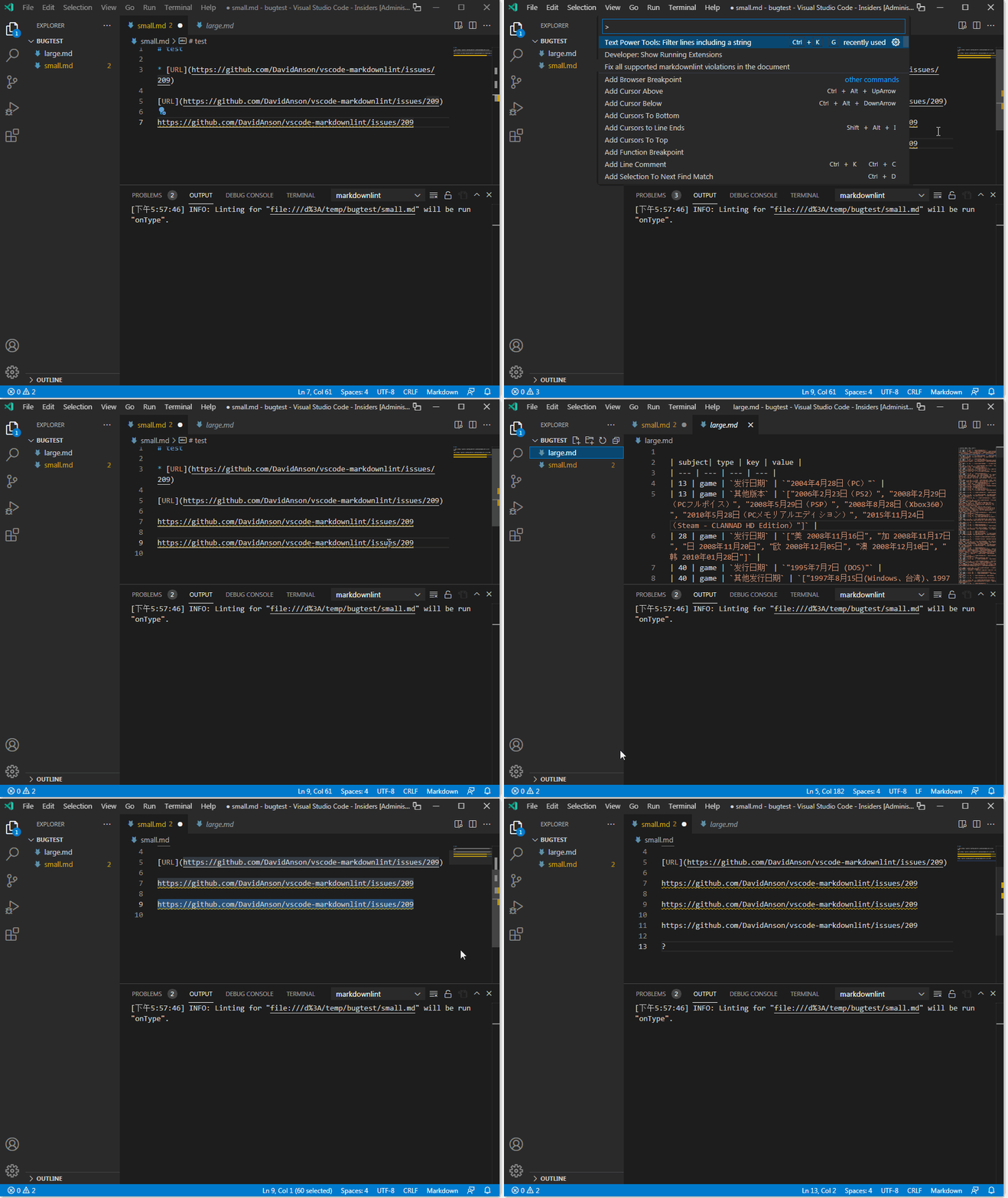
When that happens (after I tried to use a TPT command), markdownlint actually freezes. The document (or even a different file) will no longer show new linting error anymore:

image

To make it worse, it sometimes happens even without using TPT.

As for debugging the issue, I'll be frank I don't know how to do it :/

<!-- gh-comment-id:976014823 --> @fireattack commented on GitHub (Nov 22, 2021): When that happens (after I tried to use a TPT command), markdownlint actually freezes. The document (or even a different file) will no longer show new linting error anymore: ![image](https://user-images.githubusercontent.com/4130991/142952265-8cc4c458-543c-4d8f-8d81-46292e62b411.png) To make it worse, it sometimes happens even without using TPT. As for debugging the issue, I'll be frank I don't know how to do it :/
Author
Owner

@fireattack commented on GitHub (Nov 23, 2021):

Here is a GIF
quick

<!-- gh-comment-id:976021769 --> @fireattack commented on GitHub (Nov 23, 2021): Here is a GIF ![quick](https://user-images.githubusercontent.com/4130991/142953088-083268c1-7cc2-49a4-9b7b-9b1ef5ff9c78.gif)
Author
Owner

@DavidAnson commented on GitHub (Nov 23, 2021):

Please describe the steps to reproduce the problem reliably - ideally without TPT. (The GIF is hard to tell what's going on.)

If VS Code is prompting you to collect diagnostics like this, please attach them: https://github.com/microsoft/vscode/wiki/Explain-extension-causes-high-cpu-load

If you can't find reproducible steps, here are ways to narrow down the issue on your machine: https://github.com/Microsoft/vscode/wiki/Performance-Issues#profile-the-running-extensions

<!-- gh-comment-id:976126029 --> @DavidAnson commented on GitHub (Nov 23, 2021): Please describe the steps to reproduce the problem reliably - ideally without TPT. (The GIF is hard to tell what's going on.) If VS Code is prompting you to collect diagnostics like this, please attach them: https://github.com/microsoft/vscode/wiki/Explain-extension-causes-high-cpu-load If you can't find reproducible steps, here are ways to narrow down the issue on your machine: https://github.com/Microsoft/vscode/wiki/Performance-Issues#profile-the-running-extensions
Author
Owner

@fireattack commented on GitHub (Nov 23, 2021):

The reproducible steps are already listed in original post. You do need TPT installed to trigger the issue. Feel free to test it to see if you can reproduce it or not. (I edited it a little bit to emphasize that markdownlint will freeze afterwards.)

The GIF is just showing that after running command in TPT, markdownlint freezes and can no longer show new linting error.

(Sometimes you don't need to actually run commands in TPT to cause issue, just having it installed; but using command more reliably causes the issue.)

<!-- gh-comment-id:976127341 --> @fireattack commented on GitHub (Nov 23, 2021): The reproducible steps are already listed in original post. You do need TPT installed to trigger the issue. Feel free to test it to see if you can reproduce it or not. (I edited it a little bit to emphasize that markdownlint will freeze afterwards.) The GIF is just showing that after running command in TPT, markdownlint freezes and can no longer show new linting error. (Sometimes you don't need to actually _run commands_ in TPT to cause issue, just having it installed; but using command more reliably causes the issue.)
Author
Owner

@fireattack commented on GitHub (Nov 23, 2021):

The profile is attached.

CPU-20211123T033253.375Z.cpuprofile.txt

<!-- gh-comment-id:976133911 --> @fireattack commented on GitHub (Nov 23, 2021): The profile is attached. [CPU-20211123T033253.375Z.cpuprofile.txt](https://github.com/DavidAnson/vscode-markdownlint/files/7585676/CPU-20211123T033253.375Z.cpuprofile.txt)
Author
Owner

@DavidAnson commented on GitHub (Nov 24, 2021):

Thanks! Your trace shows an unreasonable amount of time being spent in markdownlint's helpers.emphasisMarkersInContent function which is used exclusively by MD037/no-space-in-emphasis. It doesn't seem to be stuck, but rather spending all its time in the "search code spans" phase splitting code with newLineRe and running emphasisMarkersRe.

Interestingly, if I weren't looking at your issue, I was going to be looking at this function anyway because it relates to a commit I did yesterday. I'll see if I can reproduce the issue using the file you link to above.

<!-- gh-comment-id:977354672 --> @DavidAnson commented on GitHub (Nov 24, 2021): Thanks! Your trace shows an unreasonable amount of time being spent in markdownlint's `helpers.emphasisMarkersInContent` function which is used exclusively by `MD037`/`no-space-in-emphasis`. It doesn't seem to be stuck, but rather spending all its time in the "search code spans" phase splitting code with `newLineRe` and running `emphasisMarkersRe`. Interestingly, if I weren't looking at your issue, I was going to be looking at this function anyway because it relates to a commit I did yesterday. I'll see if I can reproduce the issue using the file you link to above.
Author
Owner

@DavidAnson commented on GitHub (Nov 24, 2021):

Trying to load that page into https://dlaa.me/markdownlint/ takes a very long time, so I think TPT is probably innocent and markdownlint has an infinite loop or major performance problem associated with the structure of that file. Thanks again, I'll continue to look into this.

<!-- gh-comment-id:977358945 --> @DavidAnson commented on GitHub (Nov 24, 2021): Trying to load that page into https://dlaa.me/markdownlint/ takes a very long time, so I think TPT is probably innocent and markdownlint has an infinite loop or major performance problem associated with the structure of that file. Thanks again, I'll continue to look into this.
Author
Owner

@DavidAnson commented on GitHub (Nov 24, 2021):

Oh no... The pattern of calling forEachInlineCodeSpan(tokenLines.join("\n"), ...) is very problematic at the moment. In this case, token corresponds to one of the cells of the table and tokenLines includes all 26695 lines of the table. Each line contains 2-4 tokens depending on the scenario, and the entire table is re-scanned for every token. Not good. This is fixable, but it's an issue with the library and I'll transfer the issue there.

<!-- gh-comment-id:977404380 --> @DavidAnson commented on GitHub (Nov 24, 2021): Oh no... The pattern of calling `forEachInlineCodeSpan(tokenLines.join("\n"), ...)` is very problematic at the moment. In this case, `token` corresponds to one of the cells of the table and `tokenLines` includes all 26695 lines of the table. Each line contains 2-4 tokens depending on the scenario, and the entire table is re-scanned for every token. Not good. This is fixable, but it's an issue with the library and I'll transfer the issue there.
Sign in to join this conversation.
No milestone
No project
No assignees
1 participant
Notifications
Due date
The due date is invalid or out of range. Please use the format "yyyy-mm-dd".

No due date set.

Dependencies

No dependencies set.

Reference
starred/markdownlint#384
No description provided.