mirror of
https://github.com/axllent/mailpit.git
synced 2026-04-26 08:45:54 +03:00
[GH-ISSUE #106] UI : add and attachment icon #70
Labels
No labels
awaiting feedback
bug
docker
documentation
enhancement
github_actions
invalid
pull-request
question
stale
wontfix
No milestone
No project
No assignees
1 participant

Notifications
Due date
No due date set.
Dependencies
No dependencies set.
Reference
starred/mailpit#70
Loading…
Add table
Add a link
Reference in a new issue
No description provided.
Delete branch "%!s()"
Deleting a branch is permanent. Although the deleted branch may continue to exist for a short time before it actually gets removed, it CANNOT be undone in most cases. Continue?
Originally created by @jeromelaurens on GitHub (May 3, 2023).
Original GitHub issue: https://github.com/axllent/mailpit/issues/106
The UI would benefit having an attachment icon when an email in the list have attachments
@axllent commented on GitHub (May 3, 2023):
I am confused as Mailpit has always had this (paperclip icon), so maybe I don't understand you correctly?
The only exception is "inline attachments" which are images embedded into an HTML email. Technically inline attachments are still attachments, however Mailpit does not show those as attachments as they haven't been specifically attached to the email (all email programs, Gmail etc do the same).
@jeromelaurens commented on GitHub (May 4, 2023):
Strange, may be a bug on specific os and browsers ?
I'm on macOS, Firefox
@axllent commented on GitHub (May 4, 2023):
Hmm, that is odd, mainly because the icon font is included in Mailpit, and that is clearly working (based on the other icons in your screenshot). I also just tested in a virtual MacOS desktop I have, works perfectly in both Safari and Firefox. I suspect it may be an issue with the email you are sending. If you open the email, does it show attachments or if the message all garbled?
Please could you try this test email which should display an icon too (I have just tested and it works here too)? (
mailpit sendmail < mime-attachment.emlafter you download it).@jeromelaurens commented on GitHub (May 4, 2023):
My email is displaying correctly, I can even download the attachment
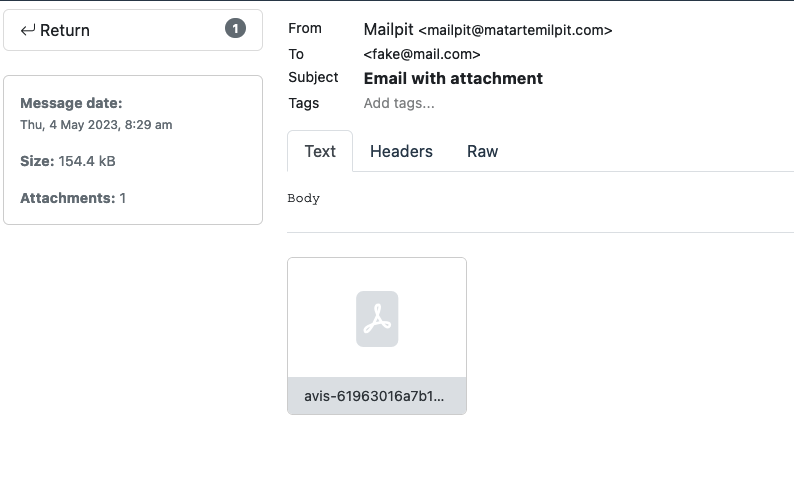
With your

mime-attachment.emlit is working fine.The wrong email has been sent with macOS Mail.app, maybe something specific with attachments ?
Bellow is the raw email content (base64 of attachment has been truncated)
@jeromelaurens commented on GitHub (May 4, 2023):
Reading at the raw message, it seems that Mail.app from macOS tries to attach a PDF as an inline.
Perhaps mailpit should consider displaying the icon in the list in the case it displays the attachment in the footer of the opened email.
This is just a suggestion to have some consistency in the UI.
Whatever you decide, it is not a big issue then.
@axllent commented on GitHub (May 4, 2023):
Thank you for the message source, very helpful. I was just about to point the same thing out:
Content-Disposition: inline;. This means "it can be displayed inside the Web page, or as the Web page", and is not classified as an "attachment" as far as any email app overview is concerned. This behaviour is consistent with Gmail, Thunderbird, Outlook, various phone apps etc. The only difference is Mailpit will also display all attachments (including inline) as downloadable files when you open it to give the tester the ability to easily & identify see all attachments (Gmail for instance won't show inline images files as attachments). My guess is they probably have some work-around for broken email clients to still display an email like yours as having an attachment, but in reality this is wrong.I'm curious as to how this email was created, did you drag the PDF into the email when you attached it (like one normally would for an inline image), or did you attach it via a button click etc?
Whilst I'd love to solve your issue, I feel that by showing any email containing just an inline image as having an attachment (think of email signatures etc) it would make it inconsistent with all other email programs. This isn't an issue with Mailpit (after all, it is a testing tool which just discovered a bug in your email :)), it is an issue with Mail.app. Thanks for the info though, handy to know for others!
@jeromelaurens commented on GitHub (May 4, 2023):
in Mail app macOS, this email was attached via button click, not vie dragging it. This is odd but Mail seems to inline it despite this.
I agree that this is an issue with Mail, and that mailpit should not display inline images such as image signature as attachment.
I also think that the workaround (displaying inline PDF as attachment) is not necessary in mailpit, since this is not the use case of mailpit (send emails to mailpit with macOS app).
BTW, you're doing great job here !
@axllent commented on GitHub (May 4, 2023):
Thank you! I'm closing this ticket as there is nothing left for me to do here.