[GH-ISSUE #205] Doesn't build on Centos7 in node 10.15.3 #173

Closed
opened 2026-02-26 05:31:31 +03:00 by kerem · 5 comments
Owner

Originally created by @RickeyWard on GitHub (May 7, 2019).
Original GitHub issue: https://github.com/NarrativeScience-old/log.io/issues/205

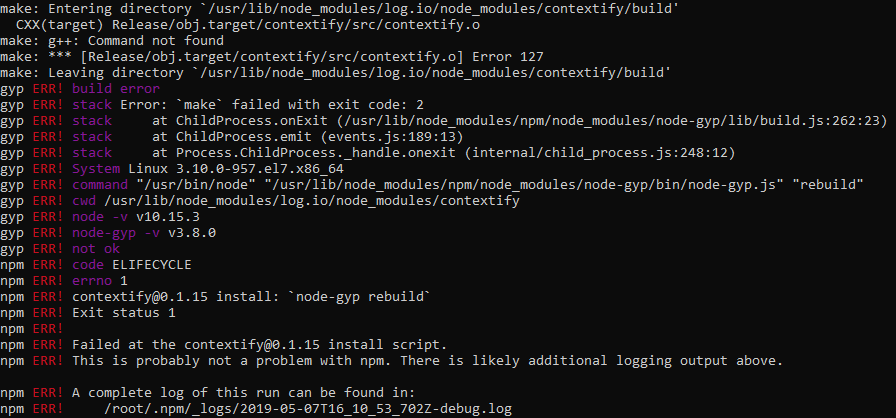
Installing on centos 7 with latest node doesn't succeed.
image

If you install an old node version, I used 5.12.0, it will install and build.
but it won't run. If you then switch back to node 10.13.3, it runs and works.

Originally created by @RickeyWard on GitHub (May 7, 2019). Original GitHub issue: https://github.com/NarrativeScience-old/log.io/issues/205 Installing on centos 7 with latest node doesn't succeed. ![image](https://user-images.githubusercontent.com/342468/57318116-9315e800-70c7-11e9-96f9-34b268cc6919.png) If you install an old node version, I used 5.12.0, it will install and build. but it won't run. If you then switch back to node 10.13.3, it runs and works.
kerem closed this issue 2026-02-26 05:31:31 +03:00
Author
Owner

@atjiu commented on GitHub (May 28, 2019):

I install Node version is v11.11.0, it fail when i run npm install -g log.io

-bash-4.1# npm i -g --unsafe-perm log.io
npm WARN deprecated coffee-script@1.4.0: CoffeeScript on NPM has moved to "coffeescript" (no hyphen)
npm WARN deprecated jquery@1.8.3: Versions of the jquery npm package older than 1.9.0 are patched versions that don't work in web browsers. Please upgrade to >=1.11.0.
npm WARN deprecated connect@2.7.2: connect 2.x series is deprecated
/root/.nvm/versions/node/v11.11.0/bin/log.io-server -> /root/.nvm/versions/node/v11.11.0/lib/node_modules/log.io/bin/log.io-server
/root/.nvm/versions/node/v11.11.0/bin/log.io-harvester -> /root/.nvm/versions/node/v11.11.0/lib/node_modules/log.io/bin/log.io-harvester

> contextify@0.1.15 install /root/.nvm/versions/node/v11.11.0/lib/node_modules/log.io/node_modules/contextify
> node-gyp rebuild

make: Entering directory `/root/.nvm/versions/node/v11.11.0/lib/node_modules/log.io/node_modules/contextify/build'
  CXX(target) Release/obj.target/contextify/src/contextify.o
cc1plus: 错误:无法识别的命令行选项“-std=gnu++1y”
make: *** [Release/obj.target/contextify/src/contextify.o] 错误 1
make: Leaving directory `/root/.nvm/versions/node/v11.11.0/lib/node_modules/log.io/node_modules/contextify/build'
gyp ERR! build error 
gyp ERR! stack Error: `make` failed with exit code: 2
gyp ERR! stack     at ChildProcess.onExit (/root/.nvm/versions/node/v11.11.0/lib/node_modules/npm/node_modules/node-gyp/lib/build.js:262:23)
gyp ERR! stack     at ChildProcess.emit (events.js:197:13)
gyp ERR! stack     at Process.ChildProcess._handle.onexit (internal/child_process.js:254:12)
gyp ERR! System Linux 2.6.32-431.el6.x86_64
gyp ERR! command "/root/.nvm/versions/node/v11.11.0/bin/node" "/root/.nvm/versions/node/v11.11.0/lib/node_modules/npm/node_modules/node-gyp/bin/node-gyp.js" "rebuild"
gyp ERR! cwd /root/.nvm/versions/node/v11.11.0/lib/node_modules/log.io/node_modules/contextify
gyp ERR! node -v v11.11.0
gyp ERR! node-gyp -v v3.8.0
gyp ERR! not ok 
npm ERR! code ELIFECYCLE
npm ERR! errno 1
npm ERR! contextify@0.1.15 install: `node-gyp rebuild`
npm ERR! Exit status 1
npm ERR! 
npm ERR! Failed at the contextify@0.1.15 install script.
npm ERR! This is probably not a problem with npm. There is likely additional logging output above.

npm ERR! A complete log of this run can be found in:
npm ERR!     /root/.npm/_logs/2019-05-28T02_05_39_137Z-debug.log

I wonder if that's why I use root?

<!-- gh-comment-id:496339260 --> @atjiu commented on GitHub (May 28, 2019): I install Node version is v11.11.0, it fail when i run `npm install -g log.io` ```log -bash-4.1# npm i -g --unsafe-perm log.io npm WARN deprecated coffee-script@1.4.0: CoffeeScript on NPM has moved to "coffeescript" (no hyphen) npm WARN deprecated jquery@1.8.3: Versions of the jquery npm package older than 1.9.0 are patched versions that don't work in web browsers. Please upgrade to >=1.11.0. npm WARN deprecated connect@2.7.2: connect 2.x series is deprecated /root/.nvm/versions/node/v11.11.0/bin/log.io-server -> /root/.nvm/versions/node/v11.11.0/lib/node_modules/log.io/bin/log.io-server /root/.nvm/versions/node/v11.11.0/bin/log.io-harvester -> /root/.nvm/versions/node/v11.11.0/lib/node_modules/log.io/bin/log.io-harvester > contextify@0.1.15 install /root/.nvm/versions/node/v11.11.0/lib/node_modules/log.io/node_modules/contextify > node-gyp rebuild make: Entering directory `/root/.nvm/versions/node/v11.11.0/lib/node_modules/log.io/node_modules/contextify/build' CXX(target) Release/obj.target/contextify/src/contextify.o cc1plus: 错误:无法识别的命令行选项“-std=gnu++1y” make: *** [Release/obj.target/contextify/src/contextify.o] 错误 1 make: Leaving directory `/root/.nvm/versions/node/v11.11.0/lib/node_modules/log.io/node_modules/contextify/build' gyp ERR! build error gyp ERR! stack Error: `make` failed with exit code: 2 gyp ERR! stack at ChildProcess.onExit (/root/.nvm/versions/node/v11.11.0/lib/node_modules/npm/node_modules/node-gyp/lib/build.js:262:23) gyp ERR! stack at ChildProcess.emit (events.js:197:13) gyp ERR! stack at Process.ChildProcess._handle.onexit (internal/child_process.js:254:12) gyp ERR! System Linux 2.6.32-431.el6.x86_64 gyp ERR! command "/root/.nvm/versions/node/v11.11.0/bin/node" "/root/.nvm/versions/node/v11.11.0/lib/node_modules/npm/node_modules/node-gyp/bin/node-gyp.js" "rebuild" gyp ERR! cwd /root/.nvm/versions/node/v11.11.0/lib/node_modules/log.io/node_modules/contextify gyp ERR! node -v v11.11.0 gyp ERR! node-gyp -v v3.8.0 gyp ERR! not ok npm ERR! code ELIFECYCLE npm ERR! errno 1 npm ERR! contextify@0.1.15 install: `node-gyp rebuild` npm ERR! Exit status 1 npm ERR! npm ERR! Failed at the contextify@0.1.15 install script. npm ERR! This is probably not a problem with npm. There is likely additional logging output above. npm ERR! A complete log of this run can be found in: npm ERR! /root/.npm/_logs/2019-05-28T02_05_39_137Z-debug.log ``` I wonder if that's why I use root?
Author
Owner

@RickeyWard commented on GitHub (Jun 1, 2019):

Seems like it's an out of date install dependency that doesn't work will current npm. But I'm not familiar with this build process, so I don't know for sure. I was able to get it installed by using multiple versions of node/npm.

<!-- gh-comment-id:497970558 --> @RickeyWard commented on GitHub (Jun 1, 2019): Seems like it's an out of date install dependency that doesn't work will current npm. But I'm not familiar with this build process, so I don't know for sure. I was able to get it installed by using multiple versions of node/npm.
Author
Owner

@qokelate commented on GitHub (Jul 16, 2019):

My solution:


# z shell
yum install -y zsh

zsh

# install n
npm install -g n

# install node 6.17.1
n 6.17.1

# find node
where node

> /usr/bin/node #v10.16.0
> /usr/local/bin/node #v6.17.1

# we need /usr/local/bin/node, set PATH env
export "PATH=/usr/local/bin:$PATH"

# now, install log.io
npm install -g log.io

# log.io-server
log.io-server

<!-- gh-comment-id:511756505 --> @qokelate commented on GitHub (Jul 16, 2019): My solution: ``` # z shell yum install -y zsh zsh # install n npm install -g n # install node 6.17.1 n 6.17.1 # find node where node > /usr/bin/node #v10.16.0 > /usr/local/bin/node #v6.17.1 # we need /usr/local/bin/node, set PATH env export "PATH=/usr/local/bin:$PATH" # now, install log.io npm install -g log.io # log.io-server log.io-server ```
Author
Owner

@luckyboy77 commented on GitHub (Oct 13, 2019):

your solution is very important to me!you help me a lot,it fix my problem,thank you!

<!-- gh-comment-id:541373865 --> @luckyboy77 commented on GitHub (Oct 13, 2019): your solution is very important to me!you help me a lot,it fix my problem,thank you!
Author
Owner

@msmathers commented on GitHub (Jan 10, 2020):

v0.4.3 uses node v12, this should fix most OS compatibility issues.

<!-- gh-comment-id:573153474 --> @msmathers commented on GitHub (Jan 10, 2020): v0.4.3 uses node v12, this should fix most OS compatibility issues.
Sign in to join this conversation.
No milestone
No project
No assignees
1 participant
Notifications
Due date
The due date is invalid or out of range. Please use the format "yyyy-mm-dd".

No due date set.

Dependencies

No dependencies set.

Reference
starred/log.io-NarrativeScience-old#173
No description provided.