mirror of
https://github.com/koel/koel.git
synced 2026-04-26 09:15:59 +03:00
[GH-ISSUE #1507] Empty db after scanning #866
Labels
No labels
Authentication
Dependencies
Documentation
Feature Request
Flac
Help Wanted
Installation/Setup
Integration
Mobile
PR Welcome
Pending Release
Performance
Playlist
S3
Search
Sync
[Pri] Low
[Pri] Normal
[Status] Keep Open
[Status] Needs Author Reply
[Status] Needs Review
[Status] Stale
[Status] Will Implement
[Type] Blessed
[Type] Bug
[Type] Duplicate
[Type] Enhancement
[Type] Help Request
[Type] Question
[Type] Task
pull-request
No milestone
No project
No assignees
1 participant

Notifications
Due date
No due date set.
Dependencies
No dependencies set.
Reference
starred/koel-koel#866
Loading…
Add table
Add a link
Reference in a new issue
No description provided.
Delete branch "%!s()"
Deleting a branch is permanent. Although the deleted branch may continue to exist for a short time before it actually gets removed, it CANNOT be undone in most cases. Continue?
Originally created by @qstar-inc on GitHub (Sep 19, 2022).
Original GitHub issue: https://github.com/koel/koel/issues/1507
Describe the bug
After
php artisan koel:synccompletes successfully, it shows XX new files found on the CLI. But when Iserve, there's nothing on the web UI. I've also checked the MySQL db and the tables are there, but it's all mostly empty. No songs, only unknown album/artist.To reproduce
Steps to reproduce the behaviour:
php artisan koel:syncExpected behaviour
Everything shows working; there's no error, but there's no result as well; nothing appears on site console or CLI as well to show anything isn't working.
Screenshots
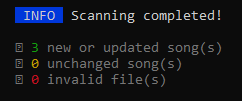

Environment
Additional context
Are there any other logs that I'm missing?
@phanan commented on GitHub (Sep 21, 2022):
Well, first thing first, Koel seems to have only seen 3 files during scanning according to your screen. I'd try syncing with
-vflag and see what the problem is.@qstar-inc commented on GitHub (Sep 23, 2022):
It was showing 3 because I've chosen just a small album with 3 tracks to test, since some of the files on the library was showing lib error with the artwork. It also happened with the whole library too. Regardless even that three should appear on the db.
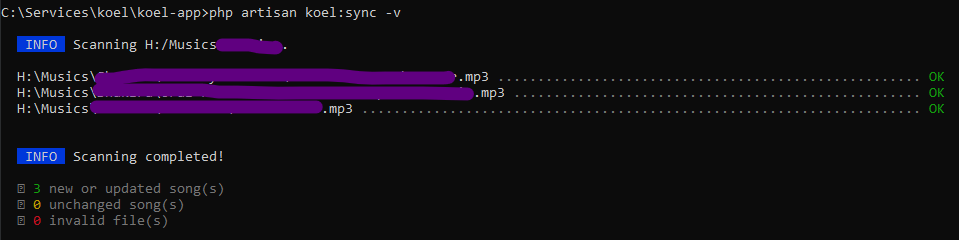
I forgot to mention that I've already tried
-vand it showed the full path of the file and OK; so no benefit with it.@phanan commented on GitHub (Sep 24, 2022):
Hmm that's very weird. What happens if you drag these files directly into the UI to upload them?
@qstar-inc commented on GitHub (Sep 24, 2022):
I've tried uploading the files using drag and drop.
When I dragged folders, it said "No applicable files". So I went inside and tried two files one by one.
The progress showed successfully added. The files were also copied to a
__KOEL_UPLOADS__folder.But they didn't appear on the All songs list or on the DB.
When it was starting, it took some time to load
useUpload....jsfile so I went to retry.After restarting koel, I tried two different songs. They did show success like before , files were copied to
__KOEL_UPLOADS__folder. And that new two songs appeared on the DB, but not on the All song list. But there were entries on the Artist page and I was even able to play them from there.After restarting, the songs were still there. So I added the previous two too.
They were also there again after another restart.
Then I went ahead to do another sync with
php artisan koel:sync -v; it showed 7 files found (3 original and 4 copied to upload folder). But on the UI again, all lists were empty as well as the database.The database is clearly not read-only as it's able to write from the web UI, however when it syncs, it just cleans up the whole database.
I see there's an update, so I'm gonna try with the new update again.
@aBuDeZ commented on GitHub (Nov 7, 2022):
Hello @qstar-inc , i have the same exact problem did you resolve it ?
@qstar-inc commented on GitHub (Nov 7, 2022):
Nope. Then again, I haven't tried since then.
@aBuDeZ commented on GitHub (Nov 7, 2022):
Okay,appreciated for the quick reply, i will try and let you know if i find a solution.
@neov-98 commented on GitHub (Nov 26, 2022):
Hello, I have the same problem.
From additional information, I can inform you that it appears on my:
37a1e568I don't see such a problem on Linux.
I also noticed that at the time of scanning, it does not matter via the Web or the command line.
If the database is updated, rows are added one at a time and all are deleted at the end of the scan.
I can assume that the problem is at the final stage.
Therefore, the
php artisan koel:sync -vrequest shows no problems.At the same time, if I upload one song or several via the Web, then everything works fine.
But the rescan resets the entire table.
@phanan commented on GitHub (Nov 27, 2022):
If in
/app/Listeners/DeleteNonExistingRecordsPostSync.phpyou replace thehandle()method body with:Run a scan, check the logged paths in
storage/logs/laravel.log, and compare them with thesongstable. What do you see?@neov-98 commented on GitHub (Nov 28, 2022):
Here is the output:
So everything is fine - the records are saved.
Apparently on Windows the problem is in backslashes
@phanan commented on GitHub (Nov 28, 2022):
Ah, just like I suspected. Will try to issue a fix.
On Mon 28. Nov 2022 at 18:47 Вадим @.***> wrote:
@phanan commented on GitHub (Nov 28, 2022):
@Vadim-vg Does #1605 fix the problem?