mirror of
https://github.com/koel/koel.git
synced 2026-04-25 08:46:00 +03:00
[GH-ISSUE #1127] yarn: no option: --colors #655
Labels
No labels
Authentication
Dependencies
Documentation
Feature Request
Flac
Help Wanted
Installation/Setup
Integration
Mobile
PR Welcome
Pending Release
Performance
Playlist
S3
Search
Sync
[Pri] Low
[Pri] Normal
[Status] Keep Open
[Status] Needs Author Reply
[Status] Needs Review
[Status] Stale
[Status] Will Implement
[Type] Blessed
[Type] Bug
[Type] Duplicate
[Type] Enhancement
[Type] Help Request
[Type] Question
[Type] Task
pull-request
No milestone
No project
No assignees
1 participant

Notifications
Due date
No due date set.
Dependencies
No dependencies set.
Reference
starred/koel-koel#655
Loading…
Add table
Add a link
Reference in a new issue
No description provided.
Delete branch "%!s()"
Deleting a branch is permanent. Although the deleted branch may continue to exist for a short time before it actually gets removed, it CANNOT be undone in most cases. Continue?
Originally created by @Hajduk-d on GitHub (Nov 28, 2019).
Original GitHub issue: https://github.com/koel/koel/issues/1127
Describe the bug
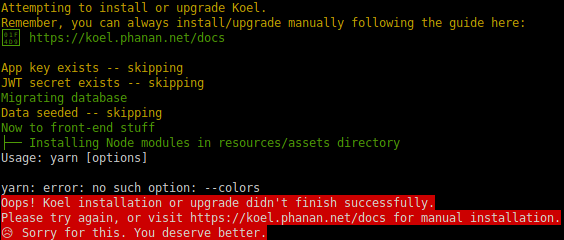
I have a Ubuntu 18.04 Server and wanted to install koel, after when runing php artisan koel:init, after i set the database i get the yarn no option --colors error.
To reproduce
Steps to reproduce the behavior:
Expected behavior
I am not really sure what more information i can provide
Screenshots
Environment
Additional context
This is my first issue on github i apologize if its not supposed to be posted here
@phanan commented on GitHub (Nov 28, 2019):
What's your yarn version?
@Hajduk-d commented on GitHub (Nov 28, 2019):
apparently I was running an old version, I updated yarn to 1.19. but no i get an error while building

Where do I start on reading this error?
@phanan commented on GitHub (Nov 28, 2019):
Can you try this? https://github.com/phanan/koel/issues/1093#issuecomment-549186081.
@phanan commented on GitHub (Nov 28, 2019):
Released v4.2.0 which should work with Node 12.x. Feel free to open another issue if it's not the case.
@Hajduk-d commented on GitHub (Nov 28, 2019):
yea downgrading to NOde 10.x fixed it. but weirdly enough going to the home page on my server doesn't show a login in button or anything except the logo, mail and pw
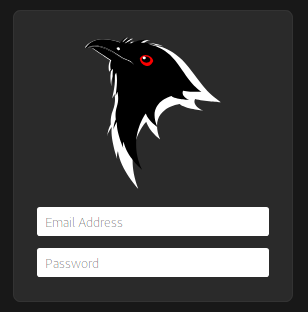
I'm on Firefox 70.0
@BrookeDot commented on GitHub (Jan 12, 2020):
Hi @toter200 Any update here? If you're still having trouble can you check for errors in the browser console?
@Hajduk-d commented on GitHub (Jan 12, 2020):
I checked it and nothing was there, i have since moved to another service so i cant tell anything more
@DDriggs00 commented on GitHub (Apr 15, 2020):
I ran into this error, and it was caused by a outdated version of yarn. I fixed it by installing the latest version via this method:
@BrookeDot commented on GitHub (Apr 15, 2020):
Thanks for the details on how you fixed it @DDriggs00. Since this looks to be resolved by an update of Yarn and not an issue with Koel directly I'm going to close this. If anyone runs into this in the future and a Yarn update doesn't resolve it please create a new ticket and refer back to this one.