mirror of
https://github.com/LionSec/katoolin.git
synced 2026-04-26 17:35:47 +03:00
[GH-ISSUE #159] No such file or directory #133
Labels
No labels
pull-request
No milestone
No project
No assignees
1 participant

Notifications
Due date
No due date set.
Dependencies
No dependencies set.
Reference
starred/katoolin-LionSec#133
Loading…
Add table
Add a link
Reference in a new issue
No description provided.
Delete branch "%!s()"
Deleting a branch is permanent. Although the deleted branch may continue to exist for a short time before it actually gets removed, it CANNOT be undone in most cases. Continue?
Originally created by @ghost on GitHub (Oct 18, 2018).
Original GitHub issue: https://github.com/LionSec/katoolin/issues/159
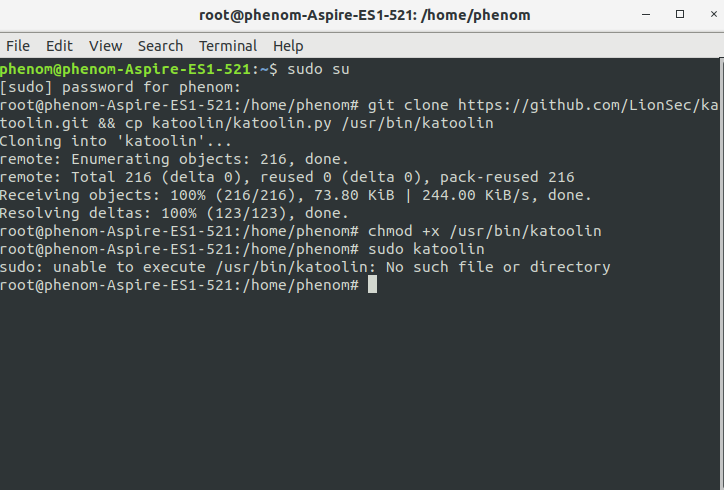
The command line shows there is no such file or directory even though there is katoolin installed properly in the system i am unable to execute the script by following commands.
@slapin95 commented on GitHub (Oct 25, 2018):
Just run Katoolin without sudo. It will tell you that python is not installed.
I have performed an apt-get install python-minimal to solve it...
however on my box many other packages are missing :(
@alexsilva1983 commented on GitHub (Nov 6, 2018):
Greeting Anon! I also notice that issue as well when I attempted t set the software.
@mko-x commented on GitHub (Jan 26, 2019):
You could use the new maintained fork with multi-plattform support provided at
https://mko-x.github.io/katoolin
There are checks for installed python and more.
@ironsec commented on GitHub (Mar 14, 2019):
I have this same exact issues with giving proper permission, gives me the error message:
"chmod: cannot access '/usr/bin/katoolin': No such file or directory"
Even thought I am on sudo su root user or just su to get to root, either way, nothing worked. These things needs to be tested before sharing to minimize issues... python is installed and tested.. going to try out mko-x link above...