mirror of
https://github.com/LionSec/katoolin.git
synced 2026-04-25 17:05:57 +03:00
[GH-ISSUE #137] the public key is not available #115
Labels
No labels
pull-request
No milestone
No project
No assignees
1 participant

Notifications
Due date
No due date set.
Dependencies
No dependencies set.
Reference
starred/katoolin-LionSec#115
Loading…
Add table
Add a link
Reference in a new issue
No description provided.
Delete branch "%!s()"
Deleting a branch is permanent. Although the deleted branch may continue to exist for a short time before it actually gets removed, it CANNOT be undone in most cases. Continue?
Originally created by @Cyberhan123 on GitHub (May 12, 2018).
Original GitHub issue: https://github.com/LionSec/katoolin/issues/137
I change the kali public key Server by:keyserver.ubuntu.com but it doesn't work.
who can help me ,Thanks
Hit:1 http://mirrors.aliyun.com/ubuntu bionic InRelease
Hit:2 http://mirrors.aliyun.com/ubuntu bionic-security InRelease
Hit:3 http://mirrors.aliyun.com/ubuntu bionic-updates InRelease
Hit:4 http://mirrors.aliyun.com/ubuntu bionic-proposed InRelease
Hit:5 http://mirrors.aliyun.com/ubuntu bionic-backports InRelease
Get:6 http://mirrors.aliyun.com/kali kali-rolling InRelease [30.5 kB]
Err:6 http://mirrors.aliyun.com/kali kali-rolling InRelease
The following signatures couldn't be verified because the public key is not available: NO_PUBKEY ED444FF07D8D0BF6
Reading package lists... Done
W: GPG error: http://mirrors.aliyun.com/kali kali-rolling InRelease: The following signatures couldn't be verified because the public key is not available: NO_PUBKEY ED444FF07D8D0BF6
E: The repository 'http://mirrors.aliyun.com/kali kali-rolling InRelease' is not signed.
N: Updating from such a repository can't be done securely, and is therefore disabled by default.
N: See apt-secure(8) manpage for repository creation and user configuration details.
@renaudgweb commented on GitHub (May 30, 2018):
Hi, you can try to comment the line 49 of the katoolin.py setup script and save them.
after:
sudo wget -q -O - https://archive.kali.org/archive-key.asc | apt-key add
sudo apt-get update
sudo katoolin
katoolin > 1 (for repo menu)
after you can install your wanted tools.
it works on my Ubuntu 18.
hoping to have helped you
and please excuse me for my english level ;)
@serenityit2018 commented on GitHub (Jun 20, 2018):
Good evening,
@Cyberhan123 i tried your solution, but i got the same error message.
What do you want to do ?> 1
Executing: /tmp/apt-key-gpghome.IWpav2r2lI/gpg.1.sh --keyserver pgp.mit.edu --recv-keys ED444FF07D8D0BF6
gpg: key ED444FF07D8D0BF6: 1 duplicate signature removed
gpg: key ED444FF07D8D0BF6: 142 Beglaubigungen wegen fehlender Schlüssel nicht geprüft
gpg: Schlüssel ED444FF07D8D0BF6: "Kali Linux Repository devel@kali.org" nicht geändert
gpg: Anzahl insgesamt bearbeiteter Schlüssel: 1
gpg: unverändert: 1
It seems that the key is not valid anymore. Is there an alternative for Katoolin or another solution?
Thx
@VikasAmbrale commented on GitHub (Jun 24, 2018):
I tried replacing the public keyServer from "pgp.mit.edu" to "pool.sks-keyservers.net" and it worked perfectly. For this open katoolin.py file in read and write mode and replace the keyserver (line 49) "pgp.mit.edu" to "pool.sks-keyservers.net" and run the katoolin.
hope this helps.
@Mightyb0x commented on GitHub (Jul 9, 2018):
@VikasAmbrale
Thanks that worked! 👍
@Cyberhan123 commented on GitHub (Jul 11, 2018):
@VikasAmbrale
Thanks this worked, I think this issues can be close.
@seajaysec commented on GitHub (Jul 24, 2018):
@VikasAmbrale's fix doesn't work for me. Still getting
gpg: keyserver receive failed: Server indicated a failure.@Cyberhan123 commented on GitHub (Jul 24, 2018):
@chrsjhnsn U can uninstall and reload,it may help
@BlackWolf95 commented on GitHub (Aug 11, 2018):
Hi everybody,
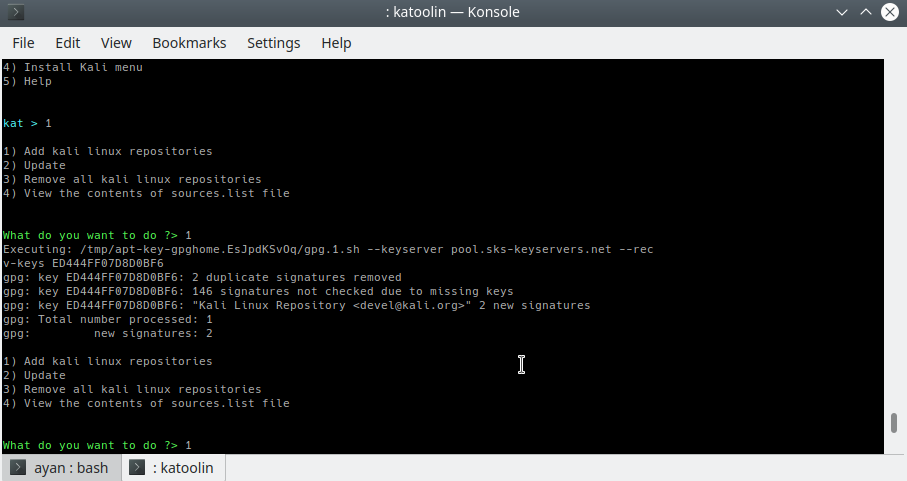
I tried installing Katoolin and faced the same problem. I changed the content in line 49 as indicated but still getting the same result. What's going wrong?
@juandisouza commented on GitHub (Apr 10, 2019):
how can i open katoolin.py in read and write mode?
@Ronexlemon commented on GitHub (Apr 3, 2022):
replace the "pools.sks-keyservers.net" with "pgp.mit.edu" and it works perfectly