[GH-ISSUE #2176] [bug]: browser extension not reported but it's installed #738

Closed
opened 2026-03-16 16:56:46 +03:00 by kerem · 18 comments
Owner

Originally created by @alexander-paterson on GitHub (Mar 18, 2022).
Original GitHub issue: https://github.com/hoppscotch/hoppscotch/issues/2176

Originally assigned to: @amk-dev on GitHub.

Is there an existing issue for this?

  • I have searched the existing issues

Current behavior

I'm using Edge Chromium Version 99.0.1150.46 (Official build) (64-bit)

I've been using hoppscotch.io for maybe a month with no issues but a few times this week I've gone to send a request and instead of a response I'm getting the following message:

image

The extension has been installed since the beginning.

Steps to reproduce

Click send response
Don't get response

Environment

Production

Version

Cloud

Originally created by @alexander-paterson on GitHub (Mar 18, 2022). Original GitHub issue: https://github.com/hoppscotch/hoppscotch/issues/2176 Originally assigned to: @amk-dev on GitHub. ### Is there an existing issue for this? - [X] I have searched the existing issues ### Current behavior I'm using Edge Chromium Version 99.0.1150.46 (Official build) (64-bit) I've been using hoppscotch.io for maybe a month with no issues but a few times this week I've gone to send a request and instead of a response I'm getting the following message: ![image](https://user-images.githubusercontent.com/931083/159004901-0fb072b8-1ee2-45be-b679-909935468225.png) The extension has been installed since the beginning. ### Steps to reproduce Click send response Don't get response ### Environment Production ### Version Cloud
kerem 2026-03-16 16:56:46 +03:00
Author
Owner

@asitemade4u commented on GitHub (Mar 24, 2022):

Same situation here

<!-- gh-comment-id:1078081965 --> @asitemade4u commented on GitHub (Mar 24, 2022): Same situation here
Author
Owner

@AndrewBastin commented on GitHub (Mar 25, 2022):

We can't seem to reproduce this in our end though.

@alexander-paterson please try removing the extension and installing it again.
@asitemade4u can you tell me which browser you are using ? and also try reinstalling the extension ?

And then restart your browser and see if the issue still persists with https://hoppscotch.io (if you are using any other domain, eg. self hosted ones, please make sure to add it to the extension list).

The extension hook takes a second to recognize and connect with the Hoppscotch instance, so you might need to wait 3-4 seconds after Hoppscotch is loaded for the extension to properly be recognized by Hoppscotch.

<!-- gh-comment-id:1078704617 --> @AndrewBastin commented on GitHub (Mar 25, 2022): We can't seem to reproduce this in our end though. @alexander-paterson please try removing the extension and installing it again. @asitemade4u can you tell me which browser you are using ? and also try reinstalling the extension ? And then restart your browser and see if the issue still persists with https://hoppscotch.io (if you are using any other domain, eg. self hosted ones, please make sure to add it to the extension list). The extension hook takes a second to recognize and connect with the Hoppscotch instance, so you might need to wait 3-4 seconds after Hoppscotch is loaded for the extension to properly be recognized by Hoppscotch.
Author
Owner

@bjornkpu commented on GitHub (Mar 25, 2022):

I had the same issue.
Ran hopscotch in docker.

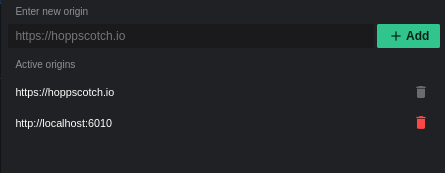
I was fixed when I added the container endpoint to the Hopscotch extention:
image

No idea if this is related.

<!-- gh-comment-id:1078892110 --> @bjornkpu commented on GitHub (Mar 25, 2022): I had the same issue. Ran hopscotch in docker. I was fixed when I added the container endpoint to the Hopscotch extention: ![image](https://user-images.githubusercontent.com/31271671/160105890-851f80c6-6f22-4344-8ce5-01157f8decd3.png) No idea if this is related.
Author
Owner

@AndrewBastin commented on GitHub (Mar 25, 2022):

@bjornkpu as I mentioned. For security reasons any other domains running Hoppscotch, you have to specify the domain to the extension by clicking on the extension icon on the browser and adding the domain on the popup.

<!-- gh-comment-id:1078910482 --> @AndrewBastin commented on GitHub (Mar 25, 2022): @bjornkpu as I mentioned. For security reasons any other domains running Hoppscotch, you have to specify the domain to the extension by clicking on the extension icon on the browser and adding the domain on the popup.
Author
Owner

@Eddie-Hartman commented on GitHub (Apr 10, 2022):

@AndrewBastin
I'm totally new to hoppscotch and trying to switch over from Postman.

Your above statement:

The extension hook takes a second to recognize and connect with the Hoppscotch instance, so you might need to wait 3-4 seconds after Hoppscotch is loaded for the extension to properly be recognized by Hoppscotch.

hasn't quite been my experience in Chrome Version 100. It's taking a few minutes to recognize. It's reproducible by just refreshing hoppscotch.io and switching between the Rest and Settings tabs and looking to see when it recognizes the browser extension in the Interceptor section of settings.

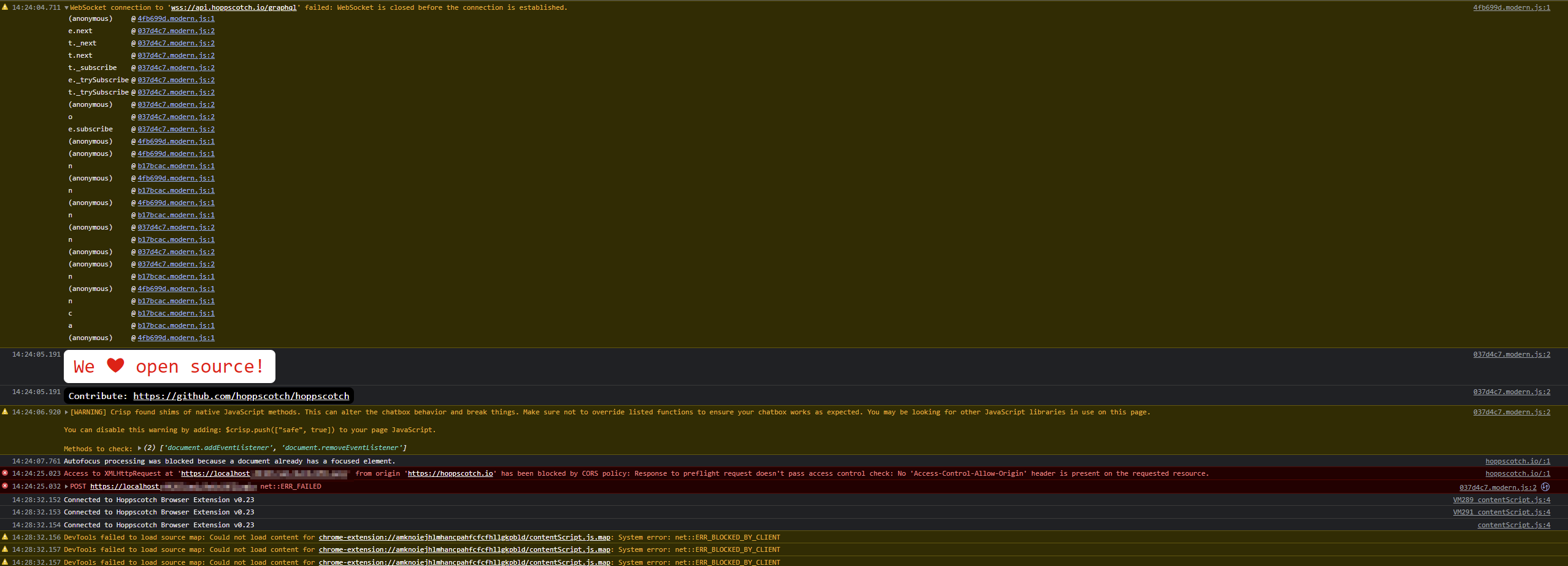
Here is a screenshot with some timestamps that hopefully are helpful, but you can see it took 4 minutes to recognize the extension:
image

For the 3 instances thing, again I'm new to hoppscotch, but I have noticed that when I send a request, it's actually hitting the server 3 times with the same request.

<!-- gh-comment-id:1094341425 --> @Eddie-Hartman commented on GitHub (Apr 10, 2022): @AndrewBastin I'm totally new to hoppscotch and trying to switch over from Postman. Your above statement: > The extension hook takes a second to recognize and connect with the Hoppscotch instance, so you might need to wait 3-4 seconds after Hoppscotch is loaded for the extension to properly be recognized by Hoppscotch. hasn't quite been my experience in Chrome Version 100. It's taking a few minutes to recognize. It's reproducible by just refreshing hoppscotch.io and switching between the Rest and Settings tabs and looking to see when it recognizes the browser extension in the Interceptor section of settings. Here is a screenshot with some timestamps that hopefully are helpful, but you can see it took 4 minutes to recognize the extension: ![image](https://user-images.githubusercontent.com/14089997/162634269-a0e954cf-9482-4891-872a-710e50622c9d.png) For the 3 instances thing, again I'm new to hoppscotch, but I have noticed that when I send a request, it's actually hitting the server 3 times with the same request.
Author
Owner

@tormnator commented on GitHub (Apr 13, 2022):

I'm also having the same problem. It was working great last time I used it in February. I'm running a local server on https://localhost:7202, and have added this url (incl the port) to the extension's active origin list. I have also opened it up, along with https://hoppscotch.io, in my server's cors settings. I have remove the extension and reinstalled it, and I have restarted all Chrome instances.

Nevertheless, I'm getting the same console error messages as can be seen in the screenshot uploaded by @Eddie-Hartman ("WebSocket is closed before the connection is established" and "Access to XMLHttpRequest at 'https://localhost:7202/api/teetimes?courseid=100' from origin 'https://hoppscotch.io' has been blocked by CORS policy: Request header field content-type is not allowed by Access-Control-Allow-Headers in preflight response.").

<!-- gh-comment-id:1098535351 --> @tormnator commented on GitHub (Apr 13, 2022): I'm also having the same problem. It was working great last time I used it in February. I'm running a local server on https://localhost:7202, and have added this url (incl the port) to the extension's active origin list. I have also opened it up, along with https://hoppscotch.io, in my server's cors settings. I have remove the extension and reinstalled it, and I have restarted all Chrome instances. Nevertheless, I'm getting the same console error messages as can be seen in the screenshot uploaded by @Eddie-Hartman ("_WebSocket is closed before the connection is established_" and "_Access to XMLHttpRequest at 'https://localhost:7202/api/teetimes?courseid=100' from origin 'https://hoppscotch.io' has been blocked by CORS policy: Request header field content-type is not allowed by Access-Control-Allow-Headers in preflight response._").
Author
Owner

@tormnator commented on GitHub (Apr 13, 2022):

I forgot to mention that under Settings, Interceptor, Browser extension, it always says "Extension Version: Not Reported".

<!-- gh-comment-id:1098537052 --> @tormnator commented on GitHub (Apr 13, 2022): I forgot to mention that under Settings, Interceptor, Browser extension, it always says "Extension Version: Not Reported".
Author
Owner

@AndrewBastin commented on GitHub (Apr 14, 2022):

For the 3 instances thing, again I'm new to hoppscotch, but I have noticed that when I send a request, it's actually hitting the server 3 times with the same request.

Usually the browser will also send an OPTIONS request as well as part of CORS even on the extension.

Anyways, since there are widespread reports, I will look into the hooking mechanism and see if anything is wrong over there.

<!-- gh-comment-id:1098709253 --> @AndrewBastin commented on GitHub (Apr 14, 2022): > For the 3 instances thing, again I'm new to hoppscotch, but I have noticed that when I send a request, it's actually hitting the server 3 times with the same request. Usually the browser will also send an OPTIONS request as well as part of CORS even on the extension. Anyways, since there are widespread reports, I will look into the hooking mechanism and see if anything is wrong over there.
Author
Owner

@AndrewBastin commented on GitHub (Jun 16, 2022):

Should have been solved with #2332

Please let me know if you still have issues.

<!-- gh-comment-id:1157402658 --> @AndrewBastin commented on GitHub (Jun 16, 2022): Should have been solved with #2332 Please let me know if you still have issues.
Author
Owner

@smilence86 commented on GitHub (May 12, 2023):

I had the same issue. Ran hopscotch in docker.

I was fixed when I added the container endpoint to the Hopscotch extention: image

No idea if this is related.

Thanks for your idea, It works for me, but I spend 10 mins to find this place to be set.

<!-- gh-comment-id:1545553103 --> @smilence86 commented on GitHub (May 12, 2023): > I had the same issue. Ran hopscotch in docker. > > I was fixed when I added the container endpoint to the Hopscotch extention: ![image](https://user-images.githubusercontent.com/31271671/160105890-851f80c6-6f22-4344-8ce5-01157f8decd3.png) > > No idea if this is related. Thanks for your idea, It works for me, but I spend 10 mins to find this place to be set.
Author
Owner

@alastair-drong-wd commented on GitHub (Oct 11, 2023):

I had the same issue. Ran hopscotch in docker.
I was fixed when I added the container endpoint to the Hopscotch extention: image
No idea if this is related.

Thanks for your idea, It works for me, but I spend 10 mins to find this place to be set.

...the kicker being that you didn't tell us where to find the setting.

<!-- gh-comment-id:1758469617 --> @alastair-drong-wd commented on GitHub (Oct 11, 2023): > > I had the same issue. Ran hopscotch in docker. > > I was fixed when I added the container endpoint to the Hopscotch extention: ![image](https://user-images.githubusercontent.com/31271671/160105890-851f80c6-6f22-4344-8ce5-01157f8decd3.png) > > No idea if this is related. > > Thanks for your idea, It works for me, but I spend 10 mins to find this place to be set. ...the kicker being that you didn't tell us where to find the setting.
Author
Owner

@alastair-drong-wd commented on GitHub (Oct 11, 2023):

Okay, ya'll. As of Oct. 11th, 2023 Firefox and Chrome don't show you an icon for this addon on the toolbar. In both browsers, you need to use the 'Extensions' icon (looks like a puzzle piece) to pin the extension to the toolbar. From there, you can set the setting illustrated above.

Adding http://localhost:3000 fixed this issue for me.

<!-- gh-comment-id:1758486863 --> @alastair-drong-wd commented on GitHub (Oct 11, 2023): Okay, ya'll. As of Oct. 11th, 2023 Firefox and Chrome don't show you an icon for this addon on the toolbar. In both browsers, you need to use the 'Extensions' icon (looks like a puzzle piece) to pin the extension to the toolbar. From there, you can set the setting illustrated above. Adding `http://localhost:3000` fixed this issue for me.
Author
Owner

@SoCuul commented on GitHub (Dec 21, 2023):

I had to right click the extension and change the "extension can read and change data" option from "Only when clicked" to "Always on hoppscotch.io". This was on Firefox 120 release on macOS.

<!-- gh-comment-id:1865526113 --> @SoCuul commented on GitHub (Dec 21, 2023): I had to right click the extension and change the "extension can read and change data" option from "Only when clicked" to "Always on hoppscotch.io". This was on Firefox 120 release on macOS.
Author
Owner

@nick-neely commented on GitHub (Jan 18, 2024):

I had to right click the extension and change the "extension can read and change data" option from "Only when clicked" to "Always on hoppscotch.io". This was on Firefox 120 release on macOS.

I did a similar thing to get it working:

  1. Right-click the extension.
  2. Select "Manage Extension."
  3. Go to "Permissions."
  4. Enable Access your data for all websites.
<!-- gh-comment-id:1897601131 --> @nick-neely commented on GitHub (Jan 18, 2024): > I had to right click the extension and change the "extension can read and change data" option from "Only when clicked" to "Always on hoppscotch.io". This was on Firefox 120 release on macOS. I did a similar thing to get it working: 1. Right-click the extension. 2. Select "Manage Extension." 3. Go to "Permissions." 4. Enable `Access your data for all websites`.
Author
Owner

@Shirkit commented on GitHub (Feb 10, 2024):

I had to right click the extension and change the "extension can read and change data" option from "Only when clicked" to "Always on hoppscotch.io". This was on Firefox 120 release on macOS.

I did a similar thing to get it working:

1. Right-click the extension.

2. Select "Manage Extension."

3. Go to "Permissions."

4. Enable `Access your data for all websites`.

This was the fix for me, I could not even use otherwise.

<!-- gh-comment-id:1936856455 --> @Shirkit commented on GitHub (Feb 10, 2024): > > I had to right click the extension and change the "extension can read and change data" option from "Only when clicked" to "Always on hoppscotch.io". This was on Firefox 120 release on macOS. > > I did a similar thing to get it working: > > 1. Right-click the extension. > > 2. Select "Manage Extension." > > 3. Go to "Permissions." > > 4. Enable `Access your data for all websites`. This was the fix for me, I could not even use otherwise.
Author
Owner

@Kailegh commented on GitHub (Mar 6, 2025):

This just started happening to me. A couple days ago it was working fine. Suddenly no requests are sent. I have the extension installed but I get this:
It says Extension version: not reported

Even though that later it says it is installed.
I tried with Chrome and Firefox and I get the same error.
I added my local endpoint to the active origins list
And I gave persmissions to the extension:
Enable Access your data for all websites.

Image

<!-- gh-comment-id:2703118150 --> @Kailegh commented on GitHub (Mar 6, 2025): This just started happening to me. A couple days ago it was working fine. Suddenly no requests are sent. I have the extension installed but I get this: It says `Extension version: not reported` Even though that later it says it is installed. I tried with Chrome and Firefox and I get the same error. I added my local endpoint to the active origins list And I gave persmissions to the extension: `Enable Access your data for all websites`. ![Image](https://github.com/user-attachments/assets/9e683db8-035a-4ae1-a1a8-17ad9e68932e)
Author
Owner

@wahidqoin commented on GitHub (Jun 30, 2025):

any update? I still got the same issues like @Kailegh

extension version = 0.37
edge version = 138.0.3351.55
chrome version = 138.0.7204.49

self host hoppscotch

things i tried:

  • restart os
  • add localhost url to the extension
  • allow extension permission
<!-- gh-comment-id:3017882540 --> @wahidqoin commented on GitHub (Jun 30, 2025): any update? I still got the same issues like @Kailegh extension version = 0.37 edge version = 138.0.3351.55 chrome version = 138.0.7204.49 self host hoppscotch things i tried: - restart os - add localhost url to the extension - allow extension permission
Author
Owner

@Ashishjadoun13 commented on GitHub (Jul 26, 2025):

localhost: 8000

<!-- gh-comment-id:3121378861 --> @Ashishjadoun13 commented on GitHub (Jul 26, 2025): localhost: 8000
Sign in to join this conversation.
No milestone
No project
No assignees
1 participant
Notifications
Due date
The due date is invalid or out of range. Please use the format "yyyy-mm-dd".

No due date set.

Dependencies

No dependencies set.

Reference
starred/hoppscotch#738
No description provided.