mirror of
https://github.com/hoppscotch/hoppscotch.git
synced 2026-04-25 16:55:59 +03:00
[GH-ISSUE #1911] Firebase CORS issue #612
Labels
No labels
CodeDay
a11y
browser limited
bug
bug fix
cli
core
critical
design
desktop
discussion
docker
documentation
duplicate
enterprise
feature
feature
fosshack
future
good first issue
hacktoberfest
help wanted
i18n
invalid
major
minor
need information
need testing
not applicable to hoppscotch
not reproducible
pull-request
question
refactor
resolved
sandbox
self-host
spam
stale
testmu
wip
wont fix
No milestone
No project
No assignees
1 participant

Notifications
Due date
No due date set.
Dependencies
No dependencies set.
Reference
starred/hoppscotch#612
Loading…
Add table
Add a link
Reference in a new issue
No description provided.
Delete branch "%!s()"
Deleting a branch is permanent. Although the deleted branch may continue to exist for a short time before it actually gets removed, it CANNOT be undone in most cases. Continue?
Originally created by @DeveloperKamlesh on GitHub (Oct 28, 2021).
Original GitHub issue: https://github.com/hoppscotch/hoppscotch/issues/1911
Describe the bug
I have integrated firebase now when i login with gmail I get following error in console
Access to fetch at 'https://firestore.googleapis.com/google.firestore.v1.Firestore/Write...' from origin 'https://domain-name:3000' has been blocked by CORS policy: The value of the 'Access-Control-Allow-Origin' header in the response must not be the wildcard '*' when the request's credentials mode is 'include'.To Reproduce
Steps to reproduce the behavior:
to reproduce simply integrate firebase and try performing action live save, login again etc.
Expected behavior
due to this firebase cors issue unable to save collection in firebase.
Screenshots

Desktop (please complete the following information):
Additional context
Kindly Guide me if anyone have any idea about this issue
Thank you
@liyasthomas commented on GitHub (Oct 28, 2021):
Hi @DeveloperKamlesh, did you set the correct environment variables in
.env?Here's the sample environment variables required to setup Firebase: https://github.com/hoppscotch/hoppscotch/blob/main/packages/hoppscotch-app/.env.example
@DeveloperKamlesh commented on GitHub (Oct 28, 2021):
Yes, I have set correct environment variables.
and able to get user signup details too (like User Emails)
just not able to get data in DB for collection due to this CORS issue
@liyasthomas commented on GitHub (Oct 28, 2021):
If you're accessing the Firebase app from
https://domain-name:3000, you have to add it to the Google Cloud Platform console > APIs & Services > Credentials > Browser Key.@DeveloperKamlesh commented on GitHub (Oct 29, 2021):
at this location
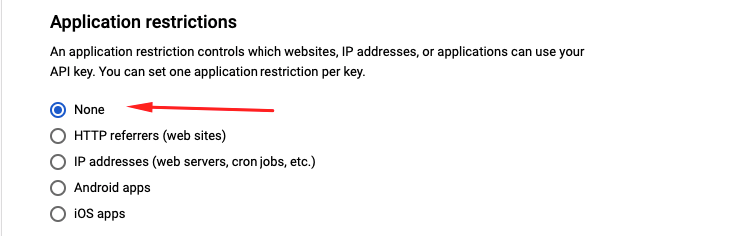
Google Cloud Platform console > APIs & Services > Credentials > Browser Key.
I have set no restriction for any domain, so might be no need to add any domain name, Sir!
@liyasthomas commented on GitHub (Oct 29, 2021):
Since this is not an issue with Hoppscotch but rather it relates to Firebase you might want to raise this issue in Firebase JS SDK repository. Hence closing.
@DeveloperKamlesh commented on GitHub (Oct 29, 2021):
Ok thank you let me check there