[GH-ISSUE #1824] Invalid database causes data not to be synchronized #576

Closed
opened 2026-03-16 16:05:35 +03:00 by kerem · 2 comments
Owner

Originally created by @1-bytes on GitHub (Sep 12, 2021).
Original GitHub issue: https://github.com/hoppscotch/hoppscotch/issues/1824

Describe the bug
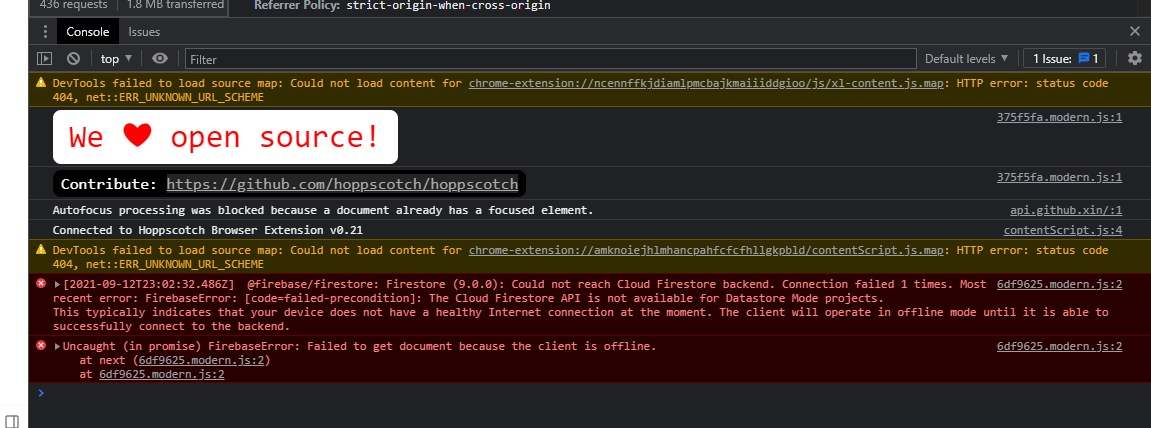
Accounts are not synchronizing data with each other and there are errors in the console...
error:
recent error: FirebaseError: [code=failed-precondition]: The Cloud Firestore API is not available for Datastore Mode projects. This typically indicates that your device does not have a healthy Internet connection at the moment. The client will operate in offline mode until it is able to successfully connect to the backend.

To Reproduce
Steps to reproduce the behavior:

  1. Error on console after login (Login is successful)
  2. Be sure to have environment sync enabled
  3. Create an environmentAdd a key/value
  4. Move to another device
  5. Login (error in the console)
  6. Be sure to have environment sync enabled
  7. Nothing is synced

Expected behavior
No errors in the console and Can synchronize properly

Screenshots
image

Desktop (please complete the following information):

  • OS: Windows 10 Professional Edition
  • Browser: Chrome
  • Version: 93.0.4577.63

Additional context

  1. I suspect that there is a problem with my network, but I am fine with https://hoppscotch.io and there are no errors in the console.
  2. I enabled the firebase database and filled in the .env with DATABASE_URL=https://xxxxx-default-rtdb.asia-southeast1.firebasedatabase.app but it doesn't seem to work.
  3. I made sure my computer's firewall was turned off.
  4. Do I need to fill in the database key? I can't find where to configure it in the project :(

image

Originally created by @1-bytes on GitHub (Sep 12, 2021). Original GitHub issue: https://github.com/hoppscotch/hoppscotch/issues/1824 **Describe the bug** Accounts are not synchronizing data with each other and there are errors in the console... error: `recent error: FirebaseError: [code=failed-precondition]: The Cloud Firestore API is not available for Datastore Mode projects. This typically indicates that your device does not have a healthy Internet connection at the moment. The client will operate in offline mode until it is able to successfully connect to the backend.` **To Reproduce** Steps to reproduce the behavior: 1. Error on console after login (Login is successful) 2. Be sure to have environment sync enabled 3. Create an environmentAdd a key/value 4. Move to another device 5. Login (error in the console) 6. Be sure to have environment sync enabled 7. Nothing is synced **Expected behavior** No errors in the console and Can synchronize properly **Screenshots** ![image](https://user-images.githubusercontent.com/17564454/133005973-b2461138-78ed-48f5-88da-61d5e5f41b9e.png) **Desktop (please complete the following information):** - OS: Windows 10 Professional Edition - Browser: Chrome - Version: 93.0.4577.63 **Additional context** 1. I suspect that there is a problem with my network, but I am fine with https://hoppscotch.io and there are no errors in the console. 2. I enabled the firebase database and filled in the .env with `DATABASE_URL=https://xxxxx-default-rtdb.asia-southeast1.firebasedatabase.app` but it doesn't seem to work. 3. I made sure my computer's firewall was turned off. 4. Do I need to fill in the database key? I can't find where to configure it in the project :( ![image](https://user-images.githubusercontent.com/17564454/133006159-27ee3161-e886-46ac-ab9c-4ebe7075de5a.png)
kerem closed this issue 2026-03-16 16:05:40 +03:00
Author
Owner

@1-bytes commented on GitHub (Sep 13, 2021):

Resolved
Unable to write data due to missing Firestore firewall rules

https://console.firebase.google.com/project/<your_project_name>/firestore/rules

Change the rule:
rules_version = '2';
service cloud.firestore {
  match /databases/{database}/documents {
    match /{document=**} {
      allow read, write: if request.auth.uid != null;
    }
    // Make sure the uid of the requesting user matches the name of the user
    // document. The wildcard expression {userId} makes the userId variable
    // available in rules.
    match /users/{your userId} {
      allow read, update, delete: if request.auth.uid == userId;
      allow create: if request.auth.uid != null;
    }
  }
}
<!-- gh-comment-id:917756691 --> @1-bytes commented on GitHub (Sep 13, 2021): Resolved Unable to write data due to missing Firestore firewall rules https://console.firebase.google.com/project/<your_project_name>/firestore/rules ``` Change the rule: rules_version = '2'; service cloud.firestore { match /databases/{database}/documents { match /{document=**} { allow read, write: if request.auth.uid != null; } // Make sure the uid of the requesting user matches the name of the user // document. The wildcard expression {userId} makes the userId variable // available in rules. match /users/{your userId} { allow read, update, delete: if request.auth.uid == userId; allow create: if request.auth.uid != null; } } } ```
Author
Owner

@TheBeachMaster commented on GitHub (Mar 18, 2022):

Thanks @1-bytes

<!-- gh-comment-id:1072326143 --> @TheBeachMaster commented on GitHub (Mar 18, 2022): Thanks @1-bytes
Sign in to join this conversation.
No milestone
No project
No assignees
1 participant
Notifications
Due date
The due date is invalid or out of range. Please use the format "yyyy-mm-dd".

No due date set.

Dependencies

No dependencies set.

Reference
starred/hoppscotch#576
No description provided.