[GH-ISSUE #1606] Installing as a PWA, Requests fail untill you install chrome extension #505

Closed
opened 2026-03-16 15:45:14 +03:00 by kerem · 8 comments
Owner

Originally created by @richard-muvirimi on GitHub (Apr 19, 2021).
Original GitHub issue: https://github.com/hoppscotch/hoppscotch/issues/1606

Describe the bug
All requests fail until you install the chrome extension and it doesn't tell you why the requests are failing, instead says:

Setup a proxy and press f12 to view the log

And the log doesn't have any useful information. This might give the impression to first time users that it does not work and might be better to first test for the chrome extension and show an appropriate message if it does not exist

To Reproduce
Steps to reproduce the behavior:

  1. Goto hopscotch.io
  2. Top left, url input click download and install
  3. Open app and try a request
  4. Just an error message without much useful information on how to proceed

Expected behavior
After entering url and hitting send. At least check if chrome extension is available and if not required set self up for that

Screenshots
Reproducible on windows, android and linux

Desktop (please complete the following information):

  • OS: Linux Manjaro
  • Browser chrome
  • Version 86

Smartphone (please complete the following information):

  • Device: Samsung a20
  • OS: android 10
  • Browser chrome
  • Version 10

Additional context
None

Originally created by @richard-muvirimi on GitHub (Apr 19, 2021). Original GitHub issue: https://github.com/hoppscotch/hoppscotch/issues/1606 **Describe the bug** All requests fail until you install the chrome extension and it doesn't tell you why the requests are failing, instead says: Setup a proxy and press f12 to view the log And the log doesn't have any useful information. This might give the impression to first time users that it does not work and might be better to first test for the chrome extension and show an appropriate message if it does not exist **To Reproduce** Steps to reproduce the behavior: 1. Goto hopscotch.io 2. Top left, url input click download and install 3. Open app and try a request 4. Just an error message without much useful information on how to proceed **Expected behavior** After entering url and hitting send. At least check if chrome extension is available and if not required set self up for that **Screenshots** Reproducible on windows, android and linux **Desktop (please complete the following information):** - OS: Linux Manjaro - Browser chrome - Version 86 **Smartphone (please complete the following information):** - Device: Samsung a20 - OS: android 10 - Browser chrome - Version 10 **Additional context** None
kerem closed this issue 2026-03-16 15:45:19 +03:00
Author
Owner

@liyasthomas commented on GitHub (Apr 19, 2021):

By default, browser extension is not required to make API requests to hosted API endpoints. I guess you're requesting locally (localhost) served API endpoints which why request failed without browser extension.

We already have a similar issue ticket on #1376 where we're discussing better approaches to let the user know what went wrong and how to fix it. Please continue discussion on that thread and feel free to respond what you'd like to expect on such error cases. Thanks - closing this issue for #1376.

<!-- gh-comment-id:822433550 --> @liyasthomas commented on GitHub (Apr 19, 2021): By default, browser extension is not required to make API requests to hosted API endpoints. I guess you're requesting locally (`localhost`) served API endpoints which why request failed without browser extension. We already have a similar issue ticket on #1376 where we're discussing better approaches to let the user know what went wrong and how to fix it. Please continue discussion on that thread and feel free to respond what you'd like to expect on such error cases. Thanks - closing this issue for #1376.
Author
Owner

@richard-muvirimi commented on GitHub (Apr 19, 2021):

Screenshot from 2021-04-19 16 24 10
Here is a screenshot to help clarify. no extension and that's the message i get plus the url to a remote server.

<!-- gh-comment-id:822510787 --> @richard-muvirimi commented on GitHub (Apr 19, 2021): ![Screenshot from 2021-04-19 16 24 10](https://user-images.githubusercontent.com/19529979/115252759-0c2f6e00-a12c-11eb-840d-59fa82e3fc35.png) Here is a screenshot to help clarify. no extension and that's the message i get plus the url to a remote server.
Author
Owner

@liyasthomas commented on GitHub (Apr 19, 2021):

You've to use https:// (HTTPS) protocol. Or else, try enabling Proxy mode from Settings > Proxy which allows you to request http:// endpoints.

<!-- gh-comment-id:822512399 --> @liyasthomas commented on GitHub (Apr 19, 2021): You've to use `https://` (HTTPS) protocol. Or else, try enabling Proxy mode from Settings > Proxy which allows you to request `http://` endpoints.
Author
Owner

@richard-muvirimi commented on GitHub (Apr 19, 2021):

Ok have noticed the other issue. the error messages are actually the same. Would have loved to test my api's through a mobile device when not near a pc, (guess won't be possible if extension is required).

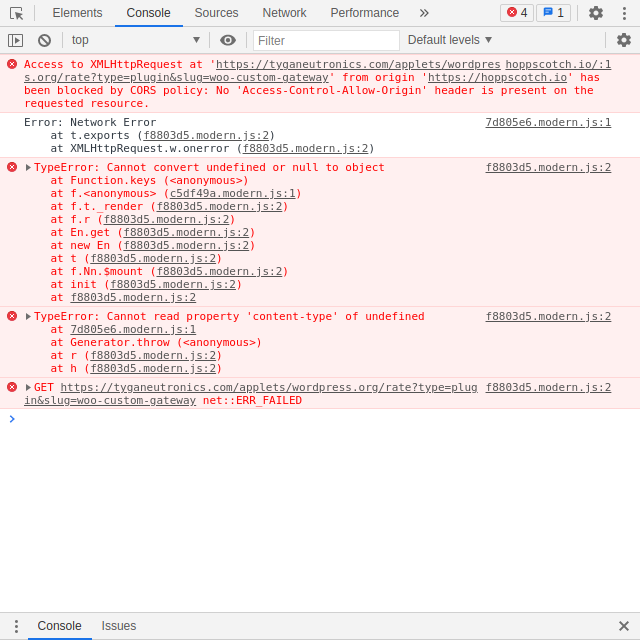
Have attached a screenshot after clearing the console and hitting send with https
Screenshot from 2021-04-19 16 30 44

<!-- gh-comment-id:822520050 --> @richard-muvirimi commented on GitHub (Apr 19, 2021): Ok have noticed the other issue. the error messages are actually the same. Would have loved to test my api's through a mobile device when not near a pc, (guess won't be possible if extension is required). Have attached a screenshot after clearing the console and hitting send with https ![Screenshot from 2021-04-19 16 30 44](https://user-images.githubusercontent.com/19529979/115254017-3e8d9b00-a12d-11eb-8683-080e92337c13.png)
Author
Owner

@liyasthomas commented on GitHub (Apr 19, 2021):

Extension is only required to access APIs hosted in local server. It looks like you're using and http:// endpoint which can be fixed by turning on Proxy Mode from https://hoppscotch.io/settings

<!-- gh-comment-id:822525107 --> @liyasthomas commented on GitHub (Apr 19, 2021): Extension is only required to access APIs hosted in local server. It looks like you're using and `http://` endpoint which can be fixed by turning on Proxy Mode from https://hoppscotch.io/settings
Author
Owner

@richard-muvirimi commented on GitHub (Apr 19, 2021):

Had tried with https.

Though looking at the bigger picture here, a user installs tries a url and gets above message. the first thing that comes to their mind is this extension does not work. The end result is most likely high downloads but low user retention. After going through #1376 i realised there are a few things we can do to go around this

  1. Ask user to install extension to proceed (somewhat forced)
  2. Bring up a dialog telling user that either they are not connected to the internet and or ask them to install extension
  3. Notify user some way that only https works without the extension

Though all this basically comes down to the extension. Most test requests are done in local enviroments as opposed to production and would be detrimental to this app to only work by default on production api.

This is not my first time trying this app, but failed on first attempt and had to find a quick alternative as i did not have the time to try and find where the issue was. Today i tried again and after going through the settings GUESSED that maybe i needed to install an extesion and that's when i was able to successfully make a request. Not sure most would make such a wild guess.

I don't think asking users to setup a proxy is going to work when they can already do requests through alternatives and most probably have never setup one, (I for one).

<!-- gh-comment-id:822552065 --> @richard-muvirimi commented on GitHub (Apr 19, 2021): Had tried with https. Though looking at the bigger picture here, a user installs tries a url and gets above message. the first thing that comes to their mind is this extension does not work. The end result is most likely high downloads but low user retention. After going through [#1376](https://github.com/hoppscotch/hoppscotch/issues/1376) i realised there are a few things we can do to go around this 1. Ask user to install extension to proceed (somewhat forced) 2. Bring up a dialog telling user that either they are not connected to the internet and or ask them to install extension 3. Notify user some way that only https works without the extension Though all this basically comes down to the extension. Most test requests are done in local enviroments as opposed to production and would be detrimental to this app to only work by default on production api. This is not my first time trying this app, but failed on first attempt and had to find a quick alternative as i did not have the time to try and find where the issue was. Today i tried again and after going through the settings GUESSED that maybe i needed to install an extesion and that's when i was able to successfully make a request. Not sure most would make such a wild guess. I don't think asking users to setup a proxy is going to work when they can already do requests through alternatives and most probably have never setup one, (I for one).
Author
Owner

@liyasthomas commented on GitHub (Apr 19, 2021):

As per the error message you got (https://github.com/hoppscotch/hoppscotch/issues/1606#issuecomment-822510787), the toast clearly shows to turn on Proxy mode for non https requests. Clicking on "Yes" will take you to Settings page from where you can turn on Proxy mode.

And turning on the Proxy would fix this instantaneously. As simple as that.

Also, you don't need to setup your own proxy for Proxy Mode. It does have a default proxy URL which is hosted by Hoppscotch itself and it's source code is available under the organisation.

<!-- gh-comment-id:822562163 --> @liyasthomas commented on GitHub (Apr 19, 2021): As per the error message you got (https://github.com/hoppscotch/hoppscotch/issues/1606#issuecomment-822510787), the toast clearly shows to turn on Proxy mode for non https requests. Clicking on "Yes" will take you to Settings page from where you can turn on Proxy mode. And turning on the Proxy would fix this instantaneously. As simple as that. Also, you don't need to setup your own proxy for Proxy Mode. It does have a default proxy URL which is hosted by Hoppscotch itself and it's source code is available under the organisation.
Author
Owner

@richard-muvirimi commented on GitHub (Apr 19, 2021):

Ok. guessing this issue will never be solved.

Just tried the proxy with extension disabled and another error message. Was just expressing my first impressions. Not sure how proxies work but i use a mobile connection and incoming requests are automatically blocked by my service provider.

Have a good a day. thanks for your time.

<!-- gh-comment-id:822572484 --> @richard-muvirimi commented on GitHub (Apr 19, 2021): Ok. guessing this issue will never be solved. Just tried the proxy with extension disabled and another error message. Was just expressing my first impressions. Not sure how proxies work but i use a mobile connection and incoming requests are automatically blocked by my service provider. Have a good a day. thanks for your time.
Sign in to join this conversation.
No milestone
No project
No assignees
1 participant
Notifications
Due date
The due date is invalid or out of range. Please use the format "yyyy-mm-dd".

No due date set.

Dependencies

No dependencies set.

Reference
starred/hoppscotch#505
No description provided.