[GH-ISSUE #1104] Cannot read property 'value' of undefined. Check console for details. #385

Closed
opened 2026-03-16 14:59:51 +03:00 by kerem · 29 comments
Owner

Originally created by @JameEnder on GitHub (Aug 22, 2020).
Original GitHub issue: https://github.com/hoppscotch/hoppscotch/issues/1104

Describe the bug
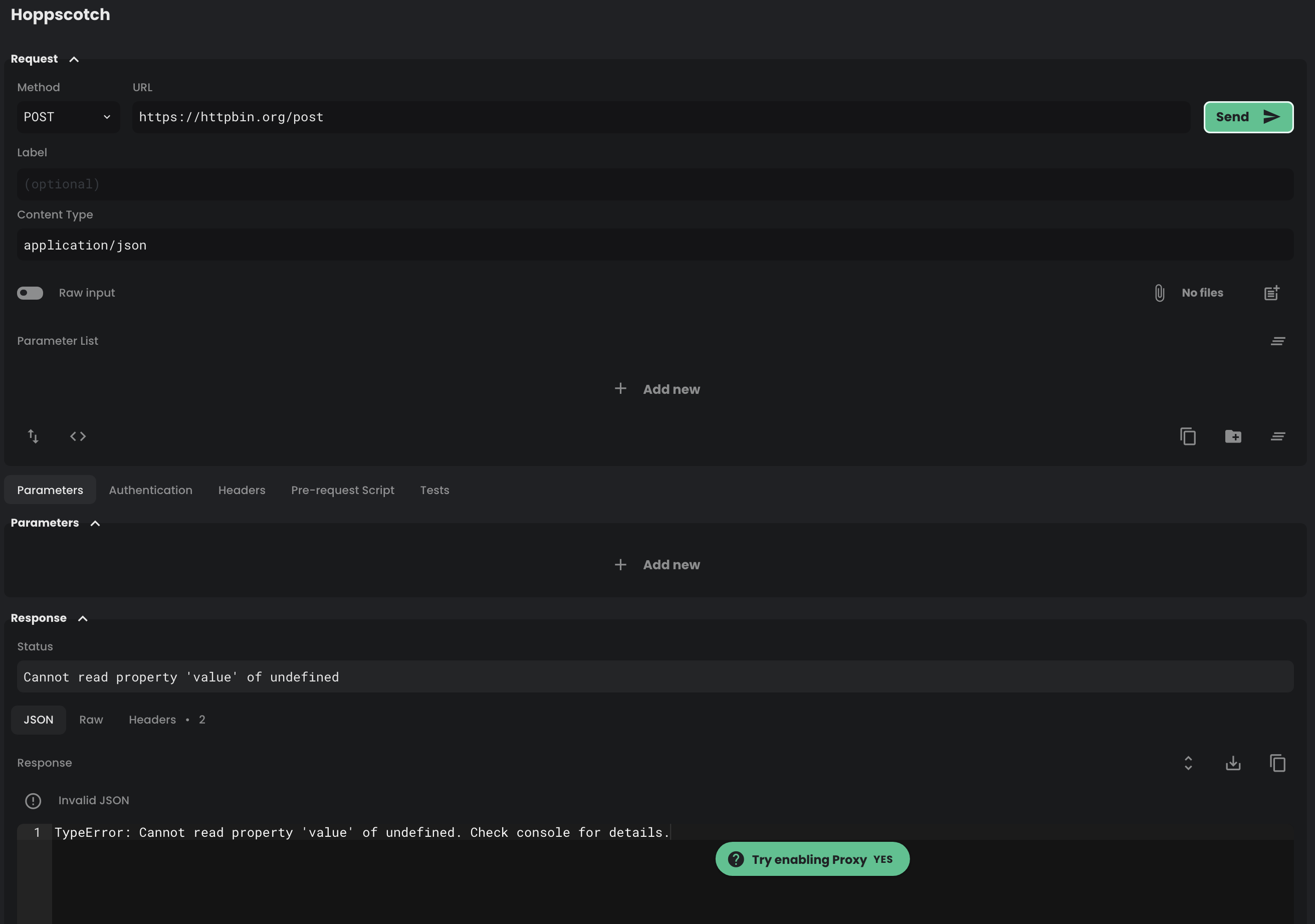
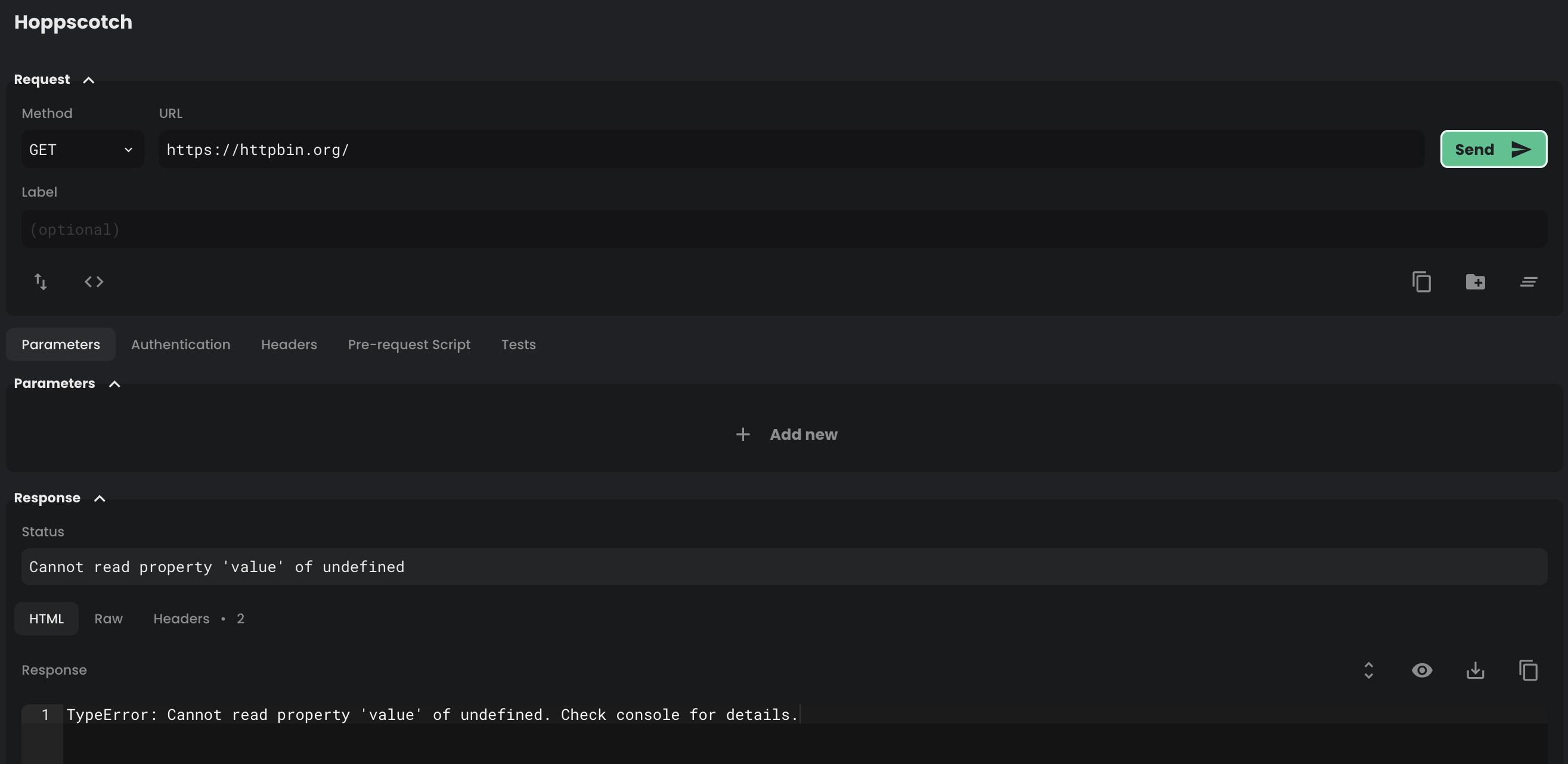
I can't seem to get hoppscotch working, even when i have the browser extension installed, the site always tells me that "Cannot read property 'value' of undefined. Check console for details."

To Reproduce

  1. Go to 'hoppscotch.io'
  2. Try to make a POST request to localhost that will result in some JSON
  3. See error

Expected behavior
I would expect it to give me back the JSON my API sends.

Screenshots
hoppscotch.io

2020 srpen 1713
2020 srpen 1714

httpie

2020 srpen 1712

Desktop (please complete the following information):

  • OS: Windows 10
  • Browser: Chrome
  • Version: 84.0
Originally created by @JameEnder on GitHub (Aug 22, 2020). Original GitHub issue: https://github.com/hoppscotch/hoppscotch/issues/1104 **Describe the bug** I can't seem to get hoppscotch working, even when i have the browser extension installed, the site always tells me that "Cannot read property 'value' of undefined. Check console for details." **To Reproduce** 1. Go to 'hoppscotch.io' 2. Try to make a POST request to localhost that will result in some JSON 3. See error **Expected behavior** I would expect it to give me back the JSON my API sends. **Screenshots** hoppscotch.io ![2020 srpen 1713](https://user-images.githubusercontent.com/47925045/90945600-1aef4500-e426-11ea-8434-ff3c9ee35307.png) ![2020 srpen 1714](https://user-images.githubusercontent.com/47925045/90945601-1c207200-e426-11ea-8ae2-04d1f64e8333.png) httpie ![2020 srpen 1712](https://user-images.githubusercontent.com/47925045/90945603-1d519f00-e426-11ea-8228-eefde0b4eceb.png) **Desktop (please complete the following information):** - OS: Windows 10 - Browser: Chrome - Version: 84.0
kerem 2026-03-16 14:59:51 +03:00
Author
Owner

@liyasthomas commented on GitHub (Aug 22, 2020):

Can you follow below steps:

  1. Select POST method, set request url: https://httpbin.org/post
  2. Send and see if it's working at your end.
<!-- gh-comment-id:678574296 --> @liyasthomas commented on GitHub (Aug 22, 2020): Can you follow below steps: 1. Select `POST` method, set request url: `https://httpbin.org/post` 2. Send and see if it's working at your end.
Author
Owner

@JameEnder commented on GitHub (Aug 22, 2020):

No, the error stays the same.

<!-- gh-comment-id:678574392 --> @JameEnder commented on GitHub (Aug 22, 2020): No, the error stays the same.
Author
Owner

@liyasthomas commented on GitHub (Aug 22, 2020):

@JameEnder
Are you signed in to Hoppscotch using GitHub/Google?
If yes, try signing out and signing in back again. Then do a force refresh (Ctrl + Shift + R) and see if the issue exists.

<!-- gh-comment-id:678574518 --> @liyasthomas commented on GitHub (Aug 22, 2020): @JameEnder Are you signed in to Hoppscotch using GitHub/Google? If yes, try signing out and signing in back again. Then do a force refresh (Ctrl + Shift + R) and see if the issue exists.
Author
Owner

@JameEnder commented on GitHub (Aug 22, 2020):

Yes, using github

<!-- gh-comment-id:678574635 --> @JameEnder commented on GitHub (Aug 22, 2020): Yes, using github
Author
Owner

@liyasthomas commented on GitHub (Aug 22, 2020):

try signing out and signing in back again. Then do a force refresh (Ctrl + Shift + R) and see if the issue exists.

<!-- gh-comment-id:678574863 --> @liyasthomas commented on GitHub (Aug 22, 2020): > try signing out and signing in back again. Then do a force refresh (Ctrl + Shift + R) and see if the issue exists.
Author
Owner

@JameEnder commented on GitHub (Aug 22, 2020):

Without being logged in everything works, except the json formatting, it says invalid json and its all in one line. When i log back in the problem comes back.

<!-- gh-comment-id:678575025 --> @JameEnder commented on GitHub (Aug 22, 2020): Without being logged in everything works, except the json formatting, it says invalid json and its all in one line. When i log back in the problem comes back.
Author
Owner

@liyasthomas commented on GitHub (Aug 22, 2020):

This usually happens when Signed in, the background task take few seconds to sync your History, Collections, Environments and Notes to cloud. While performing this, some feature will be set to pause (such as History - if you've lot of entries).

Try this:

  1. Sign in using GitHub / Google.
  2. Wait until page loads completely.
  3. You can see History Section with your past entries.
  4. Then make a request to the default URL and method.

Let me know if this doesn't works.

JSON formatting issue is a minor bug in extension, will be fixed soon.

<!-- gh-comment-id:678575587 --> @liyasthomas commented on GitHub (Aug 22, 2020): This usually happens when Signed in, the background task take few seconds to sync your History, Collections, Environments and Notes to cloud. While performing this, some feature will be set to pause (such as History - if you've lot of entries). Try this: 1. Sign in using GitHub / Google. 2. Wait until page loads completely. 3. You can see History Section with your past entries. 4. Then make a request to the default URL and method. Let me know if this doesn't works. JSON formatting issue is a minor bug in extension, will be fixed soon.
Author
Owner

@JameEnder commented on GitHub (Aug 22, 2020):

Still doesn't work, but i noticed when i refresh the page, the history is visible for a few frames and then is empy for the rest of the time.

<!-- gh-comment-id:678575852 --> @JameEnder commented on GitHub (Aug 22, 2020): Still doesn't work, but i noticed when i refresh the page, the history is visible for a few frames and then is empy for the rest of the time.
Author
Owner

@liyasthomas commented on GitHub (Aug 22, 2020):

It's the time taken to sync your previous entries to cloud. Keep waiting until your History entries are shown in History tab. If entries are loaded, then continue.

<!-- gh-comment-id:678576046 --> @liyasthomas commented on GitHub (Aug 22, 2020): It's the time taken to sync your previous entries to cloud. Keep waiting until your History entries are shown in History tab. If entries are loaded, then continue.
Author
Owner

@JameEnder commented on GitHub (Aug 22, 2020):

I gave it a minute, still nothing loaded.

<!-- gh-comment-id:678576426 --> @JameEnder commented on GitHub (Aug 22, 2020): I gave it a minute, still nothing loaded.
Author
Owner

@liyasthomas commented on GitHub (Aug 22, 2020):

Oops usually it won't take more than 5 seconds to sync unless you've poor network connection.

Is there any other errors in console?

<!-- gh-comment-id:678576493 --> @liyasthomas commented on GitHub (Aug 22, 2020): Oops usually it won't take more than 5 seconds to sync unless you've poor network connection. Is there any other errors in console?
Author
Owner

@JameEnder commented on GitHub (Aug 22, 2020):

"DevTools failed to load SourceMap: Could not load content for chrome-extension://amknoiejhlmhancpahfcfcfhllgkpbld/contentScript.js.map: HTTP error: status code 404, net::ERR_UNKNOWN_URL_SCHEME"

@AndrewBastin

<!-- gh-comment-id:678577023 --> @JameEnder commented on GitHub (Aug 22, 2020): "DevTools failed to load SourceMap: Could not load content for chrome-extension://amknoiejhlmhancpahfcfcfhllgkpbld/contentScript.js.map: HTTP error: status code 404, net::ERR_UNKNOWN_URL_SCHEME" @AndrewBastin
Author
Owner

@liyasthomas commented on GitHub (Aug 22, 2020):

Can you check whether Hoppscotch Extension is turned on from chrome://extensions/

If it's turned off, turn it on. Try reinstalling it from Chrome Web Store and make sure extension is turned on to access endpoints served in localhost.

Let me know if reinstalling the extension doesn't fix your issue.

<!-- gh-comment-id:678577446 --> @liyasthomas commented on GitHub (Aug 22, 2020): Can you check whether Hoppscotch Extension is turned on from `chrome://extensions/` If it's turned off, turn it on. Try reinstalling it from Chrome Web Store and make sure extension is turned on to access endpoints served in `localhost`. Let me know if reinstalling the extension doesn't fix your issue.
Author
Owner

@JameEnder commented on GitHub (Aug 22, 2020):

Hoppscotch extension is turned on.

did you try reinstalling the extension?

<!-- gh-comment-id:678577507 --> @JameEnder commented on GitHub (Aug 22, 2020): Hoppscotch extension is turned on. > did you try reinstalling the extension?
Author
Owner

@JameEnder commented on GitHub (Aug 22, 2020):

Yes i did, didnt work.

<!-- gh-comment-id:678578063 --> @JameEnder commented on GitHub (Aug 22, 2020): Yes i did, didnt work.
Author
Owner

@liyasthomas commented on GitHub (Aug 22, 2020):

Will look into this after a while.
Btw, there seems to be no issue here at my end.

<!-- gh-comment-id:678578174 --> @liyasthomas commented on GitHub (Aug 22, 2020): Will look into this after a while. Btw, there seems to be no issue here at my end.
Author
Owner

@AndrewBastin commented on GitHub (Aug 22, 2020):

"DevTools failed to load SourceMap: Could not load content for chrome-extension://amknoiejhlmhancpahfcfcfhllgkpbld/contentScript.js.map: HTTP error: status code 404, net::ERR_UNKNOWN_URL_SCHEME"

@AndrewBastin

This is not an error, it is a warning. This warning won't affect the functioning of the extension.

To check whether the extension is working, you can just check if the extension is reporting its version number in the Settings page of the app.

<!-- gh-comment-id:678578743 --> @AndrewBastin commented on GitHub (Aug 22, 2020): > "DevTools failed to load SourceMap: Could not load content for chrome-extension://amknoiejhlmhancpahfcfcfhllgkpbld/contentScript.js.map: HTTP error: status code 404, net::ERR_UNKNOWN_URL_SCHEME" > > @AndrewBastin This is not an error, it is a warning. This warning won't affect the functioning of the extension. To check whether the extension is working, you can just check if the extension is reporting its version number in the Settings page of the app.
Author
Owner

@AndrewBastin commented on GitHub (Aug 22, 2020):

@JameEnder can you try running the request and send a screenshot of the DevTools Console ?

<!-- gh-comment-id:678579078 --> @AndrewBastin commented on GitHub (Aug 22, 2020): @JameEnder can you try running the request and send a screenshot of the DevTools Console ?
Author
Owner

@JameEnder commented on GitHub (Aug 22, 2020):

2020 srpen 1716

<!-- gh-comment-id:678677515 --> @JameEnder commented on GitHub (Aug 22, 2020): ![2020 srpen 1716](https://user-images.githubusercontent.com/47925045/90963560-dc569a80-e4b8-11ea-85b8-48d9fd4c9fde.png)
Author
Owner

@liyasthomas commented on GitHub (Aug 22, 2020):

@JameEnder he meant the entire screenshot of DevTools console.

<!-- gh-comment-id:678705761 --> @liyasthomas commented on GitHub (Aug 22, 2020): @JameEnder he meant the entire screenshot of DevTools console.
Author
Owner

@JameEnder commented on GitHub (Aug 22, 2020):

2020 srpen 1727

like that?

<!-- gh-comment-id:678706188 --> @JameEnder commented on GitHub (Aug 22, 2020): ![2020 srpen 1727](https://user-images.githubusercontent.com/47925045/90967226-695f1b00-e4dc-11ea-911a-69dd35979e18.png) like that?
Author
Owner

@liyasthomas commented on GitHub (Aug 26, 2020):

I'm wondering whether this issue still persist. I was never able to reproduce this issue at my end. And no other user has reported this issue.

<!-- gh-comment-id:681171504 --> @liyasthomas commented on GitHub (Aug 26, 2020): I'm wondering whether this issue still persist. I was never able to reproduce this issue at my end. And no other user has reported this issue.
Author
Owner

@liyasthomas commented on GitHub (Aug 31, 2020):

Closing due to inactivity.

<!-- gh-comment-id:683519984 --> @liyasthomas commented on GitHub (Aug 31, 2020): Closing due to inactivity.
Author
Owner

@Hum4n01d commented on GitHub (Oct 25, 2020):

Can confirm, I have the same issue (my account is connected through GitHub) even after signing out and back in, refreshing without cache and making a POST request to https://httpbin.org/post I still get this response:
image

<!-- gh-comment-id:716076523 --> @Hum4n01d commented on GitHub (Oct 25, 2020): Can confirm, I have the same issue (my account is connected through GitHub) even after signing out and back in, refreshing without cache and making a POST request to `https://httpbin.org/post` I still get this response: ![image](https://user-images.githubusercontent.com/17228477/97096525-9fc32e80-1622-11eb-93b8-54cb4394c36e.png)
Author
Owner

@liyasthomas commented on GitHub (Oct 25, 2020):

Does it happens only in POST request?

<!-- gh-comment-id:716076780 --> @liyasthomas commented on GitHub (Oct 25, 2020): Does it happens only in `POST` request?
Author
Owner

@Hum4n01d commented on GitHub (Oct 25, 2020):

Nope, same thing with a GET request
image

<!-- gh-comment-id:716076891 --> @Hum4n01d commented on GitHub (Oct 25, 2020): Nope, same thing with a GET request ![image](https://user-images.githubusercontent.com/17228477/97096558-0cd6c400-1623-11eb-8324-8d8fee8777e5.png)
Author
Owner

@Hum4n01d commented on GitHub (Oct 25, 2020):

Using the app logged out works fine though 🤔

<!-- gh-comment-id:716076929 --> @Hum4n01d commented on GitHub (Oct 25, 2020): Using the app logged out works fine though 🤔
Author
Owner

@liyasthomas commented on GitHub (Oct 25, 2020):

Goto hoppscotch.io > Settings > Account

Check if Collections, History and Environments are allowed to sync. If all are turned on, try turning it off and on again.

<!-- gh-comment-id:716077162 --> @liyasthomas commented on GitHub (Oct 25, 2020): Goto hoppscotch.io > Settings > Account Check if Collections, History and Environments are allowed to sync. If all are turned on, try turning it off and on again.
Author
Owner

@Hum4n01d commented on GitHub (Oct 25, 2020):

It was disabled for me but after turning it on and then flipping everything on and off again, the app appears to be working when signed in!

On Oct 24, 2020, at 6:05 PM, Liyas Thomas notifications@github.com wrote:

Goto hoppscotch.io > Settings > Account

Check if Collections, History and Environments are allowed to sync. If all are turned on, try turning it off and on again.


You are receiving this because you commented.
Reply to this email directly, view it on GitHub https://github.com/hoppscotch/hoppscotch/issues/1104#issuecomment-716077162, or unsubscribe https://github.com/notifications/unsubscribe-auth/AEDOFPO2RC5VWLOGUJZIZW3SMN2WXANCNFSM4QHZ3LFA.

<!-- gh-comment-id:716077336 --> @Hum4n01d commented on GitHub (Oct 25, 2020): It was disabled for me but after turning it on and then flipping everything on and off again, the app appears to be working when signed in! > On Oct 24, 2020, at 6:05 PM, Liyas Thomas <notifications@github.com> wrote: > > > Goto hoppscotch.io > Settings > Account > > Check if Collections, History and Environments are allowed to sync. If all are turned on, try turning it off and on again. > > — > You are receiving this because you commented. > Reply to this email directly, view it on GitHub <https://github.com/hoppscotch/hoppscotch/issues/1104#issuecomment-716077162>, or unsubscribe <https://github.com/notifications/unsubscribe-auth/AEDOFPO2RC5VWLOGUJZIZW3SMN2WXANCNFSM4QHZ3LFA>. >
Sign in to join this conversation.
No milestone
No project
No assignees
1 participant
Notifications
Due date
The due date is invalid or out of range. Please use the format "yyyy-mm-dd".

No due date set.

Dependencies

No dependencies set.

Reference
starred/hoppscotch#385
No description provided.