[GH-ISSUE #1067] URL bar shows red border when an environment variable is being used #374

Closed
opened 2026-03-16 14:56:49 +03:00 by kerem · 8 comments
Owner

Originally created by @xaddict on GitHub (Aug 11, 2020).
Original GitHub issue: https://github.com/hoppscotch/hoppscotch/issues/1067

Originally assigned to: @liyasthomas on GitHub.

Describe the bug
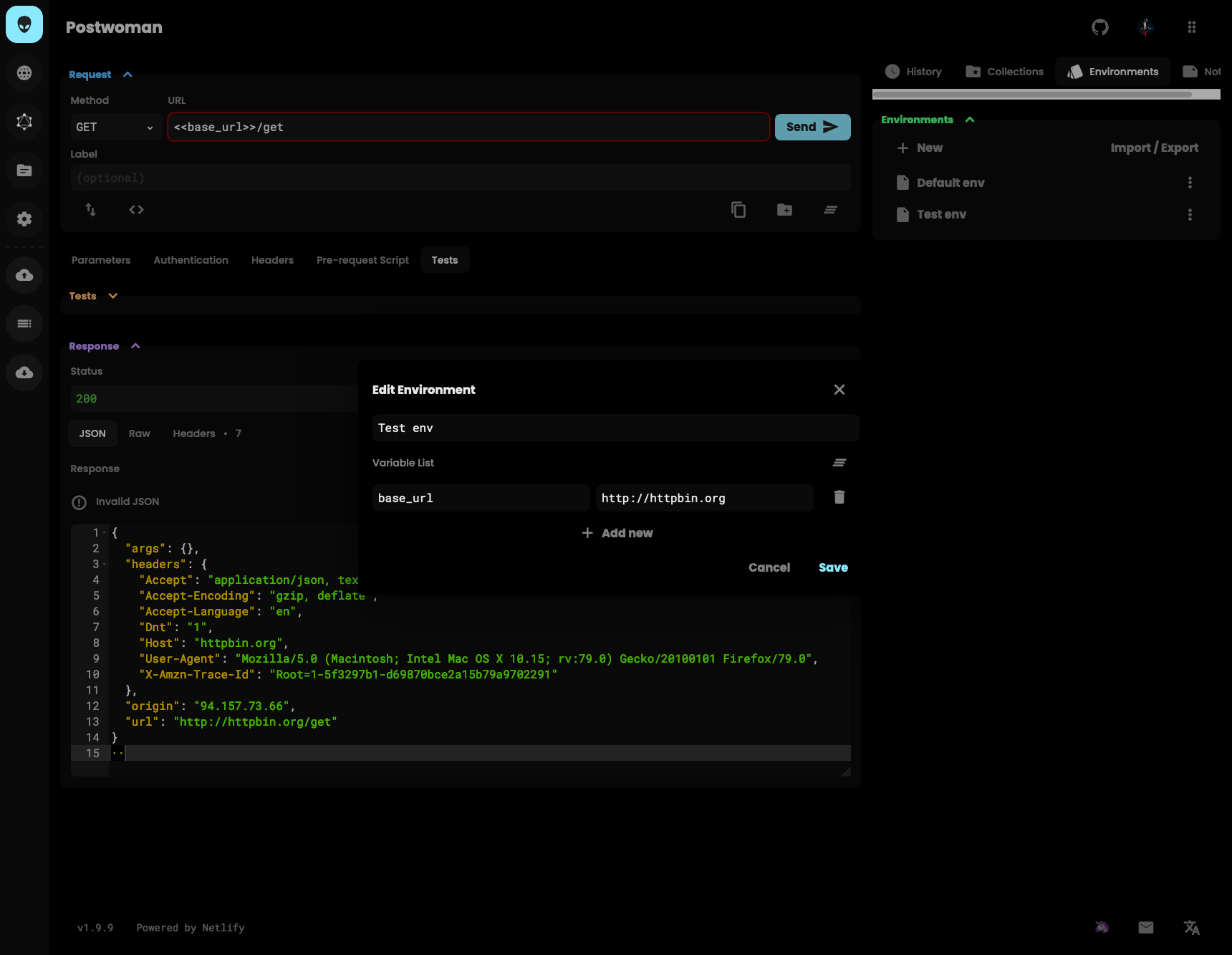
When you fill in an environment variable in the URL ("<<base_url>>/products") the URL input field shows a red border as if something is wrong.

To Reproduce
Steps to reproduce the behavior:

  1. Go to environments, fill in a variable base_url as "http://httpbin.org"
  2. Fill in URL as "<<base_url>>/get"
  3. Move your cursor out of the URL field
  4. The border is red even though the request URL is valid

Expected behavior
If Postwoman does variable checking the border should be like the default state if the resulting URL is valid.
If it does not check the variables' content, the border should be default if there is any variable in it.
If postwoman doesn't check for variables in the URL field at all, the border should always be default since there's no way to find out if the URL is valid.

Screenshots
Screenshot_2020-08-11 Postwoman

Desktop (please complete the following information):

  • OS macOS
  • Browser Firefox
  • Version 79
Originally created by @xaddict on GitHub (Aug 11, 2020). Original GitHub issue: https://github.com/hoppscotch/hoppscotch/issues/1067 Originally assigned to: @liyasthomas on GitHub. **Describe the bug** When you fill in an environment variable in the URL ("<<base_url>>/products") the URL input field shows a red border as if something is wrong. **To Reproduce** Steps to reproduce the behavior: 1. Go to environments, fill in a variable base_url as "http://httpbin.org" 2. Fill in URL as "<<base_url>>/get" 3. Move your cursor out of the URL field 4. The border is red even though the request URL is valid **Expected behavior** If Postwoman does variable checking the border should be like the default state if the resulting URL is valid. If it does not check the variables' content, the border should be default if there is any variable in it. If postwoman doesn't check for variables in the URL field at all, the border should always be default since there's no way to find out if the URL is valid. **Screenshots** ![Screenshot_2020-08-11 Postwoman](https://user-images.githubusercontent.com/3295364/89900811-834b5480-dbe4-11ea-8b63-759de655f595.png) **Desktop (please complete the following information):** - **OS** macOS - **Browser** Firefox - **Version** 79
kerem 2026-03-16 14:56:49 +03:00
Author
Owner

@liyasthomas commented on GitHub (Aug 11, 2020):

Hiya - I tried to repoduce this behaviour in windows 10, Chrome latest. There seems to be no issue in this setup, will try out in macOS later get back to you.

postwoman io_

<!-- gh-comment-id:671949252 --> @liyasthomas commented on GitHub (Aug 11, 2020): Hiya - I tried to repoduce this behaviour in windows 10, Chrome latest. There seems to be no issue in this setup, will try out in macOS later get back to you. ![postwoman io_](https://user-images.githubusercontent.com/10395817/89903351-2c09ac00-dc05-11ea-9181-6cad4f7d5a68.png)
Author
Owner

@liyasthomas commented on GitHub (Aug 17, 2020):

OS macOS
Browser Firefox
Version 79

@NBTX can you reproduce this issue in above configs?

<!-- gh-comment-id:674982127 --> @liyasthomas commented on GitHub (Aug 17, 2020): ``` OS macOS Browser Firefox Version 79 ``` @NBTX can you reproduce this issue in above configs?
Author
Owner

@joelcamus commented on GitHub (Aug 17, 2020):

I try in Firefox and I replicate a bug, With Chromo I don't replicate the bug

image
image

Windows 10
Browser Firefox Developer 80.0b8

image
image

Windows 10
Browser Firefox 79.0 (64-bit)

<!-- gh-comment-id:674990106 --> @joelcamus commented on GitHub (Aug 17, 2020): I try in Firefox and I replicate a bug, With Chromo I don't replicate the bug ![image](https://user-images.githubusercontent.com/8535654/90421113-31f60600-e0b9-11ea-8a80-e7da596fc659.png) ![image](https://user-images.githubusercontent.com/8535654/90421337-8ac59e80-e0b9-11ea-82db-c855bc47a750.png) Windows 10 Browser Firefox Developer 80.0b8 ![image](https://user-images.githubusercontent.com/8535654/90421522-d24c2a80-e0b9-11ea-9aeb-d2212d305e09.png) ![image](https://user-images.githubusercontent.com/8535654/90421549-dd06bf80-e0b9-11ea-978d-404a78a39413.png) Windows 10 Browser Firefox 79.0 (64-bit)
Author
Owner

@joelcamus commented on GitHub (Aug 17, 2020):

I look for and I think it's a problem, I change type="url" for type="text"

github.com/hoppscotch/hoppscotch@629ee3e33f/pages/index.vue (L144-L156)

<!-- gh-comment-id:674993338 --> @joelcamus commented on GitHub (Aug 17, 2020): I look for and I think it's a problem, I change `type="url"` for `type="text"` https://github.com/hoppscotch/hoppscotch/blob/629ee3e33fb3118719f6b7960a24be21bf75ade1/pages/index.vue#L144-L156
Author
Owner

@liyasthomas commented on GitHub (Aug 17, 2020):

If type='text' then no issues?

<!-- gh-comment-id:674994055 --> @liyasthomas commented on GitHub (Aug 17, 2020): If `type='text'` then no issues?
Author
Owner

@joelcamus commented on GitHub (Aug 17, 2020):

Yes, it works

image

<!-- gh-comment-id:674999133 --> @joelcamus commented on GitHub (Aug 17, 2020): Yes, it works ![image](https://user-images.githubusercontent.com/8535654/90423316-83ec5b00-e0bc-11ea-8f90-a84b82e8d2c1.png)
Author
Owner

@liyasthomas commented on GitHub (Aug 17, 2020):

Fixed

<!-- gh-comment-id:675001825 --> @liyasthomas commented on GitHub (Aug 17, 2020): Fixed
Author
Owner

@joelcamus commented on GitHub (Aug 18, 2020):

LGTM

<!-- gh-comment-id:675444255 --> @joelcamus commented on GitHub (Aug 18, 2020): LGTM
Sign in to join this conversation.
No milestone
No project
No assignees
1 participant
Notifications
Due date
The due date is invalid or out of range. Please use the format "yyyy-mm-dd".

No due date set.

Dependencies

No dependencies set.

Reference
starred/hoppscotch#374
No description provided.